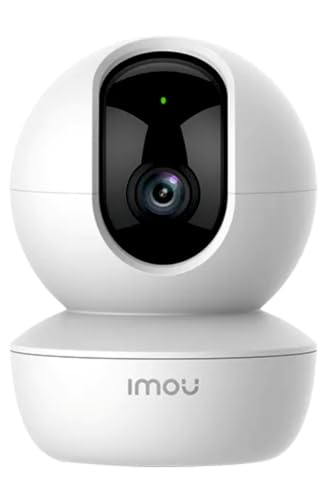
What is the best wifi security cameras under 3000 in India?
The Imou Ranger S2 3MP 2K is the best wifi security cameras under 3000 in India. It offers 3mp 2k super hd (2304x1296), making it the top choice for budget-conscious buyers. Best AI features in price range, this product consistently delivers outstanding results.
Which is the best WiFi security camera under ₹3,000 in India?
TP-Link Tapo C210 (₹2,099) is the best overall with superior 2K resolution, widest 360°/114° coverage, and massive 512GB storage support. For tightest budgets, Imou Ranger 2 (₹1,499) offers exceptional value with AI human detection and smart tracking. For highest resolution, Qubo Smart 360° Ultra (₹2,249) provides 4MP quality and Made in India reliability. Choose Tapo C210 for best overall features, Imou Ranger 2 for best budget value, or Qubo for highest resolution and patriotic choice.
Is 2K resolution worth the extra cost over 1080p?
Yes, for primary security areas. 2K cameras (3MP/4MP) offer 50-60% more pixels than 1080p (2MP), providing significantly sharper details for face recognition, license plate reading, and identifying intruders up to 25ft. The price difference is only ₹300-600 (Imou Ranger 2 at ₹1,499 vs Tapo C210 2K at ₹2,099). Recommended: Use 2K for main entrances, living rooms, and shops; 1080p for secondary areas like hallways or baby monitoring. Digital zoom on 2K footage remains clear; 1080p becomes pixelated when zoomed.
What is AI human detection and do I really need it?
AI human/person detection uses algorithms to distinguish humans from pets, moving shadows, curtains, or environmental movement - reducing false motion alerts by 70-80%. You need it if: You have pets that trigger constant alerts, ceiling fans cause movement, you receive 10+ daily notifications, or you monitor high-traffic areas. Skip it if: You monitor low-traffic specific spots (like main door) or don't mind manually checking frequent alerts. Available in Imou Ranger 2 (₹1,499), Imou Ranger S2 (₹2,299), and Qubo (₹2,249) - worth the investment for peace of mind.
Should I use SD card storage or cloud storage?
Best practice: Use both. SD card (128-512GB, ₹500-2,000 one-time) provides continuous recording with no monthly fees but can be stolen with camera. Cloud storage (₹200-500/month after trials) offers theft-proof backup but has ongoing costs. Recommended setup: Use 256GB SD card as primary storage (15-20 days recording) + cloud backup for main entrance/critical areas. Imou cameras include 31 days free cloud storage (₹200+ value). Format SD cards monthly for reliability and longevity. For multiple cameras, cloud costs add up - prioritize SD cards with selective cloud backup.
Will these cameras work with my WiFi router?
Critical requirement: All WiFi cameras require 2.4GHz WiFi band (NOT 5GHz). Most modern routers support both bands - ensure 2.4GHz is enabled in router settings. Each camera uses 2-4 Mbps bandwidth (higher for 2K models). For multiple cameras: 3 cameras = 15+ Mbps upload speed needed. Before installation: Test WiFi signal strength at camera location using your phone - weak signal causes disconnections, grainy video, and app crashes. For large homes, consider WiFi mesh systems (TP-Link Deco, Google WiFi) or WiFi extenders. Cameras cannot switch between 2.4GHz and 5GHz automatically.
What's the difference between color night vision and infrared night vision?
Infrared (IR) Night Vision: Uses invisible IR LEDs to illuminate scenes, producing black-and-white images (10-40ft range). Standard in most cameras - sufficient for identifying people and movement. Cannot show colors. Color Night Vision: Uses built-in spotlights/floodlights for full-color images at night - crucial for identifying clothing colors, vehicle details, or distinguishing between similar-looking people. Only Imou Ranger S2 (₹2,299) offers true color night vision in this comparison. Choose color night vision if: You monitor vehicles, need color details for police reports, or have high-security requirements. IR is sufficient for most home monitoring needs.
Can I view the camera feed when I'm away from home?
Yes, from anywhere worldwide. All cameras offer remote viewing via mobile apps (Tapo, Imou Life, Realme Link, Mi Home). Requirements: (1) Camera connected to home WiFi with internet access, (2) Your phone with internet (WiFi/4G/5G), (3) Free app installed with account login. You can: View live feed in real-time, review recorded footage, control pan/tilt remotely, talk via 2-way audio, receive instant motion alerts, trigger alarms. Data usage: Live viewing uses 2-4 Mbps bandwidth on your mobile data - use WiFi when possible or enable lower quality streaming in app settings.
How difficult is installation and setup?
Very easy - 5-10 minutes for most users. Setup steps: (1) Place camera near power outlet, (2) Download brand app (Tapo/Imou Life/etc.), (3) Create free account, (4) Scan QR code on camera, (5) Connect camera to WiFi via app, (6) Done. TP-Link Tapo has simplest setup process. Mounting: Position camera 6-8 feet high on wall/shelf using included adhesive mount (no drilling) or screws. Test viewing angle and WiFi signal before permanent mounting. Cameras need continuous power - ensure outlet access. No technical knowledge or tools required. Video tutorials available in apps for step-by-step guidance.