
PRODUCT REVIEW
Best FDM and Resin 3D Printers in India 2026
We compared 11 FDM and resin 3D printers from Bambu Lab, Flashforge, Anycubic, Creality and Elegoo on speed, calibration and verified India reviews for 2026.
 By Naveen Bhavnani
Updated
By Naveen Bhavnani
Updated
As an Amazon Associate we earn from qualifying purchases. We could also earn a fee through some links when you click on them.

On this page
3D printer picks by type and budget
Already covered the winner above — here are the picks for specific needs.

Anycubic Kobra 2 Neo Auto-Leveling Direct-Drive FDM 3D Printer

FLASHFORGE AD5X Multi-Color CoreXY 3D Printer

Anycubic Photon Mono 4 10K MSLA Resin 3D Printer
3D printers compared side by side
How the shortlist stacks up. Scroll sideways on mobile.
| WWCD Score | Product | Technology | Max Speed | Build Volume | Kinematics | Extruder | Bed Levelling | Connectivity | Price | Deal |
|---|---|---|---|---|---|---|---|---|---|---|
| 8.7/10 | Bambu Lab A1 Mini 3D Printer | FDM | 500 mm/s | 180 × 180 × 180 mm | Cantilever | Direct Drive (All-Metal) | Fully Auto (Eddy Current + Auto Z) | Wi-Fi, microSD | ₹19,599 | Check Price |
| 8.5/10 | FLASHFORGE AD5X Multi-Color CoreXY 3D Printer | FDM | 600 mm/s | 220 × 220 × 220 mm | CoreXY | Direct Drive (All-Metal) | Fully Auto (One-Click Load Cell) | Wi-Fi, Ethernet, USB | ₹37,045 | Check Price |
| 8.3/10 | Anycubic Kobra X Multi-Color High-Speed FDM 3D Printer | FDM | 600 mm/s | 260 × 260 × 260 mm | Bedslinger (Cartesian) | Direct Drive | Fully Auto (LeviQ 3.0 + Auto Z) | Wi-Fi, USB, LAN | ₹38,495 | Check Price |
| 8.3/10 | 3IDEA Creality Hi Combo Multi-Color 3D Printer with CFS | FDM | 500 mm/s | 260 × 260 × 300 mm | Bedslinger (Cartesian) | Direct Drive (All-Metal) | Fully Auto (Strain + Auto Z) | Wi-Fi, USB | ₹43,899 | Check Price |
| 8.2/10 | ELEGOO Neptune 4 Plus High-Speed Large-Format FDM 3D Printer | FDM | 500 mm/s | 320 × 320 × 385 mm | Bedslinger (Cartesian) | Direct Drive (All-Metal) | Auto Probe (121-Point + Manual Knob) | Wi-Fi, LAN, USB | ₹33,999 | Check Price |
| 8.2/10 | Bambu Lab A1 3D Printer | FDM | 500 mm/s | 256 × 256 × 256 mm | Bedslinger (Cartesian) | Direct Drive (All-Metal) | Fully Auto (Eddy Current + Auto Z) | Wi-Fi, microSD | ₹28,599 | Check Price |
| 7.8/10 | Anycubic Kobra 2 Neo Auto-Leveling Direct-Drive FDM 3D Printer | FDM | 250 mm/s | 220 × 220 × 250 mm | Bedslinger (Cartesian) | Direct Drive | Auto Probe (LeviQ 2.0 + Smart Z) | microSD, USB-C | ₹13,995 | Check Price |
| 7.6/10 | Creality Ender-3 V3 SE Auto-Leveling Direct-Drive 3D Printer | FDM | 250 mm/s | 220 × 220 × 250 mm | Bedslinger (Cartesian) | Direct Drive | Fully Auto (CR-Touch + Strain Auto Z) | SD Card, USB-C | ₹18,399 | Check Price |
| 7.3/10 | Anycubic Photon Mono 4 10K MSLA Resin 3D Printer | MSLA (Resin) | 70 mm/hr | 153.4 × 87 × 165 mm | MSLA Monochrome LCD | N/A (Resin — 10K LCD) | Manual 4-Point | USB | ₹19,249 | Check Price |
| 7.0/10 | Creality Halot R6 Compact 2K MSLA Resin 3D Printer | MSLA (Resin) | 60 mm/hr | 130 × 82 × 160 mm | MSLA Monochrome LCD | N/A (Resin — 2K LCD) | Manual 4-Point | USB, Wi-Fi | ₹16,499 | Check Price |
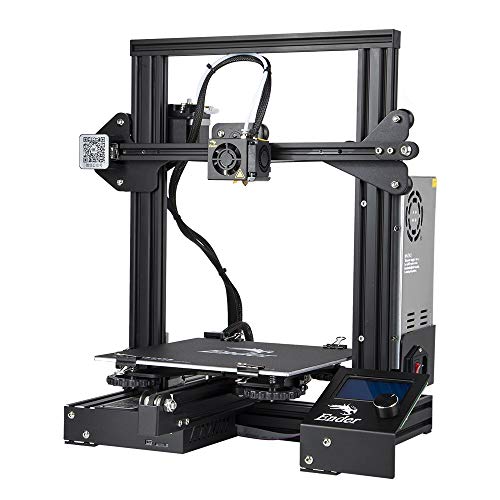
| 6.0/10 | WOL3D Creality Ender-3 Original DIY FDM 3D Printer | FDM | 180 mm/s | 220 × 220 × 250 mm | Bedslinger (Cartesian) | Bowden | Manual 4-Point | microSD, Mini-USB | ₹12,000 | Check Price |


3D printer reviews: speed, calibration and build volume
Specs, the honest pros and cons, and who each one is for.
Bambu Lab A1 Mini 3D Printer
The plug-and-play gold standard for beginners and hobbyists under ₹20,000
- Printer Technology
- FDM
- Kinematics
- Cantilever
- Max Print Speed
- 500 mm/s
- Build Volume
- 180 × 180 × 180 mm (listed as 256 × 256 × 256 mm in title)
- Extruder
- Direct Drive (All-Metal)
- Bed Levelling
- Fully Auto (Eddy Current + Auto Z)
- Connectivity
- Wi-Fi, microSD
The Bambu Lab A1 Mini is the easiest and quietest 3D printer in India under ₹20,000. Its automated calibration, eddy-current flow control, and Wi-Fi workflow put budget bedslingers a generation behind. The only exception is a full 250 mm+ bed for large helmets.
- + True hands-free calibration: automatic bed levelling
- + auto Z-offset
- + resonance compensation
- + and eddy-current flow calibration with zero paper-test tuning
- + Whisper-quiet operation (≤48 dB) with active motor noise cancelling and all-metal linear rails
- + 500 mm/s max speed and 10,000 mm/s² acceleration produce clean 15-minute Benchy prints out of the box
- + 1-clip quick-swap all-metal hotend (up to 300 °C) makes nozzle maintenance tool-free
- + Seamless Wi-Fi printing and monitoring via Bambu Studio and Bambu Handy mobile app
- + Market-leading validation in India with 400+ units bought per month and 72% positive recent verified India reviews
- - Compact 180 × 180 × 180 mm true build volume (the WOL3D listing title erroneously claims 256 × 256 × 256 mm)
- - 80 °C max bed temperature and open frame restrict printing to PLA/PETG/TPU/PVA only (not suited for ABS/ASA)
- - 24% of recent verified Indian reviewers report transit damage or non-factory repackaging from third-party sellers — inspect packaging and screen on delivery
- - Warranty duration is not explicitly stated on the Amazon.in listing
FLASHFORGE AD5X Multi-Color CoreXY 3D Printer
The most affordable CoreXY 4-color 3D printer in India
- Printer Technology
- FDM
- Kinematics
- CoreXY
- Max Print Speed
- 600 mm/s
- Build Volume
- 220 × 220 × 220 mm
- Extruder
- Direct Drive (All-Metal)
- Bed Levelling
- Fully Auto (One-Click Load Cell)
- Connectivity
- Wi-Fi, Ethernet, USB
The Flashforge AD5X is the standout CoreXY machine in our selection. It bundles a 600 mm/s, 20,000 mm/s² CoreXY frame with a 4-color Intelligent Filament System for ₹37,045. Its kinematics and multi-color TPU printing are superb for the price. Indian buyers should note that local after-sales spare-part support is noticeably slower than Bambu Lab or Creality.
- + True all-metal CoreXY kinematics with 600 mm/s max speed and 20,000 mm/s² acceleration
- + Bundled 4-color Intelligent Filament System (IFS) with auto filament backup at ₹37,045 — ₹7,954 cheaper than the Bambu Lab A1 Combo
- + Capable of multi-color flexible TPU printing as well as PLA/PETG/PLA-CF/PETG-CF with its 300 °C nozzle and 110 °C bed
- + Full one-click automatic bed levelling with flexible textured PEI spring steel build plate
- + Full connectivity suite including Wi-Fi/Ethernet/USB and native OrcaSlicer compatibility
- - 33% of recent verified Indian reviews (2 of 6) complain of unresponsive local after-sales support for spare toolhead boards or software setup
- - Complex multi-color printhead assembly can trigger filament sensor errors that are difficult to self-service
- - Slightly shorter 220 mm Z-height than standard 250 mm bedslingers
- - Low India verified review count (6 India reviews out of 351 global ratings); warranty term not published on listing
Anycubic Kobra X Multi-Color High-Speed FDM 3D Printer
Large-volume 260 mm build plate 4-color high-speed printer with AI spaghetti detection
- Printer Technology
- FDM
- Kinematics
- Bedslinger (Cartesian)
- Max Print Speed
- 600 mm/s
- Build Volume
- 260 × 260 × 260 mm
- Extruder
- Direct Drive
- Bed Levelling
- Fully Auto (LeviQ 3.0 + Auto Z)
- Connectivity
- Wi-Fi, USB, LAN
The Anycubic Kobra X packs native 4-color printing into a ₹38,495 machine. It adds a roomy 260 × 260 × 260 mm build volume, 600 mm/s speed, and AI spaghetti detection. It is a compelling multi-color alternative to the Bambu Lab A1. Its Indian buyer track record is still brand new, with just one verified domestic review.
- + Integrated 4-color printing system (expandable up to 19 colors) without needing an external AMS tower
- + Spacious 260 × 260 × 260 mm build volume — larger than both Bambu Lab A1 and Flashforge AD5X
- + 600 mm/s max speed and 20,000 mm/s² acceleration with active vibration compensation
- + LeviQ 3.0 fully automatic bed levelling and Z-offset calibration plus AI spaghetti detection
- + 300 °C direct-drive extruder and 110 °C bed handle PLA/PETG/TPU and carbon-fiber composites
- - Thin India review base (only 1 verified India review; 99% of the 278 global ratings are from overseas buyers)
- - Open-frame bedslinger design is prone to warping and fumes with ASA/ABS despite marketing claims
- - Anycubic model library and slicer ecosystem are less polished than Bambu Lab MakerWorld
- - Warranty duration is not published on the Amazon.in listing
3IDEA Creality Hi Combo Multi-Color 3D Printer with CFS
Multi-color 260 × 260 × 300 mm printer with an airtight, monsoon-friendly 4-spool CFS hub
- Printer Technology
- FDM
- Kinematics
- Bedslinger (Cartesian)
- Max Print Speed
- 500 mm/s
- Build Volume
- 260 × 260 × 300 mm
- Extruder
- Direct Drive (All-Metal)
- Bed Levelling
- Fully Auto (Strain + Auto Z)
- Connectivity
- Wi-Fi, USB
The Creality Hi Combo stands out from the Bambu Lab A1 Combo in two ways. Its 4-spool CFS unit is fully airtight — a genuine advantage during humid Indian monsoons. It also offers a taller 260 × 260 × 300 mm build volume. However, its sole verified India review dates back to July 2025, so we hold it out of our top 3 until fresher buyer evidence lands.
- + Bundled Creality Filament System (CFS) stores 4 spools inside an airtight moisture-sealed enclosure (unlike Bambu Lab's open-air AMS Lite)
- + Generous 260 × 260 × 300 mm build volume with an all-metal die-cast frame and FOC step-servo motors (500 mm/s and 12,000 mm/s² acceleration)
- + Independent dual Z-axis motorized lead screws automatically level the X-gantry horizontal tilt
- + Built-in webcam with privacy shutter and RFID filament recognition
- + 95% pre-assembled out of the box with a foldable 3.2-inch touchscreen
- - No verified India review since July 2025 (15.8 months of silence on this listing) — current shipping batch is unverified by recent Indian buyers
- - Only 1 rating on Amazon.in and no monthly purchase velocity displayed
- - Spec table erroneously mentions unrelated mounting hardware despite shipping with Creality CFS
- - Warranty duration is not published on the Amazon.in listing
ELEGOO Neptune 4 Plus High-Speed Large-Format FDM 3D Printer
The best large-format 320 × 320 × 385 mm Klipper printer for helmets and big prototypes
- Printer Technology
- FDM
- Kinematics
- Bedslinger (Cartesian)
- Max Print Speed
- 500 mm/s
- Build Volume
- 320 × 320 × 385 mm
- Extruder
- Direct Drive (All-Metal)
- Bed Levelling
- Auto Probe (121-Point + Manual Knob)
- Connectivity
- Wi-Fi, LAN, USB
The ELEGOO Neptune 4 Plus is in a class of its own for helmets, props, and large enclosures. At ₹33,999, its 320 × 320 × 385 mm build volume is more than twice the size of standard printers. It backs that size with native Klipper firmware and a 300 °C direct-drive extruder.
- + Massive 320 × 320 × 385 mm build volume (39.4 L) prints full-scale cosplay helmets and architectural models in one piece
- + Native Klipper firmware with 500 mm/s max speed
- + 12,000 mm/s² acceleration
- + and built-in X/Y input-shaping accelerometers
- + 300 °C all-metal dual-gear direct-drive extruder with 5.2:1 reduction ratio and twin auxiliary blower fans
- + Wi-Fi/LAN/USB connectivity allows direct browser control and webcam monitoring via Fluidd/Mainsail
- + Includes chassis tie-rod braces and a flexible textured PEI magnetic spring-steel build plate
- - Very low review count on Amazon.in (4 ratings and 1 verified India text review) — reliability is less validated on this SKU
- - Requires manual Z-offset paper adjustment alongside its 121-point mesh probe (not load-cell auto-Z)
- - Large footprint (70 × 61 cm space needed) and loud auxiliary part-cooling fan array at full speed
- - Open frame means ABS and Nylon claims require an external enclosure to prevent warping; warranty duration not published
Bambu Lab A1 3D Printer
Full-size 256 mm bed Bambu Lab speed and automation — held back by fulfilment complaints on this listing
- Printer Technology
- FDM
- Kinematics
- Bedslinger (Cartesian)
- Max Print Speed
- 500 mm/s
- Build Volume
- 256 × 256 × 256 mm
- Extruder
- Direct Drive (All-Metal)
- Bed Levelling
- Fully Auto (Eddy Current + Auto Z)
- Connectivity
- Wi-Fi, microSD
On paper, the Bambu Lab A1 (256 × 256 × 256 mm) is one of the finest open-frame 3D printers ever made. But our analysis of 18 verified Indian reviews on this ₹28,599 listing found a 44% negative rate. Buyers cited missing box accessories, repackaged units, and early heating faults. That demotes it behind the far cleaner Bambu Lab A1 Mini listing, and makes a thorough unboxing inspection essential.
- + Spacious 256 × 256 × 256 mm build volume with the same hands-free auto calibration and eddy-current flow control as the A1 Mini
- + 500 mm/s max speed
- + 10,000 mm/s² acceleration
- + and whisper-quiet ≤48 dB operation
- + 100 °C heated bed (up from 80 °C on the A1 Mini) improves PETG adhesion across large parts
- + 1-clip tool-free quick-swap 300 °C all-metal nozzle and native AMS Lite multi-color expandability
- + High market demand in India with 100+ units bought in the past month
- - 44% of recent verified Indian reviews (8 of 18) report fulfilment or hardware defects — including missing accessories in the box
- - used/damaged base parts
- - or nozzle heating failure after 1-3 months
- - Ships with a 2-prong ungrounded power plug in some batches
- - which a verified Indian buyer flagged for causing leakage current on the metal frame
- - Spec table erroneously lists an Ethernet connector (the A1 only supports Wi-Fi and microSD)
- - Warranty duration is not published on the Amazon.in listing
Anycubic Kobra 2 Neo Auto-Leveling Direct-Drive FDM 3D Printer
The undisputed budget value king under ₹15,000
- Printer Technology
- FDM
- Kinematics
- Bedslinger (Cartesian)
- Max Print Speed
- 250 mm/s
- Build Volume
- 220 × 220 × 250 mm
- Extruder
- Direct Drive
- Bed Levelling
- Auto Probe (LeviQ 2.0 + Smart Z)
- Connectivity
- microSD, USB-C
At ₹13,995, the Anycubic Kobra 2 Neo makes buying an old manual-levelling Ender-3 completely obsolete. It pairs a direct-drive extruder, LeviQ 2.0 auto-levelling, and a genuine textured PEI magnetic build plate. That bundle costs ₹4,400 less than the Creality Ender-3 V3 SE, earning our Best Value badge.
- + Unbeatable budget value at ₹13,995 — includes direct-drive extrusion
- + LeviQ 2.0 auto-levelling
- + and a magnetic textured PEI spring-steel plate
- + 250 mm/s max speed (150 mm/s normal) with Marlin input shaping and linear advance built in
- + Explicitly publishes warranty terms in listing bullets: 1-year printer warranty (3 months printhead and 6 months heated bed)
- + Proven Indian track record with 39 verified India reviews and 50+ units bought per month
- + Standard 220 × 220 × 250 mm build volume with 110 °C bed and 60W rapid-heating hotend
- - Single Z-axis lead screw and V-slot POM wheels require periodic roller maintenance and replacement
- - LeviQ 2.0 auto-levelling still frequently requires manual Z-offset fine-tuning via the rotary knob screen
- - No Wi-Fi printing (microSD card and USB-C only) and no filament runout sensor included in the box
- - 26% of verified Indian reviewers report either Z-axis binding/roller wear or slow seller support when parts fail
Creality Ender-3 V3 SE Auto-Leveling Direct-Drive 3D Printer
The safest full-size (220 × 220 × 250 mm) beginner alternative to the compact A1 Mini
- Printer Technology
- FDM
- Kinematics
- Bedslinger (Cartesian)
- Max Print Speed
- 250 mm/s
- Build Volume
- 220 × 220 × 250 mm
- Extruder
- Direct Drive
- Bed Levelling
- Fully Auto (CR-Touch + Strain Auto Z)
- Connectivity
- SD Card, USB-C
The Creality Ender-3 V3 SE upgrades the classic budget bedslinger formula. It adds dual Z-axis screws, steel Y-axis linear shafts, a Sprite direct-drive extruder, and strain-sensor auto Z-offset. The Bambu Lab A1 Mini is faster and smarter for ₹1,200 more. But the V3 SE remains the go-to choice under ₹19,000 if you need a full 220 × 220 × 250 mm build volume with true auto Z-offset.
- + True hands-free levelling: pairs CR-Touch mesh probing with a strain-gauge sensor for automatic Z-offset calibration
- + Dual Z-axis lead screws and dual 8 mm steel Y-axis linear shafts eliminate V-wheel Y-bed wobble
- + Proven Creality "Sprite" direct-drive extruder prints flexible TPU/PLA/PETG smoothly with one-tap filament loading
- + 220 × 220 × 250 mm build volume is 83% larger by volume than the Bambu Lab A1 Mini
- + Unmatched third-party spare-part and nozzle availability across India
- - Priced at ₹18,399 — only ₹1,200 less than the Wi-Fi-enabled
- - 500 mm/s Bambu Lab A1 Mini
- - Ships with a PC-coated spring steel build plate (more prone to over-adhesion/scarring than textured PEI) and lacks Wi-Fi (SD card / USB-C only)
- - Review-authenticity flag: shared listing — 4 of the 10 verified India reviews describe the older Ender-3 Neo before this ASIN was updated to the V3 SE
- - Warranty duration is not published on the Amazon.in listing
Anycubic Photon Mono 4 10K MSLA Resin 3D Printer
True 10K (17 µm) miniature-grade resin detail under ₹20,000 — with LCD longevity caveats
- Printer Technology
- MSLA (Resin)
- Kinematics
- MSLA Monochrome LCD
- Max Print Speed
- 70 mm/hr
- Build Volume
- 153.4 × 87 × 165 mm
- Extruder
- N/A (Resin — 17×17 µm 10K LCD)
- Bed Levelling
- Manual 4-Point
- Connectivity
- USB
No FDM filament printer can touch the 17 µm 10K resolution of the Anycubic Photon Mono 4 at ₹19,249. That makes it the pick for tabletop miniatures, figurines, and jewellery patterns. However, Indian buyers should go in with eyes open: monochrome LCD screens are delicate consumables. 2 of 7 verified Indian reviewers reported LCD black spots within 1-3 months, with slow warranty support.
- + Microscopic 17 × 17 µm XY pixel resolution from a 7-inch 10K (9024 × 5120) monochrome LCD — unmatched for tabletop miniatures/jewellery patterns/dental models
- + LighTurbo matrix light source delivers uniform UV curing with invisible layer lines
- + Laser-engraved 2.0 metal build plate holds prints securely without peeling
- + Compact 25.4 × 25.4 cm desk footprint with 153.4 × 87 × 165 mm (2.2 L) build volume at ₹19,249
- - 43% of verified Indian reviews (3 of 7) are 1★
- - with two buyers reporting monochrome LCD burnout/black spots after just 1-3 months and unresponsive warranty service
- - Thin FEP vat film is easily punctured when peeling or prying models if not handled carefully
- - Manual 4-screw levelling and USB-only file transfer (no Wi-Fi)
- - Requires messy liquid-resin safety precautions — gloves/mask/washing and UV curing — and has no published warranty term on the listing
Creality Halot R6 Compact 2K MSLA Resin 3D Printer
Entry-level Wi-Fi resin printer for beginners on a strict budget
- Printer Technology
- MSLA (Resin)
- Kinematics
- MSLA Monochrome LCD
- Max Print Speed
- 60 mm/hr
- Build Volume
- 130 × 82 × 160 mm
- Extruder
- N/A (Resin — 6.08" 2K LCD)
- Bed Levelling
- Manual 4-Point
- Connectivity
- USB, Wi-Fi (Creality Cloud)
The Creality Halot R6 is an approachable, Wi-Fi-enabled entry point into resin printing at ₹16,499. Its 6.08-inch screen is only 2K resolution, though. Most miniature hobbyists will be better served spending ₹2,750 more for the 10K Anycubic Photon Mono 4.
- + Lowest-priced MSLA resin 3D printer on Amazon.in at ₹16,499
- + Includes Wi-Fi connectivity (Creality Cloud / HALOT BOX) and a complimentary CHITUBOX Pro season pass
- + Integral UV light source (>90% uniformity) and impact-resistant alloy chassis
- + Ultra-compact footprint with beginner boot-up configuration guide
- - Dated 6.08-inch 2K LCD resolution (~50 µm XY pixel size) is far less sharp than the 10K (17 µm) Anycubic Photon Mono 4 priced just ₹2,750 higher
- - Small 130 × 82 × 160 mm build volume
- - Thin India review base (1 verified India review out of 67 global ratings)
- - Spec table mislabels Printing Technology as FDM and does not publish a warranty duration
WOL3D Creality Ender-3 Original DIY FDM 3D Printer
The classic ₹12,000 DIY tinkerer kit — now outclassed by ₹14,000 auto-levelling printers
- Printer Technology
- FDM
- Kinematics
- Bedslinger (Cartesian)
- Max Print Speed
- 180 mm/s
- Build Volume
- 220 × 220 × 250 mm
- Extruder
- Bowden
- Bed Levelling
- Manual 4-Point
- Connectivity
- microSD, Mini-USB
The original Creality Ender-3 put desktop 3D printing on the map in India. It still sells 50+ units a month at ₹12,000. In 2026, though, we only recommend it to students who explicitly want to build and mod a printer from parts. Everyone else should spend ₹1,995 more for the Anycubic Kobra 2 Neo, which adds auto-levelling, direct-drive extrusion, and a PEI spring-steel bed.
- + Lowest entry price of any full-size (220 × 220 × 250 mm) 3D printer in India at ₹12,000
- + Massive open-source community and ultra-cheap replacement parts across every Indian hobby store
- + Teaches core 3D printer mechanics
- + gantry squaring
- + and firmware fundamentals when assembled from the DIY kit
- + Proven 15,550-rating history with 173 verified India text reviews and 50+ monthly purchases
- - Outdated 2018 architecture: 3-5× slower than modern budget printers
- - noisy stepper drivers
- - and plastic Bowden extruder prone to clogging
- - No auto bed levelling — requires tedious 4-corner manual paper tramming that frustrates beginners
- - Requires ~2 hours of full DIY mechanical assembly (20+ bolts plus belt tensioning and wiring)
- - Spec table lists only a 1-month warranty
- - and spending ₹1,995 more buys the far superior Anycubic Kobra 2 Neo
Which 3D printer to buy
A pick earns its place here on verified India reliability, not just a spec sheet. If you want to skip the full comparison, these two are the ones worth choosing between.
For most people, buy the Bambu Lab A1 Mini (₹19,599) — it is the only printer here that calibrates its bed mesh, Z-offset and extrusion flow completely hands-free, and it has the cleanest verified India review record of any modern high-speed printer. Skip it only if you need a 250 mm+ bed for full-size props.
Check Price on Amazon →Want to spend the least? Get the Anycubic Kobra 2 Neo (₹13,995) — it pairs a direct-drive extruder with genuine auto-levelling, making an old manual-levelling Ender-3 pointless at a similar price. You give up Wi-Fi printing and a filament runout sensor in exchange.
Check Price on Amazon →How to choose a 3D printer in India
-
FDM Filament vs MSLA Resin: Which Technology Do You Need?
FDM melts plastic filament; MSLA cures liquid resin with UV light.
- FDM is cheaper and safer. Filament costs ₹800–1,400/kg and prints brackets, enclosures and toys with no fumes.
- MSLA wins on detail. A 10K monochrome LCD like the Anycubic Photon Mono 4 captures invisible layer lines for miniatures, dental models and jewellery patterns.
- Resin needs real precautions. Light-curing resins analysed in a resin-safety study contain undisclosed irritants and sensitisers, so gloves and ventilation are not optional.
Choose FDM for function, resin for detail — and budget for PPE either way.
-
Kinematics and Real-World Speed: CoreXY vs Bedslinger vs Cantilever
Headline speeds of 250–600 mm/s mean little without acceleration and frame type.
- Bedslingers move the bed. The Bambu Lab A1 and Kobra 2 Neo shake the bed, risking ring on tall prints.
- CoreXY moves only the head. The Flashforge AD5X holds the bed still, swinging the head at up to 20,000 mm/s².
- Cantilevers cut moving mass. The compact A1 Mini rides a rigid 180×180×180 mm platform on linear rails.
For tall, detailed prints, CoreXY beats a bedslinger at the same advertised speed.
-
Calibration and First-Layer Automation: Manual Knobs vs Probe Mesh vs Load-Cell Auto-Z
First-layer failure is the top reason beginners quit 3D printing.
- Manual levelling means paper and patience. Classic kits like the original Ender-3 need four spring knobs adjusted by hand.
- Probe mesh still needs a manual Z-offset. The Kobra 2 Neo and Neptune 4 Plus map bed warp but leave nozzle height to you.
- Load-cell auto-Z is truly hands-free. The A1 Mini, AD5X and Ender-3 V3 SE tap the bed to set Z-offset automatically.
Pay for load-cell auto-Z, not just a probe, if you want zero calibration ritual.
-
Multi-Color Systems and Indian Monsoon Humidity
Multi-color FDM has arrived in India between ₹37,000 and ₹45,000.
- Color swaps waste filament. Every change purges a short length of plastic, via a spool hub or printhead switcher.
- Humid air ruins open spools fast. A filament-moisture study found nylon absorbs far more moisture than PLA, losing over 80% of its elastic modulus once saturated.
- Sealed hubs protect spools better. Creality's airtight CFS box guards filament through the monsoon better than an open rack.
Store spools in an airtight box or dryer if you live somewhere humid.
-
Indian Fulfilment, Grounding and Power Backup Realities
Most 3D printers on Amazon.in ship from Indian distributors like WOL3D, 3IDEA and Robu.
- Film your unboxing. Some buyers reported missing power cords, spool holders or PEI plates — video is your proof.
- Check the plug is earthed. India's appliance safety standard mandates earthing; swap any 2-prong plug for a 3-pin IEC cable.
- Don't trust power-loss resume alone. A heated PEI bed releases its grip below ~40°C, so a 15-minute outage can pop a print loose.
Pair any printer here with a 600VA–1000VA UPS if your area gets frequent cuts.
Frequently asked questions
Which is the best 3D printer in India for beginners in 2026?
What is the best 3D printer under ₹30,000 in India?
Why is the Bambu Lab A1 Mini ranked higher than the full-size Bambu Lab A1?
Should I still buy the original Creality Ender-3 at ₹12,000?
What is the best multi-color 3D printer available in India?
Is auto bed levelling really necessary, or just a luxury feature?
Can I print phone cases and other flexible TPU parts with these printers?
Can open-frame 3D printers print ABS, ASA, or Nylon safely?
How much does 3D printer filament or resin cost in India, and what are the running costs?
Does power-loss recovery protect my print during Indian power cuts?
Do I need an enclosure for 3D printing in India?
Should I buy Creality, Anycubic, or Bambu Lab for long-term reliability?
What warranty do 3D printers carry on Amazon India?
Which 3D printer is best for beginners under ₹25,000?
Can I run a small 3D printing business with one of these printers?
How much build volume do I actually need?
What print speed and layer height actually matter for quality?
What features should a beginner's first 3D printer have?
Sources & References
- IS 302 (Part 1) / IEC 60335-1:2020 — Household and Similar Electrical Appliances: Safety Bureau of Indian Standards · 2024 Mandates protective earthing and leakage-current limits for household electrical appliances — the basis for the grounded-plug warning given imported 3D printers.
- Moisture Sorption and Degradation of Polymer Filaments Used in 3D Printing Polymers (MDPI), via PubMed Central · 2023 Found nylon absorbs far more moisture than PLA or PETG and can lose up to ~80% of its elastic modulus once saturated — the basis for the monsoon filament-storage advice.
- Comparison of Product Safety Data Sheet Ingredient Lists With Skin Irritants and Sensitizers Present in Light-Curing Resins Used in Additive Manufacturing PubMed Central · 2022 Found undisclosed irritant and sensitising chemicals in most commercial UV-resin safety data sheets — the basis for mandatory gloves and ventilation when printing resin.
- ANSI/CAN/UL 2904 — Method for Measuring and Evaluating Particle and Chemical Emissions from 3D Printers UL Standards & Engagement · 2022 Establishes test methods for particle and VOC emissions from desktop 3D printers in indoor, non-industrial settings — the basis for recommending enclosure and ventilation with ABS/ASA/Nylon.
