PRODUCT REVIEW
Best Drawing Tablets in India 2026
Find the best graphic tablet for digital art in India 2026. Compare 12 drawing tablets from XP-Pen & more from ₹2,178 to ₹32,990.
 By Naveen Bhavnani
Updated
By Naveen Bhavnani
Updated
As an Amazon Associate we earn from qualifying purchases. We could also earn a fee through some links when you click on them.

On this page
Drawing tablet picks by skill
Already covered the winner above — here are the picks for specific needs.

Huion HS64 Graphics Drawing Tablet
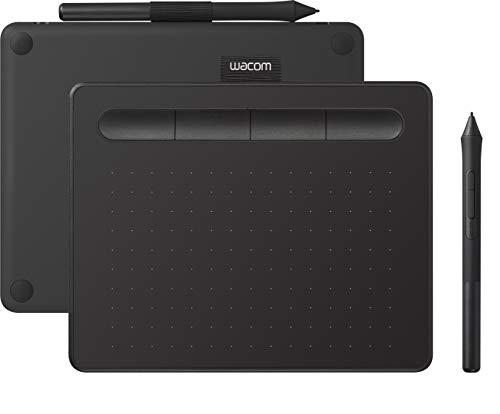
Wacom Intuos CTL-4100 Graphics Tablet

XP-Pen Deco Fun L Graphics Tablet
Drawing tablets compared side by side
How the shortlist stacks up. Scroll sideways on mobile.
| Product | Active Area | Pressure | Key Feature | Price | Deal |
|---|---|---|---|---|---|
| XP-Pen Deco 01 V3 | 10 x 6.25" | 16,384 | 8 shortcut keys + tilt | ₹5,990 | Check Price |
| Huion HS64 | 6.3 x 4" | 8,192 | Most affordable | ₹2,178 | Check Price |
| XP-Pen Deco Fun S | 6 x 4" | 8,192 | Tilt + colorful design | ₹2,999 | Check Price |
| XP-Pen Deco Fun L | 10 x 6" | 8,192 | Large area budget | ₹4,499 | Check Price |
| Wacom One CTL-472 | 6 x 3.5" | 2,048 | Wacom reliability | ₹2,990 | Check Price |
| XP-Pen StarG640 | 6 x 4" | 8,192 | 2mm ultra-thin | ₹3,500 | Check Price |
| Huion Inspiroy H640P | 6.3 x 3.9" | 8,192 | 6 shortcut keys | ₹4,990 | Check Price |
| XP-Pen Deco Mini7 V2 | 7 x 4" | 16,384 | Highest sensitivity | ₹5,499 | Check Price |
| Wacom Intuos CTL-4100 | 7.8 x 6.3" | 4,096 | Software bundle | ₹6,999 | Check Price |
| Wacom Intuos BT CTL-4100WL | 7.8 x 6.3" | 4,096 | Bluetooth wireless | ₹7,899 | Check Price |
| Huion Kamvas 13 | 13.3" display | 8,192 | Pen display | ₹22,990 | Check Price |
| Huion Kamvas 16 Gen 3 | 15.8" 2.5K QHD | 16,384 | Best pen display | ₹32,990 | Check Price |




Drawing tablet reviews: pressure, area and pen type
Specs, the honest pros and cons, and who each one is for.
XP-Pen Deco 01 V3 Graphics Tablet
- Active Area
- 10 x 6.25"
- Pressure
- 16,384 levels
- Tilt Support
- 60 degrees
- Shortcut Keys
- 8 programmable
- Pen
- Battery-free
- Compatibility
- Win/Mac/Android/ChromeOS
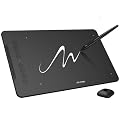
The XP-Pen Deco 01 V3 dominates this category with the largest working area (10 x 6.25 inches) and industry-leading 16,384 pressure levels - double what most competitors offer. The 8 programmable shortcut keys let you assign frequently used tools like undo, brush size, and zoom, dramatically speeding up your workflow. The 60-degree tilt support enables natural shading just like a real pencil. Compatible with Windows, Mac, Android, and Chrome OS, it works with every major creative app from Photoshop to Krita. At ₹5,990, it delivers professional-level features at a mid-range price - making it the best drawing tablet in India for serious digital artists.
- + Largest working area
- + industry-leading 16384 pressure levels
- + 8 programmable shortcut keys
- + tilt support
- + all OS compatible
- + 20 spare nibs
- - No wireless connectivity
- - pen nibs wear with heavy use
Huion HS64 Graphics Drawing Tablet
- Active Area
- 6.3 x 4"
- Pressure
- 8,192 levels
- Thickness
- 8mm ultra-thin
- Shortcut Keys
- 4 press keys
- Pen
- Battery-free
- Android
- Supported
The Huion HS64 is the undisputed budget champion at just ₹2,178 - making digital art accessible to everyone. Despite its low price, it packs 8,192 pressure levels - the same as tablets costing 2-3x more. The 8mm ultra-thin design makes it incredibly portable, perfect for students carrying it between college and home. Android support via OTG means you can sketch on your phone without needing a computer. The 4 customizable press keys provide basic shortcut access. For anyone starting their digital art journey, the Huion HS64 proves you don't need to spend ₹5,000+ to get a capable drawing tablet.
- + Most affordable at ₹2,178
- + great for beginners
- + ultra-portable
- + reliable Huion brand
- - Smaller working area
- - only 4 shortcut keys
- - not ideal for professional work
- - no tilt support
XP-Pen Deco Fun S Graphics Tablet
- Active Area
- 6 x 4"
- Pressure
- 8,192 levels
- Tilt Support
- 60 degrees
- Shortcut Keys
- None
- Pen
- Battery-free
- Colors
- Multiple options
The XP-Pen Deco Fun S stands out with its fun, colorful design options and surprisingly capable 60-degree tilt support at just ₹2,999. Tilt support is typically found on tablets costing ₹5,000+, making this a standout value. The 8,192 pressure levels handle everything from light sketching to detailed shading. While the 6x4" area is compact, it's perfectly sized for beginners who don't yet need a massive workspace. The multiple color options (black, blue, green, red) make it appealing as a gift for young artists. Compatible with Android and Chrome OS alongside Windows and Mac.
- + Affordable with tilt support
- + colorful design options
- + good for beginners
- - Small working area
- - no shortcut keys
- - basic feature set
XP-Pen Deco Fun L Graphics Tablet
- Active Area
- 10 x 6"
- Pressure
- 8,192 levels
- Tilt Support
- 60 degrees
- Shortcut Keys
- None
- Pen
- Battery-free
- Setup
- Plug and play
The XP-Pen Deco Fun L offers an incredible deal - a 10 x 6 inch workspace with tilt support for just ₹4,499. That's a large-format tablet at a mid-range price, giving you the arm movement and drawing comfort usually reserved for ₹6,000+ tablets. The 60-degree tilt support adds natural shading capability, while 8,192 pressure levels ensure smooth, responsive strokes. The plug-and-play setup means zero hassle - just connect via USB and start drawing. Works with Android devices too. If you want the largest possible workspace without spending premium prices, the Deco Fun L is unbeatable.
- + Large 10x6 area at budget price
- + tilt support
- + good for detailed work
- - No shortcut keys
- - basic pen
- - limited customization
Wacom One CTL-472 Digital Drawing Tablet
- Active Area
- 6 x 3.5"
- Pressure
- 2,048 levels
- Tilt Support
- No
- Shortcut Keys
- None
- Pen
- Battery-free cordless
- Brand
- Wacom (industry standard)
The Wacom One CTL-472 is your entry point into the Wacom ecosystem - the industry standard trusted by professional studios worldwide. While it has only 2,048 pressure levels (lowest in this list), Wacom's superior driver stability means it works flawlessly with every creative application. The ergonomic pen design feels natural for hours of use. Where Wacom truly excels is software compatibility and customer support - you'll never face driver conflicts that occasionally plague budget brands. At ₹2,990, it's a reliable starting point if you value stability and brand trust over raw specifications.
- + Reliable Wacom quality
- + excellent driver stability
- + easy to use
- + software compatibility
- - Lower pressure levels
- - compact area
- - no shortcut keys
- - higher price for features
XP-Pen StarG640 Graphics Tablet
- Active Area
- 6 x 4"
- Pressure
- 8,192 levels
- Thickness
- 2mm ultra-thin
- Shortcut Keys
- None
- Spare Nibs
- 20 included
- Pen
- Battery-free
The XP-Pen StarG640 is legendary in the OSU community for its ultra-thin 2mm design and incredibly responsive pen tracking. At just 2mm thick, it's the slimmest tablet on this list - fitting easily into any laptop bag or backpack. The 8,192 pressure levels provide smooth, lag-free input perfect for rhythm games and quick sketches. XP-Pen generously includes 20 replacement nibs - enough for years of heavy use. While it lacks shortcut keys and tilt support, its minimal latency and responsive tracking make it the go-to choice for competitive OSU players and students who need ultra-portability.
- + Ultra-portable 2mm design
- + responsive pen
- + great for OSU gaming
- + excellent value
- - No shortcut keys
- - limited area for complex artwork
- - no tilt support
Huion Inspiroy H640P Graphics Tablet
- Active Area
- 6.3 x 3.9"
- Pressure
- 8,192 levels
- Shortcut Keys
- 6 customizable
- Thickness
- 8mm slim
- Pen
- PW100 battery-free
- Android
- Supported
The Huion Inspiroy H640P hits the sweet spot with 6 customizable shortcut keys at ₹4,990 - more shortcut keys than tablets costing ₹7,000+. The PW100 battery-free stylus is responsive and comfortable for extended drawing sessions. The 8mm slim profile keeps it portable while the Android support adds versatility. With 8,192 pressure levels and solid build quality, it's a reliable workhorse for hobbyists upgrading from basic tablets. The 6 shortcut keys let you assign undo, zoom, brush size, and more - dramatically improving your workflow speed.
- + 6 shortcut keys
- + Android support
- + responsive pen
- + solid build quality
- - Moderate working area
- - average pen resolution
- - no tilt support
XP-Pen Deco Mini7 V2 Drawing Tablet
- Active Area
- 7 x 4"
- Pressure
- 16,384 levels
- Tilt Support
- 60 degrees
- Shortcut Keys
- 8 programmable
- Wireless
- Optional (W model)
- Pen
- Battery-free
The XP-Pen Deco Mini7 V2 packs the highest pressure sensitivity (16,384 levels) into a compact, feature-rich package. Combined with 8 programmable shortcut keys and 60-degree tilt support, it offers premium-tier features in a portable form factor. The 7x4" area strikes a balance between portability and usability. What sets this apart is the optional Bluetooth wireless upgrade (W model) - the only tablet in this list with true wireless capability from XP-Pen. For artists who need maximum pen control for detailed line art, calligraphy, or intricate shading, the 16,384 pressure levels provide unmatched precision.
- + Highest 16384 pressure sensitivity
- + 8 shortcut keys
- + tilt support
- + wireless option available
- - Smaller working area than Deco 01 V3
- - wireless costs more
- - compact size limits large illustrations
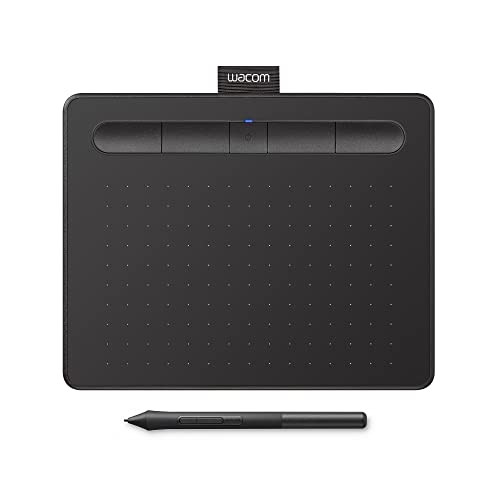
Wacom Intuos CTL-4100 Graphics Tablet
- Active Area
- 7.8 x 6.3"
- Pressure
- 4,096 levels
- Tilt Support
- Yes
- ExpressKeys
- 4 customizable
- Software
- Bundle included
- Build
- Premium Wacom
The Wacom Intuos CTL-4100 is the professional's choice - offering the best overall drawing experience in this category. While competitors boast higher pressure levels on paper, Wacom's 4,096 levels feel more refined and natural thanks to superior pen technology and driver optimization. The 7.8 x 6.3" medium area is perfectly sized for most workflows. What truly sets it apart is the free creative software bundle including Clip Studio Paint (2-year license), worth ₹3,000+ alone. The 4 ExpressKeys provide quick access to essential tools. Wacom's legendary driver stability means zero compatibility headaches across all creative applications. For professionals who can't afford workflow interruptions, this is the safest investment.
- + Professional-grade build
- + superior pen accuracy
- + free software bundle
- + best driver stability
- + excellent support
- - Higher price
- - no Bluetooth in base model
- - lower pressure than competitors
Wacom Intuos Bluetooth CTL-4100WL
- Active Area
- 7.8 x 6.3"
- Pressure
- 4,096 levels
- Connectivity
- Bluetooth + USB
- ExpressKeys
- 4 customizable
- Software
- Bundle included
- Tilt
- Yes
The Wacom Intuos Bluetooth CTL-4100WL adds true wireless freedom to everything the CTL-4100 offers. Connect via Bluetooth for a clean, cable-free desk setup - essential for artists who value aesthetics and flexibility. All the premium Wacom features carry over: 4,096 pressure levels with tilt, 4 ExpressKeys, and the creative software bundle. The wireless capability makes it perfect for drawing on the couch, presenting work to clients, or simply keeping your workspace clutter-free. At ₹7,899 (just ₹900 more than the wired version), the wireless upgrade is absolutely worth it.
- + Wireless Bluetooth freedom
- + premium Wacom quality
- + excellent software bundle
- + best-in-class support
- - Premium pricing
- - lower pressure levels than budget alternatives
Huion Kamvas 13 Pen Display
- Display
- 13.3" Full HD IPS
- Pressure
- 8,192 levels
- Lamination
- Fully laminated
- Shortcut Keys
- 8 keys
- Stand
- Adjustable included
- Compatibility
- Win/Mac/Android
The Huion Kamvas 13 transforms your digital art experience - draw directly on a 13.3" Full HD screen just like drawing on paper. The fully laminated display minimizes parallax (the gap between pen tip and cursor), making it feel incredibly natural. With 8,192 pressure levels and 8 shortcut keys, you get the full professional toolkit. The included adjustable stand lets you find the perfect drawing angle. At ₹22,990, it's the most affordable pen display worth buying - bringing screen-based drawing to artists who thought it was out of reach.
- + Draw directly on screen
- + laminated display reduces parallax
- + good color accuracy
- + adjustable stand
- - Premium price
- - requires computer connection
- - needs desk space
Huion Kamvas 16 Gen 3 Pen Display
- Display
- 15.8" 2.5K QHD
- Pressure
- 16,384 (PenTech 4.0)
- Color
- 99% sRGB
- Glass
- Anti-sparkle laminated
- Controls
- Dual dial + keys
- Compatibility
- Mac/PC/Android
The Huion Kamvas 16 Gen 3 represents the pinnacle of pen display technology in India. The 15.8" 2.5K QHD resolution delivers stunningly sharp details - text is crisp, colors are vibrant, and artwork looks spectacular. The latest PenTech 4.0 with 16,384 pressure levels provides the most nuanced pen control available. The full laminated anti-sparkle glass minimizes reflections and parallax for a paper-like feel. With 99% sRGB color accuracy, your artwork looks exactly as intended. The innovative dual dial controls let you adjust brush size and canvas rotation intuitively. This is the best pen display you can buy under ₹35,000 in India.
- + Stunning 2.5K QHD display
- + latest PenTech 4.0
- + minimal parallax
- + 99% sRGB
- + dual dial controls
- - Most expensive
- - needs powerful computer
- - not portable
Which drawing tablet to buy
Here is who each pick is for, based on the comparison above.
XP-Pen Deco 01 V3 Graphics Tablet · ₹5,990
10x6.25" area, 16384 pressure, 8 shortcut keys
Check Price on Amazon →Huion HS64 Graphics Drawing Tablet · ₹2,178
Best value under ₹2,500, perfect for beginners
Check Price on Amazon →Wacom Intuos CTL-4100 Graphics Tablet · ₹6,999
Industry standard Wacom, best support, software bundle
Check Price on Amazon →XP-Pen Deco Fun L Graphics Tablet · ₹4,499
10x6" area with tilt at budget price
Check Price on Amazon →How to choose a drawing tablet
-
Pressure Sensitivity Levels
Entry-level tablets offer 2048-4096 levels (suitable for beginners), while professional tablets provide 8192-16384 levels for nuanced strokes. For digital art, aim for minimum 4096 levels; for professional illustration, 8192+ levels provide best results. -
Active Area Size
Small tablets (6x4 inch) are portable and budget-friendly. Medium tablets (8x6 to 10x6 inch) offer comfortable workspace for detailed illustrations. Match tablet size to your monitor - larger monitors work better with medium to large tablets. -
Pen Tablet vs Pen Display
Pen tablets (no screen) require hand-eye coordination but are affordable (₹2,000-8,000). Pen displays let you draw directly on screen like paper but cost ₹20,000+. Start with pen tablet - upgrade to display only if needed.
Frequently asked questions
Which graphic tablet is best for beginners in India? ▼
Is Wacom worth 3x the price of XP-Pen or Huion? ▼
Do I need a pen display or is a regular tablet enough? ▼
Can I use a graphic tablet with my Android phone? ▼
What free software works with graphic tablets? ▼
How long do graphic tablet pen nibs last? ▼
What's the difference between 8,192 and 16,384 pressure levels? ▼
You may also like
More guides and reviews to help you decide.
Best tablets in India 2026 — Samsung Galaxy Tab S12 Ultra, Apple iPad Pro M5, Xiaomi Pad and more compared on display, chip, battery and verified buyer reviews.
Read more →Find the best kids tablet in India 2026. Compare Samsung, OnePlus, Google, Lenovo with research-based reviews, prices, pros & cons.
Read more →Best tablets in India from 8k to 80k — iPad, Samsung, Xiaomi compared by size and budget. 8-inch for reading, 10-inch for entertainment, 11-inch for work.
Read more →The best e-readers in India for 2026: Kindle Paperwhite vs Kobo Clara BW and Libra Colour, compared on display, colour, India warranty, battery and price.
Read more →Best smartphones under ₹25,000 in India 2026 — 9 5G phones compared on chip, AMOLED, camera and battery. The Redmi Note 15 SE 5G is our top pick.
Read more →We analysed 8 flagship-chip phones under ₹50,000. The realme GT 7 wins at ₹48,999 with a real 2x telephoto, 7000mAh battery, IP69 and 4.6 years of updates.
Read more →