
PRODUCT REVIEW
Best Smartphones for Senior Citizens in India 2026
5 smartphones for elderly in India 2026 — ranked by Easy Mode, scam blocking, SOS, battery and durability. Options from ₹7,000 to ₹23,000.
 By Naveen Bhavnani
Updated
By Naveen Bhavnani
Updated
As an Amazon Associate we earn from qualifying purchases. We could also earn a fee through some links when you click on them.
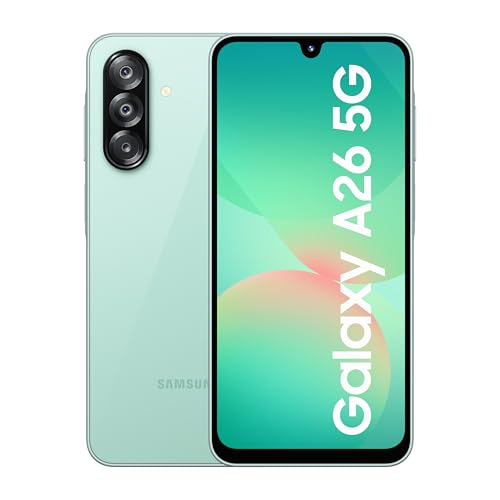
Smartphone picks for every budget
Already covered the winner above — here are the picks for specific needs.

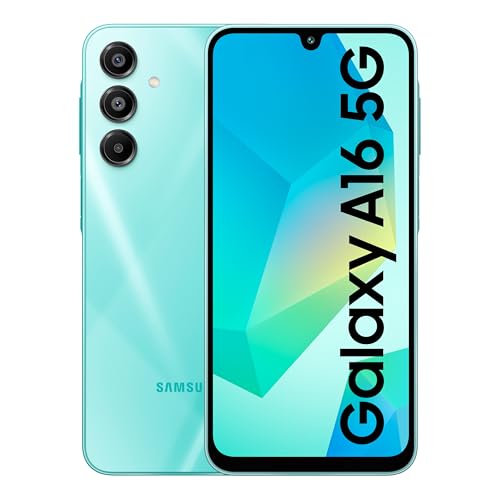
Samsung Galaxy A16 5G

Smartphones compared on safety
How the shortlist stacks up. Scroll sideways on mobile.
| WWCD Score | Product | Scam Blocking | Easy Mode | Waterproof | Updates | Price | Deal |
|---|---|---|---|---|---|---|---|
| 9.6/10 | Samsung Galaxy A26 5G | Truecaller Built-In | Best in Class | IP67 | 5 Years | ₹21,999 | Check Price |
| 9.0/10 | Google Pixel 8a | Google Spam Filter | None (Manual) | IP67 | 7 Years | ₹22,999 | Check Price |
| 8.8/10 | Samsung Galaxy A16 5G | Truecaller Built-In | Full | IP54 | 5 Years | ₹15,999 | Check Price |
| 8.5/10 | Samsung Galaxy M07 | Truecaller Built-In | Full | IP54 | 3-4 Years | ₹6,999 | Check Price |
| 8.3/10 | Motorola G06 Power | None Built-In | None | IP64 | 1-2 Years | ₹7,499 | Check Price |

Scam Call Blocking (Weight: 25%)
The problem: UPI fraud calls, fake bank OTP scams, and insurance fraud calls specifically target elderly in India. They answer unknown numbers because "it might be important."
What we check: Does the phone automatically identify and warn about spam callers without any app installation or setup? Only Samsung has Truecaller built into the dialer with zero configuration. Google Pixel has basic spam flags. Everyone else requires installing Truecaller manually — which elderly won't do themselves.
Smartphone reviews for seniors: scam blocking and easy mode
Specs, the honest pros and cons, and who each one is for.
Samsung Galaxy A26 5G
- ● IP67 Water & Dust Proof
- ● Gorilla Glass Victus+ (Survives 2m Drops)
- ● Truecaller Built Into Dialer
- ● Samsung Easy Mode (Best in Class)
- ● SOS with Location + Photos
- ● 5 Years Software Updates
- + IP67 waterproof — survives accidental water spills and rain
- + Gorilla Glass Victus+ survives 2m drops
- + Truecaller built-in scam call blocking with zero setup
- + most comprehensive Easy Mode in any phone
- + SOS sends location + auto-takes photos to emergency contacts
- + Samsung Remote Service lets family fix phone remotely
- + stereo Dolby Atmos speakers
- + AMOLED display
- + 5 years of security updates
- - Higher price at ₹21,999
- - 5000mAh battery (not 6000mAh)
- - needs family help for initial 1-2 hour setup
- - charger not included in box
Google Pixel 8a
- ● 7 Years Software Updates (Until 2031)
- ● Car Crash Detection (Auto-Calls 112)
- ● IP67 Water & Dust Proof
- ● Best Google Assistant (On-Device AI)
- ● Live Caption for Hearing Impaired
- ● Google Spam Call Detection
- + 7 years of updates — buy once and use until 2031
- + car crash detection auto-calls emergency services
- + IP67 waterproof
- + best Google Assistant with on-device AI processing
- + Live Caption transcribes all audio on screen in real-time (for hearing impaired elderly)
- + excellent face unlock with Tensor chip
- + cleanest Android experience
- - No Easy Mode — needs manual accessibility setup by family
- - no built-in Truecaller (only Google spam detection)
- - 5000mAh battery (1.5 days)
- - smaller 6.1" display
- - no stereo speakers
Samsung Galaxy A16 5G
- ● 5 Years Software Updates (Best at This Price)
- ● Truecaller Built Into Dialer
- ● Samsung Easy Mode
- ● 6.7" AMOLED Display
- ● SOS with Location Sharing
- ● IP54 Splash Resistant
- + 5 years of security updates at just ₹15,999 — best update longevity in mid-range
- + Truecaller scam blocking built-in
- + full Samsung Easy Mode with big icons and favorite contacts
- + 6.7" AMOLED display with good brightness
- + SOS emergency feature
- + Samsung service centres everywhere in India
- + slim and lightweight design
- - IP54 only (splash-resistant, not waterproof like A26)
- - Gorilla Glass 5 (not Victus+)
- - 5000mAh battery (1.5 days)
- - mono speaker (not as loud as A26)
- - no crash detection
Samsung Galaxy M07
- ● 800 Nits Brightness (Best for Weak Eyesight)
- ● Samsung Easy Mode
- ● Truecaller Built Into Dialer
- ● 6.7" HD+ Display
- ● MediaTek Helio G99 Processor
- ● 5000mAh + 25W Fast Charging
- + Brightest display (800 nits) — best for elderly with weak eyesight or cataracts
- + most affordable Samsung with Easy Mode and Truecaller at ₹6,999
- + MediaTek Helio G99 handles WhatsApp and video calls smoothly
- + IP54 splash resistant
- + Samsung service network across India
- + 6 years OS updates promised
- - No IP67 waterproofing
- - no Gorilla Glass Victus
- - basic build compared to A-series
- - charger not included
- - 4G only (no 5G)
- - mono speaker
- - no fingerprint sensor
Motorola G06 Power
- ● 7000mAh Battery (Longest in India)
- ● 6.88" Largest Display
- ● Clean Android 15 (No Bloatware)
- ● Hearing Aid Compatible (M3/T3)
- ● IP64 Water & Dust Resistant
- ● Gorilla Glass 3
- + Industry-leading 7000mAh battery lasts 2+ days — best for elderly who forget charging
- + largest 6.88" display for easy reading
- + clean Android 15 with zero bloatware
- + hearing aid compatible with M3/T3 rating
- + IP64 protection
- + Gorilla Glass 3
- + excellent value at ₹7,499
- - No Easy Mode — stock Android needs manual accessibility setup
- - no built-in Truecaller (must install separately)
- - no SOS feature built-in
- - only 1-2 years of OS updates (Motorola's weak point)
- - Motorola service network smaller than Samsung's
- - larger and heavier
Which senior-friendly phone to buy
Here is who each pick is for, based on the comparison above.
Samsung Galaxy A26 5G · ₹21,999
IP67, Truecaller, Easy Mode, SOS
Check Price on Amazon →Google Pixel 8a · ₹22,999
7-year updates, crash detection
Check Price on Amazon →Samsung Galaxy A16 5G · ₹15,999
5-year updates at ₹15,999
Check Price on Amazon →Motorola G06 Power · ₹7,499
7000mAh, 2+ days, 6.88" display
Check Price on Amazon →Students, gamers and camera-first buyers each have a dedicated list. The budget ladder explains what every price rung buys.
Find a phone for every buyer →Choosing a phone for elderly users
-
Why Samsung Dominates for Elderly Users
Samsung is not just another phone brand for elderly — it has built a genuine ecosystem of elderly-relevant features that no competitor matches. Truecaller is integrated directly into the phone dialer with zero setup required, blocking scam calls from day one. Easy Mode transforms the entire phone into a simplified experience with large icons, favorite contacts panel, and modified touch behavior. SOS sends location and auto-captures photos to emergency contacts. Samsung Remote Service lets family members see and control the phone screen remotely to fix issues. And Samsung has the most extensive service centre network across India, including tier-2 and tier-3 cities — critical when elderly parents need in-person help. -
When to Choose Google Pixel Instead
Google Pixel 8a is the right choice in two specific scenarios. First, if you want a phone that stays secure and updated for 7 years (Samsung offers 5 years maximum). A Pixel bought today gets updates until 2031 — meaning you do not need to replace the phone for nearly a decade. Second, if your elderly parent has hearing impairment, Pixel's Live Caption feature transcribes all audio on screen in real-time during video calls, YouTube, or phone calls. No other phone does this as well. The trade-off is no Easy Mode — a family member needs to manually configure accessibility settings during setup. -
Battery Life Matters More Than You Think
For elderly users, battery anxiety is real. Many elderly forget to charge, or worry about the phone dying when they need it most (medical emergency, getting lost, calling family). All phones in our list have minimum 5000mAh batteries lasting 1.5+ days. The Motorola G06 Power leads with a massive 7000mAh battery lasting 2+ days. Samsung phones with 5000mAh last about 1.5 days with elderly-typical light usage. For elderly who frequently forget charging, the Motorola is the safest choice — but it lacks Easy Mode and Truecaller. -
Understanding IP Ratings for Drop and Spill Protection
Elderly users drop phones. Shaky hands, placing phones on armrests, forgetting them on laps before standing up. IP67 (Samsung A26, Pixel 8a) means the phone survives 30 minutes submerged in 1 meter of water — accidental sink drops, tea spills, and rain are no problem. IP54 (Samsung A16, M07) means splash-resistant only — brief rain is fine but submersion is not. IP64 (Motorola G06 Power) is dust-tight and splash-resistant. For clumsy-prone elderly, IP67 provides genuine peace of mind. Pair any phone with a good silicone case for drop protection. -
Software Updates Protect Against Scams
Outdated phones are security risks. Hackers exploit known vulnerabilities in old Android versions to steal banking data, UPI credentials, and personal information. Elderly users are the most targeted demographic for phone scams. Longer software updates mean longer protection. Google Pixel 8a leads with 7 years, Samsung A-series offers 5 years, Samsung M-series offers 3-4 years, and Motorola offers only 1-2 years. This is Motorola's biggest weakness despite having excellent hardware. -
How to Set Up Any Smartphone for Elderly Parents
Budget 1-2 hours for initial setup with family help. Steps: (1) Enable Easy Mode in Samsung Settings > Display > Easy Mode. (2) Increase font size to maximum. (3) Set up favorite contacts on home screen with photos. (4) Install and configure WhatsApp with large text. (5) Set up UPI app (Google Pay or PhonePe) with simplified home screen. (6) Configure emergency SOS in Settings > Safety and Emergency — add 3-5 family contacts. (7) Enable spam call blocking (automatic on Samsung, install Truecaller on others). (8) Remove unnecessary apps to reduce confusion. (9) Set up face unlock as primary with PIN backup. (10) Show elderly parent the 3 things they need: calling, WhatsApp, and camera.
Frequently asked questions
What is the best smartphone for elderly in India?
Why does Samsung dominate the elderly phone recommendations?
Which smartphone has the best scam call blocking for elderly?
What is Samsung Easy Mode and how does it help elderly?
Should I buy Samsung Galaxy A26 or Google Pixel 8a for elderly parents?
Is the Motorola G06 Power good for elderly?
What is the cheapest smartphone suitable for elderly in India?
How many years of updates do these phones get?
Can family members control the elderly person's phone remotely?
What should I do after buying a smartphone for elderly parent?
You may also like
More guides and reviews to help you decide.
Find the best flagship smartphone under 50000 in India 2026. Compare Samsung, Realme, OnePlus, Google with research-based reviews, prices, pros & cons.
Read more →Best smartphones under ₹25,000 in India 2026 — 9 5G phones compared on chip, AMOLED, camera and battery. The Redmi Note 15 SE 5G is our top pick.
Read more →Best rugged phones in India with IP68 and IP69 ratings. Waterproof, dustproof and drop-tested smartphones compared for outdoor use, construction and adventure.
Read more →Find the best amoled phone under 15000 in India 2026. Compare Samsung, Poco & more with research-based reviews, prices & pros and cons.
Read more →Find the best foldable smartphone in India 2026. Compare Samsung, Motorola & more with research-based reviews, prices & pros and cons.
Read more →Find the best smartphone under 15000 India offers. Compare Moto G57, Realme Narzo, Samsung M17, iQOO, Poco 5G phones. Verified prices & research-based reviews.
Read more →