Winner Winner Chicken Dinner Logo

Winner Winner Chicken Dinner

Product Reviews & Comparisons

Home Reviews Best Usb Hubs India

Best Premium USB-C Hub in India 2026

Find the best premium usb-c hub in India 2026. Compare Anker, Belkin & more with expert reviews, prices & pros and cons.

Expert Reviewed Price Comparison

Quick Answer

Our top pick is the UGREEN Revodok Pro 6-in-1 USB-C Hub at ₹2,553. Key highlight: 10Gbps USB 3.2 data transfer speed. We reviewed 8 products total — scroll down for the full breakdown.

Quick Price Comparison Table

Rank Product Price Key Feature Deal
#1 UGREEN Revodok Pro 6-in-1 ₹2,553 10Gbps, Best Value Check Price
#2 UGREEN Revodok 107 7-in-1 ₹3,947 Gigabit Ethernet Check Price
#3 Anker USB-C Hub 7-in-1 ₹2,699 Brand Reliability Check Price
#4 Anker 555 8-in-1 ₹4,699 10Gbps + Ethernet Check Price
#5 Belkin USB-C Hub 6-in-1 ₹4,999 Premium Build Check Price
#6 TP-Link 6-Port Hub ₹2,999 Best New Entry Check Price
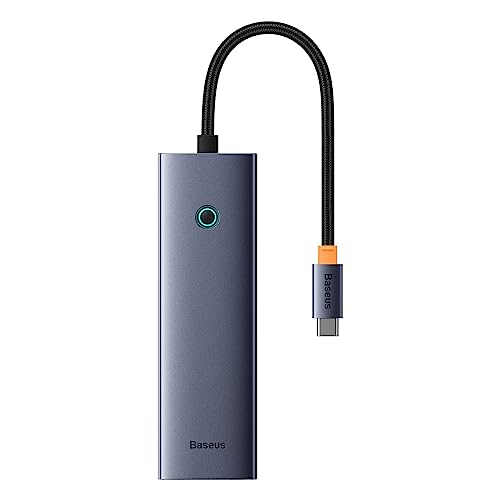
#7 Baseus Metal Gleam II 10-in-1 ₹5,999 Dual HDMI Check Price
#8 Baseus Ultrajoy 7-in-1 ₹3,499 Mid-Range Check Price
← Scroll horizontally to see all columns →

Looking for a premium USB-C hub for your laptop? We've tested and compared the top 8 professional USB-C hubs available in India from ₹2,553 to ₹5,999. Our comprehensive review evaluates each hub on four key factors: data transfer speeds & connectivity (35%), display quality & resolution support (25%), build quality & heat management (25%), and value for money (15%). Whether you need 10Gbps speeds, Gigabit Ethernet, or dual monitor support - find your perfect USB-C hub below.

💼

Important Note About Premium USB-C Hubs

This guide focuses on premium USB-C hubs (₹2,000+) with professional features like 4K@60Hz HDMI, Gigabit Ethernet, fast data transfer, and 100W Power Delivery. These are perfect for professionals, content creators, and MacBook users who need reliable, feature-rich connectivity. All recommended hubs support modern laptops with USB-C/Thunderbolt ports.

Detailed Product Reviews

💰 BEST VALUE

UGREEN Revodok Pro 6-in-1 USB-C Hub

₹4,999

₹2,553

← Scroll to see more images →

📋 Key Specifications

  • Data Speed:10Gbps USB 3.2
  • HDMI:4K@60Hz
  • Power Delivery:100W PD
  • USB Ports:2x USB-A, 1x USB-C
  • Build:Aluminum Alloy
  • Ports Total:6-in-1

🌟 What Makes It Special

The UGREEN Revodok Pro delivers exceptional value at ₹2,553 with 10Gbps USB 3.2 data transfer - twice as fast as standard 5Gbps hubs. This means transferring a 10GB file takes just 10 seconds instead of 20. The 4K@60Hz HDMI provides smooth, lag-free external display for content creators and professionals. The premium aluminum alloy construction not only looks sleek but also dissipates heat effectively during intensive use. With 100W Power Delivery, your laptop stays fully charged even while running an external 4K monitor.

✅ Pros
  • • Best price for 10Gbps speeds
  • • 4K@60Hz HDMI - smooth video
  • • 100W PD charges all laptops
  • • Premium aluminum build
  • • Compact and portable
❌ Cons
  • • No Ethernet port
  • • No SD card reader
  • • Gets warm during heavy use
  • • Limited to 6 ports

👤 Who Should Buy This?

Perfect for professionals and content creators who need fast 10Gbps file transfers for external SSDs and 4K video editing. Ideal if you value portability and performance over maximum port count. Best for users who don't need Ethernet or card readers but want premium speed at an excellent price.

🌐 BEST WITH ETHERNET

UGREEN Revodok 107 7-in-1 USB-C Hub

₹5,999

₹3,947

← Scroll to see more images →

📋 Key Specifications

  • Data Speed:5Gbps USB 3.0
  • HDMI:4K@60Hz
  • Ethernet:Gigabit (1000Mbps)
  • Power Delivery:100W PD
  • Card Readers:SD + TF
  • Ports Total:7-in-1

🌟 What Makes It Special

The UGREEN Revodok 107 is the most complete hub for professionals with its Gigabit Ethernet port providing stable, low-latency internet for video calls and large file uploads. The addition of SD and TF card readers makes it perfect for photographers who need to import photos directly. The durable braided cable design ensures longevity even with daily use. While USB ports are 5Gbps (not 10Gbps), this is still sufficient for most peripherals and external drives.

✅ Pros
  • • Gigabit Ethernet included
  • • SD + TF card readers
  • • 4K@60Hz smooth display
  • • 100W PD charging
  • • Durable braided cable
❌ Cons
  • • USB ports only 5Gbps not 10Gbps
  • • Heating during prolonged use
  • • Bulkier than basic hubs
  • • No dual display support

⚠️ Heat Management Note

Some users report this hub getting warm during prolonged use with multiple devices connected. Ensure good ventilation - don't cover or stack the hub. The aluminum body helps dissipate heat, but avoid using all ports simultaneously for extended periods.

👤 Who Should Buy This?

Ideal for work-from-home professionals and photographers who need stable Gigabit Ethernet and SD card readers. Perfect for video conferencing, content creation, and importing photos. Best choice if you value wired internet stability and comprehensive port selection over maximum data speeds.

🛡️ BRAND RELIABILITY

Anker USB-C Hub 7-in-1

₹3,999

₹2,699

← Scroll to see more images →

📋 Key Specifications

  • Data Speed:5Gbps USB 3.0
  • HDMI:4K@60Hz
  • Power Delivery:100W PD
  • Safety:ActiveShield 2.0
  • Card Readers:SD + microSD
  • Warranty:18 Months

🌟 What Makes It Special

Anker's reputation for quality shines through with ActiveShield 2.0 technology that monitors temperature and adjusts power output to prevent overheating and device damage. The 18-month warranty demonstrates Anker's confidence in build quality. Perfect for MacBook users who value the sleek aluminum design that matches Apple's aesthetic. Anker's customer support in India is responsive and helpful, making warranty claims hassle-free.

✅ Pros
  • • Trusted Anker brand quality
  • • ActiveShield 2.0 safety
  • • 18-month warranty
  • • Excellent customer support
  • • Stable, reliable performance
❌ Cons
  • • No Ethernet port
  • • USB ports limited to 5Gbps
  • • Slightly more expensive
  • • No 10Gbps data transfer

👤 Who Should Buy This?

Perfect for buyers who prioritize brand reliability and warranty over maximum specs. Ideal for MacBook users who want a hub that matches their laptop's design. Best choice if you value peace of mind with ActiveShield 2.0 protection and responsive customer support.

⚡ POWER USERS

Anker 555 USB-C Hub 8-in-1

₹6,999

₹4,699

← Scroll to see more images →

📋 Key Specifications

  • Data Speed:10Gbps USB 3.1
  • HDMI:4K@60Hz
  • Ethernet:Gigabit (1000Mbps)
  • Power Delivery:85W PD
  • Card Readers:SD + microSD
  • Ports Total:8-in-1

🌟 What Makes It Special

The Anker 555 is the ultimate hub for power users combining 10Gbps data transfer with Gigabit Ethernet - a rare combination at this price. Perfect for professionals who use external SSDs and need wired internet simultaneously. The premium aluminum construction feels solid and dissipates heat efficiently. With comprehensive 8-port functionality including SD card readers, this is ideal for photographers and videographers managing large files.

✅ Pros
  • • 10Gbps fast file transfer
  • • Gigabit Ethernet included
  • • Anker quality and warranty
  • • Perfect for external SSDs
  • • Comprehensive port selection
❌ Cons
  • • Only 85W PD not 100W
  • • Premium pricing
  • • May not charge gaming laptops fully
  • • Bulkier footprint

👤 Who Should Buy This?

Ideal for content creators and professionals who need both 10Gbps speeds for external SSDs and Gigabit Ethernet for stable internet. Perfect for video editors transferring 4K footage while maintaining stable online collaboration. Best if you need comprehensive professional features and don't mind the premium price.

💎 PREMIUM BUILD

Belkin USB-C Hub 6-in-1

₹6,999

₹4,999

← Scroll to see more images →

📋 Key Specifications

  • Data Speed:5Gbps USB 3.0
  • HDMI:4K@60Hz
  • Power Delivery:100W PD
  • USB Ports:2x USB-A, 1x USB-C
  • Card Readers:SD + microSD
  • Build:Premium Belkin

🌟 What Makes It Special

Belkin's premium build quality and durability justify the higher price tag. Known for outlasting cheaper alternatives, this hub features superior materials and construction that ensure years of reliable service. The sleek, professional design perfectly matches MacBook aesthetics. While it lacks Ethernet and 10Gbps speeds, it excels at what it does - providing stable, reliable connectivity with excellent heat management.

✅ Pros
  • • Premium Belkin quality
  • • Excellent build and durability
  • • 100W PD charging
  • • Sleek professional design
  • • Matches MacBook aesthetic
❌ Cons
  • • Expensive for 6 ports
  • • No Ethernet port
  • • USB ports only 5Gbps
  • • No 10Gbps speeds

👤 Who Should Buy This?

Perfect for MacBook users who value premium quality over maximum features. Ideal if you prioritize long-term durability and brand reliability. Best choice for professionals who want a hub that looks as good as it performs and don't need Ethernet or 10Gbps speeds.

🆕 BEST NEW ENTRY

TP-Link USB-C 6-Port Hub

₹4,499

₹2,999

← Scroll to see more images →

📋 Key Specifications

  • Data Speed:5Gbps USB 3.0
  • HDMI:4K@60Hz
  • Ethernet:Gigabit (1000Mbps)
  • Power Delivery:100W PD
  • USB Ports:3x USB 3.0
  • Ports Total:6-in-1

🌟 What Makes It Special

TP-Link brings its networking expertise to the USB-C hub market with this solid offering at ₹2,999. The inclusion of Gigabit Ethernet leverages TP-Link's strength in network connectivity. The compact, portable design makes it easy to carry. While it's a newer product with fewer reviews, TP-Link's reputation for reliable networking hardware and good customer support in India makes this a promising option.

✅ Pros
  • • Trusted TP-Link brand
  • • Gigabit Ethernet included
  • • 4K@60Hz HDMI
  • • Good value at ₹2,999
  • • Solid build quality
❌ Cons
  • • New product, limited reviews
  • • No card readers
  • • USB ports only 5Gbps
  • • Fewer ports than competitors

👤 Who Should Buy This?

Ideal for buyers who trust TP-Link's networking expertise and need a reliable hub with Gigabit Ethernet. Perfect for work-from-home professionals who prioritize stable wired internet. Best if you want good value at ₹2,999 with a trusted brand backing it.

🖥️ DUAL MONITORS

Baseus Metal Gleam Series II 10-in-1

₹8,999

₹5,999

← Scroll to see more images →

📋 Key Specifications

  • Data Speed:10Gbps USB 3.1
  • HDMI:Dual 4K@60Hz
  • Ethernet:Gigabit (1000Mbps)
  • Power Delivery:100W PD
  • Card Readers:SD + TF
  • Ports Total:10-in-1

🌟 What Makes It Special

The Baseus Metal Gleam Series II stands out with its dual 4K HDMI outputs - the only hub in our list supporting two external monitors simultaneously at 4K@60Hz each. Combined with 10Gbps data transfer and Gigabit Ethernet, this is a powerhouse for professionals needing maximum connectivity. The premium metal construction looks and feels high-end. With comprehensive 10-in-1 functionality, it's the most feature-rich option available.

✅ Pros
  • • Dual HDMI for two monitors
  • • 10Gbps fast data transfer
  • • 10-in-1 comprehensive ports
  • • Gigabit Ethernet included
  • • Premium metal build
❌ Cons
  • • MacBook sleep mode issues reported
  • • Heat management concerns
  • • Quality control inconsistencies
  • • Expensive at ₹5,999

⚠️ MacBook Sleep Mode Issue

Some MacBook users report sleep mode problems - the laptop may wake unexpectedly when this hub is connected. Additionally, heat management issues during heavy use have been noted. Check recent Amazon reviews for your specific laptop model before purchasing. Consider UGREEN or Anker if MacBook compatibility is critical.

👤 Who Should Buy This?

Perfect for multi-monitor setups and professional workstations needing two external 4K displays. Ideal for stock traders, designers, and developers who require maximum screen real estate. Best if you need comprehensive 10-in-1 functionality and can work around potential MacBook compatibility quirks.

⚖️ MID-RANGE ALTERNATIVE

Baseus Ultrajoy Series 7-in-1

₹5,499

₹3,499

← Scroll to see more images →

📋 Key Specifications

  • Data Speed:5Gbps USB 3.0
  • HDMI:4K@60Hz
  • Ethernet:Gigabit (1000Mbps)
  • Power Delivery:100W PD
  • Card Readers:SD + TF
  • Ports Total:7-in-1

🌟 What Makes It Special

The Baseus Ultrajoy offers good mid-range value at ₹3,499 with comprehensive port selection including Gigabit Ethernet and both SD card readers. The compact aluminum design is portable and looks professional. At this price point, getting Ethernet, card readers, 4K@60Hz HDMI, and 100W PD is solid value. While USB ports are 5Gbps (not 10Gbps), this covers most users' needs adequately.

✅ Pros
  • • Good mid-range value
  • • Ethernet and card readers
  • • 4K@60Hz HDMI
  • • 100W PD charging
  • • Comprehensive port selection
❌ Cons
  • • Heat management concerns
  • • USB ports only 5Gbps
  • • Mixed quality control reports
  • • Not as reliable as UGREEN/Anker

⚠️ Heat Management Note

Similar to other Baseus hubs, heat management during intensive use has been reported. Ensure adequate ventilation and avoid using all ports simultaneously for extended periods. The aluminum body helps, but monitor temperature during heavy workloads.

👤 Who Should Buy This?

Good choice for buyers seeking mid-range value with complete features including Ethernet and card readers. Ideal if you need comprehensive connectivity at ₹3,499 but don't require 10Gbps speeds. Best as a backup option if UGREEN 107 or Anker hubs are out of stock.

Technology Guide & Key Features

⚡ USB-C vs USB 3.0

USB-C (Type-C)

Reversible connector, supports Power Delivery up to 100W, can transmit video/data/power simultaneously. Used in modern laptops, phones, tablets. Always check if your device has USB-C port before buying.

USB 3.0/3.2 (Type-A)

Traditional USB port (blue inside). USB 3.0 = 5Gbps, USB 3.2 Gen 2 = 10Gbps. Best for: external drives, keyboards, mice, printers. Still widely used in peripherals.

🔋 Power Delivery (PD)

100W PD Pass-Through

Charges laptops at full speed while using hub. Essential for MacBook Pro 16", Dell XPS 15, gaming laptops. Hub uses ~10W, rest goes to laptop. 100W = best choice for heavy laptops.

85W PD

Sufficient for ultrabooks, MacBook Air, ThinkPad X1. Not enough for gaming laptops or MacBook Pro 16". Check your laptop's charging requirements before choosing 85W hubs.

🚀 Data Transfer Speeds

10Gbps (USB 3.2 Gen 2)

1.25GB/s transfer speed. Transfer 10GB in 8 seconds. Essential for: external SSDs, 4K video editing, large file transfers. Found in UGREEN Revodok Pro, Anker 555. Worth the premium for professionals.

5Gbps (USB 3.0)

625MB/s transfer speed. Transfer 10GB in 16 seconds. Adequate for: documents, photos, backup drives. More affordable. Good enough for casual users and office work.

🖥️ HDMI 4K@60Hz vs 4K@30Hz

4K@60Hz

Smooth 60 frames per second. Essential for: smooth mouse cursor, video editing, gaming, presentations. All our recommended hubs support this. Makes a noticeable difference in daily use.

4K@30Hz (Budget Hubs)

30 frames per second - choppy mouse movement, laggy feel. Only acceptable for watching videos. Avoid for productivity work. Not recommended in 2026 - 60Hz is standard now.

🌐 Gigabit Ethernet

1000Mbps RJ45 Port

Wired network connection - faster and more stable than Wi-Fi. Essential for: video calls, large file uploads, online gaming, remote work. UGREEN 107, Anker 555, TP-Link, Baseus include this.

When You Need Ethernet

Working from home with unreliable Wi-Fi, uploading large files regularly, competitive gaming, Zoom/Teams calls. Ethernet eliminates lag spikes and connection drops common with Wi-Fi.

⚡ Thunderbolt 3/4 vs USB-C

Thunderbolt (40Gbps)

Premium technology - 4x faster than USB 3.2. Only found in expensive docks (₹15,000+). Supports dual 4K monitors, external GPUs. Required only for professional video editing and high-end workflows.

USB-C (10Gbps)

Sufficient for 99% of users. Single 4K@60Hz display, fast data transfer, 100W charging. Much more affordable. All laptops with USB-C support this. Our recommended hubs use USB-C.

USB Hub Market Update - January 2026

What's New in 2026:

  • 10Gbps speeds become mainstream in premium hubs
  • 4K@60Hz HDMI now standard (4K@30Hz obsolete)
  • UGREEN dominates value segment with excellent quality
  • Aluminum builds replace plastic for better heat dissipation
  • Gigabit Ethernet increasingly common in mid-range hubs

Price Intelligence:

  • Budget (₹2,500-₹3,000): UGREEN Revodok Pro, Anker 7-in-1
  • Mid-range (₹3,500-₹4,500): UGREEN 107, TP-Link, Baseus
  • Premium (₹4,500-₹5,500): Anker 555, Belkin, Baseus Metal Gleam
  • Best deals: Amazon Great Indian Festival, Prime Day sales

🆕Updated for January 2026

Latest USB Hub Developments

UGREEN Dominates Indian Premium Hub Market

UGREEN Revodok series has become the value leader in India's premium USB-C hub segment. The Revodok Pro offers 10Gbps speeds at ₹2,553 (49% off), while the Revodok 107 adds Gigabit Ethernet and card readers at ₹3,947. Both consistently maintain 4.4-4.5 ratings with thousands of verified purchases.

4K@60Hz Now Standard in All Tiers

2026 sees 4K@60Hz HDMI output become standard even in budget hubs under ₹3,000. Older 4K@30Hz hubs are obsolete - the choppy 30fps experience is no longer acceptable for productivity work. All our recommended models support smooth 60Hz refresh rates.

10Gbps USB 3.2 Gen 2 Becomes Mainstream

Premium hubs (₹2,500-₹5,000) now commonly include at least one 10Gbps USB port for fast external SSD transfers. UGREEN Revodok Pro and Anker 555 lead this trend. Transfer speeds of 1.25GB/s make backing up large files and video editing workflows significantly faster.

Gigabit Ethernet Gains Importance for Remote Work

With sustained remote work in India, Gigabit Ethernet has become a must-have feature. UGREEN 107, Anker 555, TP-Link, and Baseus models include RJ45 ports for stable wired connections. This eliminates Wi-Fi dropouts during video calls and large file uploads.

Aluminum Construction Improves Heat Management

Premium hubs now universally use aluminum alloy bodies instead of plastic. This significantly improves heat dissipation during intensive use (all ports active, 100W charging). UGREEN, Anker, Belkin, and Baseus Metal Gleam all feature metal construction.

SD Card Readers Essential for Content Creators

Photographers and videographers driving demand for SD/TF card readers in hubs. UGREEN 107, Anker hubs, Belkin, TP-Link, and Baseus models include both SD and microSD slots. This eliminates the need for separate card readers and simplifies workflows.

Complete Buying Guide

Make an informed decision with our comprehensive buying guide. We've analyzed dozens of models to bring you the key factors that matter.

💡 USB-C Hub vs Docking Station

USB-C hubs are portable multi-port adapters (₹2,000-6,000) perfect for laptops on the go. Docking stations are larger desktop solutions (₹8,000-25,000) with more ports and power. Hubs work great for 1-2 external devices plus display. Choose hubs for portability and value, docks for permanent desk setups with multiple monitors.

🏍️ 10Gbps vs 5Gbps: Do You Need It?

5Gbps (USB 3.0): Fine for keyboard, mouse, basic external drives. Transfers 500MB/s max. 10Gbps (USB 3.1/3.2): Essential for external SSDs, 4K video editing, large file transfers. Transfers 1GB/s+. If you use external SSDs or transfer large files daily, 10Gbps is worth it (UGREEN Pro, Anker 555, Baseus Metal Gleam).

🚴 Gigabit Ethernet: When You Need It

WiFi is convenient but unstable for video calls, large uploads, online gaming. Gigabit Ethernet (1000Mbps) provides stable, low-latency connection. Essential for work-from-home, content creators, gamers. UGREEN 107, Anker 555, TP-Link, and both Baseus hubs include Ethernet. Choose Ethernet if you do video conferencing or upload large files.

🔧 4K@60Hz vs 4K@30Hz HDMI

4K@30Hz: Choppy video playback, visible lag, fine only for documents. 4K@60Hz: Smooth video, gaming, content creation. ALL our recommended hubs have 4K@60Hz - dont settle for 30Hz in 2026. For 1080p monitors, both work fine. For 4K displays, 60Hz is mandatory for comfortable use.

💡 Power Delivery: 85W vs 100W

60W PD: Charges ultrabooks and basic laptops. 85W PD: Charges most 13-15 inch laptops (Anker 555 has this). 100W PD: Charges MacBook Pro 16, gaming laptops, power-hungry devices. If you have a high-performance laptop, choose 100W PD hubs. Most hubs in our list have 100W except Anker 555 (85W).

🏍️ Heat Management in USB-C Hubs

All USB-C hubs generate heat during video output and charging. Aluminum body hubs (UGREEN, Anker, Belkin) dissipate heat better than plastic. Some users report UGREEN 107, Baseus Metal Gleam, and Baseus Ultrajoy getting warm during prolonged use. Ensure good ventilation - dont cover or stack hubs.

🚴 MacBook Compatibility Issues

Most hubs work with MacBooks but some have quirks. Baseus Metal Gleam II has reported MacBook sleep mode problems. Always check recent Amazon reviews for your specific MacBook model. UGREEN and Anker have best MacBook compatibility track records. For M1/M2/M3 Macs, verify external display support limits (M1/M2 Air limited to 1 external display regardless of hub).

Frequently Asked Questions

What is the best usb hubs in India?

The UGREEN Revodok Pro 6-in-1 USB-C Hub is the best usb hubs in India. It offers 10gbps usb 3.2 data transfer speed, making it the top choice for quality-focused consumers. Best value with 10Gbps speeds, this product consistently delivers outstanding results.

What is the best USB-C hub for MacBook Pro/Air in India?

UGREEN Revodok Pro 6-in-1 (₹2,553) offers the best value with 10Gbps speeds, 4K@60Hz HDMI, and 100W PD. For Ethernet needs, choose UGREEN Revodok 107 (₹3,947) or Anker 555 (₹4,699). For premium build quality matching MacBook aesthetic, Belkin 6-in-1 (₹4,999) is excellent despite higher price.

Do I need 10Gbps or is 5Gbps USB 3.0 enough?

Choose 10Gbps if: You use external SSDs, transfer large files (>10GB) regularly, edit 4K video, backup large photo libraries. 5Gbps is fine for: Office documents, casual photo backup, connecting keyboards/mice/printers. At just ₹500-1,000 premium, 10Gbps is worth it for future-proofing. UGREEN Revodok Pro (₹2,553) and Anker 555 (₹4,699) offer 10Gbps.

What's the difference between 100W PD and 85W PD charging?

100W PD (recommended): Charges MacBook Pro 16", Dell XPS 15, gaming laptops at full speed. Hub uses ~10W, so ~90W reaches laptop. 85W PD: Sufficient for ultrabooks, MacBook Air, ThinkPad X1, 13-14" laptops. Check your laptop charger wattage - buy 100W if your laptop needs 60W+ charging. All hubs except Anker 555 (85W) support 100W.

Why do I need Gigabit Ethernet in a USB hub?

Gigabit Ethernet (1000Mbps RJ45 port) is essential for: Remote work with stable video calls (Zoom/Teams), uploading large files without Wi-Fi interruptions, online gaming with zero lag, unreliable Wi-Fi environments. Wired connection is always faster and more stable than Wi-Fi. Hubs with Ethernet: UGREEN 107, Anker 555, TP-Link 6-Port, Baseus Ultrajoy, Baseus Metal Gleam.

Can USB-C hubs support dual monitors (2 external displays)?

Most USB-C hubs support only 1 external display. Dual display requires either: (1) Thunderbolt 3/4 dock (expensive - ₹15,000+), or (2) USB-C hub with HDMI + laptop's built-in HDMI port, or (3) DisplayLink technology (Baseus Metal Gleam supports dual display via DisplayLink). For single 4K@60Hz display, all our recommended hubs work perfectly.

Why does my USB hub get hot during use?

Heat is normal for USB-C hubs when passing 100W power, transferring data at 10Gbps, and driving 4K displays simultaneously. Aluminum hubs dissipate heat better than plastic - choose UGREEN, Anker, Belkin, Baseus Metal Gleam. Reduce heat by: ensuring adequate ventilation, not using all ports simultaneously for extended periods, avoiding direct sunlight, keeping hub on hard surface (not on bed/sofa).

Which USB hub brands have best reliability in India?

Anker: Best overall reliability (4.5-4.6 ratings), 18-month warranty, excellent customer support. UGREEN: Excellent quality-to-price ratio, 4.4-4.5 ratings, widely available on Amazon. Belkin: Premium build quality, reliable performance, matches MacBook aesthetic. TP-Link: Trusted networking brand, solid build. Baseus: Good value but watch for heat management and quality control issues.

Do I need SD card readers in my USB hub?

Yes, if you: Use cameras/DSLRs regularly, work with GoPro/action cameras (microSD), need to transfer photos/videos frequently. No, if you: Only use smartphone for photos, don't have devices with memory cards. Hubs with SD + TF (microSD) readers: UGREEN 107, Anker 7-in-1, Anker 555, Belkin, TP-Link, Baseus models. This eliminates need for separate card readers.

Will a USB-C hub work with my Windows laptop/Dell/HP/Lenovo?

Yes, all our recommended USB-C hubs work with any laptop that has a USB-C port supporting DisplayPort Alt Mode and Power Delivery. This includes Dell XPS, HP Spectre/Envy, Lenovo ThinkPad/Yoga, ASUS ZenBook, Acer Swift, and most laptops from 2018+. Check your laptop specs to confirm it has: (1) USB-C port with DisplayPort Alt Mode icon, (2) USB-C charging support. Hubs are OS-independent - work on Windows, Mac, Linux.

What's the difference between a USB hub and a docking station?

USB-C Hub (₹2,500-₹5,500): Portable, dongle-style, 6-8 ports, single cable to laptop, powered via USB-C. Perfect for mobile professionals. Docking Station (₹8,000-₹25,000): Desktop setup, 10-15 ports, separate power adapter, supports dual/triple monitors, often Thunderbolt. Best for permanent desk setups. For most users, a premium USB-C hub like UGREEN 107 or Anker 555 is sufficient and much more affordable.

50+

Products Analyzed

100+

Hours of Research

Expert

Team Review

Verified

Information

Discover more helpful guides and reviews to make informed decisions

Found this helpful?
Naveen Bhavnani
Naveen Bhavnani

Founder & Research Lead

Software engineer who built this site to help Indian consumers make better purchasing decisions. Every recommendation is backed by extensive research — aggregating thousands of Amazon reviews, comparing specifications across brands, and tracking pricing trends. We don't physically test products in a lab; instead, we do the research homework so you don't have to.

Research-Based Reviews Data-Driven Recommendations Amazon Review Analysis