
PRODUCT REVIEW
Best Gaming Keyboards Under 2000 in India 2026
Find the best gaming keyboards under 2000 in India for 2026. Compare Redragon K630 Dragonborn & more from ₹1,359 to ₹1,799 with hot-swappable switches, RGB.
 By Naveen Bhavnani
Updated
By Naveen Bhavnani
Updated
As an Amazon Associate we earn from qualifying purchases. We could also earn a fee through some links when you click on them.

Keyboard picks by layout size
Already covered the winner above — here are the picks for specific needs.

EvoFox Katana X2 TKL Mechanical Keyboard

HP GK320 Full-Size Mechanical Gaming Keyboard

Zebronics Transformer PRO Wireless Keyboard + Mouse Combo
Keyboards compared on switches
How the shortlist stacks up. Scroll sideways on mobile.
| Product | Layout / Switches | Key Feature | Price | Deal |
|---|---|---|---|---|
| Redragon K630 Dragonborn | 60% / Brown (Hot-Swap) | Hot-Swap + RGB + Software | ₹1,700 | Check Price |
| EvoFox Katana X2 TKL | TKL / Blue (Hot-Swap) | Volume Knob + Copilot Keys | ₹1,799 | Check Price |
| Ant Esports MK1300 V2 Mini | 60% / Red (Hot-Swap) | Detachable USB-C + RGB | ₹1,485 | Check Price |
| Cosmic Byte Themis CB-GK-21 | 60% / Blue | Per-Key RGB + Macros | ₹1,645 | Check Price |
| Cosmic Byte Pandora TKL | TKL / Red (Hot-Swap) | ₹1,399 Hot-Swappable | ₹1,399 | Check Price |
| HP GK320 | Full-Size / Mechanical | 104 Keys + 3yr Warranty | ₹1,500 | Check Price |
| Ant Esports MK1000 TKL | TKL / Blue | Metal Top Panel | ₹1,699 | Check Price |
| Zebronics Transformer PRO | Full-Size / Membrane Wireless | KB + Mouse Combo ₹1,359 | ₹1,359 | Check Price |


Gaming keyboards under ₹2,000: switches, layout and hot-swap
Specs, the honest pros and cons, and who each one is for.
Redragon K630 Dragonborn 60% Mechanical Keyboard
- Layout
- 60% (61 Keys)
- Switches
- Brown (Hot-Swap)
- Backlighting
- RGB (11 Modes)
- Anti-Ghost
- N-Key Rollover
- Connection
- USB Wired
- Software
- Pro Driver
The Redragon K630 Dragonborn is the keyboard that made us rethink what ₹1,700 can buy. The headline feature is hot-swappable Brown switches — you can pull out any switch with a basic tool and replace it with a different type (Red for faster gaming, Blue for clicky typing) without any soldering. This means your keyboard evolves with your preferences instead of becoming obsolete. Brown switches are the perfect starting point because they offer a gentle tactile bump that helps you feel each keypress without the ear-splitting click of Blue switches — ideal for gamers who also type essays, code, or chat extensively. Redragon has been a dominant force in budget gaming peripherals globally, and that engineering expertise shows in the K630's solid build quality and consistent switch feel across all 61 keys. The RGB backlighting with 11 preset modes is vibrant and evenly distributed, and the Pro Driver software lets you customize each LED, record macros, and remap keys — features that most competitors at this price simply do not offer. The compact 60% form factor frees up significant desk space for wide mouse sweeps in FPS games like Valorant and CS2, giving you a competitive edge in flick shots and tracking.
- + Hot-swappable Brown switches let you customize feel without soldering
- + tactile feedback ideal for both gaming and typing
- + RGB with 11 modes and software control
- + Redragon is globally trusted in budget gaming
- + compact 60% saves desk space for mouse movement.
- - 60% layout means no function row or arrow keys (use Fn combos)
- - Brown switches may feel mushy to users who prefer clicky feedback
- - no dedicated media keys or volume knob
- - wired only with non-detachable cable
- - keycaps are ABS not PBT.
EvoFox Katana X2 TKL Mechanical Keyboard
- Layout
- TKL (87 Keys)
- Switches
- Blue (Hot-Swap)
- Backlighting
- RGB (11 Modes)
- Volume Knob
- Yes
- Anti-Ghost
- Full NKRO
- Special
- Copilot Key
The EvoFox Katana X2 TKL packs more features per rupee than any other keyboard in this list. The standout feature is the dedicated volume knob — a premium convenience typically found on keyboards costing ₹5,000+ from brands like Corsair and Razer. During intense gaming sessions, you can adjust volume or mute audio without alt-tabbing or hunting for function key combos. The TKL layout is the perfect middle ground — you keep your arrow keys and function row (essential for many games and productivity) while still saving enough desk space for comfortable mouse movement. The 3-pin hot-swappable Blue switches deliver a satisfying clicky sound and tactile feedback that gamers love, and you can swap them out for quieter Red or Brown switches whenever you want. EvoFox (by Amkette) has included dedicated shortcut keys for Windows Copilot, Xbox Game Bar, and screenshots — modern touches that show this keyboard was designed for 2026 workflows. With an 8.6/10 rating from 646+ users, the Katana X2 has been validated by the Indian gaming community as a genuine value leader.
- + Volume knob is a rare luxury under ₹2,000
- + hot-swappable 3-pin switches for easy customization
- + TKL layout retains arrow keys and function row
- + dedicated Copilot and Xbox Gamebar shortcuts
- + strong 8.6/10 rating from 646+ users
- + EvoFox (Amkette) is a trusted Indian brand.
- - Most expensive in this list at ₹1,799
- - Blue switches are loud for shared rooms or late-night gaming
- - no detachable cable
- - wired only (tri-mode wireless version costs ₹2,849)
- - keycaps are ABS plastic.
Ant Esports MK1300 V2 Mini 60% Mechanical Keyboard
- Layout
- 60% (61 Keys)
- Switches
- Red (Hot-Swap)
- Backlighting
- RGB (14 Modes)
- Cable
- Detachable USB-C
- Software
- Yes
- Compat
- Mac + Windows
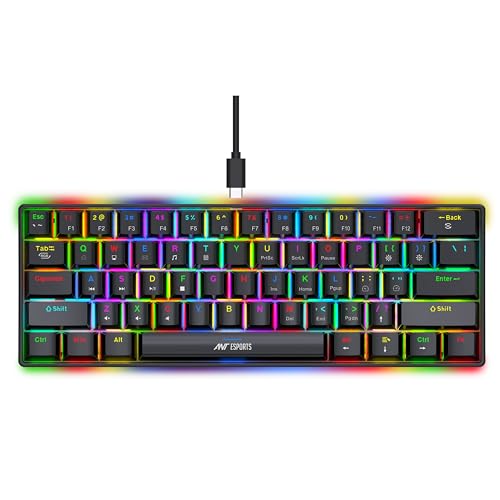
The Ant Esports MK1300 V2 Mini is the only keyboard in this list with a detachable USB-C cable — and that single feature makes it the best choice for gamers on the go. Unplug the cable, toss the keyboard in your backpack, and you have a portable mechanical keyboard for LAN parties, college, or a friend's place. No dangling cable to snag or stress the port. The hot-swappable Outemu Red switches are linear — smooth and silent with no bump or click — making them the fastest switches for rapid key presses in competitive gaming. Red switches also mean you can game late at night without waking up your roommate or family. The per-key RGB with 14 LED modes is genuinely impressive at ₹1,485, offering more lighting customization than keyboards costing twice as much. The included software lets you program macros, customize RGB per key, and adjust settings — a feature that Cosmic Byte Pandora and HP GK320 lack entirely. At ₹1,485 with hot-swap + detachable USB-C + RGB software, the MK1300 V2 offers the best feature-to-price ratio in the 60% keyboard segment.
- + Detachable USB-C cable makes it the most portable keyboard here
- + hot-swappable switches with Red and Blue options
- + per-key RGB with 14 lighting modes
- + software support for macro programming
- + 8.4/10 rating from 232+ reviews
- + great value at ₹1,485.
- - 60% layout requires learning Fn key combos for missing keys
- - stock switches feel slightly scratchy compared to Redragon
- - software is basic compared to premium brands
- - build feels lighter/less premium than competitors
- - no volume knob or media controls.
Cosmic Byte CB-GK-21 Themis 60% Mechanical Keyboard
- Layout
- 60% (61 Keys)
- Switches
- Outemu Blue
- Backlighting
- Per-Key RGB
- Software
- Full Suite
- Anti-Ghost
- All-Key
- Weight
- 530g
The Cosmic Byte Themis CB-GK-21 delivers what many budget keyboards cannot: genuine per-key RGB customization with full software control. While other keyboards in this list offer preset RGB modes, the Themis lets you assign individual colors to each key, create custom lighting profiles for different games, and program macros — turning it into a personalized gaming tool rather than a generic keyboard. Cosmic Byte's software is the most comprehensive companion app available at this price point, offering key remapping, macro recording with timing adjustments, and profile saving. The Outemu Blue switches deliver the classic mechanical keyboard experience — a satisfying click and tactile bump on every keypress that typists and gamers both love. At just 530 grams, the Themis is surprisingly lightweight, making it easy to tilt, adjust, or carry. The USB-A plug-and-play connection works instantly on any PC or laptop without drivers. Cosmic Byte has established itself as one of India's leading gaming peripheral brands, and their after-sales support is accessible for Indian buyers.
- + Best software support in this price range with per-key RGB customization and macro programming
- + Outemu Blue switches provide satisfying clicky feedback
- + Cosmic Byte is a well-established Indian gaming brand
- + lightweight at 530g for portability
- + plug-and-play USB-A connectivity.
- - Some durability concerns — reports of keys stopping after 6-12 months
- - not hot-swappable (switches are soldered)
- - USB-A cable is not detachable
- - Blue switches are noisy for shared spaces
- - no volume knob or media keys.
Cosmic Byte CB-GK-26 Pandora TKL Mechanical Keyboard
- Layout
- TKL (87 Keys)
- Switches
- Red (Hot-Swap)
- Backlighting
- Rainbow LED
- LED Effects
- 20 Modes
- Anti-Ghost
- All-Key
- Weight
- 565g
At ₹1,399, the Cosmic Byte Pandora TKL is the cheapest hot-swappable mechanical keyboard available in India — and that alone makes it remarkable. Hot-swappable keyboards typically start at ₹1,700+ (like the Redragon K630), so the Pandora delivers this premium feature at a 20% lower price. The Outemu Red linear switches are smooth, silent, and fast — the switch type preferred by competitive gamers because there is no tactile bump or click to slow down rapid key presses. The TKL layout with 87 keys keeps your arrow keys and function row intact while saving desk space — a better balance than 60% for gamers who also use their keyboard for work, browsing, and coding. The 20 backlight effects with adjustable speed and brightness offer solid customization, and the 8 game mode presets are pre-configured lighting profiles for different gaming genres. At 565 grams, it is light enough to carry but heavy enough to feel stable during intense gaming. The downside is the rainbow-only LED (no per-key RGB) and no software support — but at ₹1,399, the hot-swap and Red switches more than compensate.
- + Cheapest hot-swappable mechanical keyboard in India at ₹1,399
- + TKL layout retains arrow and function keys
- + Outemu Red linear switches are smooth and quiet for gaming
- + 20 LED backlight effects with speed control
- + 8 gaming presets for different genres
- + lightweight and portable.
- - Rainbow LED only — no per-key RGB customization
- - Red switches lack tactile feedback which some typists prefer
- - no software support for key remapping
- - build quality is budget-tier with some flex
- - no detachable cable
- - rated 6/10 by some expert reviewers.
HP GK320 Full-Size Mechanical Gaming Keyboard
- Layout
- Full (104 Keys)
- Switches
- Mechanical
- Backlighting
- RGB
- Keycaps
- Double Injection
- Warranty
- 3 Years (HP)
- Lock Key
- Windows Lock
The HP GK320 is the only full-size mechanical keyboard in this list, and for many gamers, that matters more than any other feature. A full 104-key layout means you get a dedicated numpad — essential for data entry, accounting, coding with number-heavy operations, and games that use the numpad for controls (flight sims, strategy games, MMO macros). The HP brand with a 3-year warranty is the strongest warranty proposition in this entire roundup — HP service centers are ubiquitous across India, and you get genuine after-sales support that no Cosmic Byte, Ant Esports, or Redragon can match. The double injection keycaps are a quality touch — the legends are molded through the plastic rather than printed on top, meaning they will never fade or wear off even after years of heavy use. The RGB backlighting shines through these double-shot legends with exceptional clarity. The Windows Lock key prevents accidental alt-tabs during gaming — a small but crucial feature for competitive players. At ₹1,500, you are getting a full-size mechanical keyboard from a Fortune 500 brand with a 3-year warranty — that is remarkably good value for buyers who prioritize reliability over fancy features.
- + Only full-size mechanical keyboard in this list — includes numpad for productivity
- + HP brand with 3-year warranty is unmatched at this price
- + double injection keycaps resist legend fading
- + RGB backlighting with multiple modes
- + works great for both gaming and office work.
- - Full-size takes more desk space reducing mouse area
- - switches are not hot-swappable
- - some users report key issues after 12-18 months
- - heavier and less portable than TKL/60% options
- - no software for RGB customization
- - no volume knob or dedicated media keys.
Ant Esports MK1000 TKL Mechanical Keyboard
- Layout
- TKL (87 Keys)
- Switches
- Outemu Blue
- Top Panel
- Metal
- LED
- Multicolor (9 Effects)
- Lifespan
- 50M Keystrokes
- Ratings
- 1,523+ Reviews
The Ant Esports MK1000 TKL is the only keyboard in this list with a metal top panel, and you can feel the difference the moment you pick it up. While every other keyboard here uses all-plastic construction, the MK1000's aluminum alloy top plate adds heft, rigidity, and a distinctly premium feel. There is zero flex when you press keys aggressively during intense gaming — the keyboard stays rock solid on your desk. This structural advantage translates directly to typing stability and consistent key feel across the entire board. The Outemu Blue switches are the classic mechanical keyboard experience — every keypress delivers a crisp click and a tactile bump that confirms the key has registered. This feedback is especially valuable in gaming where you need absolute certainty that your input was received. The 50 million keystroke lifespan means the switches will outlast years of heavy daily use. With 1,523+ ratings averaging 7.6/10, the MK1000 has been thoroughly tested by the Indian gaming community. The 9 dynamic lighting effects and 8 game mode presets provide enough visual customization without needing software. It is the keyboard you buy when you want something that feels built to last.
- + Metal top panel gives the most premium build quality under ₹2,000
- + Outemu Blue switches deliver satisfying clicky tactile feedback
- + 9 dynamic lighting effects with 8 gaming presets
- + all-key anti-ghosting for competitive gaming
- + 7.6/10 rating from 1,523+ users
- + durable 50 million keystroke switches.
- - Not hot-swappable — stuck with Blue switches
- - heavier than plastic competitors due to metal panel
- - multicolor LED is not true per-key RGB
- - no software support for customization
- - no detachable cable
- - Blue switches are loud for late-night gaming.
Zebronics Transformer PRO Wireless Keyboard + Mouse Combo
- Layout
- Full (104 Keys)
- Type
- Membrane
- Wireless
- 2.4GHz Dongle
- Body
- Aluminum
- Charging
- USB-C
- Mouse
- 4000 DPI Included
The Zebronics Transformer PRO is a fundamentally different proposition from every other keyboard in this list — and that is exactly why it deserves a spot. At ₹1,359, you get both a wireless keyboard AND a 4000 DPI gaming mouse. If you were buying these separately, you would spend ₹800-1,000 on a decent wireless keyboard and ₹500-800 on a decent gaming mouse — the combo price is genuinely unbeatable. The aluminum body construction gives the Transformer PRO a premium weight and feel that belies its price — it looks and feels significantly more expensive than ₹1,359. The 2.4GHz wireless connection via USB dongle offers lower latency than Bluetooth, making it suitable for casual gaming where the wire-free convenience outweighs the minor latency trade-off. USB-C charging means you use the same cable as your phone — no hunting for micro-USB cables. The included 4000 DPI mouse is a capable gaming mouse on its own, with adjustable DPI settings for different games. With 36,287+ ratings averaging 8.4/10, this is the most popular product in this roundup by a massive margin. The double-shot keycaps and dedicated Rupee key show attention to the Indian market. Yes, it uses membrane switches instead of mechanical — but for casual gamers who want a clean, wireless desk setup with both peripherals included, nothing else comes close at this price.
- + Keyboard AND mouse combo at ₹1,359 is insane value
- + wireless freedom with 2.4GHz low-latency connection
- + aluminum body feels premium and sturdy
- + 8.4/10 rating from 36,287 users is massive social proof
- + USB-C charging is modern and convenient
- + double-shot keycaps resist legend fading
- + dedicated Rupee key for Indian users.
- - Membrane switches — not mechanical (mushy key feel)
- - wireless adds slight latency vs wired for competitive gaming
- - full-size takes more desk space
- - LED modes are limited (3 modes only)
- - battery life requires periodic charging
- - not ideal for serious competitive gaming.
Which gaming keyboard under ₹2,000
Here is who each pick is for, based on the comparison above.
Redragon K630 Dragonborn 60% Mechanical Keyboard · ₹1,700
Hot-swappable Brown switches with RGB and Redragon quality at ₹1,700
Check Price on Amazon →EvoFox Katana X2 TKL Mechanical Keyboard · ₹1,799
Volume knob + hot-swap + TKL with Copilot shortcuts at ₹1,799
Check Price on Amazon →HP GK320 Full-Size Mechanical Gaming Keyboard · ₹1,500
Full 104-key with numpad + 3-year HP warranty at ₹1,500
Check Price on Amazon →Zebronics Transformer PRO Wireless Keyboard + Mouse Combo · ₹1,359
Wireless keyboard + mouse with aluminum body at ₹1,359
Check Price on Amazon →Our keyboard rankings run up to gasket-mounted enthusiast boards with tri-mode wireless, next to the mouse and headset to pair them with.
Compare keyboards at every budget →Choosing a budget gaming keyboard
-
Layout: 60% vs TKL vs Full-Size
60% keyboards (Redragon K630, MK1300, Themis) have 61 keys — no function row, arrow keys, or numpad. You access missing keys via Fn combos. Best for FPS gamers who want maximum mouse space. TKL keyboards (Katana X2, Pandora, MK1000) have 87 keys — they keep function and arrow keys but drop the numpad. Best balance of space saving and usability. Full-size (HP GK320, Zebronics Transformer PRO) have all 104 keys including numpad — ideal if you do data entry, coding with numbers, or just prefer having every key available. -
Switch Types: Blue vs Red vs Brown
Blue switches (clicky) produce an audible click and tactile bump — satisfying but loud. Found in Themis, MK1000, and Katana X2. Best for typists and gamers who like feedback. Red switches (linear) are smooth with no bump or click — silent and fast. Found in Pandora TKL and MK1300 Red variant. Best for gaming where rapid keypresses matter. Brown switches (tactile) have a gentle bump without the loud click — the middle ground. Found in Redragon K630. Best for gamers who also type a lot. Choose Blue for typing feel, Red for gaming speed, Brown for versatility. -
Hot-Swappable vs Soldered Switches
Hot-swappable keyboards (K630, Katana X2, MK1300, Pandora) let you pull out switches and replace them without soldering — swap from Blue to Red to Brown anytime. This is the biggest feature advancement in budget keyboards. Soldered keyboards (Themis, HP GK320, MK1000) have switches permanently attached — you are stuck with what you buy. At under ₹2,000, hot-swappable is strongly recommended because it lets you experiment with different switch types as your preference evolves. -
Wired Mechanical vs Wireless Membrane
All 7 mechanical keyboards in this list are wired, offering zero latency and no battery concerns. The Zebronics Transformer PRO is the only wireless option but uses membrane switches — the key feel is mushier and less precise than mechanical. For competitive gaming, wired mechanical is always better. For casual gaming with a clean desk setup, the wireless Zebronics combo at ₹1,359 (keyboard + mouse) is unbeatable value. Budget wireless mechanical keyboards start at ₹2,500+ (like the EvoFox Katana X2 Tri-Mode at ₹2,849).
Frequently asked questions
Which gaming keyboard under ₹2,000 is best for Valorant and CS2?
What does hot-swappable mean and is it worth paying extra for?
60% vs TKL vs Full-size — which layout should I choose?
Blue vs Red vs Brown switches — which is best for gaming?
Is the Zebronics Transformer PRO good enough for gaming?
Which keyboard should I buy if I type a lot AND game?
You may also like
More guides and reviews to help you decide.
Find the best gaming keyboards under 10000 in India for 2026. Compare AULA F75 & more with gasket mount, hot-swap, wireless, QMK/VIA from ₹3,500 to ₹9,486.
Read more →Find the best gaming keyboard under 3000 in India 2026. Compare HP, Redragon & more with research-based reviews, prices & pros and cons.
Read more →Compare 12 best mechanical keyboards under 5000 in India 2026. Kreo Hive 65, Redragon K668, Acer Nitro G & more with scores, pros, cons and prices.
Read more →Find the best gaming mice under 1000 in India for 2026. Compare Cosmic Byte & more from ₹549 to ₹999 with Pixart 3327 sensors, ultralight designs.
Read more →Find the best gaming headsets under 2000 in India for 2026. Compare Zebronics Blitz C Dolby Atmos & more from ₹669 to ₹1,999 with Dolby Atmos, 7.1 surround.
Read more →How to choose a keyboard in India: switch feel over colour names, the size that fits your desk, Hall-effect vs mechanical, wired vs wireless — all sourced.
Read more →