
PRODUCT REVIEW
Best Gaming Mouse Under 1000 in India 2026
Find the best gaming mice under 1000 in India for 2026. Compare Cosmic Byte & more from ₹549 to ₹999 with Pixart 3327 sensors, ultralight designs.
 By Naveen Bhavnani
Updated
By Naveen Bhavnani
Updated
As an Amazon Associate we earn from qualifying purchases. We could also earn a fee through some links when you click on them.

Gaming mouse picks by weight
Already covered the winner above — here are the picks for specific needs.

daWg Slay 25 Gaming Mouse

Ant Esports GM320 RGB Gaming Mouse

Kreo Harpy Ultralight Gaming Mouse
Gaming mice compared on sensor
How the shortlist stacks up. Scroll sideways on mobile.
| Product | Sensor / DPI | Key Feature | Price | Deal |
|---|---|---|---|---|
| Cosmic Byte Firestorm | Pixart 3327 / 12.4K | 67g + Paracord + PTFE | ₹956 | Check Price |
| daWg Slay 25 | PAW3327 / 12.4K | Huano Switches + 5.0★ | ₹999 | Check Price |
| Ant Esports GM320 | Generic / 12.8K | 8 Buttons at ₹549 | ₹549 | Check Price |
| Kreo Harpy | Generic / 12.8K | 55g + 13 RGB Modes | ₹599 | Check Price |
| Cosmic Byte Raptor | Pixart 3212 / 4.8K | Wired + 2.4GHz Wireless | ₹825 | Check Price |
| Zebronics Transformer M Plus | Generic / 12.8K | Detachable Cable + 6 DPI Levels | ₹599 | Check Price |
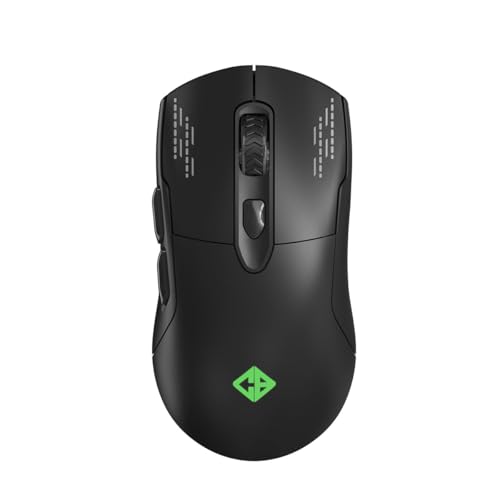

Gaming mice under ₹1,000: sensor, weight and cable
Specs, the honest pros and cons, and who each one is for.
Cosmic Byte Firestorm Gaming Mouse
- Sensor
- Pixart 3327 Optical
- DPI Range
- Up to 12,400
- Polling Rate
- 1000Hz
- Weight
- 67g Ultralight
- Cable
- Paracord
- Feet
- PTFE
The Cosmic Byte Firestorm is, frankly, an absurd amount of mouse for under ₹1,000. The headline feature is the Pixart 3327 optical sensor—this is the same sensor found in gaming mice that cost ₹2,500 to ₹3,000 from international brands. The 3327 delivers accurate, jitter-free tracking with genuine 12,400 DPI native resolution, not the interpolated nonsense you get from generic sensors. At 67 grams, it undercuts most mid-range mice in weight, and the paracord cable is a revelation at this price—it is so flexible and lightweight that you genuinely forget the mouse is wired. Most budget mice use stiff rubber or braided cables that actively drag your aim around; the Firestorm eliminates that problem entirely. The PTFE feet glide smoothly on any mousepad surface, another feature typically reserved for ₹2,000+ mice. Cosmic Byte also provides software for DPI profile customization, button remapping, and RGB control—rare at this price point. The 10-million-click rated switches ensure longevity that matches your skill progression.
- + Best sensor at this price (Pixart 3327 is used in mice costing 3x more)
- + lightweight 67g
- + paracord cable doesn't drag
- + PTFE feet for smooth glide
- + software support for customization.
- - Only 6 buttons (no side thumb buttons beyond 2)
- - no wireless option
- - sensor tracking can vary on textured surfaces
- - RGB can't be turned off via hardware (need software).
daWg Slay 25 Gaming Mouse
- Sensor
- PixArt PAW3327
- DPI Range
- Up to 12,400
- Polling Rate
- 1000Hz
- Switches
- Huano
- Cable
- 1.5m Red Braided
- Buttons
- 6 Programmable
The daWg Slay 25 is the dark horse of this list—a sub-brand of Zebronics that has quietly launched one of the most spec-competitive budget mice in India. It packs the exact same PixArt PAW3327 sensor as the Cosmic Byte Firestorm, giving you identical tracking accuracy and native 12,400 DPI capability. Where it differentiates is in its switch choice: Huano switches are widely respected in the enthusiast mouse community for their crisp, tactile click feel and excellent durability. They are stiffer than typical Omron-style switches, which many FPS players actually prefer because it reduces accidental clicks during intense gameplay. The perfect 5.0 star rating on Amazon across 185 reviews is remarkable—while the sample size is smaller than established brands, it suggests that early adopters are genuinely impressed. The distinctive red braided cable gives it a unique visual identity in a market full of black mice. daWg provides customization software for DPI profiles and button mapping, putting it on par with the Firestorm in software support.
- + Same PAW3327 sensor as Firestorm
- + Huano switches (durable, tactile)
- + perfect 5.0 star Amazon rating with 185 reviews
- + customization software included
- + unique red aesthetic.
- - New brand with limited track record
- - fewer reviews (185 vs thousands for established brands)
- - limited availability and stock
- - no PTFE feet like Firestorm.
Ant Esports GM320 RGB Gaming Mouse
- Sensor
- Generic Optical
- DPI Range
- Up to 12,800
- Polling Rate
- 1000Hz
- Buttons
- 8 Programmable
- Cable
- Braided
- RGB
- Yes (toggle)
At ₹549, the Ant Esports GM320 delivers a feature-per-rupee ratio that nothing else in this list can match. The standout specification is 8 programmable buttons—the highest count in our entire roundup, beating even mice that cost nearly double. For MOBA players in Dota 2 or League of Legends, those extra buttons translate directly into faster spell casting and item usage. The 5,495 Amazon ratings make it the most battle-tested mouse here by a massive margin; when thousands of Indian gamers have bought and rated a product, you know the reliability baseline. The 1000Hz polling rate at this price is impressive—many ₹300-500 mice cap at 125Hz or 500Hz. The braided cable adds durability over the rubber cables found in similarly priced competitors. RGB lighting with an easy toggle button lets you cycle through effects or turn them off without software. The GM320 does not have a named sensor, which means its 12,800 DPI claim likely uses interpolation above its native resolution—but for the majority of gamers who play at 800-1600 DPI anyway, this is a non-issue.
- + Incredible price at ₹549
- + 8 programmable buttons (most in this list)
- + 1000Hz polling rate
- + 5,495 ratings prove reliability
- + RGB with easy toggle
- + braided cable.
- - No named or branded sensor
- - heavier than ultralight options
- - plastic build feels budget
- - software is basic
- - DPI claims may not be accurate at highest settings.
Kreo Harpy Ultralight Gaming Mouse
- Sensor
- Generic Optical
- DPI Range
- Up to 12,800
- Polling Rate
- 1000Hz
- Weight
- 55g Ultralight
- RGB
- 13 Modes
- Buttons
- 6
At 55 grams, the Kreo Harpy is the lightest mouse in this entire roundup—and it is lighter than many mice costing ₹3,000 to ₹5,000. To put that in perspective, the highly regarded Razer Cobra costs ₹2,999 and weighs 58g; the Harpy beats it by 3 grams at one-fifth the price. For FPS gamers, every gram matters during rapid flick shots and 180-degree turns. The symmetrical design accommodates all grip styles—palm, claw, and fingertip—and works equally well for left-handed and right-handed players. Kreo has packed in 13 RGB lighting modes, the most lighting variety in our list, which gives your setup a premium visual flair that belies the ₹599 price tag. The 1000Hz polling rate ensures your micro-adjustments register at the fastest possible speed. The trade-off for this extraordinary weight and price is the generic, unnamed sensor—it works well enough for most gaming scenarios, but it cannot match the pixel-perfect tracking consistency of the Pixart 3327 in the Firestorm or Slay 25. For pure aim-dependent competitive play, spend the extra ₹400 on the Firestorm. For everything else, the Harpy's weight advantage is compelling.
- + Lightest at 55g (lighter than mice costing 5x more)
- + symmetrical design suits all grips
- + 13 RGB modes
- + 1000Hz polling
- + incredible value at ₹599.
- - No named sensor brand
- - honeycomb-style design may collect dust
- - symmetrical shape not as ergonomic as contoured designs
- - newer product with fewer long-term reviews.
Cosmic Byte Raptor Dual Mode Gaming Mouse
- Sensor
- Pixart 3212
- DPI Range
- Up to 4,800
- Polling Rate
- 500Hz
- Connection
- Wired + 2.4GHz
- Feet
- PTFE
- RGB
- 11 Effects
The Cosmic Byte Raptor is the only dual-mode wireless gaming mouse under ₹1,000 in India that features a named Pixart sensor—and that alone makes it remarkable. The Pixart 3212 is a purpose-built wireless gaming sensor designed for power efficiency without sacrificing tracking quality. While its 4,800 DPI maximum is lower than the 12,000+ DPI claimed by wired competitors, remember that most professional gamers play at 400-1600 DPI—the Raptor covers that range perfectly. The dual-mode connectivity gives you the best of both worlds: plug in the braided cable for zero-latency wired gaming during competitive sessions, then switch to 2.4GHz wireless for a clean desk during casual play or work. The PTFE feet provide the same smooth glide as the Firestorm, and the 10-million-click rated switches ensure durability. With 11 RGB effects, the Raptor looks the part too. The 500Hz polling rate is the main compromise—it means 2ms response time versus 1ms on the wired competitors—but for casual and mid-tier competitive gaming, this difference is imperceptible to most human reaction times.
- + ONLY dual-mode mouse under ₹1000 with named Pixart sensor
- + wireless freedom for clean desk
- + PTFE feet
- + 11 RGB effects
- + Cosmic Byte established brand trust.
- - Lower 4800 DPI vs competitors
- - 500Hz polling (half of others)
- - wireless latency won't match premium wireless tech
- - battery life unspecified
- - heavier than wired-only options.
Zebronics Transformer M Plus Gaming Mouse
- Sensor
- Generic Optical
- DPI Range
- Up to 12,800
- Polling Rate
- 1000Hz
- DPI Switch
- 6-Level
- Cable
- 1.5m Detachable
- RGB
- 8 Modes
The Zebronics Transformer M Plus stands out with a feature no other mouse in this list offers: a detachable 1.5-meter cable. This might seem minor until you consider the most common way budget mice die—cable fraying near the USB connector from repeated bending. With the Transformer M Plus, a damaged cable means a ₹100 replacement, not a ₹600 new mouse. For students and younger gamers who tend to be rougher with their peripherals, this is a practical advantage that saves money long-term. The 6-level DPI switch gives you finer control than the typical 4-level switches found in competitors—you can dial in exactly the right sensitivity for different games without needing software. Zebronics is one of India's most established electronics brands with service centers across every major city, giving you warranty support that newer brands like daWg or Kreo cannot match. The 1000Hz polling rate and 8 RGB lighting modes round out a solid all-around package. The Transformer M Plus is not the flashiest or the most spec-heavy mouse here, but it is arguably the most practical choice for someone buying their first gaming mouse.
- + Detachable cable (unique feature - easy to replace if damaged)
- + trusted Zebronics brand with wide service
- + 6-level DPI switch for fine control
- + 8 RGB modes
- + solid build at ₹599.
- - No named sensor
- - detachable cable can come loose during intense gaming
- - basic software
- - no side thumb buttons for gaming macros
- - generic sensor quality.
Which gaming mouse under ₹1,000
Here is who each pick is for, based on the comparison above.
Cosmic Byte Firestorm Gaming Mouse · ₹956
Pixart 3327 sensor, 67g ultralight with paracord cable
Check Price on Amazon →daWg Slay 25 Gaming Mouse · ₹999
Same PAW3327 sensor with Huano switches and 5.0 star rating
Check Price on Amazon →Ant Esports GM320 RGB Gaming Mouse · ₹549
8 programmable buttons at just ₹549 with 5,495 ratings
Check Price on Amazon →Kreo Harpy Ultralight Gaming Mouse · ₹599
Lightest at 55g with 13 RGB modes for ₹599
Check Price on Amazon →Our gaming peripherals roundup ranks mice in every budget band, up to premium wireless flagships. It also covers the keyboard, headset and pad to go with it.
Compare gaming mice at every budget →Choosing a budget gaming mouse
-
Named Sensors vs Generic Sensors
Named sensors like Pixart 3327 (used in Cosmic Byte Firestorm and daWg Slay 25) have published specifications, consistent tracking curves, and predictable behavior across surfaces. Generic sensors claiming 12,800 DPI often use interpolation to inflate numbers—the actual native DPI may be much lower. At under ₹1,000, the Pixart 3327 is the gold standard: it tracks accurately up to 12,400 DPI with minimal jitter and is used in mice costing ₹2,500+ from other brands. -
Polling Rate Matters
Polling rate determines how often your mouse reports its position to the PC. 1000Hz means the mouse updates every 1ms—essential for fast-paced FPS gaming where every millisecond counts. 500Hz updates every 2ms, which is noticeable in competitive play but perfectly fine for casual gaming. Most mice in this list offer 1000Hz; the Cosmic Byte Raptor wireless runs at 500Hz, a trade-off for wireless capability at this price. -
Weight and Cable Type
Lightweight mice (55-67g) reduce wrist fatigue and allow faster flick shots in FPS games. The Kreo Harpy at 55g and Cosmic Byte Firestorm at 67g are remarkably light for their price. Cable type matters too: paracord cables (Firestorm) feel almost wireless due to flexibility, braided cables are durable but stiffer, and detachable cables (Zebronics Transformer) are convenient but can disconnect during intense gaming sessions. -
RGB and Software
Most gaming mice under ₹1,000 include RGB lighting with multiple modes. The real differentiator is software support: Cosmic Byte and daWg provide software for customizing DPI profiles, button mapping, and lighting effects. Mice without software (like Kreo Harpy) rely on physical buttons for DPI switching—simpler but less flexible. If you need precise DPI customization for different games, prioritize mice with software support.
Frequently asked questions
Which is the best gaming mouse under ₹1,000 in India?
Is Pixart 3327 sensor good for gaming?
Should I buy wired or wireless gaming mouse under ₹1,000?
Are budget gaming mice durable?
What DPI should I set for gaming?
Can I use these mice for office work too?
You may also like
More guides and reviews to help you decide.
6 best gaming mice under ₹2000 in India 2026 — Cosmic Byte Firestorm (PixArt 3327 winner), Logitech G102, Kreo Hawk, Redragon M612 PRO wireless.
Read more →Best gaming mice under ₹5,000 in India 2026. Compare Razer, Logitech, HyperX, Redragon from ₹1,200 to ₹4,999 for FPS, MMO and casual gaming.
Read more →Find the best premium wireless gaming mouse in India 2026. Compare Razer, Logitech & more with research-based reviews, prices & pros and cons.
Read more →Find the best wireless mouse under 1500 in India 2026. Compare HP, Logitech & more with research-based reviews, prices & pros and cons.
Read more →How to choose a mouse in India: why higher DPI is a myth, when 8000Hz polling is wasted, optical vs mechanical switches, and grip by hand size. All sourced.
Read more →Find the best gaming headsets under 2000 in India for 2026. Compare Zebronics Blitz C Dolby Atmos & more from ₹669 to ₹1,999 with Dolby Atmos, 7.1 surround.
Read more →