
PRODUCT REVIEW
Best Laptops Under 50000 in India 2026
Best laptops under ₹50,000 in India 2026 compared — Acer Aspire 3 (16GB IPS), HP 14 Ryzen 5, Acer TravelLite, Dell Inspiron 120Hz and more.
 By Naveen Bhavnani
Updated
By Naveen Bhavnani
Updated
As an Amazon Associate we earn from qualifying purchases. We could also earn a fee through some links when you click on them.
On this page
Laptop picks: value or performance
Already covered the winner above — here are the picks for specific needs.

HP Laptop 14 (Ryzen 5 7520U, em0026AU)
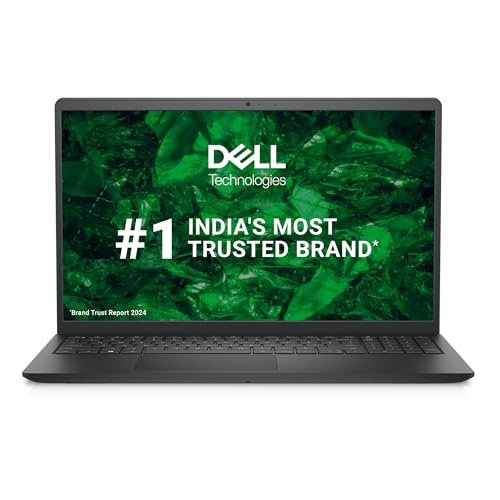
Dell Inspiron 15 3535 (Ryzen 5 7520U)

Acer TravelLite (Ryzen 5 7430U, TL04-41M)
Laptops compared side by side
How the shortlist stacks up. Scroll sideways on mobile.
| WWCD Score | Product | Processor | RAM | Display | Weight | Battery | Rating | Price | Deal |
|---|---|---|---|---|---|---|---|---|---|
| 9.1/10 | Acer Aspire 3 (Core i3-1305U, 16GB, A324-53) | Intel Core i3-1305U (5 cores) | 16 GB DDR4 | 14-inch Full HD IPS | 1.45 kg | 45.6 Wh | 4.3 (60) | ₹49,890 | Check Price |
| 9.0/10 | HP Laptop 14 (Ryzen 5 7520U, em0026AU) | AMD Ryzen 5 7520U (4C/8T) | 8 GB LPDDR5 | 14-inch Full HD | 1.41 kg | 41 Wh | 4.2 (37) | ₹39,990 | Check Price |
| 9.0/10 | Acer TravelLite (Ryzen 5 7430U, TL04-41M) | AMD Ryzen 5 7430U (6C/12T) | 16 GB DDR4 | 14-inch Full HD Anti-Glare | 1.34 kg (metal) | ~50 Wh | 4.8 (6) | ₹50,015 | Check Price |
| 9.0/10 | Dell Inspiron 15 3535 (Ryzen 5 7520U) | AMD Ryzen 5 7520U (4C/8T) | 8 GB DDR5 | 15.6-inch Full HD 120Hz | 1.67 kg | 41 Wh | 4.1 (57) | ₹48,770 | Check Price |
| 9.0/10 | Acer Aspire (Ryzen 3-7330U, 16GB, AS15-42) | AMD Ryzen 3 7330U (4C/8T) | 16 GB DDR4 | 15.6-inch Full HD IPS | 1.79 kg | 55 Wh | 4.6 (7) | ₹49,990 | Check Price |
| 8.9/10 | ASUS Vivobook 14 (Core i3-1315U, X1404VA) | Intel Core i3-1315U (6 cores) | 8 GB | 14-inch Full HD | 1.4 kg | 42 Wh | 5.0 (2) | ₹48,999 | Check Price |
| 8.8/10 | Dell Inspiron 15 DC15250 (Core 3-100U) | Intel Core 3-100U | 8 GB DDR5 | 15.6-inch Full HD | 1.5 kg | Integrated | 5.0 (2) | ₹47,877 | Check Price |
| 8.8/10 | ASUS Vivobook 15 (Core i3-1315U, X1504VA) | Intel Core i3-1315U (6 cores) | 8 GB | 15.6-inch Full HD | 1.7 kg | 42 Wh | 4.5 (4) | ₹49,980 | Check Price |
| 8.7/10 | Lenovo IdeaPad Slim 3 (Core i3-1315U, 82X7) | Intel Core i3-1315U (6 cores) | 8 GB LPDDR5 | 15.6-inch Full HD | 1.62 kg | 47 Wh | 4.0 (33) | ₹47,490 | Check Price |




Laptop reviews under ₹50,000: CPU, RAM and battery
Specs, the honest pros and cons, and who each one is for.
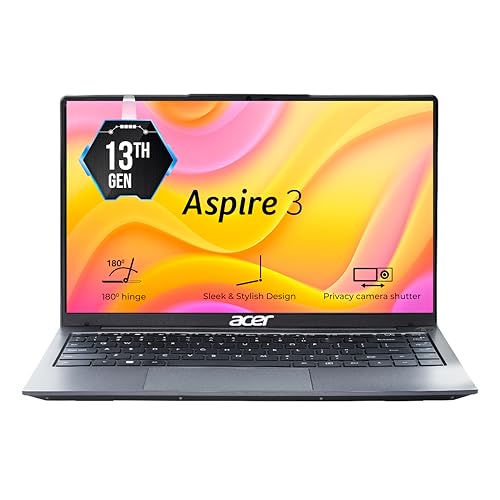
Acer Aspire 3 (Core i3-1305U, 16GB, A324-53)
The 16GB value champion with a true IPS screen.
- Processor
- Intel Core i3-1305U (5 cores)
- RAM
- 16 GB DDR4
- Storage
- 512 GB SSD
- Display
- 14-inch Full HD IPS
- Weight
- 1.45 kg
- Battery
- 45.6 Wh
- Graphics
- Intel UHD
- OS
- Windows 11 Home
- Office
- Office 2024 + M365 Basic (1yr)
A rare 16GB-RAM laptop under ₹50,000 with a genuine Full HD IPS panel, light 1.45 kg body and consistently strong India reviews. The entry-level i3 is the only compromise, but for everyday work, study and media it is the most well-rounded pick here.
- + Rare 16GB RAM at this price keeps multitasking smooth
- + Genuine Full HD IPS display - best viewing angles in the segment
- + Light 1.45 kg
- + compact 14-inch body
- + Larger 45.6 Wh battery than most rivals
- + Office 2024 + Microsoft 365 (1yr) bundled
- + Strong
- + consistent India reviews praising value
- - Entry-level i3-1305U - not for heavy workloads or gaming
- - DDR4 (not DDR5) memory
- - Plastic chassis
- - No backlit keyboard
HP Laptop 14 (Ryzen 5 7520U, em0026AU)
The cheapest way into a Ryzen 5 Full HD laptop.
- Processor
- AMD Ryzen 5 7520U (4C/8T)
- RAM
- 8 GB LPDDR5
- Storage
- 512 GB SSD
- Display
- 14-inch Full HD
- Weight
- 1.41 kg
- Battery
- 41 Wh
- Graphics
- AMD Radeon
- OS
- Windows 11 Home
- Office
- MSO 2021
At ₹39,990 this is the best value in the segment: a Ryzen 5 chip, Full HD screen, backlit keyboard and 1.41 kg body for thousands less than rivals. Just 8GB RAM and HP's patchy after-sales are the trade-offs, but the hardware itself is well-liked.
- + Lowest price for a Ryzen 5 + Full HD laptop (₹39,990)
- + Light 1.41 kg with backlit keyboard
- + Fast LPDDR5 memory
- + FHD webcam with privacy shutter
- + Hardware praised even by critical reviewers
- - Only 8 GB RAM and not user-upgradeable (LPDDR5 soldered)
- - Some units shipped are older manufacturing stock
- - HP after-sales/warranty complaints in reviews
- - Only 1 unit in stock at research time
Acer TravelLite (Ryzen 5 7430U, TL04-41M)
A 6-core, 16GB metal ultraportable at the ceiling price.
- Processor
- AMD Ryzen 5 7430U (6C/12T)
- RAM
- 16 GB DDR4
- Storage
- 512 GB SSD
- Display
- 14-inch Full HD Anti-Glare
- Weight
- 1.34 kg (metal)
- Battery
- ~50 Wh
- Graphics
- AMD Radeon
- OS
- Windows 11 Home
- Office
- MS Office
The strongest spec sheet here - 6-core Ryzen 5, 16GB RAM and an all-metal 1.34 kg body. It sits right at the ₹50k ceiling and has only a handful of India reviews, so it is a spec-lover's pick rather than a proven safe bet.
- + 6-core Ryzen 5 7430U - strongest CPU here
- + 16GB RAM for comfortable multitasking
- + Premium all-metal body
- + lightest at 1.34 kg
- + Anti-glare Full HD with privacy shutter
- - Priced right at the ₹50k ceiling (₹50,015)
- - Only 6 India ratings - reliability not yet proven
- - DDR4 memory
- - 14-inch screen smaller than 15.6-inch rivals
Dell Inspiron 15 3535 (Ryzen 5 7520U)
Ryzen 5 power on a smooth 120Hz big screen.
- Processor
- AMD Ryzen 5 7520U (4C/8T)
- RAM
- 8 GB DDR5
- Storage
- 512 GB SSD
- Display
- 15.6-inch Full HD 120Hz
- Weight
- 1.67 kg
- Battery
- 41 Wh
- Graphics
- AMD Radeon 610M
- OS
- Windows 11 Home
- Office
- -
A well-reviewed 15.6-inch all-rounder with a Ryzen 5 chip and a rare 120Hz Full HD panel. Reviewers love the speed and loud speakers; 8GB RAM is the main limit for heavy multitasking or coding, where a RAM upgrade is worth budgeting for.
- + Capable Ryzen 5 7520U with DDR5 memory
- + Smooth 120Hz Full HD 15.6-inch display
- + Loud
- + good speakers (per reviewers)
- + Full port selection including USB-C
- + Well reviewed - 'best laptop at this price'
- + Dell onsite service
- - 8 GB RAM limits heavy multitasking and coding
- - Heavier 1.67 kg plastic body
- - 41 Wh battery is only average
- - Occasional defective-unit reports
Acer Aspire (Ryzen 3-7330U, 16GB, AS15-42)
16GB, IPS and the biggest battery in the class.
- Processor
- AMD Ryzen 3 7330U (4C/8T)
- RAM
- 16 GB DDR4
- Storage
- 512 GB SSD
- Display
- 15.6-inch Full HD IPS
- Weight
- 1.79 kg
- Battery
- 55 Wh
- Graphics
- AMD Radeon, Wi-Fi 6
- OS
- Windows 11 Home
- Office
- -
Packs 16GB RAM, a Full HD IPS panel, Wi-Fi 6 and a class-leading 55 Wh battery for all-day endurance. The entry-level Ryzen 3 and a heavier 1.79 kg body are the catches, and India reviews are still few - but the spec value near ₹50k is excellent.
- + 16GB RAM despite the budget price
- + Full HD IPS display
- + Class-leading 55 Wh battery for all-day use
- + Wi-Fi 6 connectivity
- + Strong early ratings (4.6)
- - Entry-level Ryzen 3 7330U - modest CPU
- - Heaviest here at 1.79 kg
- - Only 7 ratings - limited validation
- - Only 1 unit in stock at research time
ASUS Vivobook 14 (Core i3-1315U, X1404VA)
A compact, secure 14-inch Full HD ASUS.
- Processor
- Intel Core i3-1315U (6 cores)
- RAM
- 8 GB
- Storage
- 512 GB SSD
- Display
- 14-inch Full HD
- Weight
- 1.4 kg
- Battery
- 42 Wh
- Graphics
- Intel UHD
- OS
- Windows 11 Home
- Office
- Office 2021 + fingerprint
A light 1.4 kg, 14-inch Full HD machine with a fingerprint reader and the well-regarded 6-core i3-1315U. A tidy compact pick, though it has very few India reviews so far.
- + Light 1.4 kg
- + compact 14-inch
- + Full HD display
- + Fingerprint reader for quick login
- + Capable 6-core i3-1315U
- + Office 2021 bundled
- - Only 8 GB RAM
- - Very few India reviews (2)
- - Integrated UHD graphics only
- - Only 1 unit in stock at research time
Dell Inspiron 15 DC15250 (Core 3-100U)
The freshest 2026 Dell, with onsite warranty.
- Processor
- Intel Core 3-100U
- RAM
- 8 GB DDR5
- Storage
- 512 GB SSD
- Display
- 15.6-inch Full HD
- Weight
- 1.5 kg
- Battery
- Integrated
- Graphics
- Intel Graphics
- OS
- Windows 11 Home
- Office
- Office 2024 + M365
A brand-new 2026 Dell with current Core 3-100U silicon, fast DDR5, Office 2024 + Microsoft 365 and next-business-day onsite warranty. The newer platform and Dell support are reassuring; as a fresh launch it simply has few reviews yet.
- + Latest 2026 Core 3-100U platform
- + Fast DDR5 memory
- + Full HD display
- + Office 2024 + Microsoft 365 included
- + Dell next-business-day onsite warranty
- - Entry-level CPU - modest raw performance
- - Only 8 GB RAM
- - Brand-new model with very few reviews (2)
- - Battery capacity not clearly specified
ASUS Vivobook 15 (Core i3-1315U, X1504VA)
A 15-inch Full HD ASUS with a backlit keyboard.
- Processor
- Intel Core i3-1315U (6 cores)
- RAM
- 8 GB
- Storage
- 512 GB SSD
- Display
- 15.6-inch Full HD
- Weight
- 1.7 kg
- Battery
- 42 Wh
- Graphics
- Intel UHD
- OS
- Windows 11 Home
- Office
- Office 2021 + backlit KB
A straightforward 15.6-inch Full HD laptop with the capable 6-core i3-1315U and a backlit keyboard. Specs are solid, but India reviews are sparse and over a year old, so buy on the spec sheet rather than the crowd.
- + 6-core i3-1315U for everyday productivity
- + Full HD 15.6-inch display
- + Backlit keyboard
- + Office 2021 bundled
- + Light-ish 1.7 kg for a 15-inch
- - Only 8 GB RAM
- - Reviews are sparse and over a year old
- - Integrated graphics only
- - Only 1 unit in stock at research time
Lenovo IdeaPad Slim 3 (Core i3-1315U, 82X7)
Strong on paper - 47Wh and free ADP - but check the reviews.
- Processor
- Intel Core i3-1315U (6 cores)
- RAM
- 8 GB LPDDR5
- Storage
- 512 GB SSD
- Display
- 15.6-inch Full HD
- Weight
- 1.62 kg
- Battery
- 47 Wh
- Graphics
- Intel UHD
- OS
- Windows 11 Home
- Office
- Office 2024 + 1yr ADP
On paper a good deal: 6-core i3, 47 Wh battery, Office 2024 and a free year of Accidental Damage Protection. However, a recent run of India reviews flag lag on the 8GB config, average display quality and that the keyboard is not backlit - reasons it lands at the foot of this list.
- + Larger 47 Wh battery for longer endurance
- + Free 1-year Accidental Damage Protection
- + 6-core i3-1315U with LPDDR5
- + Office 2024 + 3-month Game Pass
- + Full HD display
- - Recent India reviews report lag/hanging on 8GB
- - Owners criticise display quality
- - Keyboard is NOT backlit despite listing imagery
- - Recurring after-sales/service complaints
- - Lowest current rating in this list (4.0)
Which laptop to buy under ₹50,000
After weighing performance, screen, build, battery and price, here is who each top pick is for.
Acer Aspire 3 (i3-1305U, 16GB) · ₹49,890
The pick most buyers won’t second-guess — the only sub-₹50k laptop with 16GB RAM and a genuine Full HD IPS screen, in a light 1.45 kg body with strong India reviews.
Check Price on Amazon →HP Laptop 14 (Ryzen 5 7520U) · ₹39,990
Buy this if value is the goal — a Ryzen 5, Full HD screen and backlit keyboard at ₹39,990, thousands less than rivals. Live with 8GB soldered RAM.
Check Price on Amazon →Dell Inspiron 15 3535 (Ryzen 5 7520U) · ₹48,770
For a bigger, smoother screen — a well-reviewed 15.6-inch Ryzen 5 with a rare 120Hz Full HD panel and loud speakers. Add RAM if you multitask heavily.
Check Price on Amazon →Acer TravelLite (Ryzen 5 7430U, 16GB) · ₹50,015
The spec-lover’s pick — a 6-core Ryzen 5 and 16GB RAM in a premium 1.34 kg all-metal body. Sits at the ₹50k ceiling with few reviews yet.
Check Price on Amazon →Gaming needs a dedicated graphics card, and those laptops start above this rung. Compare them with student machines on one page.
Compare work, student and gaming →How to choose a budget laptop
-
How much processor do you really need under ₹50,000?
At this budget you'll choose between Intel Core i3 (1305U/1315U) and Core 3-100U, and AMD Ryzen 3 (7330U) and Ryzen 5 (7520U/7430U). For browsing, Office, video calls and study, any of them is enough. If you multitask heavily or do light creative work, prioritise a Ryzen 5 (especially the 6-core 7430U) or pair an i3 with 16GB RAM. Avoid older Celeron/Athlon and anything that ships with DOS unless you're comfortable installing Windows yourself. -
Why 16GB RAM matters - and who can live with 8GB
Windows 11, Chrome and Office together can easily use 6-7GB, so 8GB machines start swapping to disk when you open many tabs - the most common 'laptop feels slow' complaint in reviews. If you can find 16GB under ₹50,000 (the Acer Aspire 3 and Acer Ryzen 3 models here do), it's the single best longevity upgrade. 8GB is fine for light, single-task use, and many of these laptops solder the RAM, so check upgradeability before buying if you plan to add memory later. -
Insist on a Full HD screen - ideally IPS
Several laptops in this range still ship a low-resolution 1366x768 'HD' panel that looks grainy and cramped. Always confirm the listing says Full HD (1920x1080). Better still is a Full HD IPS panel (as on the Acer Aspire 3 and Acer Ryzen 3 here), which gives noticeably better viewing angles and colour. A 120Hz panel (Dell Inspiron 3535) is a nice bonus for smoothness. -
Check the India review count, not the global number
The big number near a laptop's title is the GLOBAL rating count, which can be dominated by US or other foreign buyers - and foreign-market units can have different stock, warranty and support. We dropped one popular-looking Dell precisely because its 400+ ratings were almost all from the US. On the product page, scroll to 'Reviews from India' to see how many real Indian buyers have actually reviewed it. -
Weight, build and after-sales
For a daily-carry laptop, aim for under 1.6 kg; metal-bodied options like the Acer TravelLite (1.34 kg) feel more premium and durable. Also weigh after-sales: Dell's onsite/next-business-day warranty and Lenovo's free Accidental Damage Protection add real peace of mind, while a few brands draw recurring service complaints in reviews.
Frequently asked questions
Which is the best laptop under Rs.50,000 in India in 2026?
Is 16GB RAM necessary in 2026, or is 8GB enough?
AMD Ryzen 5 vs Intel Core i3 — which should I pick under Rs.50,000?
Can these laptops handle gaming?
Should I avoid laptops with an HD (1366x768) screen?
Do these laptops come with Windows and MS Office?
What does ‘Only 1 left in stock’ mean — should I still buy?
Is a laptop with very few reviews risky?
You may also like
More guides and reviews to help you decide.
Best laptops under 30000 in India for students and everyday use. Compare Primebook 2 Pro & Max & more with real specs, honest pros and cons.
Read more →The best laptop cooling pads in India for 2026, from ₹599 budget picks to ₹1,899 premium coolers. Compare fans, cooling, build and prices with pros and cons.
Read more →Find the best 64gb pen drive in India 2026. Compare SanDisk & more with research-based reviews, prices & pros and cons.
Read more →Find the best wireless mouse for office in India 2026. Compare Logitech & more with research-based reviews, prices & pros and cons.
Read more →Find the best laptop bag under 2000 India offers. Compare uppercase, American Tourister & more with water-resistant fabric & padded straps. Verified prices.
Read more →The best e-readers in India for 2026: Kindle Paperwhite vs Kobo Clara BW and Libra Colour, compared on display, colour, India warranty, battery and price.
Read more →