
PRODUCT REVIEW
Best Laptops Under 30000 in India 2026
Best laptops under 30000 in India for students and everyday use. Compare Primebook 2 Pro & Max & more with real specs, honest pros and cons.
 By Naveen Bhavnani
Updated
By Naveen Bhavnani
Updated
As an Amazon Associate we earn from qualifying purchases. We could also earn a fee through some links when you click on them.
On this page
Laptop picks by OS and screen
Already covered the winner above — here are the picks for specific needs.

Chuwi HeroBook Plus — 8GB/256GB SSD, 15.6" FHD, Celeron N4020, Windows 11
Lenovo IdeaPad Slim 3 — 4GB/256GB SSD, 14" HD, Celeron N4020, Windows 11 + Office 2021

Primebook 2 Max (2026) — 8GB/256GB, 15.6" FHD IPS, Helio G99
Laptops compared side by side
How the shortlist stacks up. Scroll sideways on mobile.
| WWCD Score | Product | OS | Processor | RAM | Storage | Display | Battery | Price | Deal |
|---|---|---|---|---|---|---|---|---|---|
| 9.0/10 | Primebook 2 Pro (2026) | Android 15 / PrimeOS 3.0 | Helio G99 | 8GB LPDDR4X | 128GB UFS 2.2 | 14.1" FHD IPS | Up to 14 hrs | ₹26,990 | Check Price |
| 8.8/10 | Primebook 2 Max (2026) | Android 15 / PrimeOS 3.0 | Helio G99 | 8GB LPDDR4X | 256GB UFS 2.2 | 15.6" FHD IPS | Up to 12 hrs | ₹28,990 | Check Price |
| 8.4/10 | Chuwi HeroBook Plus | Windows 11 | Celeron N4020 | 8GB | 256GB SSD | 15.6" FHD | 38Wh | ₹29,690 | Check Price |
| 8.2/10 | Lenovo IdeaPad Slim 3 | Windows 11 + Office 2021 | Celeron N4020 | 4GB | 256GB SSD | 14" HD | Up to 14 hrs | ₹29,999 | Check Price |
Laptop reviews under ₹30,000: RAM, storage and battery
Specs, the honest pros and cons, and who each one is for.
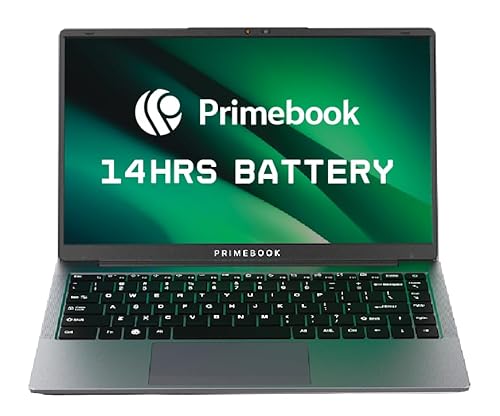
Primebook 2 Pro (2026) — 8GB/128GB, 14.1" FHD IPS, Helio G99
The best-value laptop under ₹30,000 — if you can live in the Android world.
- Processor
- MediaTek Helio G99 (octa-core, up to 2.2 GHz)
- RAM
- 8GB LPDDR4X
- Storage
- 128GB UFS 2.2 (microSD up to 1TB)
- Display
- 14.1" Full HD IPS, 250 nits, anti-glare
- OS
- Android 15 / PrimeOS 3.0
- Battery
- 60.3Wh, up to 14 hours
- Weight
- 1.38 kg
- Warranty
- 1-year (walk-in service)
For browsing, streaming, note-taking and student work, nothing under ₹30,000 matches the Primebook 2 Pro's FHD IPS screen, 8GB RAM, battery life and price. Just go in knowing it's Android (PrimeOS), not Windows — perfect for students, not for desktop-Office professionals.
- + Best hardware-per-rupee: 8GB LPDDR4X + 128GB UFS 2.2 + FHD IPS at ₹26990
- + Bright and sharp 14.1-inch Full HD IPS anti-glare panel far better than rivals' HD screens
- + Excellent real-world battery — the 14-hour claim is widely confirmed by reviewers
- + Light 1.38 kg build with a backlit keyboard and 1080p webcam
- + Made in India and runs Play Store apps including mobile Office
- + Strong recent India review base (4.4 from 734 ratings)
- - Runs Android (PrimeOS) not Windows — desktop MS Office and Windows-only software won't run
- - Some office workflows (printers / screen-share / certain apps) can be limited
- - After-sales responsiveness is criticised in several reviews
- - Service is walk-in only on limited pincodes
Primebook 2 Max (2026) — 8GB/256GB, 15.6" FHD IPS, Helio G99
A big-screen 15.6" FHD laptop for the price of a tablet — Android-powered.
- Processor
- MediaTek Helio G99 (octa-core, up to 2.2 GHz)
- RAM
- 8GB LPDDR4X
- Storage
- 256GB UFS 2.2 (microSD up to 1TB)
- Display
- 15.6" Full HD IPS, 250 nits
- OS
- Android 15 / PrimeOS 3.0
- Battery
- 60.3Wh, up to 12 hours
- Weight
- 1.61 kg
- Ports
- USB-A, USB-C, 3.5mm (no HDMI)
The Max trades the Pro's portability for a larger 15.6" FHD screen and double the storage. Great for students who want a desktop-replacement feel for media and study, but the missing HDMI port and Android OS limit it for office use.
- + Big 15.6-inch Full HD IPS display — the largest screen in the budget field
- + Generous 256GB UFS 2.2 storage (double the Pro) plus microSD expansion
- + 8GB LPDDR4X RAM with the same capable Helio G99 SoC
- + Backlit keyboard with dual stereo speakers and dual mics for calls and classes
- + Made in India with a large recent review base (4.3 from 831 ratings)
- + Strong value at ₹28990 for the size and storage
- - Android (PrimeOS) not Windows — no desktop MS Office or Windows apps
- - No HDMI port so you cannot connect an external monitor or projector
- - Heavier at 1.61 kg with a ~12-hour battery
- - Isolated reports of battery swelling and weak after-sales support
Chuwi HeroBook Plus — 8GB/256GB SSD, 15.6" FHD, Celeron N4020, Windows 11
The most Windows laptop you can get under 30k — if you accept the brand risk.
- Processor
- Intel Celeron N4020 (dual-core, up to 2.8 GHz)
- RAM
- 8GB
- Storage
- 256GB SSD
- Display
- 15.6" Full HD (1920x1080)
- OS
- Windows 11
- Battery
- 38Wh
- Weight
- 1.74 kg
- Connectivity
- WiFi 6, Bluetooth 5.2, HDMI
If you specifically need Windows with 8GB RAM and an FHD screen on a tight budget, the HeroBook Plus delivers more hardware than anything else here. The catch is Chuwi's patchy reliability and support — buy it for the specs, not for peace of mind.
- + Only sub-30k Windows 11 laptop here with both 8GB RAM and a Full HD screen
- + 256GB SSD and a 15.6-inch FHD display make it usable for everyday Windows tasks
- + WiFi 6 with Bluetooth 5.2 and a full-size HDMI port for external monitors
- + Reviewers praise the vibrant display and smooth multitasking for the price
- + Genuine Windows 11 runs real desktop Office and Windows software
- - Low 3.6 rating with recurring reports of charger / HDD / battery defects
- - Weak after-sales support from an obscure brand
- - Celeron N4020 is a slow dual-core fine for basics but not heavy multitasking
- - Heavy 1.74 kg plastic build with a small 38Wh battery
- - Only 90 ratings so reliability is less validated than mainstream brands
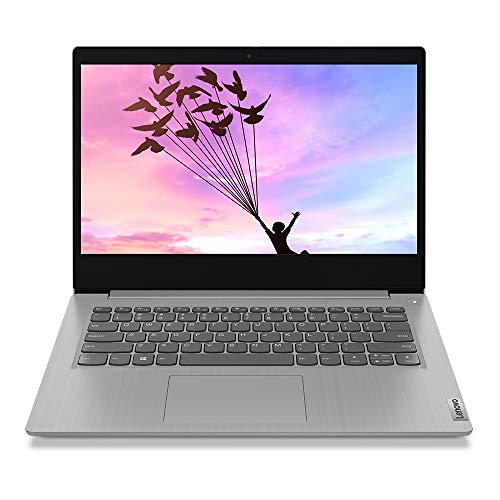
Lenovo IdeaPad Slim 3 — 4GB/256GB SSD, 14" HD, Celeron N4020, Windows 11 + Office 2021
The safe, brand-backed Windows pick — strictly for light, single-task work.
- Processor
- Intel Celeron N4020 (dual-core, up to 2.8 GHz)
- RAM
- 4GB
- Storage
- 256GB SSD
- Display
- 14" HD (1366x768)
- OS
- Windows 11 Home + MS Office 2021
- Battery
- Up to 14 hours (claimed)
- Weight
- 1.5 kg
- Warranty
- 2-year onsite
If brand trust, onsite warranty and bundled MS Office matter more than raw power, the IdeaPad Slim 3 is the dependable Windows choice. But its 4GB RAM and HD screen mean it's only comfortable for browsing, typing and basic Office — don't expect smooth multitasking.
- + Genuine Lenovo with a 2-year onsite warranty and the largest review base (888 ratings / 4.0)
- + Bundled MS Office 2021 and 3-month Game Pass — real desktop Windows out of the box
- + 256GB SSD keeps Windows responsive for boot and file access
- + Light 1.5 kg with a strong ~14-hour battery for all-day basic use
- + The safest and most reliable brand choice in this price band
- - Only 4GB RAM which reviewers call a severe limitation that causes lag when multitasking
- - 14-inch HD (1366x768) display is low-res and dim next to the FHD picks
- - Celeron N4020 is slow and suitable only for browsing / typing / light Office
- - Isolated complaints about keyboard feel and a few charging issues
- - Most expensive pick (₹29999) for the weakest core specs
Display, storage & OS explained
Operating system
Display
Storage
Which laptop to buy under ₹30,000
Under ₹30,000 you're really choosing an ecosystem. Here's the quickest way to the right pick for your needs.
Primebook 2 Pro · ₹26,990
Buy if you want the best screen, battery and value and can live in Android.
Check Price on Amazon →Chuwi HeroBook Plus · ₹29,690
Buy if you specifically need Windows with 8GB RAM and an FHD screen.
Check Price on Amazon →Lenovo IdeaPad Slim 3 · ₹29,999
Buy if brand trust, onsite warranty and bundled Office matter most.
Check Price on Amazon →Primebook 2 Max · ₹28,990
Buy if you want the biggest screen and most storage for media and study.
Check Price on Amazon →The next rung up adds 16GB of RAM for office work and multitasking. Gaming laptops are compared too, with their weight and battery trade-offs.
See what each laptop budget buys →How to choose a student laptop
-
First decide: Windows, ChromeOS or Android?
Under ₹30,000 you cannot get a powerful new Windows laptop. You're really choosing an ecosystem. Pick **Windows** (Lenovo IdeaPad Slim 3, Chuwi HeroBook) only if you need real desktop MS Office or Windows-only software — and accept slow Celeron performance. Pick an **Android laptop** (Primebook 2 Pro/Max) if you mainly browse, stream, take notes and use mobile apps — you get far better screen, RAM and battery for the money. ChromeOS sits in between but the new models here have no India reviews yet. -
RAM matters more than the processor at this price
Every CPU in this band is entry-level, so 8GB vs 4GB RAM is the single biggest real-world difference. India reviewers of the 4GB Lenovo repeatedly report hangs when opening multiple windows. If you want any multitasking, prioritise an 8GB model (Primebook 2 Pro/Max, Chuwi HeroBook) over a 4GB one. -
Insist on a Full HD IPS screen
The most common budget trap is an HD (1366x768) or TN panel — dim, grainy and tiring to read. The Primebook 2 Pro/Max and Chuwi HeroBook all use Full HD (1920x1080) IPS-class panels; the Lenovo IdeaPad Slim 3 is only HD. A sharper screen is the upgrade you'll notice every single day. -
Storage: UFS/SSD over eMMC
Fast storage makes a slow CPU feel far more responsive. Prefer UFS 2.2 (Primebook) or a proper SSD (Chuwi, Lenovo) over slow eMMC (found on the rejected AVITA/Acer/HP units). 128GB is a sensible minimum; many here add a microSD slot for cheap expansion. -
Check the warranty and after-sales, not just the brand
At this price, support quality varies wildly. Lenovo offers a 2-year onsite warranty and nationwide service. Primebook is walk-in service on limited pincodes. Obscure brands like Chuwi have patchy after-sales — factor that risk in. Avoid 'Certified'/'refurbished' business-laptop listings: they carry no genuine manufacturer India warranty. -
Avoid grey-market refurbished 'business laptops'
Many sub-30k listings are used HP ProBook/Dell Latitude/Lenovo ThinkPad machines sold by third-party 'Certified'/'Generic' sellers (often with odd stylised brand names). Specs look great (i5, 8GB) but condition, battery health and warranty are unreliable. For a dependable everyday machine, stick to new, warrantied products.
Frequently asked questions
What is the best laptop under Rs.30,000 in India in 2026?
Should I buy a Windows laptop, Chromebook, or Android laptop?
4GB or 8GB RAM — does it really matter in 2026?
Is the Primebook reliable, and what is PrimeOS?
Which laptop under Rs.30,000 is best for a student?
Will these laptops run MS Office and printers?
Are refurbished i5 business laptops a better deal?
Why are the ASUS and Acer Chromebooks not recommended?
Which laptop here has the best battery life?
Should I save more and buy a better laptop above Rs.30,000?
You may also like
More guides and reviews to help you decide.
Best laptops under ₹50,000 in India 2026 compared — Acer Aspire 3 (16GB IPS), HP 14 Ryzen 5, Acer TravelLite, Dell Inspiron 120Hz and more.
Read more →The best laptop cooling pads in India for 2026, from ₹599 budget picks to ₹1,899 premium coolers. Compare fans, cooling, build and prices with pros and cons.
Read more →Find the best laptop bag under 2000 India offers. Compare uppercase, American Tourister & more with water-resistant fabric & padded straps. Verified prices.
Read more →Find the best wireless mouse for office in India 2026. Compare Logitech & more with research-based reviews, prices & pros and cons.
Read more →Find the best 64gb pen drive in India 2026. Compare SanDisk & more with research-based reviews, prices & pros and cons.
Read more →We analysed India owner reviews of 12 monitors under ₹10,000. The MSI MAG 255F E20 wins at ₹8,599 with a 24.5-inch 200Hz IPS panel, 100% sRGB and DisplayPort.
Read more →