
PRODUCT REVIEW
Best Portable USB Fans in India 2026
Find the best portable usb fan in India 2026. Compare Bajaj, Portronics & more with research-based reviews, prices & pros and cons.
 By Naveen Bhavnani
Updated
By Naveen Bhavnani
Updated
As an Amazon Associate we earn from qualifying purchases. We could also earn a fee through some links when you click on them.

On this page
USB fan picks by form factor
Already covered the winner above — here are the picks for specific needs.


USB fans compared side by side
How the shortlist stacks up. Scroll sideways on mobile.
| WWCD Score | Product | Key Feature | Price | Deal |
|---|---|---|---|---|
| 8.8/10 | Bajaj Pygmy Mini 110MM | Multi-clip, 20K reviews | ₹979 | Check Price |
| 8.6/10 | Portronics Toofan Mini | 7800 RPM, Type-C | ₹749 | Check Price |
| 8.5/10 | Bajaj Pygmy Go 178MM | LED light, larger blade | ₹1,399 | Check Price |
| 8.4/10 | ARCTICOOL Portable Mini | Budget champion | ₹502 | Check Price |
| 8.3/10 | Portronics Aero Breeze | Table fan, 360xB0 rotation | ₹799 | Check Price |
| 8.2/10 | Gaiatop Mini Desktop | Desk design, quiet | ₹550 | Check Price |
| 8.0/10 | UN1QUE Mini Handheld | Lowest price | ₹299 | Check Price |
| 7.9/10 | Gesto Portable with LED | Foldable, LED | ₹379 | Check Price |


Portable USB fan reviews: runtime, airflow and charging
Specs, the honest pros and cons, and who each one is for.
Bajaj Pygmy Mini Fan 110MM
- Blade Size
- 110MM
- Battery
- 1800mAh
- Runtime
- 4 hours
- Speed Modes
- 3 speeds
- Charging
- Micro USB
- Weight
- 400g
- Reviews
- 20,893+
The Bajaj Pygmy Mini Fan stands out as our top pick due to its trusted brand reputation and multi-utility clip mechanism. With over 20,000 customer reviews, it's the most popular portable fan in India for good reason. The versatile clip function allows mounting on desk, wall, stroller, or bed. Silent operation makes it perfect for office environments, while the Bajaj brand reliability ensures excellent after-sales service across India.
- + Trusted Bajaj brand with excellent after-sales service
- + versatile clip mechanism for multiple mounting options
- + over 20,000 customer reviews with 4.0 rating
- + energy efficient with long battery life
- + silent operation suitable for office environments
- + compact and lightweight at 400g
- - Takes 4-6 hours for complete charging
- - airflow limited to single person at close range
- - slightly more expensive than competitors
- - no Type-C charging (uses Micro USB)
Portronics Toofan Mini
- Max RPM
- 7800 RPM
- Battery
- 2000mAh
- Runtime
- 3-7 hours
- Charging
- Type-C
- Rotation
- 180°
- Weight
- 110g
- Base
- Magnetic
The Portronics Toofan Mini offers exceptional value with its powerful 7800 RPM motor, magnetic base for stable placement, and modern Type-C charging. Despite being the most affordable of the premium options, it doesn't compromise on performance. The ultra-lightweight design (only 110g) and 180° rotation capability make it perfect for desk use, while the magnetic base ensures stable operation without wobbling.
- + Excellent price-to-performance ratio
- + very lightweight and portable at 110g
- + modern Type-C charging port
- + magnetic base for stable operation
- + high RPM for strong airflow
- + 180° rotation for better air circulation
- + Amazon Choice product
- - Some users report fan stops working after few months
- - tiny blade size means limited air throw
- - effective only at highest speed
- - no clip mechanism like Bajaj
ARCTICOOL Portable Mini Fan
- Price
- ₹502
- Battery
- 2000mAh
- Runtime
- 4-6 hours
- Speeds
- 3 modes
- Charging
- USB
- Type
- Handheld
- Reviews
- 1,265
The ARCTICOOL Mini Fan proves you don't need to spend a fortune for reliable portable cooling. With over 1,200 positive reviews and a 4.3-star rating, it delivers surprising value at just ₹502. The compact handheld design makes it perfect for students and budget-conscious buyers. Despite the low price, it offers good battery life (4-6 hours) and quiet operation suitable for study environments.
- + Incredible value at just ₹502
- + over 1,200 verified customer reviews
- + 4.3-star rating shows consistent quality
- + good battery life for the price
- + compact and ultra-portable
- + low noise operation
- + perfect for students on budget
- - Build quality not as premium as others
- - limited features compared to expensive models
- - no clip or magnetic base
- - Micro USB charging (not Type-C)
Bajaj Pygmy Go 178MM
- Blade Size
- 178MM
- LED Light
- Built-in
- Charging
- USB
- Brand
- Bajaj
- Stand
- Multi-position
- Function
- Fan + Light
The Bajaj Pygmy Go 178MM is the larger, feature-rich version of the standard Pygmy. With a 178MM blade (vs 110MM), it delivers significantly more airflow. The built-in LED lighting makes it perfect for power outages - providing both cooling and illumination. Premium Bajaj build quality ensures reliability, and the larger blade size means better cooling coverage for slightly bigger spaces.
- + Larger blade size than standard Pygmy
- + LED lighting adds functionality
- + trusted Bajaj brand reliability
- + good for power outages (fan + light)
- + premium build quality
- + stable base design
- - Higher price point at ₹1,399
- - heavier than mini fans
- - LED feature may not be needed by all
- - larger footprint on desk
Portronics Aero Breeze
- Blade Size
- 178mm
- Charging
- Type-C
- Battery
- 2000mAh
- Speeds
- 3 adjustable
- Rotation
- 360°
- Type
- Table fan
The Portronics Aero Breeze bridges the gap between mini fans and table fans with its 178mm blade - larger than Toofan Mini but still portable. The 360° rotation capability and Type-C charging make it ideal for desk use, while the table fan design provides more stable operation. Good for users who need more cooling power than mini fans but want portability.
- + Larger blade than Toofan Mini
- + Type-C charging convenience
- + good for desk use
- + 360° rotation for versatile placement
- + decent battery backup
- + affordable price
- - Newer product with limited reviews
- - larger size reduces portability
- - battery life could be better
- - some quality control concerns
UN1QUE Mini Handheld Fan
- Price
- ₹299
- Motor
- Brushless
- Lanyard
- Included
- Speeds
- 3 modes
- Design
- Handheld
- Charging
- USB
The UN1QUE Mini Handheld Fan is the most affordable option at just ₹299. Despite the ultra-low price, it features a brushless motor for efficiency and includes a lanyard for hands-free carrying. The ultra-compact design makes it perfect for students, travelers on extreme budgets, or as a trial purchase to test portable fans before investing more.
- + Lowest price option at ₹299
- + brushless motor technology
- + lanyard for easy carrying
- + very compact and lightweight
- + decent performance for price
- + good for basic cooling needs
- - Very basic features
- - limited battery capacity
- - build quality matches budget price
- - no stand or clip function
- - Micro USB charging
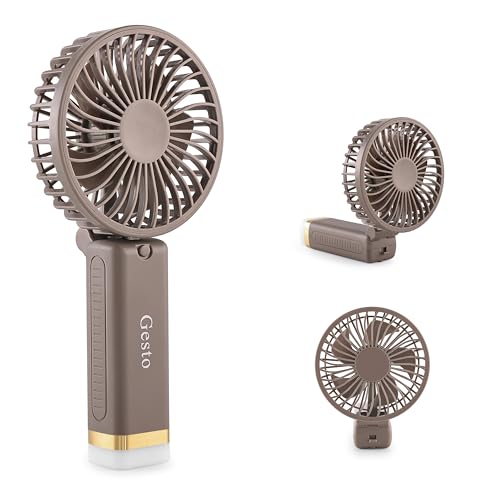
Gesto Portable Fan with LED
- Price
- ₹379
- Design
- Foldable
- LED Light
- Built-in
- Speeds
- 3 settings
- Charging
- USB
- Type
- Compact mini
The Gesto Portable Fan stands out with its foldable design that saves storage space and makes it highly portable. The built-in LED light adds dual functionality, making it useful for camping, travel, or emergency kits. At ₹379, it's very affordable and offers basic cooling with the added bonus of lighting capability.
- + Foldable design saves space
- + LED light adds utility
- + very affordable
- + compact for travel
- + dual-purpose fan and light
- + good for emergency kit
- - Limited customer reviews
- - lower rating at 3.9 stars
- - build quality concerns
- - LED feature may drain battery faster
- - basic performance
Gaiatop Mini Desktop Fan
- Battery
- 2000mAh
- Speeds
- 3 adjustable
- Design
- Desktop
- Charging
- USB
- Noise
- Quiet
- Base
- Stable
The Gaiatop Mini Desktop Fan offers a solid mid-range option with good battery capacity (2000mAh) and stable desk design. The quiet operation makes it suitable for office environments, while the compact size fits small desk spaces. Affordable pricing at ₹550 makes it an attractive choice for those wanting better quality than ultra-budget options without spending premium prices.
- + Good battery capacity
- + stable desk design
- + quiet operation
- + affordable mid-range option
- + decent build quality
- + suitable for office desks
- - Limited brand recognition
- - fewer reviews than competitors
- - basic feature set
- - no clip or magnetic function
- - Micro USB charging
Which portable USB fan to buy
Here is who each pick is for, based on the comparison above.
Bajaj Pygmy Mini Fan 110MM · ₹979
20K+ reviews, multi-clip, trusted brand
Check Price on Amazon →Portronics Toofan Mini · ₹749
7800 RPM, Type-C, magnetic base
Check Price on Amazon →ARCTICOOL Portable Mini Fan · ₹502
Ultra-compact, unbeatable price
Check Price on Amazon →Bajaj Pygmy Go 178MM · ₹1,399
Larger blade, LED, power outage ready
Check Price on Amazon →How to choose a portable USB fan
-
Battery Capacity & Runtime
Battery capacity (measured in mAh) directly impacts how long your fan runs on a single charge. 1800-2000mAh provides 3-7 hours runtime, 2400-3000mAh offers 6-8 hours, and 3600mAh+ delivers 10-12+ hours. Runtime decreases on higher speed settings - manufacturers quote maximum runtime on lowest speed. -
Type-C vs Micro USB Charging
Type-C charging offers 30-50% faster charging, reversible connector, more durable port, and universal compatibility with modern devices. Micro USB is the older standard with slower charging and one-way connector. While Type-C is preferable, excellent fans like Bajaj Pygmy use Micro USB but remain highly reliable. -
Airflow Performance: RPM Matters
RPM (Rotations Per Minute) indicates blade speed. Higher RPM (7000+) delivers stronger airflow but may be noisier. Factors affecting cooling include blade size, design, motor quality, and rotation capability. Portronics Toofan Mini at 7800 RPM provides excellent personal cooling despite compact size. -
Portability Form Factors
Desk fans offer stable base design and magnetic mounting (Portronics). Clip-on fans provide versatile mounting on shelves/tables (Bajaj Pygmy). Handheld fans are ultra-portable and lightweight (ARCTICOOL, UN1QUE). Choose based on primary use case. -
Safety Features
Look for overcharge protection to prevent battery damage, protected grills to prevent finger insertion, auto-shutoff when battery depletes, and LED battery indicators on premium models (common on newer designs). Soft blade designs are safest for homes with children or pets.
Frequently asked questions
What is the best portable usb fans in India?
What is the best USB fan for office use?
How long do USB fan batteries last?
Are USB fans better than traditional table fans?
Can USB fans be used while charging?
What is the ideal fan speed for sleeping?
Do USB fans work during power cuts?
How do I clean and maintain my USB fan?
Can I run a USB fan from a power bank?
What's the difference between clip-on and desk stand USB fans?
Are USB fans safe to use around babies and pets?
You may also like
More guides and reviews to help you decide.
Best handheld misting fans in India 2026. Compare Gaiatop & more from ₹800 to ₹2,499. USB rechargeable, foldable, 2000-5200mAh battery.
Read more →Find the best mist fan outdoor India offers in 2026. Compare HAVAI, EUROKRAFT & more from ₹8,094 to ₹22,990 for patios, gardens, balconies, and outdoor cooling.
Read more →Philips CX5535 vs Symphony Surround-i: our top picks among 5 tower fans. BLDC vs induction, noise level, airflow, and the best buy under ₹15,000.
Read more →Find the best table fan under 2000 in India 2026. Research-based reviews with detailed comparisons, prices, pros & cons to help you pick the right one.
Read more →Honest reviews of the best 3D air circulation tower fans in India 2026 — NUUK HALO v2, DOMESTICA Breezo, FASTRON & HIFRESH compared on airflow, noise.
Read more →