
Winner Winner Chicken Dinner Logo

Winner Winner Chicken Dinner

Product Reviews & Comparisons

Home Reviews Best Standing Desks For Beginners India

Best Standing Desk for Beginners in India 2026

Best standing desk for beginners in India 2026. First-time buyer guide with 6 beginner-friendly picks from ₹10,888 to ₹26,990. Compare electric options, setup tips & transition advice from Intellidesk, Green Soul, JIN OFFICE, NeuArc and Lukzer.

Expert Reviewed Price Comparison

Quick Answer

Our top pick is the Intellidesk Eco Electronic Desk at ₹17,090. Key highlight: Desktop: 48×24 inches (122×61 cm), 25mm E1 Grade Low VOC. We reviewed 6 products total — scroll down for the full breakdown.

Quick Comparison Table

Rank Product Price Desktop Size Warranty Deal
#1 Intellidesk Eco Electronic Desk ₹17,090 122×61 cm 5 Year Check Price
#2 Green Soul Trigger 2.0 ₹16,999 160×75 cm 3 Year Check Price
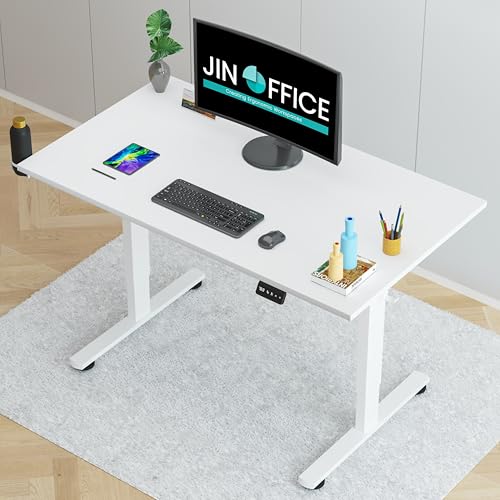
#3 JIN OFFICE Zenith ₹26,990 150×75 cm 3 Year Check Price
#4 NeuArc Momentum ₹15,490 140 cm + riser 5 Year Check Price
#5 JIN OFFICE Octave ₹16,999 120×75 cm 2 Year Check Price
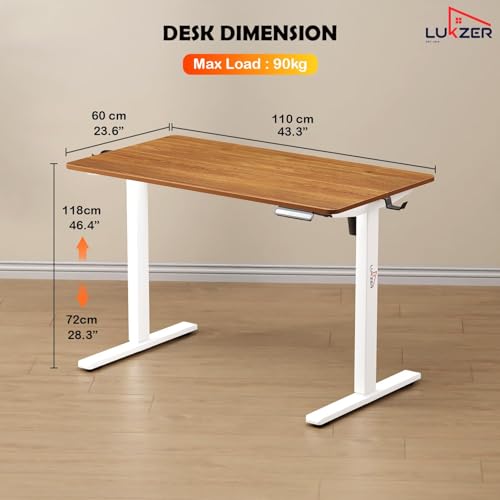
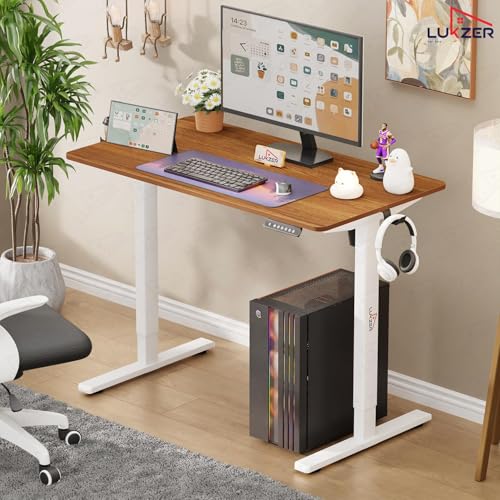
#6 Lukzer EST-003 ₹10,888 110×70 cm As per brand Check Price
← Scroll horizontally to see all columns →

Buying your first standing desk? You're in the right place. We've researched 6 beginner-friendly standing desks from ₹10,888 to ₹26,990 and ranked them on what matters most for first-time buyers: ease of use (35%), height adjustment quality (30%), desktop size and ergonomics (20%), and value for money including warranty (15%). All six are electric with memory presets — because friction-free transitions are the single biggest factor in whether beginners actually build the standing habit. Whether you need an affordable electric desk to start or a heavy-duty premium model for the long run — find your ideal starter desk below.

🏆 WWCD WINNER

Intellidesk Eco Electronic Desk

₹39,990

₹17,090

← Scroll to see more images →

📋 Key Specifications

  • Desktop:122×61 cm, 25mm E1
  • Capacity:80 kg
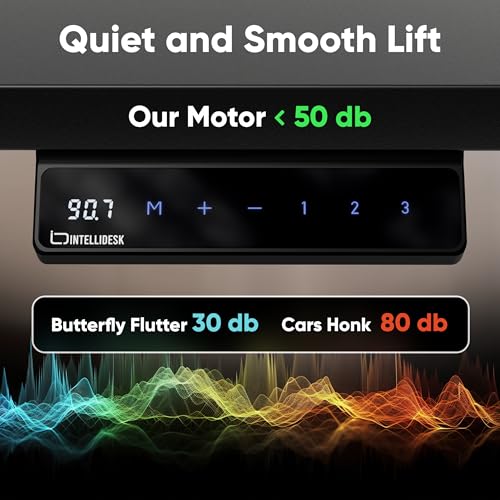
  • Controller:3 Memory Presets
  • Safety:Anti-collision
  • Charging:USB Port built-in
  • Warranty:5 Years

Why We Picked It as WWCD Winner

The Intellidesk Eco is our top recommendation for beginners because of one simple reason: 659 customers have already bought and reviewed it — by far the most of any desk in this comparison. That kind of validation matters enormously for a first-time buyer. Beyond social proof, it delivers a compelling spec sheet: 5-year warranty, anti-collision technology that stops the desk if it hits an obstacle (critical safety for homes with kids and pets), a built-in USB charging port for your phone, and an E1 Grade Low VOC tabletop that is better for indoor air quality. The SPCC steel frame with inverted T-shaped legs provides excellent stability. At ₹17,090 it is not the cheapest, but the 5-year warranty and proven customer satisfaction make it the safest first purchase.

✅ Pros
  • • Most reviewed (659 ratings)
  • • Industry-leading 5-year warranty
  • • Anti-collision safety technology
  • • Built-in USB charging port
  • • E1 Grade Low VOC tabletop
  • • Dual cable management holes
❌ Cons
  • • 122×61 cm smaller than some rivals
  • • No wireless charging
  • • Not the cheapest option
  • • Newer brand vs Green Soul

👤 Who Should Buy This?

Our top pick for any beginner buying their first standing desk. Especially recommended if you want the combination of proven customer satisfaction, long warranty, and safety features like anti-collision. If you have kids or pets at home, the anti-collision feature alone is worth the price. Perfect for WFH professionals and students making the switch from a traditional desk.

🌿 PREMIUM PICK

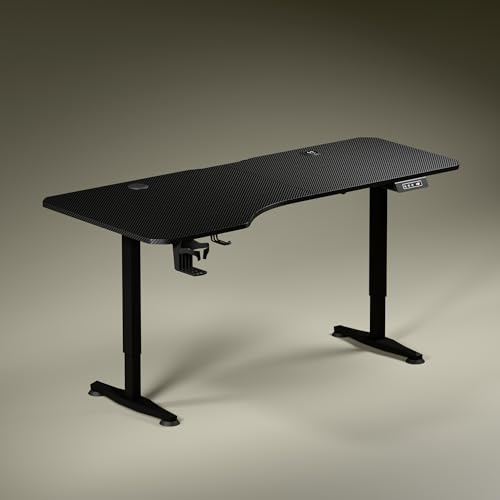
Green Soul Trigger 2.0 Standing Desk

₹36,000

₹16,999

← Scroll to see more images →

📋 Key Specifications

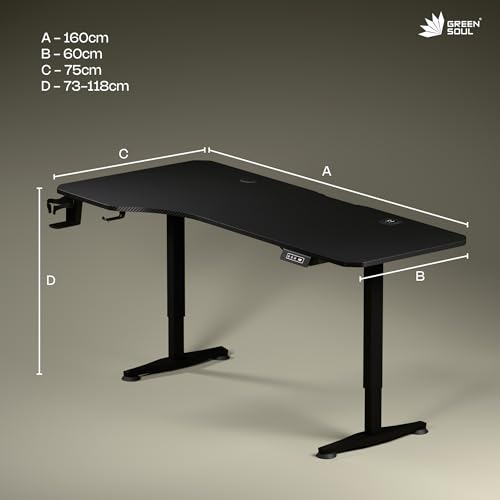
  • Desktop:160×75 cm asymmetric
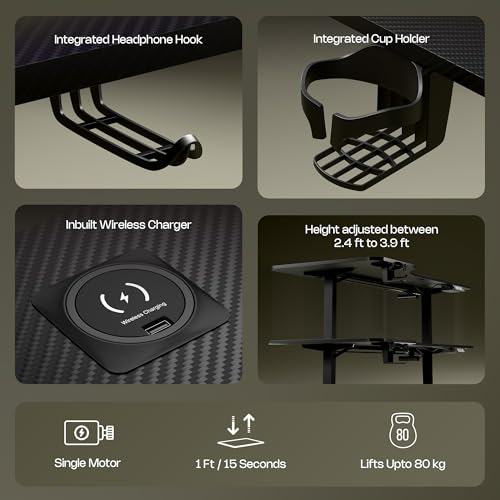
  • Wireless Charging:15W built-in
  • USB Port:15W Type-A
  • Height Range:2.4 – 3.9 ft
  • Warranty:3 Year (motor 1yr)
  • Installation:Complimentary

Largest Desktop + Smart Charging

The Green Soul Trigger 2.0 offers the most generous desktop in this comparison at 160×75 cm — enough room for dual monitors, laptop, keyboard, mouse, and accessories without feeling cramped. The asymmetric depth design (750 mm on the left, 600 mm on the right) is a thoughtful ergonomic touch that positions your primary monitor slightly further back. What truly differentiates it is the built-in 15W wireless charging pad and USB-Type port — you just set your phone down to charge, no cables needed. The complimentary installation service from Green Soul is a genuine advantage for first-time buyers who are nervous about assembly.

✅ Pros
  • • Largest desktop at 160×75 cm
  • • Built-in 15W wireless charging
  • • Complimentary installation service
  • • Trusted Green Soul brand
  • • Cup holder and headphone hook included
  • • Digital display with memory preset
❌ Cons
  • • Only 9 ratings (new product listing)
  • • Single motor (not dual)
  • • Motor warranty only 1 year
  • • Asymmetric depth may not suit all

👤 Who Should Buy This?

Best for beginners who want the largest possible workspace and the convenience of built-in wireless charging. Ideal if you have a dual-monitor setup or a cluttered desk — the 160×75 cm surface gives you space to breathe. The complimentary installation service makes it particularly welcoming for first-time buyers who don't want to deal with assembly themselves. Also perfect for Green Soul loyalists who trust the brand's service network.

💪 HEAVY DUTY

JIN OFFICE Zenith Electric Standing Desk

₹63,500

₹26,990

← Scroll to see more images →

📋 Key Specifications

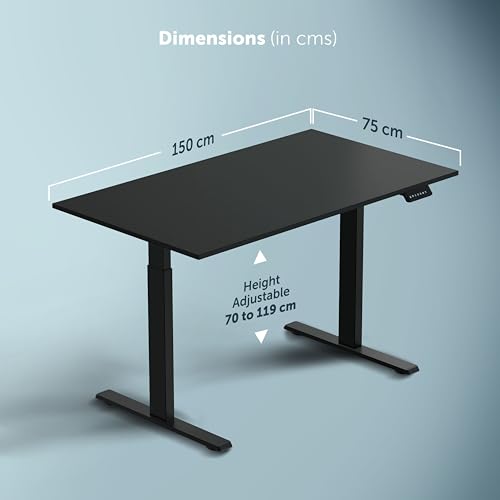
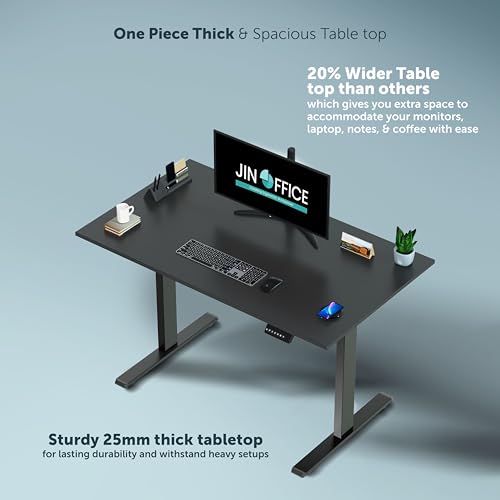
  • Desktop:150×75 cm, 25mm
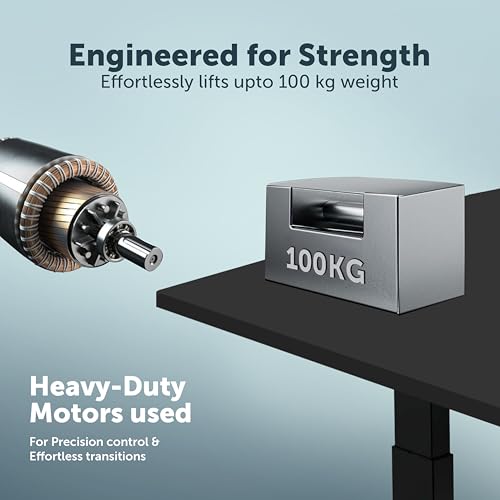
  • Capacity:100 kg (highest)
  • Height Range:710 – 1190 mm
  • Motor Speed:28mm/sec
  • Certification:CE, FCC, RoHS
  • Warranty:3 Year

Maximum Capacity with Certified Motors

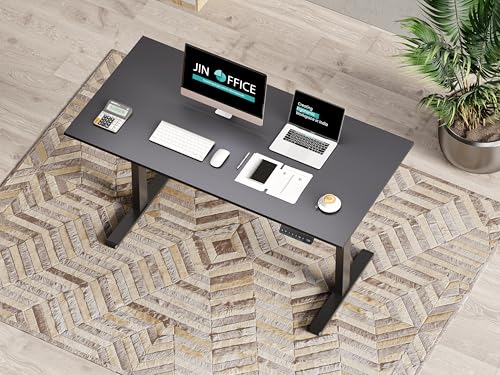
The JIN OFFICE Zenith is the premium heavy-duty choice in this comparison. Its standout feature is the 100 kg weight capacity — the highest here — powered by in-house heavy-duty motors that carry CE, FCC, and RoHS international certifications. This is not marketing fluff: certified motors mean independently verified safety and performance standards. The adjustable-width frame (1000-1500 mm) is a unique feature that lets you fine-tune the desk width to your room layout, and levelling feet accommodate castor wheels if you ever want to make the desk mobile. At ₹26,990 it is the most expensive desk here, but the motor certifications and 100 kg capacity make it the right choice if you plan a serious, long-term workstation.

✅ Pros
  • • Highest 100 kg weight capacity
  • • CE, FCC, RoHS certified motors
  • • Adjustable width frame (1000-1500mm)
  • • Wide height range (710-1190mm)
  • • Waterproof laminated surface
  • • 3-year warranty
❌ Cons
  • • Highest price at ₹26,990
  • • Only 9 ratings (new product)
  • • Overkill for light laptop setups
  • • No wireless charging

👤 Who Should Buy This?

Best for beginners who are immediately building a full workstation — multiple monitors, audio equipment, large displays — and want a desk that will never hold them back. Ideal for taller users (the 1190 mm max height accommodates people over 185 cm comfortably). If you have a ₹25,000+ budget and want to invest once in a desk that will last a decade, the Zenith's certified motors and 100 kg capacity make it the most future-proof choice here.

🎁 BONUS RISER

NeuArc Momentum Electric Standing Desk

₹38,990

₹15,490

← Scroll to see more images →

📋 Key Specifications

  • Desktop:140 cm one-piece top
  • Monitor Riser:Included
  • Memory Presets:3 Advanced
  • Colors:Rust, Black, White
  • Warranty:5 Year
  • Ratings:87

5-Year Warranty with Monitor Riser Included

The NeuArc Momentum stands out for two reasons: a 5-year warranty (tied with Intellidesk for longest here) and a monitor riser included in the box. For a beginner building their first ergonomic setup, having the monitor riser out of the box eliminates the need to buy one separately (standalone monitor risers cost ₹500-2,000). The 140 cm one-piece desktop is wide enough for a full dual-monitor setup without a centre seam. NeuArc's distinctive colour options — particularly the Rust finish — make it the most aesthetically distinctive desk in this comparison, appealing to buyers who care about home office aesthetics. At ₹15,490, it undercuts the Intellidesk while matching its warranty length.

✅ Pros
  • • 5-year warranty (industry-leading)
  • • Monitor riser included at no extra cost
  • • Wide 140 cm one-piece desktop
  • • Attractive colour options (Rust, Black, White)
  • • 87 solid customer ratings
  • • Competitive at ₹15,490
❌ Cons
  • • Less-known brand in India
  • • Service network not established
  • • Monitor riser not easily removable
  • • Limited assembly support

👤 Who Should Buy This?

Best for beginners who want a complete ergonomic setup out of the box — the included monitor riser immediately improves screen-to-eye positioning. Also ideal for home office buyers who care about aesthetics: the Rust colour option makes this the most visually distinctive desk in this roundup. The 5-year warranty provides strong peace of mind for those who want long-term coverage without paying the Intellidesk premium.

⚙️ SOLID CHOICE

JIN OFFICE Octave Electric Standing Desk

₹36,000

₹16,999

← Scroll to see more images →

📋 Key Specifications

  • Desktop:120×75 cm, 25mm MDF
  • Capacity:80 kg
  • Max Height:1180 mm
  • Crossbar:Stability included
  • Surface:Waterproof laminated
  • Warranty:2 Year

Stability Crossbar for Wobble-Free Standing

The JIN OFFICE Octave's key differentiator is its stability crossbar — a structural reinforcement between the two legs that dramatically reduces lateral wobble at standing height. If typing stability is your top concern, this is the feature to look for. The pre-drilled tabletop cuts assembly time to roughly 30 minutes — significantly faster than most competitors. The 75 cm depth provides better arm and forearm positioning than the standard 60 cm desks. At ₹16,999, the Octave sits in the same price bracket as the Green Soul Trigger 2.0 — the choice between them depends on whether you prioritise stability (Octave) or desktop size and wireless charging (Trigger 2.0).

✅ Pros
  • • Stability crossbar reduces wobble
  • • Pre-drilled for fast ~30 min assembly
  • • Good 120×75 cm depth desktop
  • • Waterproof laminated surface
  • • JIN OFFICE brand reliability
  • • Cup holder included
❌ Cons
  • • Only 9 ratings (new product)
  • • Shorter 2-year warranty vs rivals
  • • Standard feature set at this price
  • • No wireless charging or USB port

👤 Who Should Buy This?

Best for beginners who prioritise wobble-free typing stability and want a quick assembly experience. The stability crossbar makes this the most rigid desk at standing height in its price range. Also a good option if you value the JIN OFFICE brand name over Green Soul — the Octave is a solid mid-range choice that delivers on core performance without premium extras.

💰 BEST VALUE

Lukzer Electric Standing Desk EST-003

₹49,999

₹10,888

← Scroll to see more images →

📋 Key Specifications

  • Desktop:110×70 cm engineered
  • Capacity:90 kg
  • Memory Presets:4 (most in range)
  • Motor:Silent electric
  • Frame:Powder coated steel
  • Colours:6 options

Cheapest Electric Desk with 4 Memory Presets

The Lukzer EST-003 at ₹10,888 is the most affordable electric standing desk in this comparison — and it punches well above its price. With 4 memory presets (the most of any desk here), you can save sitting height, low standing, tall standing, and a custom position. The 90 kg weight capacity is surprisingly high for a budget desk, and the silent motor means no disturbance during video calls. 352 customer ratings give it a solid track record. Choose from 6 colour combinations to match your room. The trade-off versus pricier options is the smaller 110×70 cm desktop and a less established brand — but if budget is the primary concern, this is the best electric desk you can buy under ₹11,000.

✅ Pros
  • • Lowest price at ₹10,888
  • • 4 memory presets (most in range)
  • • 90 kg capacity (exceeds pricier rivals)
  • • 352 customer ratings
  • • 6 colour combos to choose from
  • • Silent electric motor
❌ Cons
  • • Smallest desktop at 110×70 cm
  • • Limited brand recognition
  • • Warranty terms need verification
  • • Basic feature set vs pricier rivals

👤 Who Should Buy This?

Best for budget-conscious beginners who want the benefits of an electric desk with memory presets at the lowest possible cost. If you use a laptop only or a single compact monitor, the 110×70 cm desktop will serve you perfectly. The 4 presets are actually a practical advantage — you can save different standing heights for morning (fresh legs, stand higher) and afternoon (tired legs, stand slightly lower). Test thoroughly within the Amazon return window.

Beginner's Guide to Standing Desks

Week 1-2: Getting Started

  • Stand 15 min / hour

    Set a phone timer. Stand during easy tasks like reading emails or attending video calls. Sit for focused, intensive work.

  • Save Your Heights

    Program memory preset 1 = sitting height, preset 2 = standing height. This one-time setup makes all future transitions instant.

  • Wear Comfortable Shoes

    Standing barefoot on hard floors causes fatigue quickly. Wear supportive shoes or invest in an anti-fatigue mat (₹500-1,500).

  • Listen to Your Body

    Leg ache? Lower back sore? Sit immediately. Discomfort is your body's way of saying "too much, too soon." Try again after 30 minutes.

Week 3-4: Building the Habit

Increase to 25-30 min / hour

By now your legs should feel comfortable. Gradually increase standing intervals. Target: 3-4 hours total standing in an 8-hour day.

Try Standing During Calls

Video/phone calls are perfect standing opportunities — you're not typing, so even slight wobble doesn't matter. Standing during calls improves alertness and vocal energy.

Maintain the 60/40 Rule

60% sitting, 40% standing is the research-backed sweet spot. Don't try to stand all day — that's as unhealthy as sitting all day. The benefit comes from movement and alternation.

Updated for April 2026

Intellidesk Eco Now Our Top Pick

With 659 verified ratings and a 5-year warranty, the Intellidesk Eco provides the best combination of proven performance, safety (anti-collision), and long-term coverage for first-time buyers.

Green Soul Enters Premium Segment with Trigger 2.0

The new Trigger 2.0 features built-in wireless charging and an asymmetric 160×75 cm desktop — Green Soul's most feature-rich standing desk yet. Complimentary installation service is a major beginner advantage.

JIN OFFICE Zenith for Serious Workstation Builders

At ₹26,990, the Zenith delivers 100 kg capacity and CE/FCC/RoHS certified motors — the right choice for beginners building a heavy-duty multi-monitor setup from day one.

Lukzer EST-003 Makes Electric Accessible Under ₹11,000

With 4 memory presets and 90 kg capacity at ₹10,888, the Lukzer EST-003 removes the price barrier to getting an electric standing desk. No reason to buy manual when electric starts this low.

Assembly Can Challenge First-Timers

Electric desks require 30-90 minutes to assemble. The JIN OFFICE Octave is fastest at ~30 min with its pre-drilled top. Green Soul Trigger 2.0 offers complimentary installation. Others should watch brand YouTube videos before starting.

New Products Have Limited Review History

Green Soul Trigger 2.0, JIN OFFICE Zenith, and JIN OFFICE Octave are new listings with only 9 ratings each. Intellidesk Eco (659 ratings), NeuArc Momentum (87 ratings), and Lukzer EST-003 (352 ratings) have more established track records.

Complete Buying Guide

Make an informed decision with our comprehensive buying guide. We've analyzed dozens of models to bring you the key factors that matter.

💡 What Beginners Should Know Before Buying

If this is your first standing desk, start simple. You don't need the most expensive model — you need one that makes it easy to build the sit-stand habit. All six desks in this review are electric with memory presets, which is ideal for beginners. Push-button adjustment removes friction and helps you actually use the standing feature daily. Manual desks require physical cranking which discourages frequent position changes — most beginners who buy manual desks stop using the standing feature within weeks. The Intellidesk Eco is our top pick for beginners because it has the most reviews, 5-year warranty, and anti-collision safety at ₹17,090.

🏍️ How to Transition From Sitting to Standing

The biggest beginner mistake is standing too long on day one. Start with 15-20 minutes of standing per hour during week one. Increase by 5 minutes each week until you reach 30-40 minutes per hour. Follow the 60/40 rule: 60% sitting, 40% standing in an 8-hour day. Use memory presets to save your sitting and standing heights — this makes transitions effortless. Wear comfortable shoes or use an anti-fatigue mat. If your legs or back ache, sit immediately and try again later.

🚴 Desktop Size Guide for Beginners

Standard 120×60 cm desks accommodate 24-27" monitors, laptop, keyboard, and mouse comfortably. The Green Soul Trigger 2.0 offers 160×75 cm for power users needing dual monitors. NeuArc Momentum provides 140 cm width with a monitor riser included. Measure your setup: dual monitors need 140 cm+ width, single laptop needs minimum 60 cm. Depth of 60-75 cm provides adequate arm rest space and prevents cramped working posture.

🔧 Height Range and Ergonomics for Indian Users

Proper standing desk height: elbows at 90° when typing, screen top at eye level. For Indians: Average male (170 cm) needs 100-110 cm standing height, average female (158 cm) needs 95-105 cm. Check minimum height suits your sitting position (typically 72-75 cm) and maximum height accommodates standing (110-120 cm). The JIN OFFICE Zenith goes up to 1190 mm max height — excellent for taller users.

💡 Weight Capacity — What Beginners Often Overlook

Calculate total load: Monitor (5-8 kg) + laptop (2-3 kg) + accessories (3-5 kg) = 10-16 kg typical. Budget for 2-3x safety margin. 80 kg handles dual monitors + equipment comfortably. The JIN OFFICE Zenith leads with 100 kg capacity — ideal if you plan to expand your setup. The Lukzer EST-003 also offers 90 kg at its budget price point. As a beginner, 80 kg capacity gives you room to grow your setup later.

🏍️ Assembly Tips for First-Time Buyers

Most desks ship semi-assembled requiring 30-90 minutes setup. Tools usually included. Electric desks need power outlet access — plan cable routing before starting. The JIN OFFICE Octave has a pre-drilled tabletop for faster assembly (~30 min). Green Soul Trigger 2.0 includes a complimentary installation service — take advantage of this as a beginner. Watch the brand's YouTube assembly video before starting. Consider paid assembly service (₹500-1000) if you're uncomfortable with DIY.

Frequently Asked Questions

Is a standing desk good for beginners?

Yes, standing desks are excellent for beginners who spend long hours sitting at work. The key is proper transition — start with 15-20 minutes of standing per hour and gradually increase. Electric desks with memory presets (like Intellidesk Eco at ₹17,090 or Lukzer EST-003 at ₹10,888) make this easy by saving your sitting and standing heights. Studies show alternating between sitting and standing reduces back pain, improves posture, and boosts energy. The most common beginner mistake is standing too long too soon — follow the 60/40 rule (60% sitting, 40% standing).

How long should a beginner use a standing desk per day?

Beginners should start with 2 hours of total standing time spread across an 8-hour workday. Week 1: Stand 15 minutes per hour. Week 2-3: Increase to 20-25 minutes per hour. Week 4+: Aim for 30-40 minutes per hour. Never stand continuously for more than 45 minutes — alternate frequently. The goal is movement, not marathon standing. Use your desk memory presets to make transitions effortless. If you feel leg fatigue or lower back pain, sit immediately and try again later.

Should beginners get an electric or manual standing desk?

Electric, without question. All six desks in this review are electric with memory presets because they remove all friction from sit-stand transitions. The Lukzer EST-003 at ₹10,888 makes electric standing desks accessible even on a tight budget. Manual cranking becomes tedious and most beginners stop using the standing feature within weeks. With affordable electric options starting under ₹11,000, there is no reason to compromise on the electric convenience that will actually help you build the standing habit.

What is the ideal standing desk height for beginners in India?

Use this formula: Your height (cm) × 0.65 = ideal standing desk height. Examples: 170 cm person needs 110 cm, 158 cm person needs 103 cm, 180 cm person needs 117 cm. Your elbows should form a 90° angle when typing, and your screen top should be at eye level. The JIN OFFICE Zenith offers the widest range (710-1190 mm) and is ideal for taller users. As a beginner, save both your sitting (typically 72-75 cm) and standing heights in memory presets so you can switch instantly.

Which standing desk is best for beginners in India?

The Intellidesk Eco (₹17,090) is our top pick for beginners. With 659 ratings — the most of any desk in this comparison — a 5-year warranty, anti-collision technology, and USB charging port, it offers the best combination of reliability and features for first-time buyers. For the budget-conscious beginner, the Lukzer EST-003 (₹10,888) offers electric convenience with 4 memory presets at the lowest price. For those who want the absolute largest desktop and premium features, the Green Soul Trigger 2.0 (₹16,999) includes built-in wireless charging and a complimentary installation service.

What desktop size do beginners need?

Laptop only: 110×70 cm adequate (Lukzer EST-003). Laptop + single 24-27" monitor: 120×75 cm standard (JIN OFFICE Octave, Intellidesk at 122×61 cm). Dual monitors or full workstation: 140 cm+ (NeuArc Momentum with monitor riser, Green Soul Trigger 2.0 at 160×75 cm). Most beginners start with a laptop and single monitor, so 120×60-75 cm is the recommended starting size. The Green Soul Trigger 2.0 offers the most surface area at 160×75 cm with an asymmetric design.

Will the desk wobble when I type at standing height?

Minimal wobble with quality models. JIN OFFICE Octave has a dedicated stability crossbar — best wobble resistance even at max height. The JIN OFFICE Zenith uses heavy-duty certified motors (CE, FCC, RoHS) at 28mm/sec with levelling feet for stability on uneven floors. Intellidesk Eco has inverted T-shaped legs for a stable base. Wobble increases with: exceeding weight capacity, uneven floors, maximum height extension, single motor models. Test by pressing the desktop corner — good desks have less than 5 mm movement.

Which brand has the best after-sales service for beginners in India?

Green Soul is the most established brand with the widest service network across India — the Trigger 2.0 even includes a complimentary installation service. JIN OFFICE has strong service support in metros. Intellidesk backs its desk with a 5-year warranty — the longest in this comparison. NeuArc also offers 5 years warranty. For budget buyers, Lukzer relies on Amazon return and replacement policy (30 days). Pro tip for beginners: Test your desk thoroughly within the Amazon return window before the warranty period becomes your only recourse.

How many hours should I stand vs sit during my work day?

Recommended ratio for beginners: 60% sitting, 40% standing in an 8-hour day. Start with 30-minute standing intervals, increase gradually over 4 weeks. Example beginner schedule: Sit 9-9:30 am, Stand 9:30-10 am, Sit 10-11 am, Stand 11-11:30 am, repeat. Never stand continuously 4+ hours — causes leg fatigue and defeats health benefits. The key is frequent transitions (every 30-60 minutes), not maximum standing time. Electric desks with memory presets make this effortless.

Can I install a monitor arm on these desks?

Yes — all reviewed desks support monitor arms. Requirements: (1) Desktop 18 mm+ thick (all have 25 mm), (2) Desk edge accessible for clamp (not flush against wall), (3) Total weight including arm within capacity. The JIN OFFICE Zenith's 100 kg capacity gives the most headroom for dual monitor arms. Monitor arms free up desk space and improve ergonomics significantly — highly recommended as a beginner upgrade once you're comfortable with your standing routine.

Is assembly difficult for someone buying their first standing desk?

Electric desks: Moderate difficulty, 60-90 minutes, 2 people recommended. The JIN OFFICE Octave has a pre-drilled tabletop for faster ~30 minute assembly. Green Soul Trigger 2.0 includes complimentary installation service — take full advantage of this. Tools usually included with all models. For first-time buyers uncomfortable with tools, professional assembly (₹500-1000) is worth it. Watch the brand's YouTube assembly video before starting — it helps significantly reduce assembly time and errors.

What makes the Intellidesk Eco the WWCD Winner?

The Intellidesk Eco wins on trust and value. With 659 customer ratings — far more than any other desk in this comparison — it has a proven track record. The 5-year warranty is the longest here (tied with NeuArc), anti-collision technology prevents accidents, there is a USB charging port built into the desk, and the E1 Grade Low VOC tabletop is better for indoor air quality. At ₹17,090, it offers the best combination of reliability, features, and customer-validated quality for a first-time standing desk buyer.

50+

Products Analyzed

100+

Hours of Research

Expert

Team Review

Verified

Information

Discover more helpful guides and reviews to make informed decisions

Found this helpful?
Naveen Bhavnani
Naveen Bhavnani

Founder & Research Lead

Software engineer who built this site to help Indian consumers make better purchasing decisions. Every recommendation is backed by extensive research — aggregating thousands of Amazon reviews, comparing specifications across brands, and tracking pricing trends. We don't physically test products in a lab; instead, we do the research homework so you don't have to.

Research-Based Reviews Data-Driven Recommendations Amazon Review Analysis