HOME/ REVIEWS/ STANDING DESK FOR BEGINNERS

PRODUCT REVIEW

Best Standing Desk for Beginners in India 2026

Best standing desk for beginners in India 2026. First-time buyer guide with 6 beginner-friendly picks from ₹10,888 to ₹26,990. Compare electric options & more.

✓ Research-based6 models compared₹10,888–₹26,990Updated 14 Apr 2026

As an Amazon Associate we earn from qualifying purchases. We could also earn a fee through some links when you click on them.

The Quick Answer

WINNER WINNER CHICKEN DINNER

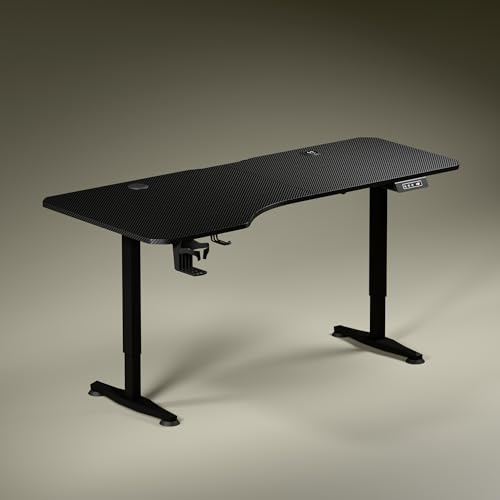
Our top pick among Standing Desk for Beginners in India is the Intellidesk Eco Electronic Desk at ₹17,090 — 659 ratings, 5yr warranty, anti-collision, USB charging

Why It's Our Top Pick
  • Most reviewed desk in this list (659 ratings)
  • 5-year warranty
  • anti-collision
  • USB charging port
  • premium E1 grade tabletop
  • inverted T-legs for stability
Intellidesk Eco Electronic Desk
Intellidesk

Intellidesk Eco Electronic Desk

₹17,090 ₹39,990 SAVE 57%
Check Price on Amazon →

Other picks worth considering

Already covered the winner above — here are the picks for specific needs.

Quick Comparison

How the shortlist stacks up. Scroll sideways on mobile.

WWCD Score Product Desktop Size Warranty Price Deal
9.4/10Intellidesk Eco Electronic Desk122×61 cm5 Year₹17,090 Check Price
9.2/10Green Soul Trigger 2.0160×75 cm3 Year₹16,999 Check Price
9.0/10JIN OFFICE Zenith150×75 cm3 Year₹26,990 Check Price
8.8/10NeuArc Momentum140 cm + riser5 Year₹15,490 Check Price
8.6/10JIN OFFICE Octave120×75 cm2 Year₹16,999 Check Price
8.4/10Lukzer EST-003110×70 cmAs per brand₹10,888 Check Price

In-depth reviews

Specs, the honest pros and cons, and who each one is for.

Intellidesk

Intellidesk Eco Electronic Desk

Desktop
122×61 cm, 25mm E1
Capacity
80 kg
Controller
3 Memory Presets
Safety
Anti-collision
Charging
USB Port built-in
Warranty
5 Years
PROS
  • Most reviewed desk in this list (659 ratings)
  • 5-year warranty
  • anti-collision
  • USB charging port
  • premium E1 grade tabletop
  • inverted T-legs for stability
CONS
  • Smaller desktop (122×61 cm) vs some competitors
  • newer brand name
Who should buy it
Our top pick for any beginner buying their first standing desk. Especially recommended if you want the combination of proven customer satisfaction, long warranty, and safety features like anti-collision. If you have kids or pets at home, the anti-collision feature alone is worth the price. Perfect for WFH professionals and students making the switch from a traditional desk.
₹17,090 ₹39,990 SAVE 57%
Check Price on Amazon →
Green Soul

Green Soul Trigger 2.0 Standing Desk

Desktop
160×75 cm asymmetric
Wireless Charging
15W built-in
USB Port
15W Type-A
Height Range
2.4 – 3.9 ft
Warranty
3 Year (motor 1yr)
Installation
Complimentary
PROS
  • Largest desktop in comparison
  • built-in wireless charging
  • trusted Green Soul brand
  • complimentary installation service
  • cup holder and headphone hook included
CONS
  • Only 9 ratings (new listing)
  • single motor
  • motor warranty only 1 year
  • asymmetric depth may not suit all setups
Who should buy it
Best for beginners who want the largest possible workspace and the convenience of built-in wireless charging. Ideal if you have a dual-monitor setup or a cluttered desk — the 160×75 cm surface gives you space to breathe. The complimentary installation service makes it particularly welcoming for first-time buyers who don't want to deal with assembly themselves. Also perfect for Green Soul loyalists who trust the brand's service network.
₹16,999 ₹36,000 SAVE 53%
Check Price on Amazon →
JIN OFFICE

JIN OFFICE Zenith Electric Standing Desk

Desktop
150×75 cm, 25mm
Capacity
100 kg (highest)
Height Range
710 – 1190 mm
Motor Speed
28mm/sec
Certification
CE, FCC, RoHS
Warranty
3 Year
PROS
  • Highest 100kg weight capacity
  • heavy-duty certified motors
  • adjustable width frame
  • large 150×75 cm desktop
  • 3-year warranty
  • waterproof laminated surface
CONS
  • Most expensive at ₹26,990
  • only 9 ratings (new listing)
  • premium investment
Who should buy it
Best for beginners who are immediately building a full workstation — multiple monitors, audio equipment, large displays — and want a desk that will never hold them back. Ideal for taller users (the 1190 mm max height accommodates people over 185 cm comfortably). If you have a ₹25,000+ budget and want to invest once in a desk that will last a decade, the Zenith's certified motors and 100 kg capacity make it the most future-proof choice here.
₹26,990 ₹63,500 SAVE 57%
Check Price on Amazon →
NeuArc

NeuArc Momentum Electric Standing Desk

Desktop
140 cm one-piece top
Monitor Riser
Included
Memory Presets
3 Advanced
Colors
Rust, Black, White
Warranty
5 Year
Ratings
87
PROS
  • 5-year warranty
  • monitor riser included at no extra cost
  • one-piece 140cm desktop
  • multiple attractive color options
  • 87 solid ratings
CONS
  • Less-known brand in India
  • assembly support limited
  • monitor riser not removable easily
Who should buy it
Best for beginners who want a complete ergonomic setup out of the box — the included monitor riser immediately improves screen-to-eye positioning. Also ideal for home office buyers who care about aesthetics: the Rust colour option makes this the most visually distinctive desk in this roundup. The 5-year warranty provides strong peace of mind for those who want long-term coverage without paying the Intellidesk premium.
₹15,490 ₹38,990 SAVE 60%
Check Price on Amazon →
JIN OFFICE

JIN OFFICE Octave Electric Standing Desk

Desktop
120×75 cm, 25mm MDF
Capacity
80 kg
Max Height
1180 mm
Crossbar
Stability included
Surface
Waterproof laminated
Warranty
2 Year
PROS
  • Stability crossbar reduces wobble
  • waterproof laminated surface
  • good 120×75 cm depth
  • pre-drilled for quick assembly (~30 min)
  • JIN OFFICE brand reliability
CONS
  • Only 9 ratings currently
  • 2-year warranty shorter than Zenith/Intellidesk
  • standard feature set
Who should buy it
Best for beginners who prioritise wobble-free typing stability and want a quick assembly experience. The stability crossbar makes this the most rigid desk at standing height in its price range. Also a good option if you value the JIN OFFICE brand name over Green Soul — the Octave is a solid mid-range choice that delivers on core performance without premium extras.
₹16,999 ₹36,000 SAVE 53%
Check Price on Amazon →
Lukzer

Lukzer Electric Standing Desk EST-003

Desktop
110×70 cm engineered
Capacity
90 kg
Memory Presets
4 (most in range)
Motor
Silent electric
Frame
Powder coated steel
Colours
6 options
PROS
  • Lowest price electric desk (₹10,888)
  • 4 memory presets
  • 90 kg capacity
  • 352 good ratings
  • 6 colour options
  • silent motor
  • scratch-resistant surface
CONS
  • Smaller 110×70 cm desktop
  • limited brand recognition
  • warranty terms need verification
  • basic feature set vs pricier alternatives
Who should buy it
Best for budget-conscious beginners who want the benefits of an electric desk with memory presets at the lowest possible cost. If you use a laptop only or a single compact monitor, the 110×70 cm desktop will serve you perfectly. The 4 presets are actually a practical advantage — you can save different standing heights for morning (fresh legs, stand higher) and afternoon (tired legs, stand slightly lower). Test thoroughly within the Amazon return window.
₹10,888 ₹49,999 SAVE 78%
Check Price on Amazon →

Final verdict & recommendations

Here is who each pick is for, based on the comparison above.

Wwcd Winner

Intellidesk Eco Electronic Desk · ₹17,090

659 ratings, 5yr warranty, anti-collision, USB charging

Check Price on Amazon →
Premium Pick

JIN OFFICE Zenith Electric Standing Desk · ₹26,990

100kg capacity, heavy-duty motors, best for serious setups

Check Price on Amazon →

How to choose the right one

  • What Beginners Should Know Before Buying

    If this is your first standing desk, start simple. You don't need the most expensive model — you need one that makes it easy to build the sit-stand habit. All six desks in this review are electric with memory presets, which is ideal for beginners. Push-button adjustment removes friction and helps you actually use the standing feature daily. Manual desks require physical cranking which discourages frequent position changes — most beginners who buy manual desks stop using the standing feature within weeks. The Intellidesk Eco is our top pick for beginners because it has the most reviews, 5-year warranty, and anti-collision safety at ₹17,090.
  • How to Transition From Sitting to Standing

    The biggest beginner mistake is standing too long on day one. Start with 15-20 minutes of standing per hour during week one. Increase by 5 minutes each week until you reach 30-40 minutes per hour. Follow the 60/40 rule: 60% sitting, 40% standing in an 8-hour day. Use memory presets to save your sitting and standing heights — this makes transitions effortless. Wear comfortable shoes or use an anti-fatigue mat. If your legs or back ache, sit immediately and try again later.
  • Desktop Size Guide for Beginners

    Standard 120×60 cm desks accommodate 24-27" monitors, laptop, keyboard, and mouse comfortably. The Green Soul Trigger 2.0 offers 160×75 cm for power users needing dual monitors. NeuArc Momentum provides 140 cm width with a monitor riser included. Measure your setup: dual monitors need 140 cm+ width, single laptop needs minimum 60 cm. Depth of 60-75 cm provides adequate arm rest space and prevents cramped working posture.
  • Height Range and Ergonomics for Indian Users

    Proper standing desk height: elbows at 90° when typing, screen top at eye level. For Indians: Average male (170 cm) needs 100-110 cm standing height, average female (158 cm) needs 95-105 cm. Check minimum height suits your sitting position (typically 72-75 cm) and maximum height accommodates standing (110-120 cm). The JIN OFFICE Zenith goes up to 1190 mm max height — excellent for taller users.
  • Weight Capacity — What Beginners Often Overlook

    Calculate total load: Monitor (5-8 kg) + laptop (2-3 kg) + accessories (3-5 kg) = 10-16 kg typical. Budget for 2-3x safety margin. 80 kg handles dual monitors + equipment comfortably. The JIN OFFICE Zenith leads with 100 kg capacity — ideal if you plan to expand your setup. The Lukzer EST-003 also offers 90 kg at its budget price point. As a beginner, 80 kg capacity gives you room to grow your setup later.
  • Assembly Tips for First-Time Buyers

    Most desks ship semi-assembled requiring 30-90 minutes setup. Tools usually included. Electric desks need power outlet access — plan cable routing before starting. The JIN OFFICE Octave has a pre-drilled tabletop for faster assembly (~30 min). Green Soul Trigger 2.0 includes a complimentary installation service — take advantage of this as a beginner. Watch the brand's YouTube assembly video before starting. Consider paid assembly service (₹500-1000) if you're uncomfortable with DIY.

Frequently asked questions

Is a standing desk good for beginners?

Yes, standing desks are excellent for beginners who spend long hours sitting at work. The key is proper transition — start with 15-20 minutes of standing per hour and gradually increase. Electric desks with memory presets (like Intellidesk Eco at ₹17,090 or Lukzer EST-003 at ₹10,888) make this easy by saving your sitting and standing heights. Studies show alternating between sitting and standing reduces back pain, improves posture, and boosts energy. The most common beginner mistake is standing too long too soon — follow the 60/40 rule (60% sitting, 40% standing).

How long should a beginner use a standing desk per day?

Beginners should start with 2 hours of total standing time spread across an 8-hour workday. Week 1: Stand 15 minutes per hour. Week 2-3: Increase to 20-25 minutes per hour. Week 4+: Aim for 30-40 minutes per hour. Never stand continuously for more than 45 minutes — alternate frequently. The goal is movement, not marathon standing. Use your desk memory presets to make transitions effortless. If you feel leg fatigue or lower back pain, sit immediately and try again later.

Should beginners get an electric or manual standing desk?

Electric, without question. All six desks in this review are electric with memory presets because they remove all friction from sit-stand transitions. The Lukzer EST-003 at ₹10,888 makes electric standing desks accessible even on a tight budget. Manual cranking becomes tedious and most beginners stop using the standing feature within weeks. With affordable electric options starting under ₹11,000, there is no reason to compromise on the electric convenience that will actually help you build the standing habit.

What is the ideal standing desk height for beginners in India?

Use this formula: Your height (cm) × 0.65 = ideal standing desk height. Examples: 170 cm person needs 110 cm, 158 cm person needs 103 cm, 180 cm person needs 117 cm. Your elbows should form a 90° angle when typing, and your screen top should be at eye level. The JIN OFFICE Zenith offers the widest range (710-1190 mm) and is ideal for taller users. As a beginner, save both your sitting (typically 72-75 cm) and standing heights in memory presets so you can switch instantly.

Which standing desk is best for beginners in India?

The Intellidesk Eco (₹17,090) is our top pick for beginners. With 659 ratings — the most of any desk in this comparison — a 5-year warranty, anti-collision technology, and USB charging port, it offers the best combination of reliability and features for first-time buyers. For the budget-conscious beginner, the Lukzer EST-003 (₹10,888) offers electric convenience with 4 memory presets at the lowest price. For those who want the absolute largest desktop and premium features, the Green Soul Trigger 2.0 (₹16,999) includes built-in wireless charging and a complimentary installation service.

What desktop size do beginners need?

Laptop only: 110×70 cm adequate (Lukzer EST-003). Laptop + single 24-27" monitor: 120×75 cm standard (JIN OFFICE Octave, Intellidesk at 122×61 cm). Dual monitors or full workstation: 140 cm+ (NeuArc Momentum with monitor riser, Green Soul Trigger 2.0 at 160×75 cm). Most beginners start with a laptop and single monitor, so 120×60-75 cm is the recommended starting size. The Green Soul Trigger 2.0 offers the most surface area at 160×75 cm with an asymmetric design.

Will the desk wobble when I type at standing height?

Minimal wobble with quality models. JIN OFFICE Octave has a dedicated stability crossbar — best wobble resistance even at max height. The JIN OFFICE Zenith uses heavy-duty certified motors (CE, FCC, RoHS) at 28mm/sec with levelling feet for stability on uneven floors. Intellidesk Eco has inverted T-shaped legs for a stable base. Wobble increases with: exceeding weight capacity, uneven floors, maximum height extension, single motor models. Test by pressing the desktop corner — good desks have less than 5 mm movement.

Which brand has the best after-sales service for beginners in India?

Green Soul is the most established brand with the widest service network across India — the Trigger 2.0 even includes a complimentary installation service. JIN OFFICE has strong service support in metros. Intellidesk backs its desk with a 5-year warranty — the longest in this comparison. NeuArc also offers 5 years warranty. For budget buyers, Lukzer relies on Amazon return and replacement policy (30 days). Pro tip for beginners: Test your desk thoroughly within the Amazon return window before the warranty period becomes your only recourse.

How many hours should I stand vs sit during my work day?

Recommended ratio for beginners: 60% sitting, 40% standing in an 8-hour day. Start with 30-minute standing intervals, increase gradually over 4 weeks. Example beginner schedule: Sit 9-9:30 am, Stand 9:30-10 am, Sit 10-11 am, Stand 11-11:30 am, repeat. Never stand continuously 4+ hours — causes leg fatigue and defeats health benefits. The key is frequent transitions (every 30-60 minutes), not maximum standing time. Electric desks with memory presets make this effortless.

Can I install a monitor arm on these desks?

Yes — all reviewed desks support monitor arms. Requirements: (1) Desktop 18 mm+ thick (all have 25 mm), (2) Desk edge accessible for clamp (not flush against wall), (3) Total weight including arm within capacity. The JIN OFFICE Zenith's 100 kg capacity gives the most headroom for dual monitor arms. Monitor arms free up desk space and improve ergonomics significantly — highly recommended as a beginner upgrade once you're comfortable with your standing routine.

Is assembly difficult for someone buying their first standing desk?

Electric desks: Moderate difficulty, 60-90 minutes, 2 people recommended. The JIN OFFICE Octave has a pre-drilled tabletop for faster ~30 minute assembly. Green Soul Trigger 2.0 includes complimentary installation service — take full advantage of this. Tools usually included with all models. For first-time buyers uncomfortable with tools, professional assembly (₹500-1000) is worth it. Watch the brand's YouTube assembly video before starting — it helps significantly reduce assembly time and errors.

What makes the Intellidesk Eco the WWCD Winner?

The Intellidesk Eco wins on trust and value. With 659 customer ratings — far more than any other desk in this comparison — it has a proven track record. The 5-year warranty is the longest here (tied with NeuArc), anti-collision technology prevents accidents, there is a USB charging port built into the desk, and the E1 Grade Low VOC tabletop is better for indoor air quality. At ₹17,090, it offers the best combination of reliability, features, and customer-validated quality for a first-time standing desk buyer.
Found this helpful? Share it
Naveen Bhavnani
Naveen Bhavnani
Founder & Research Lead

Technologist and product researcher. Every recommendation is backed by aggregating thousands of Amazon reviews, comparing specs across brands and tracking price trends — so you don't have to.

More about how we research →

You may also like

More guides and reviews to help you decide.

REVIEW
Best LED Desk Lamp Under 1500 in India 2026

Find the best led desk lamp under 1500 in India 2026. Compare Crompton & more with expert reviews, prices & pros and cons.

Read more →
REVIEW
Best Ergonomic Office Chairs Under 15000 in India 2026

Vergo Ease leads our 2026 analysis of 10 ergonomic office chairs under ₹15,000 in India — BIFMA + Class 4 gas lift. Wakefit Gravita is the ₹6,397 value pick.

Read more →
REVIEW
Best Gaming Monitor Under 50000 in India 2026

Best gaming monitors under ₹50,000 in India 2026. Samsung, ViewSonic, Lenovo, BenQ, MSI, LG, AOC compared on refresh rate, panel type, resolution.

Read more →
REVIEW
Best Gaming Chairs Under 20000 in India 2026

Best gaming chairs under ₹20,000 in India 2026 compared — Green Soul Ghost (WWCD winner), Dr Luxur Weavemonster, Monster Ultimate T.

Read more →
REVIEW
Best Gaming Monitor Under 100000 in India 2026

Best gaming monitors under ₹1,00,000 in India 2026 — 12 QD-OLED, WOLED, 4K & ultrawide models compared.

Read more →
REVIEW
Best 144Hz Monitor Under 15K in India 2026

Find the best 144hz monitor under 15k in India 2026. Compare LG, Acer, Dell, Lenovo with expert reviews, prices, pros & cons.

Read more →
Intellidesk Eco Electronic Desk
🏆 Best Overall
Intellidesk Eco Electronic Desk
₹17,090
Check Price →