Winner Winner Chicken Dinner Logo

Winner Winner Chicken Dinner

Product Reviews & Comparisons

Home Reviews Best Tablets India

Best Tablets in India 2026

Best tablets in India 2026 — Apple iPad, Samsung Galaxy Tab, and Xiaomi compared across budget, mid-range, and premium segments. Updated prices, real-world performance, and buying advice.

Expert Reviewed Price Comparison

Quick Answer

Our top pick is the Xiaomi Pad 6 at ₹22,999. Key highlight: Qualcomm Snapdragon 870 Processor. We reviewed 10 products total — scroll down for the full breakdown.

Quick Comparison — All Tablets

Rank Tablet Display Processor Battery Stylus Deal
#1 Lenovo Tab M11 11" FHD 90Hz Helio G88 7500mAh 20W Optional Check Price
#2 realme Pad 2 11.5" 2.4K 120Hz Helio G99 8360mAh 67W No Check Price
#3 Honor Pad 8 12" 2K Snapdragon 680 7250mAh 22.5W No Check Price
#4 Samsung Tab S6 Lite (2024) 10.4" 2000x1200 60Hz Exynos 1280 7040mAh 15W S Pen (included) Check Price
#5 Xiaomi Pad 6 11" 2.8K 144Hz Snapdragon 870 8840mAh 33W No Check Price
#6 Apple iPad 11" A16 11" Liquid Retina Apple A16 Bionic 28.65Wh Pencil Pro (extra) Check Price
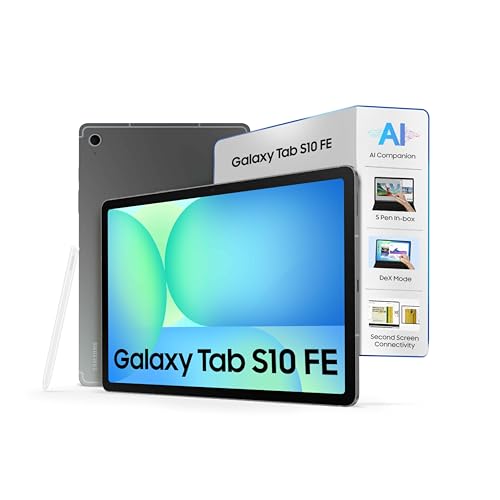
#7 Samsung Tab S10 FE 10.9" 2304x1440 90Hz Exynos 1580 8000mAh 45W S Pen (included) Check Price
#8 Apple iPad Air 11" M3 11" Liquid Retina 500 nits Apple M3 28.93Wh Pencil Pro (extra) Check Price
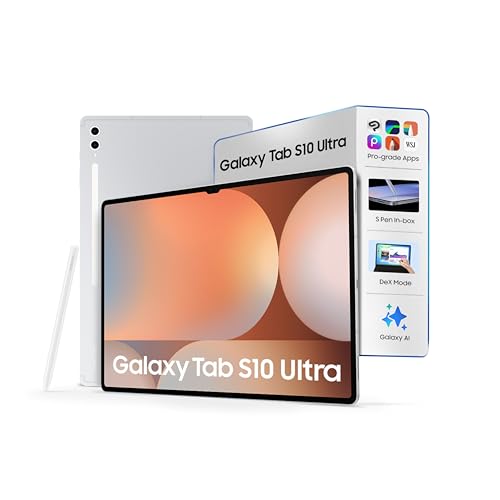
#9 Samsung Tab S10 Ultra 14.6" AMOLED 120Hz Snapdragon 8 Gen 3 11200mAh 45W S Pen (included) Check Price
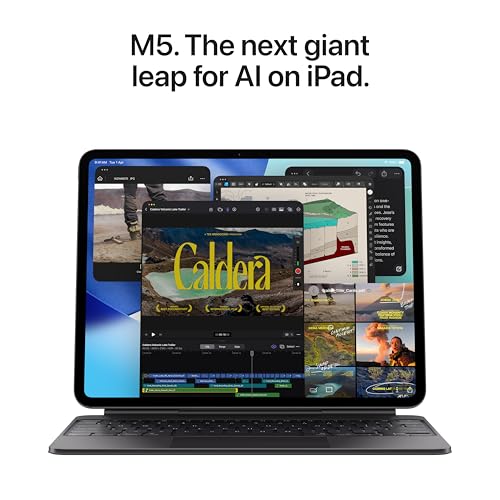
#10 Apple iPad Pro 11" M5 11" OLED ProMotion 120Hz Apple M5 38.99Wh Pencil Pro (extra) Check Price
← Scroll horizontally to see all columns →

Best Tablets in India 2026

Looking for the best tablet in India? We have compared 10 tablets spanning budget (under ₹20K), mid-range (₹20K–₹45K), and premium (above ₹45K) segments — all available on Amazon.in. Our review evaluates each tablet on four key factors: performance and processor capability (35%), display quality and refresh rate (30%), battery life and charging speed (20%), and value for money including accessories (15%). Whether you are a student needing an affordable classroom companion, a professional wanting desktop-class power, or a casual user who just wants the best screen for Netflix — this guide has your answer.

Detailed Tablet Reviews

BEST BUDGET

Lenovo Tab M11

Best 11-inch tablet under ₹16,000 — 8GB RAM, 90Hz, Dolby Atmos

8.3
/ 10

Scroll to see more images

Key Specifications

  • MediaTek Helio G88 Processor
  • 11" FHD IPS, 90Hz, 400 nits
  • 8GB RAM, 128GB Storage + MicroSD
  • 7500mAh Battery, 20W Charging
  • Quad Speakers, Dolby Atmos
  • Android 13, Optional Lenovo Pen

Pros and Cons

+8GB RAM at ₹15,999 — unbeatable
+Quad Dolby Atmos speakers
+Clean Android, no bloatware
+MicroSD expandable storage
Helio G88 struggles with gaming
400 nits — dim outdoors
Slow 20W charging

Who Should Buy This?

Students who need an affordable 11-inch tablet for online classes, reading PDFs, and YouTube. Parents buying a first tablet for children. Anyone who wants the most RAM per rupee at the budget end of the market. Do not buy if you plan to game heavily or work outdoors.

BEST BATTERY

realme Pad 2

8360mAh + 67W charging, 120Hz 2.4K display — fastest-charging mid-range tablet

8.7
/ 10

Scroll to see more images

Key Specifications

  • MediaTek Helio G99 Processor
  • 11.5" 2.4K IPS, 120Hz
  • 6GB RAM (expandable to 12GB), 128GB
  • 8360mAh Battery, 67W SUPERVOOC
  • Dual 4G SIM, MicroSD up to 1TB
  • Quad Speakers, Dolby Atmos

Pros and Cons

+67W charging — full charge in ~90 min
+120Hz 2.4K display at this price
+Dual 4G SIM for mobile data
+Expandable RAM (6GB → 12GB)
No stylus support
realme UI has some bloatware
Limited service centers in small cities

Who Should Buy This?

Frequent travelers and commuters who cannot always find a charging point. Users who want 4G connectivity without a hotspot device. Anyone who prioritizes battery + display specs over stylus capability. The 67W charging is a genuine competitive advantage — no other Android tablet under ₹25K comes close.

BIGGEST SCREEN

Honor Pad 8

12-inch 2K display with 8 speakers — best screen size under ₹18K

8.5
/ 10

Scroll to see more images

Key Specifications

  • Qualcomm Snapdragon 680 Processor
  • 12" 2K (2000x1200), 7:5 ratio
  • 6GB RAM, 128GB Storage + MicroSD
  • 7250mAh Battery, 22.5W Charging
  • Eight Speakers, Hi-Res Audio
  • Magic UI 6.1 (Android 12)

Pros and Cons

+Largest screen in budget segment
+8-speaker audio — best audio here
+2K display excellent for media
+MicroSD expandable storage
Snapdragon 680 is a budget chip
No stylus support
Limited Honor service centers in India

Who Should Buy This?

OTT streaming enthusiasts who want the biggest possible screen under ₹18K. Families who share a tablet for movie-watching. Anyone who prioritizes audio quality — the 8-speaker array is genuinely impressive at this price. Verify that the listing includes Google Play Store before purchasing, as some variants ship without it.

BEST FOR NOTES

Samsung Galaxy Tab S6 Lite (2024)

S Pen included free, DeX mode — best stylus tablet under ₹25K

8.8
/ 10

Scroll to see more images

Key Specifications

  • Exynos 1280 Octa-Core Processor
  • 10.4" 2000x1200 TFT Display, 60Hz
  • 4GB RAM, 64GB/128GB + MicroSD 1TB
  • S Pen Included in the Box
  • 7040mAh Battery, 15W Charging
  • Android 14, Samsung DeX

Pros and Cons

+S Pen included free (worth ₹5,000+)
+DeX desktop mode for productivity
+Samsung KNOX security
+Best Samsung service network
Only 4GB RAM — feels limited in 2026
60Hz display (no 90Hz or 120Hz)
Slowest charging in mid-range at 15W

Who Should Buy This?

Students who take handwritten notes, annotate PDFs, and sketch diagrams — the S Pen is genuinely excellent. Professionals who want a DeX desktop experience for presentations. Samsung ecosystem users who want KNOX security and tight Galaxy device integration. If stylus is not important to you, the Xiaomi Pad 6 gives better performance at a similar price.

BEST MID-RANGE

Xiaomi Pad 6

Snapdragon 870, 144Hz 2.8K, 1800 nits — fastest Android tablet under ₹25K

9.2
/ 10

Scroll to see more images

Key Specifications

  • Qualcomm Snapdragon 870 Processor
  • 11" 2.8K IPS, 144Hz, 1800 nits peak
  • 8GB RAM, 256GB Storage
  • 8840mAh Battery, 33W Charging
  • Quad Speakers, Dolby Atmos
  • Wi-Fi 6, USB-C, Bluetooth 5.3

Pros and Cons

+Snapdragon 870 — fastest mid-range chip
+144Hz display — smoothest scrolling
+1800 nits peak — usable outdoors
+256GB storage standard
No microSD slot
No stylus support
HyperOS shows occasional ads

Who Should Buy This?

Performance-focused Android users who want the smoothest display experience under ₹25K. Gamers who play BGMI, Call of Duty Mobile, or Asphalt on a tablet. OTT streamers who want high-brightness outdoor viewing. Anyone who does not need a stylus and wants the best raw performance for the money.

BEST ENTRY PREMIUM

Apple iPad 11" (A16 Chip)

A16 Bionic, Apple Intelligence, USB-C — the new standard iPad

9.3
/ 10

Scroll to see more images

Key Specifications

  • Apple A16 Bionic Chip
  • 11" Liquid Retina, True Tone, P3 Wide
  • 128GB / 256GB / 512GB options
  • Apple Intelligence, iPadOS 18
  • USB-C, Wi-Fi 6E, optional Cellular
  • Apple Pencil Pro & Magic Keyboard support

Pros and Cons

+A16 Bionic — generational leap from iPad 9
+Apple Intelligence AI features
+USB-C replaces Lightning
+5+ years guaranteed software support
No 120Hz display
Pencil Pro sold separately (~₹11K)
Expensive compared to Android rivals

Who Should Buy This?

iPhone users who want seamless AirDrop, iCloud, and Handoff integration. Users entering the Apple ecosystem for the first time who want a tablet that will last 5+ years. Students or professionals who want Apple Intelligence features for writing and summarisation. The best first iPad if you have never owned one.

BEST SAMSUNG PREMIUM

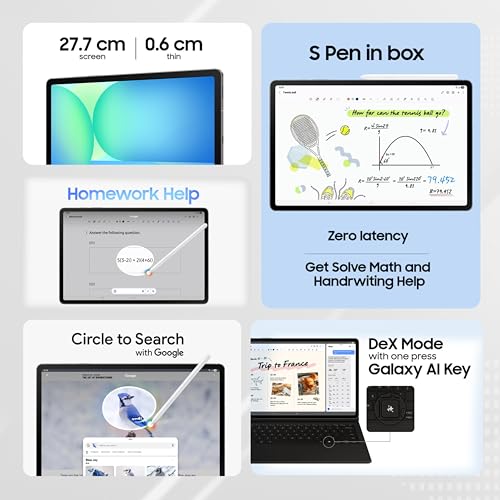
Samsung Galaxy Tab S10 FE

S Pen with AI writing, Galaxy AI, 45W fast charging — Samsung's best value premium

8.9
/ 10

Scroll to see more images

Key Specifications

  • Exynos 1580 Octa-Core Processor
  • 10.9" 2304x1440, 90Hz Display
  • 8GB RAM, 128GB/256GB Storage
  • S Pen with AI Writing Assist included
  • 8000mAh Battery, 45W Fast Charging
  • Android 15, Galaxy AI, Samsung DeX

Pros and Cons

+S Pen + Galaxy AI for smart writing
+45W fast charging — full in ~90 min
+Samsung DeX for desktop experience
+Android 15 with multi-year updates
Exynos 1580 behind Snapdragon peers
90Hz not 120Hz
More expensive than iPad 11" A16

Who Should Buy This?

Samsung Galaxy phone users who want full Samsung ecosystem integration — phone calls, Galaxy continuity, DeX. Professionals who want S Pen with AI-powered writing assistance for meetings and note-taking. Users who want a premium Android tablet with the best Samsung service support in India.

BEST PREMIUM

Apple iPad Air 11" (M3 Chip)

Apple M3 chip, Thunderbolt/USB 4, Apple Intelligence — desktop-class in a slim tablet

9.5
/ 10

Scroll to see more images

Key Specifications

  • Apple M3 Chip (MacBook Air level)
  • 11" Liquid Retina, 500 nits, P3 Wide
  • 128GB / 256GB / 512GB / 1TB
  • Thunderbolt / USB 4 port
  • Apple Intelligence, iPadOS 18
  • Apple Pencil Pro support

Pros and Cons

+M3 chip — fastest tablet chip bar iPad Pro
+Thunderbolt 4 — connect external 6K display
+Apple Intelligence full suite
+5-6 years guaranteed software support
No 120Hz ProMotion display
Accessories add ₹20,000+ to total cost
iPadOS still limited vs macOS for pro work

Who Should Buy This?

Professionals who need a portable workstation — video editors, graphic designers, writers, and architects. Apple ecosystem users who want the best iPad under ₹1 lakh. Anyone who wants to connect their tablet to an external 6K monitor via Thunderbolt. The M3 chip will remain relevant for 5-6 years, making this a long-term investment.

BEST LARGE SCREEN

Samsung Galaxy Tab S10 Ultra

14.6" AMOLED 120Hz, Snapdragon 8 Gen 3, Wi-Fi 7 — ultimate Android tablet

9.4
/ 10

Scroll to see more images

Key Specifications

  • Snapdragon 8 Gen 3 Processor
  • 14.6" Dynamic AMOLED 2X, 120Hz
  • 12GB / 16GB RAM, 256GB / 512GB
  • S Pen Included, MicroSD up to 1TB
  • 11200mAh Battery, 45W Charging
  • Wi-Fi 7, Android 14, Samsung DeX

Pros and Cons

+Largest AMOLED display in any tablet
+Snapdragon 8 Gen 3 flagship performance
+11200mAh battery for heavy users
+Wi-Fi 7 — future-proof connectivity
Very expensive (over ₹1 lakh)
Extremely heavy at 740g
Android tablet apps still lag iPad Pro

Who Should Buy This?

Power users who want the ultimate Android tablet — content creators, video editors using the Android ecosystem, and professionals who want the largest possible AMOLED screen for DeX desktop work. This is the best Android tablet money can buy in India, but at ₹1 lakh+ it competes directly with the iPad Pro.

BEST PRO TABLET

Apple iPad Pro 11" (M5 Chip)

M5 chip, OLED ProMotion 120Hz, Thunderbolt 4 — the pinnacle of tablet technology

9.6
/ 10

Scroll to see more images

Key Specifications

  • Apple M5 Chip (desktop-class)
  • 11" Ultra Retina XDR OLED, 120Hz ProMotion
  • 256GB / 512GB / 1TB / 2TB options
  • Thunderbolt 4 / USB 4
  • Apple Intelligence + Stage Manager
  • Apple Pencil Pro support

Pros and Cons

+M5 is fastest processor in any tablet
+OLED ProMotion 120Hz — best display
+Thunderbolt 4 for pro external displays
+6+ years software support guaranteed
Extremely expensive (close to laptop price)
iPadOS limitations for pro workflows
Accessories add ₹30,000+ to cost

Who Should Buy This?

Professional illustrators and animators using Procreate. Video editors who need portable 4K/6K editing power. Architects and designers who work in Autodesk AutoCAD or Shapr3D. Anyone who needs the absolute best display quality — the OLED ProMotion panel is genuinely superior to every other tablet screen. Budget warning: accessories (Apple Pencil Pro + Magic Keyboard) add ₹25,000–₹35,000 to your total cost.

Key Technologies Explained

Apple Silicon vs Qualcomm Snapdragon

Apple M-series chips (used in iPad Air and iPad Pro) are the same chips inside MacBook laptops — extraordinarily powerful. They outperform all Android tablet chips in both CPU and GPU benchmarks. Qualcomm Snapdragon 8 Gen 3 (Samsung Tab S10 Ultra) is the best Android chip, but still trails Apple M3/M5 by 20-30% in raw performance. For everyday tasks, both perform identically — the gap only shows in video editing, 3D rendering, and complex gaming.

Refresh Rate: 60Hz vs 90Hz vs 120Hz vs 144Hz

Refresh rate is how many times the screen updates per second. 144Hz (Xiaomi Pad 6): Ultra-smooth — every scroll and animation is butter-smooth. Best for gaming. 120Hz (realme Pad 2, iPad Pro): Very smooth, ideal for reading and productivity. 90Hz (Lenovo Tab M11, Tab S10 FE): Noticeably better than 60Hz for daily use. 60Hz (Samsung Tab S6 Lite): Fine for reading, documents, and video — you get used to it.

AMOLED vs LCD vs OLED Displays

LCD (Liquid Crystal Display): Most tablets use LCD — good brightness, consistent colors, slightly lower contrast. IPS LCD (most budget/mid-range tablets) offers wide viewing angles. AMOLED (Samsung Tab S10 Ultra): Each pixel produces its own light. True blacks, infinite contrast, vivid colors, power-efficient for dark mode. OLED (iPad Pro M5): A step up from AMOLED — more precise color accuracy, better for professional creative work. Liquid Retina (iPad Air, iPad): Apple's premium LCD with excellent calibration.

S Pen vs Apple Pencil vs Capacitive Stylus

Samsung S Pen: Active stylus with 4096 pressure levels, palm rejection, tilt detection. Included free with Tab S6 Lite and Tab S10 series. Best for students and note-takers on Android. Apple Pencil Pro: 4096 pressure levels, tilt and rotation detection, hover detection. The best stylus experience overall — but sold separately for ~₹11,000. Works with iPad Air M3 and iPad Pro. Capacitive Stylus: Basic rubber-tip stylus that works on any touchscreen. No pressure sensitivity or palm rejection — not suitable for serious note-taking.

India Tablet Market Update — March 2026

What Changed in Early 2026

  • Apple replaced iPad 9th Gen with new iPad 11" A16 — a massive upgrade
  • Samsung launched Tab S10 FE with AI writing features
  • Apple released iPad Air M3 with Thunderbolt 4
  • iPad Pro M5 launched with OLED ProMotion 120Hz

Key Trends in 2026

  • AI features becoming standard — Apple Intelligence, Galaxy AI
  • Fast charging reaching tablets — 67W now available under ₹20K
  • 144Hz displays now accessible in mid-range (Xiaomi Pad 6)
  • Budget segment getting more RAM — 8GB now common under ₹20K

Price Verification

All prices last verified March 30, 2026 on Amazon.in. Prices may vary by up to 10-15% based on ongoing sales. Click "Check Price" buttons for current Amazon pricing.

Complete Buying Guide

Make an informed decision with our comprehensive buying guide. We've analyzed dozens of models to bring you the key factors that matter.

💡 How to Choose Your Price Tier

Under ₹20,000 (Budget): Great for students, media consumption, and basic productivity. Helio G88/G99 chips handle Zoom, YouTube, MS Office smoothly. Expect 90-120Hz displays and 7500-8360mAh batteries. ₹20,000-₹45,000 (Mid-Range): Best value zone. You get flagship Android chips (Snapdragon 870), 144Hz displays, Apple A16 Bionic, or Samsung S Pen. Most users should stop here. ₹45,000-₹75,000 (Premium): Apple M-series chips, professional-grade performance, best display quality. Worth it for professionals and creators. Above ₹75,000 (Ultra-Premium): iPad Pro M5 and Samsung Tab S10 Ultra. Only consider if you genuinely need desktop-class computing on the go.

🏍️ iOS (iPadOS) vs Android — Which is Right for You?

Choose Apple iPad if: you already own an iPhone or Mac (seamless AirDrop, iCloud, Handoff), you want the best app quality and gaming titles, you plan to use stylus for professional illustration, or you want 5-6 years of software updates guaranteed. Choose Android tablet if: you prefer Google ecosystem (Gmail, Drive, YouTube), need USB-C file flexibility and OTG support, want more screen size for the money, prefer customization, or already own an Android phone (Nearby Share file transfer). Practical rule: If you own an iPhone, get iPad. If you own an Android phone, get Android tablet. The file transfer friction alone justifies this rule.

🚴 Display: Refresh Rate and Resolution for India

144Hz (Xiaomi Pad 6): Buttery-smooth scrolling and gaming. 120Hz (realme Pad 2, iPad Pro): Very smooth, ideal for reading and productivity. 90Hz (Lenovo Tab M11, Samsung Tab S10 FE): Noticeably smoother than standard 60Hz. 60Hz (Samsung Tab S6 Lite): Adequate for notes and video. Resolution: 2K+ (2000x1200) gives sharp text in 10-12 inch screens. OLED (iPad Pro M5): Best blacks and contrast, ideal for media. Brightness: Outdoor use needs 500+ nits. Xiaomi Pad 6 leads at 1800 nits. AMOLED auto-adjusts better in sunlight.

🔧 Stylus and Note-Taking Guide

Samsung Tab S6 Lite and Tab S10 FE include S Pen in the box — the only tablets here that do. The S Pen offers excellent palm rejection and pressure sensitivity for handwritten notes, PDF annotation, and sketching. Apple Pencil Pro (for iPad Air M3, iPad Pro M5) is the best stylus experience overall — extremely precise, tilt detection, hover detection — but sold separately for ~₹11,000. Apple Pencil (1st gen, works with older iPads) is available for ~₹7,500. Xiaomi Pad 6, realme Pad 2, and Lenovo Tab M11 work with capacitive styluses but lack palm rejection. If note-taking is your primary use case, budget for a Samsung Tab S6 Lite (S Pen included) or iPad Air + Apple Pencil Pro combo.

💡 Battery Life and Charging Speed

realme Pad 2 wins with 8360mAh + 67W SUPERVOOC (full charge ~90 min). Xiaomi Pad 6 has larger 8840mAh but slower 33W. Samsung Tab S10 FE has 8000mAh + 45W for excellent all-day use. Samsung Tab S10 Ultra has massive 11200mAh for ultra-heavy usage. Apple iPads have smaller batteries but excellent iOS optimization — expect 10-12 hours real-world regardless of watt-hour rating. Lenovo Tab M11 has 7500mAh with slow 20W charging — plan for overnight charging.

🏍️ After-Sales Service and Warranty in India

Apple: Best authorized service centers in major cities, 1-year warranty, AppleCare+ available. Samsung: Excellent service network in tier-1 and tier-2 cities, 1-year warranty, Samsung Care+ available. Xiaomi: Mi service centers in 500+ cities, 1-year warranty, generally quick turnaround. realme: Good centers in tier-1/tier-2, 1-year warranty. Honor: Limited centers, check local availability before buying. Lenovo: Adequate centers in major cities, 1-year warranty. Pro tip: Always register your product online within 10 days of purchase for smoother warranty claims.

Frequently Asked Questions

Which is the best tablet in India in 2026?

For most users, the Xiaomi Pad 6 (₹22,999) is the best mid-range tablet — it offers a 144Hz 2.8K display, Snapdragon 870, and 8840mAh battery at an unbeatable price. For premium buyers, the Apple iPad Air 11" with M3 chip (₹59,900) offers desktop-class performance with Apple Intelligence. For students who need a stylus, the Samsung Galaxy Tab S6 Lite (2024) includes the S Pen free.

Is Apple iPad better than Samsung Galaxy Tab in India?

It depends on your ecosystem. Apple iPad wins on app quality, software support duration (5+ years guaranteed), Apple Intelligence AI, and premium build. Samsung Galaxy Tab wins on stylus value (S Pen included free), Android flexibility, USB file management, and screen size for the money. If you own an iPhone, iPad is seamlessly better. If you own an Android phone, Samsung tab integrates more smoothly via Galaxy ecosystem features.

Which tablet has the best battery life in India?

The realme Pad 2 offers the best combination — 8360mAh battery with 67W SUPERVOOC fast charging (full charge in ~90 minutes). The Xiaomi Pad 6 has a larger 8840mAh battery but charges slower at 33W. The Samsung Tab S10 Ultra has a massive 11200mAh for power users. Apple iPads have smaller batteries but iOS optimization delivers consistent 10-12 hours screen-on time despite smaller capacity.

What is the best tablet for students in India?

For students with a tight budget: Lenovo Tab M11 at ₹15,999 gives 8GB RAM and 11-inch display for online classes. For note-taking: Samsung Galaxy Tab S6 Lite (2024) at ₹24,999 includes S Pen free — ideal for digital notes and PDF annotation. For students who want the best ecosystem long-term: Apple iPad 11" A16 at ₹37,900 offers unmatched app quality, Apple Intelligence, and 5+ year software support.

Should I buy a tablet under ₹30,000 or save up for a premium one?

Save up for premium if: you plan to use the tablet as a laptop replacement, you do professional video/photo editing, you want 5+ years of use with software updates, or stylus-based creative work is central to your workflow. Stick with mid-range under ₹30,000 if: you mainly stream OTT content, attend online classes, read e-books, do light productivity work, or are buying as a secondary device alongside a laptop. The Xiaomi Pad 6 at ₹22,999 covers 90% of use cases that don't require professional creative work.

Does the Samsung Galaxy Tab S6 Lite 2024 still make sense to buy?

Yes, the Samsung Galaxy Tab S6 Lite (2024) at ₹24,999 remains the only tablet in this price range that includes an S Pen in the box. For students who take handwritten notes, annotate textbooks, or sketch diagrams, the S Pen alone is worth the premium over similarly priced Android rivals. The Exynos 1280 processor handles daily tasks well. However, if you do not need a stylus, the Xiaomi Pad 6 offers significantly better performance and display for similar money.

50+

Products Analyzed

100+

Hours of Research

Expert

Team Review

Verified

Information

Discover more helpful guides and reviews to make informed decisions

Found this helpful?
Naveen Bhavnani
Naveen Bhavnani

Founder & Research Lead

Software engineer who built this site to help Indian consumers make better purchasing decisions. Every recommendation is backed by extensive research — aggregating thousands of Amazon reviews, comparing specifications across brands, and tracking pricing trends. We don't physically test products in a lab; instead, we do the research homework so you don't have to.

Research-Based Reviews Data-Driven Recommendations Amazon Review Analysis