
PRODUCT REVIEW
Best WiFi Extenders in India 2026
Find the best wifi extender in India 2026. Research-based reviews with detailed comparisons, prices, pros & cons to help you pick the right one.
 By Naveen Bhavnani
Updated
By Naveen Bhavnani
Updated
As an Amazon Associate we earn from qualifying purchases. We could also earn a fee through some links when you click on them.

WiFi extender picks by coverage
Already covered the winner above — here are the picks for specific needs.

TP-Link TL-WA850RE N300 Single Band Extender

TP-Link RE200 AC750 Dual Band Extender

TP-Link RE450 AC1750 Gigabit Extender
WiFi extenders compared on speed
How the shortlist stacks up. Scroll sideways on mobile.
| Product | WiFi Standard | Max Speed | Coverage | Price | Deal |
|---|---|---|---|---|---|
| TP-Link RE505X WiFi 6 | WiFi 6 | 1500 Mbps | 1800 sq ft | ₹3,099 | Check Price |
| TP-Link RE605X WiFi 6 | WiFi 6 | 1800 Mbps | 2000 sq ft | ₹3,999 | Check Price |
| TP-Link RE305 AC1200 | WiFi 5 | 1200 Mbps | 1500 sq ft | ₹2,499 | Check Price |
| TP-Link RE200 AC750 | WiFi 5 | 750 Mbps | 1200 sq ft | ₹1,999 | Check Price |
| TP-Link TL-WA850RE N300 | WiFi 4 | 300 Mbps | 1000 sq ft | ₹1,449 | Check Price |
| Netgear EX6120 AC1200 | WiFi 5 | 1200 Mbps | 1200 sq ft | ₹3,899 | Check Price |
| TP-Link RE450 AC1750 | WiFi 5 | 1750 Mbps | 2500 sq ft | ₹7,500 | Check Price |
| Mercusys ME30 AC1200 | WiFi 5 | 1200 Mbps | 1400 sq ft | ₹1,799 | Check Price |
| Mercusys ME70X WiFi 6 | WiFi 6 | 1800 Mbps | 1800 sq ft | ₹2,799 | Check Price |
| Mercusys MW300RE N300 | WiFi 4 | 300 Mbps | 800 sq ft | ₹899 | Check Price |


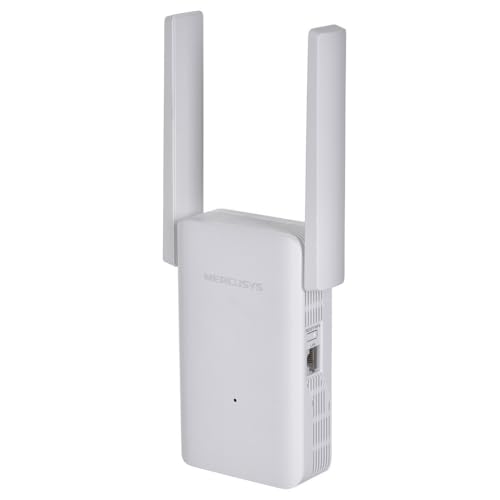

WiFi extender reviews: standard, speed and coverage
Specs, the honest pros and cons, and who each one is for.
TP-Link RE505X AX1500 WiFi 6 Extender
- WiFi Standard
- WiFi 6 (AX1500)
- Max Speed
- 1500 Mbps
- Bands
- Dual (2.4GHz + 5GHz)
- Ethernet Port
- Gigabit
- Coverage
- ~1800 sq ft
- Mesh Support
- OneMesh
The RE505X brings cutting-edge WiFi 6 technology at an affordable price point, delivering 40% faster speeds and 4x device capacity compared to WiFi 5. Its OneMesh compatibility creates seamless whole-home coverage when paired with TP-Link routers, eliminating the need to switch networks manually. The gigabit ethernet port provides wired connections for gaming consoles and smart TVs, while the intelligent signal indicator helps you find the optimal placement location.
- + Latest WiFi 6 technology
- + excellent speed performance
- + gigabit ethernet port for wired devices
- + OneMesh compatibility for seamless roaming
- + easy setup with WPS
- + compact wall-plug design
- - Premium pricing
- - benefits fully realized only with WiFi 6 router
- - no multi-gigabit ports
TP-Link RE605X AX1800 WiFi 6 Extender
- WiFi Standard
- WiFi 6 (AX1800)
- Max Speed
- 1800 Mbps
- Bands
- Dual (2.4GHz + 5GHz)
- Ethernet Port
- Gigabit
- Coverage
- ~2000 sq ft
- Mesh Support
- OneMesh + EasyMesh
The RE605X is TP-Link's premium WiFi 6 extender featuring 4-stream technology for superior performance and EasyMesh compatibility that works with any mesh-compatible router brand. Its 1800 Mbps dual-band speeds deliver lag-free gaming with 75% lower latency than WiFi 5. The gigabit ethernet port provides stable wired connections, while dual external antennas offer excellent coverage up to 2000 sq ft, perfect for large 4 BHK homes.
- + Superior WiFi 6 speeds
- + 4-stream technology for better performance
- + EasyMesh support for universal compatibility
- + gigabit port
- + excellent coverage up to 2000 sq ft
- + low latency for gaming
- - Higher price point
- - larger form factor
- - needs WiFi 6 router for full benefits
TP-Link RE305 AC1200 Dual Band Extender
- WiFi Standard
- WiFi 5 (AC1200)
- Max Speed
- 1200 Mbps
- Bands
- Dual (2.4GHz + 5GHz)
- Ethernet Port
- Fast Ethernet (100 Mbps)
- Coverage
- ~1500 sq ft
- Mesh Support
- OneMesh
The RE305 offers the perfect balance of price, performance, and features for most Indian homes. Its AC1200 dual-band speeds (867 Mbps on 5GHz, 300 Mbps on 2.4GHz) handle 4K streaming and video calls effortlessly. OneMesh compatibility creates seamless whole-home WiFi when paired with TP-Link routers. The compact wall-plug design with intelligent signal indicator makes placement optimization easy. Proven TP-Link reliability backed by thousands of positive Indian customer reviews.
- + Great value for money
- + reliable dual-band performance
- + easy setup process
- + covers up to 1500 sq ft
- + strong 2.4GHz for IoT devices
- + TP-Link build quality
- - Fast Ethernet port (not gigabit)
- - older WiFi 5 technology
- - no mesh compatibility
TP-Link RE200 AC750 Dual Band Extender
- WiFi Standard
- WiFi 5 (AC750)
- Max Speed
- 750 Mbps
- Bands
- Dual (2.4GHz + 5GHz)
- Ethernet Port
- None
- Coverage
- ~1200 sq ft
- Setup
- One-Touch WPS
The RE200 is the most affordable dual-band extender from TP-Link, offering 5GHz support at under ₹2,000. Its AC750 speeds (433 Mbps on 5GHz + 300 Mbps on 2.4GHz) handle HD streaming and video calls smoothly. The super-compact wall-plug design fits anywhere without blocking adjacent outlets. One-touch WPS setup means you're online in under 2 minutes. Perfect entry point into dual-band technology for budget-conscious buyers who need more than single-band performance.
- + Affordable dual-band option
- + easy one-touch WPS setup
- + compact size fits anywhere
- + good for small apartments
- + reliable for basic streaming and browsing
- + low power consumption
- - Lower speeds compared to AC1200
- - no ethernet port
- - limited coverage (up to 1200 sq ft)
- - basic feature set
TP-Link TL-WA850RE N300 Single Band Extender
- WiFi Standard
- WiFi 4 (N300)
- Max Speed
- 300 Mbps
- Bands
- Single (2.4GHz only)
- Ethernet Port
- Fast Ethernet
- Coverage
- ~1000 sq ft
- Reviews
- 50,000+
India's best-selling WiFi extender with over 50,000 verified reviews. The TL-WA850RE offers proven reliability at the lowest price point from a reputable brand. Its N300 speeds (300 Mbps on 2.4GHz) handle basic browsing, email, and SD video streaming. The included ethernet port (rare at this price) allows wired connection for devices. LED signal indicator helps find optimal placement. Perfect for extending WiFi to IoT devices, basic internet usage, or as a secondary extender.
- + Most affordable TP-Link option
- + ethernet port included
- + very easy setup
- + good for extending basic internet
- + compact wall-plug design
- + proven reliability with 50K+ reviews
- - Single band only (2.4GHz)
- - slower speeds
- - limited to 300 Mbps
- - not suitable for HD streaming or gaming
- - older WiFi 4 technology
Netgear EX6120 AC1200 Dual Band Extender
- WiFi Standard
- WiFi 5 (AC1200)
- Max Speed
- 1200 Mbps
- Bands
- Dual (2.4GHz + 5GHz)
- Ethernet Port
- Gigabit
- Coverage
- ~1200 sq ft
- Technology
- FastLane
The Netgear EX6120 features FastLane Technology that provides high-speed WiFi connections by using both bands simultaneously - one for router communication and one for device connection. Its compact wall-plug design stays out of the way while the gigabit ethernet port enables full-speed wired connections. Netgear's established reliability and NETGEAR Nighthawk app provides easy setup and management. Good choice for those who prefer Netgear's ecosystem or need gigabit wired port with AC1200 speeds.
- + FastLane technology for simultaneous dual-band
- + compact design
- + gigabit ethernet port
- + covers up to 1200 sq ft
- + established Netgear reliability
- + good parental controls
- - Premium pricing for AC1200 specs
- - fewer reviews than TP-Link alternatives
- - mixed feedback on Indian voltage compatibility
TP-Link RE450 AC1750 Gigabit Extender
- WiFi Standard
- WiFi 5 (AC1750)
- Max Speed
- 1750 Mbps
- Bands
- Dual (2.4GHz + 5GHz)
- Ethernet Port
- Gigabit
- Coverage
- ~2500 sq ft
- Antennas
- 3 External Adjustable
The RE450 is TP-Link's highest-performing WiFi 5 extender with 3 adjustable external antennas for customized signal direction and beamforming technology that focuses WiFi signals toward connected devices. Its AC1750 speeds (1300 Mbps on 5GHz + 450 Mbps on 2.4GHz) handle multiple 4K streams simultaneously. The gigabit ethernet port delivers full-speed wired connections for gaming consoles or smart TVs. Perfect for large 4 BHK homes or multi-story buildings requiring maximum coverage.
- + Highest WiFi 5 speeds
- + 3 adjustable external antennas for optimal coverage
- + beamforming for focused signal
- + gigabit port
- + excellent for large homes up to 2500 sq ft
- + premium build quality
- - Expensive for WiFi 5 technology
- - larger footprint
- - overkill for small apartments
- - high price competes with mesh systems
Mercusys ME30 AC1200 Dual Band Extender
- WiFi Standard
- WiFi 5 (AC1200)
- Max Speed
- 1200 Mbps
- Bands
- Dual (2.4GHz + 5GHz)
- Ethernet Port
- None
- Coverage
- ~1400 sq ft
- Antennas
- 2 External
The ME30 is the most affordable AC1200 extender on the market, offering dual-band 1200 Mbps speeds at ₹700 less than TP-Link RE305. Built by TP-Link's subsidiary Mercusys, it delivers proven technology at aggressive pricing. Two external antennas provide better range than internal antenna designs. Supports 4K streaming and video calls with its 867 Mbps 5GHz band. Setup through the Mercusys app is straightforward with step-by-step guidance.
- + Most affordable AC1200 option
- + TP-Link subsidiary quality
- + decent coverage for 2 BHK
- + easy setup with app
- + good value for money
- + works with all routers
- - No ethernet port
- - fast ethernet speed only
- - limited reviews compared to TP-Link
- - basic feature set
- - mixed long-term reliability reports
Mercusys ME70X AX1800 WiFi 6 Extender
- WiFi Standard
- WiFi 6 (AX1800)
- Max Speed
- 1800 Mbps
- Bands
- Dual (2.4GHz + 5GHz)
- Ethernet Port
- Gigabit
- Coverage
- ~1800 sq ft
- Mesh Support
- OneMesh + EasyMesh
The ME70X offers WiFi 6 AX1800 performance at WiFi 5 prices - the most affordable way to get next-generation WiFi technology. As a TP-Link subsidiary, Mercusys delivers similar quality at lower prices. Features include OneMesh and EasyMesh compatibility for seamless roaming, gigabit ethernet port for wired connections, and AP mode to create WiFi from wired connection. At ₹2,799, it's ₹300+ cheaper than TP-Link RE505X with identical specs.
- + Affordable WiFi 6 entry point
- + mesh compatibility
- + gigabit ethernet port
- + good coverage up to 1800 sq ft
- + TP-Link ecosystem compatibility
- + modern features at budget price
- - Newer brand with fewer reviews
- - mixed customer service feedback
- - availability issues reported
- - limited long-term reliability data
Mercusys MW300RE N300 Single Band Extender
- WiFi Standard
- WiFi 4 (N300)
- Max Speed
- 300 Mbps
- Bands
- Single (2.4GHz only)
- Ethernet Port
- None
- Coverage
- ~800 sq ft
- Antennas
- 3 External
At just ₹899, the MW300RE is the cheapest WiFi extender from a reputable brand. Despite the low price, it features 3 external antennas for improved coverage and MIMO technology for better multi-device handling. Built by TP-Link's Mercusys subsidiary, it delivers basic functionality with acceptable reliability. Plug-and-play setup gets you connected in minutes. Best suited for extending WiFi to a single room or for IoT devices that only need 2.4GHz.
- + Cheapest WiFi extender option
- + 3 external antennas for better coverage
- + MIMO technology
- + very easy setup
- + good for basic internet extension
- + ideal for IoT devices
- - Single band only
- - very basic features
- - slower speeds (300 Mbps)
- - limited coverage
- - not suitable for streaming or gaming
- - reliability concerns
Which WiFi extender to buy
Here is who each pick is for, based on the comparison above.
TP-Link RE305 AC1200 Dual Band Extender · ₹2,499
Perfect balance of price, performance, and features
Check Price on Amazon →TP-Link TL-WA850RE N300 Single Band Extender · ₹1,449
Most affordable with ethernet port, 50K+ reviews
Check Price on Amazon →TP-Link RE200 AC750 Dual Band Extender · ₹1,999
Affordable dual-band for small apartments
Check Price on Amazon →TP-Link RE450 AC1750 Gigabit Extender · ₹7,500
Maximum coverage, 3 antennas, beamforming
Check Price on Amazon →How to choose a WiFi extender
-
WiFi Standards Explained (WiFi 4/5/6)
WiFi 6 (802.11ax) offers 40% faster speeds, 4x device capacity, and 75% lower latency than WiFi 5 (802.11ac). WiFi 5 (AC) remains excellent for most homes with speeds up to 1750 Mbps. WiFi 4 (N) is outdated but sufficient for basic tasks at 300 Mbps. For future-proofing and homes with 15+ devices, choose WiFi 6. For budget-conscious buyers with fewer devices, WiFi 5 (AC1200/AC750) offers great value. -
Single Band vs Dual Band Performance
Single band extenders (2.4GHz only) suffer 50% speed loss due to half-duplex operation - they receive and transmit on the same frequency. Dual band extenders use dedicated backhaul (5GHz to router) and client band (2.4GHz to devices), minimizing speed loss to 20-30%. For streaming, gaming, or video calls, dual band is essential. Single band suffices only for basic browsing and IoT devices. -
Coverage Calculation for Indian Homes
Indian brick/concrete walls reduce WiFi range by 40% compared to US wood/drywall homes. For 2 BHK (1000-1200 sq ft): AC750-AC1200 extender. For 3 BHK (1500-1800 sq ft): AC1200-AC1750 or WiFi 6 AX1500. For 4 BHK or multi-story (2000+ sq ft): AX1800+ or consider mesh system. Place extender halfway between router and dead zone for optimal performance. Concrete walls between floors need higher-powered models. -
Ethernet Port Benefits
Gigabit ethernet port allows wired connections to smart TVs, gaming consoles, or PCs for zero latency and maximum speed. Fast ethernet (100 Mbps) limits speed to 100 Mbps regardless of WiFi speed. Access Point (AP) mode converts wired connection to WiFi, ideal for extending wired network. For gaming or 4K streaming, gigabit ethernet is worth the premium. Budget models without ethernet rely solely on wireless backhaul. -
OneMesh & EasyMesh Compatibility
OneMesh (TP-Link proprietary) creates seamless mesh network when paired with compatible TP-Link routers - single SSID, automatic roaming, unified management. EasyMesh (IEEE standard) offers same benefits with universal router compatibility. Mesh-capable extenders eliminate the manual switching between networks. Non-mesh extenders create separate network name (MyWiFi_EXT) requiring manual switching. For homes with frequent movement, mesh compatibility is game-changing. -
Speed Matching with Your ISP Plan
Match extender speed to your internet plan: 50-100 Mbps plan → N300/AC750 sufficient, 100-200 Mbps plan → AC1200 recommended, 300-500 Mbps plan → AC1750/AX1500 required, 500+ Mbps plan → AX1800+ essential. Extenders cannot increase your ISP speed, only extend existing coverage. Account for 20-50% speed loss in extended area. If you have 100 Mbps plan, AC1200 extender will provide ~60-80 Mbps in extended zone.
Frequently asked questions
What is the best wifi extenders in India?
Will a WiFi extender reduce my internet speed?
Can I use a TP-Link extender with a Netgear/D-Link router?
Where should I place my WiFi extender for best performance?
WiFi 5 vs WiFi 6 extender - is the upgrade worth it?
Can I use multiple extenders together?
Do WiFi extenders work with Jio Fiber, Airtel, ACT, BSNL?
You may also like
More guides and reviews to help you decide.
Find the best mesh wifi system in India 2026. Compare ASUS & more with research-based reviews, prices & pros and cons.
Read more →The 9 best WiFi routers in India 2026 from ₹2,799 to ₹26,999. TP-Link Archer AX72 Pro wins overall; ASUS RT-AX86U Pro for gaming, Archer BE400 for WiFi 7.
Read more →