
PRODUCT REVIEW
Best WiFi Routers in India 2026
The 9 best WiFi routers in India 2026 from ₹2,799 to ₹26,999. TP-Link Archer AX72 Pro wins overall; ASUS RT-AX86U Pro for gaming, Archer BE400 for WiFi 7.
 By Naveen Bhavnani
Updated
By Naveen Bhavnani
Updated
As an Amazon Associate we earn from qualifying purchases. We could also earn a fee through some links when you click on them.

WiFi router picks by WiFi standard
Already covered the winner above — here are the picks for specific needs.

TP-Link Archer AX12 AX1500
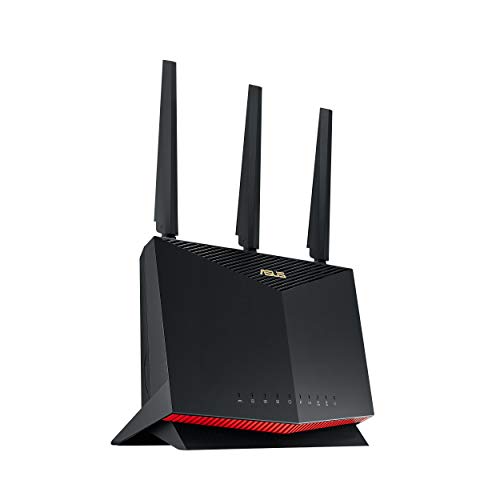
ASUS RT-AX86U Pro AX5700

TP-Link Archer BE400 BE6500 WiFi 7
WiFi routers compared on speed
How the shortlist stacks up. Scroll sideways on mobile.
| WWCD Score | Router | WiFi | Max Speed | LAN Ports | 2.5G Port | USB | Mesh | Warranty | Price | Deal |
|---|---|---|---|---|---|---|---|---|---|---|
| 9.4/10 | TP-Link Archer AX72 Pro | WiFi 6 | 5400 Mbps | 4+1 | Yes | USB 3.0 | OneMesh/EasyMesh | 3 years | ₹10,499 | Check Price |
| 9.4/10 | ASUS RT-AX86U Pro | WiFi 6 | 5700 Mbps | 4+1 | Yes | USB 3.2 | AiMesh | 3 years | ₹26,999 | Check Price |
| 9.3/10 | TP-Link Archer AX73 | WiFi 6 | 5400 Mbps | 4 | No | USB 3.0 | OneMesh | 3 years | ₹10,999 | Check Price |
| 9.1/10 | TP-Link Archer BE400 | WiFi 7 | 6500 Mbps | 1+3 | Yes (2×) | USB 3.0 | EasyMesh | 3 years | ₹15,999 | Check Price |
| 8.9/10 | TP-Link Archer AX53 | WiFi 6 | 3000 Mbps | 4 | No | None | OneMesh | 3 years | ₹5,999 | Check Price |
| 8.9/10 | ASUS RT-AX53U | WiFi 6 | 1800 Mbps | 3 | No | USB 2.0 | AiMesh | 3 years | ₹4,999 | Check Price |
| 8.8/10 | TP-Link Archer AX10 | WiFi 6 | 1500 Mbps | 4 | No | None | OneMesh | 3 years | ₹4,399 | Check Price |
| 8.7/10 | TP-Link Archer AX12 | WiFi 6 | 1500 Mbps | 3 | No | None | N/A | 3 years | ₹3,599 | Check Price |
| 8.7/10 | TP-Link Archer C6 | WiFi 5 | 1200 Mbps | 4 | No | None | None | 3 years | ₹2,799 | Check Price |


WiFi router reviews: speed, mesh and warranty
Specs, the honest pros and cons, and who each one is for.
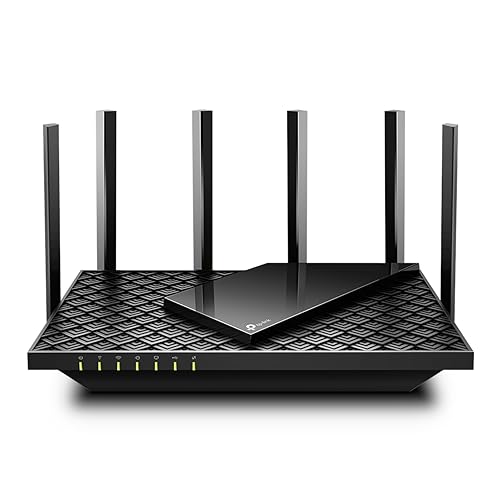
TP-Link Archer AX72 Pro AX5400
The best-value AX5400 router with a 2.5G port for Indian homes ready for next-gen internet speeds
- WiFi Standard
- WiFi 6 (802.11ax)
- Max Speed
- 5400 Mbps (AX5400)
- Band
- Dual-Band
- Multi-Gig
- 2.5G WAN/LAN port
- LAN Ports
- 4× Gigabit + 1× 2.5G
- Antennas
- 6 external + beamforming
- USB
- USB 3.0
- Mesh
- OneMesh / EasyMesh
- Warranty
- 3 years
The AX72 Pro delivers everything the popular AX73 does — plus a 2.5G multi-gig port and better thermals — at ₹500 less. The clear choice for anyone with a 500+ Mbps fiber plan or planning to upgrade.
- + 2.5G multi-gig WAN/LAN port future-proofs for fiber plans above 1 Gbps
- + AX5400 speeds with 4T4R HE160 deliver true gigabit wireless throughput
- + 6 external antennas with beamforming cover large 3-bedroom homes
- + USB 3.0 port for NAS-like media sharing
- + Improved thermal vents prevent overheating under sustained load
- + OneMesh and EasyMesh compatible for whole-home expansion
- - No tri-band so power users with 50+ devices may want dedicated backhaul
- - Fewer reviews (529) than the older AX73 — less long-term reliability data
- - HomeShield advanced features require a paid subscription (₹2500/yr)
- - No built-in VPN server
TP-Link Archer AX73 AX5400
The battle-tested AX5400 workhorse trusted by thousands of Indian homes
- WiFi Standard
- WiFi 6 (802.11ax)
- Max Speed
- 5400 Mbps (AX5400)
- Band
- Dual-Band
- Processor
- 1.5 GHz Triple-Core
- LAN Ports
- 4× Gigabit
- Antennas
- 6 external + beamforming
- USB
- USB 3.0
- Mesh
- OneMesh
- Warranty
- 3 years
With 2742 ratings and a proven triple-core CPU, the AX73 remains one of India's most trusted premium WiFi 6 routers. It loses the top spot to the newer AX72 Pro only because it lacks a 2.5G port.
- + Proven 1.5 GHz triple-core CPU handles 200+ devices without breaking a sweat
- + Most-reviewed premium WiFi 6 router on Amazon India (2742 ratings)
- + Real-world WiFi speeds of 477 Mbps vs 180 Mbps on WiFi 5 routers
- + USB 3.0 for NAS and media sharing
- + 3-year warranty with TP-Link India service centers
- + OneMesh compatible for seamless mesh expansion
- - No 2.5G multi-gig port — capped at Gigabit WAN even with faster fiber
- - Some reports of 5GHz band disconnections requiring a router restart
- - Firmware MAC whitelist bug reported in the Tether app
- - HomeShield advanced features behind a paid subscription
- - Higher power consumption (24W) than budget routers
ASUS RT-AX86U Pro AX5700
The no-compromise gaming router for power users who demand the absolute best
- WiFi Standard
- WiFi 6 (802.11ax)
- Max Speed
- 5700 Mbps (AX5700)
- Band
- Dual-Band
- Processor
- 2.0 GHz Quad-Core · 1 GB RAM
- LAN Ports
- 4× Gigabit + 1× 2.5G
- Security
- AiProtection Pro (free)
- VPN
- Instant Guard built-in
- Mesh
- AiMesh
- Warranty
- 3 years
If budget is no constraint and you need dedicated gaming acceleration, a 2.5G port, 1 GB RAM, and enterprise-grade security, the RT-AX86U Pro is unmatched. Most users will be equally happy with the AX72 Pro at half the price.
- + 2.0 GHz quad-core CPU with 1 GB RAM — the most powerful processor here
- + Dedicated 2.5G gaming port for wired gaming PCs
- + AiProtection Pro subscription-free network security
- + Mobile Game Mode reduces latency for mobile gaming with one tap
- + AiMesh compatible — add any ASUS router for whole-home mesh
- + WAN aggregation for true 2 Gbps wired throughput
- + Instant Guard built-in VPN
- - Expensive at ₹26,999 — 2.5× the price of the AX72 Pro for incremental gains
- - AiProtection Pro requires sharing network data with Trend Micro
- - Firmware update cadence has slowed (last major update March 2025)
- - Only 3 external antennas vs 6 on TP-Link models
- - Overkill for most Indian homes on 100–300 Mbps plans
TP-Link Archer BE400 BE6500 WiFi 7
India's most affordable WiFi 7 router — a future bet that's still finding its footing
- WiFi Standard
- WiFi 7 (802.11be)
- Max Speed
- 6500 Mbps (BE6500)
- Band
- Dual-Band (no 6 GHz)
- Multi-Gig
- 2.5G WAN + 2.5G LAN
- LAN Ports
- 1× 2.5G + 3× Gigabit
- Antennas
- 6 external + beamforming
- USB
- USB 3.0
- Mesh
- EasyMesh
- Warranty
- 3 years
The BE400 brings WiFi 7 features like MLO and dual 2.5G ports at a competitive price, but the lack of a 6GHz band and early-adopter reliability issues mean you're paying a premium for future-proofing that doesn't yet deliver tangible benefits over WiFi 6.
- + WiFi 7 with Multi-Link Operation (MLO) for future-proofing
- + Dual 2.5G ports (WAN + LAN) for multi-gig wired connections
- + 6 external antennas with beamforming
- + USB 3.0 for media sharing
- + EasyMesh compatible for whole-home expansion
- + 4K-QAM for higher throughput to compatible devices
- - No 6GHz band — this is dual-band WiFi 7 so real-world gains are marginal
- - Indian users report random router restarts requiring power cycling
- - DNS flooding issue reported — router sends excessive DNS queries
- - Premium over the AX72 Pro is hard to justify with today's device ecosystem
- - Range complaints from Indian reviewers — not reaching advertised coverage
TP-Link Archer AX53 AX3000
India's most-trusted AX3000 router backed by 3000+ real buyer ratings
- WiFi Standard
- WiFi 6 (802.11ax)
- Max Speed
- 3000 Mbps (AX3000)
- Band
- Dual-Band
- LAN Ports
- 4× Gigabit
- Antennas
- 4 external + beamforming
- USB
- None
- Mesh
- OneMesh
- Smart Home
- Alexa & Google
- Warranty
- 3 years
The AX53 is the safe, mainstream choice for anyone upgrading to WiFi 6. With 3131 ratings and TP-Link's 3-year warranty, it's hard to go wrong as the go-to mid-range pick.
- + Most-reviewed AX3000 router on Amazon India (3131 ratings)
- + Stable AX3000 speeds for streaming gaming and video calls
- + OneMesh compatible — add range extenders seamlessly
- + 3-year TP-Link warranty with India service centers
- + Easy setup via the Tether app
- + Alexa and Google Assistant compatible
- - No USB port — can't share storage or printers over the network
- - HomeShield advanced security features require ₹2500/year subscription
- - Some units ship as older v1 hardware instead of newer v2.8
- - Reports of random reboots from some Indian users
- - No WDS/repeater mode — can't extend existing networks
ASUS RT-AX53U AX1800
The feature-rich ASUS with free security and VPN that no TP-Link at this price can match
- WiFi Standard
- WiFi 6 (802.11ax)
- Max Speed
- 1800 Mbps (AX1800)
- Band
- Dual-Band
- LAN Ports
- 3× Gigabit
- USB
- USB 2.0 (4G dongle)
- Security
- AiProtection Classic (free)
- VPN
- Instant Guard built-in
- Mesh
- AiMesh
- Warranty
- 3 years
Buy the RT-AX53U if you value ASUS's software ecosystem — free AiProtection, built-in VPN, AiMesh, and 4G dongle backup. Accept the lower AX1800 speeds as the trade-off for features competitors charge extra for.
- + AiProtection Classic security is subscription-free unlike TP-Link HomeShield
- + USB port supports a 3G/4G dongle for backup internet
- + AiMesh expandable — add any ASUS router for seamless mesh
- + Instant Guard built-in VPN for secure remote access
- + ASUS DDNS for easy remote management
- + 3-year ASUS warranty with India support
- - Only AX1800 — slower than AX3000 competitors at similar prices
- - Internal antennas so range may not match external-antenna routers
- - 4.2-star rating is lower than peers in this price range
- - Only 3 LAN ports vs 4 on most competitors
- - USB 2.0 — limited to dongle sharing not practical for NAS
TP-Link Archer AX10 AX1500
India's proven WiFi 6 workhorse with nearly 8000 happy buyers behind it
- WiFi Standard
- WiFi 6 (802.11ax)
- Max Speed
- 1500 Mbps (AX1500)
- Band
- Dual-Band
- LAN Ports
- 4× Gigabit
- Antennas
- 4 external + beamforming
- USB
- None
- Mesh
- OneMesh
- Warranty
- 3 years
The AX10 is the safe, no-frills WiFi 6 upgrade for Indian homes. Its massive rating count proves real-world reliability. If you just want WiFi 6 that works, this is the answer — though the cheaper AX12 is catching up fast.
- + 7853 ratings at 4.4 stars — one of India's most popular WiFi 6 routers
- + WiFi 6 with MU-MIMO and OFDMA at an accessible price
- + 4 Gigabit LAN ports for wired devices
- + OneMesh compatible for easy mesh expansion
- + 3-year TP-Link warranty
- + Extremely lightweight and easy to set up
- - No USB port
- - AX1500 speeds limit throughput — won't fully utilize gigabit fiber
- - No VPN no QoS no advanced traffic management
- - 300 Mbps on the 2.4 GHz band is slow for legacy devices
- - The cheaper AX12 offers similar specs for less
TP-Link Archer AX12 AX1500
WiFi 6 for everyone — the highest-rated budget router at a price that's hard to beat
- WiFi Standard
- WiFi 6 (802.11ax)
- Max Speed
- 1500 Mbps (AX1500)
- Band
- Dual-Band
- LAN Ports
- 3× Gigabit
- Antennas
- 4 external + beamforming
- USB
- None
- Security
- WPA3
- Warranty
- 3 years
At ₹3,599, the AX12 is the cheapest way to get WiFi 6 from a trusted brand. Its 4.6-star rating speaks for itself. Perfect for 1–2BHK apartments on 100–200 Mbps broadband plans.
- + Highest-rated router in our selection at 4.6 stars (2298 ratings)
- + Cheapest WiFi 6 router from a major brand at ₹3599
- + WiFi 6 with MU-MIMO OFDMA beamforming and WPA3
- + 4 external antennas for decent coverage
- + 3-year TP-Link warranty
- + Extremely lightweight (150g) and compact
- - Only 3 LAN ports vs 4 on the AX10
- - Plastic build quality feels budget
- - Range limited for larger homes — reviewers say good for 2BHK not more
- - No USB port
- - No OneMesh compatibility mentioned — may not support mesh expansion
TP-Link Archer C6 AC1200
India's most-trusted router with 42,000+ reviews — if reliability is everything
- WiFi Standard
- WiFi 5 (802.11ac)
- Max Speed
- 1200 Mbps (AC1200)
- Band
- Dual-Band
- LAN Ports
- 4× Gigabit
- Antennas
- 4 external + beamforming
- USB
- None
- Mesh
- None
- Warranty
- 3 years
The Archer C6 is India's best-selling router for a reason: it just works. At ₹2,799, it's the cheapest path to dual-band gigabit WiFi. WiFi 5 is dated, but if your broadband plan is 100–200 Mbps, you won't notice the difference.
- + 42401 ratings — the most-reviewed router on all of Amazon India
- + Proven reliability over years with a consistent 4.4-star rating
- + 4 Gigabit LAN + 1 Gigabit WAN ports
- + The cheapest gigabit dual-band router from TP-Link
- + 4 external antennas with beamforming for reliable coverage
- + 3-year TP-Link warranty with India service centers
- - WiFi 5 (802.11ac) — lacks WiFi 6 features like OFDMA and WPA3
- - No USB port
- - No mesh support — no OneMesh or EasyMesh
- - 867 Mbps max on 5GHz — won't fully use plans above 300 Mbps
- - No MU-MIMO on the 2.4 GHz band
Understanding WiFi router technologies
Speed & efficiency
Range & coverage
Which WiFi router to buy
After comparing all nine on speed, coverage, features and price, here is which router is right for each kind of buyer.
TP-Link Archer AX72 Pro · ₹10,499
The router most buyers should get. AX5400 speed, a 2.5G multi-gig port and 6 antennas future-proof a 3BHK on fast fiber — without paying gaming-router money.
Check Price on Amazon →TP-Link Archer AX12 · ₹3,599
The cheapest sensible way into WiFi 6 and the highest-rated router here at 4.6 stars. Perfect for a 1–2BHK on a 100–200 Mbps plan.
Check Price on Amazon →ASUS RT-AX86U Pro · ₹26,999
Buy this if you want the absolute best — a 2.0 GHz quad-core CPU, 1 GB RAM, a dedicated 2.5G gaming port and free AiProtection Pro security.
Check Price on Amazon →TP-Link Archer BE400 · ₹15,999
For early adopters who want WiFi 7 and dual 2.5G ports today — just know the dual-band design means gains over the AX72 Pro are still marginal.
Check Price on Amazon →How to choose a WiFi router
-
WiFi 5 vs WiFi 6 vs WiFi 7: Which Do You Actually Need?
WiFi 6 (802.11ax) is the sweet spot for Indian homes in 2026. It offers MU-MIMO and OFDMA for handling multiple devices simultaneously — crucial when your family has 10+ smartphones, laptops, and smart TVs. WiFi 5 (AC) is still fine if your broadband plan is under 100 Mbps, but you'll miss out on WPA3 security and better congestion handling. WiFi 7 is available but early-adopter territory — dual-band WiFi 7 routers offer marginal real-world gains over WiFi 6, and the 6GHz band (where WiFi 7 truly shines) isn't available in affordable models yet. -
How Much Speed Do You Actually Need?
Match your router to your broadband plan, not the other way around. If you have a 100-200 Mbps plan (most common in India), an AX1500 router is sufficient. For 300-500 Mbps fiber plans, look at AX3000 or AX5400 routers. A 2.5G WAN port only matters if your ISP delivers speeds above 1 Gbps — currently rare in India but growing. Don't pay for AX5400 speeds if your broadband caps at 100 Mbps. -
Coverage for Indian Homes: Antennas and Mesh
Most 2BHK apartments work fine with any router that has 4 external antennas. For 3BHK or duplex homes, look for 6 antennas with beamforming, or consider a mesh-expandable router (OneMesh, EasyMesh, or AiMesh). Concrete walls in Indian construction absorb WiFi signals more than Western drywall — if you face dead zones, adding a mesh node is more effective than buying a more expensive router. -
USB Ports, VPN, and Features That Matter
A USB 3.0 port lets you attach a hard drive and create a basic NAS for media sharing — useful if you have a media library. Built-in VPN (like Instant Guard on ASUS) provides privacy without installing VPN apps on every device. Parental controls are useful but check if they're free — TP-Link HomeShield charges ₹2500/year for advanced controls, while ASUS AiProtection is free. -
Warranty and After-Sales: Why It Matters in India
TP-Link and ASUS both offer 3-year warranties with India service centers, which matters because routers run 24/7 and are prone to heat-related issues in Indian climates. A 3-year warranty provides meaningful peace of mind. TP-Link's toll-free number (1800-209-4168) and ASUS's (1800-209-0365) both handle India-specific support. -
Common Mistakes When Buying a WiFi Router
1. Buying by speed alone — a ₹15,000 AX5400 router won't make your 100 Mbps plan faster. 2. Ignoring the WAN port — if your router has a Gigabit WAN, it caps at 1 Gbps regardless of WiFi speed. 3. Placing the router in a corner — central placement dramatically improves coverage. 4. Not using the 5GHz band — connect bandwidth-hungry devices to 5GHz for the best speeds. 5. Skipping firmware updates — new firmware fixes bugs and security vulnerabilities.
Frequently asked questions
Is WiFi 7 worth the upgrade over WiFi 6 in India?
Is WiFi 6 worth upgrading to in India?
Can I use any router with JioFiber or Airtel Xstream?
Which router is best for a 3BHK Indian apartment?
How many devices can a WiFi 6 router handle?
Do I need a router with a 2.5G port?
Why is the TP-Link HomeShield subscription controversial?
Why does my 5GHz WiFi not reach all rooms?
Should I buy a mesh system or a single powerful router?
What is WPA3 and do I need it?
How often should I replace my WiFi router?
You may also like
More guides and reviews to help you decide.
Find the best mesh wifi system in India 2026. Compare ASUS & more with research-based reviews, prices & pros and cons.
Read more →Find the best wifi extender in India 2026. Research-based reviews with detailed comparisons, prices, pros & cons to help you pick the right one.
Read more →