
PRODUCT REVIEW
Best Gaming Mouse Under 5000 in India 2026
Best gaming mice under ₹5,000 in India 2026. Compare Razer, Logitech, HyperX, Redragon from ₹1,200 to ₹4,999 for FPS, MMO and casual gaming.
 By Naveen Bhavnani
Updated
By Naveen Bhavnani
Updated
As an Amazon Associate we earn from qualifying purchases. We could also earn a fee through some links when you click on them.

On this page
Gaming mouse picks by play style
Already covered the winner above — here are the picks for specific needs.

HyperX Pulsefire Haste 2 Core Wireless Gaming Mouse

Logitech G502 Hero High Performance Wired Gaming Mouse
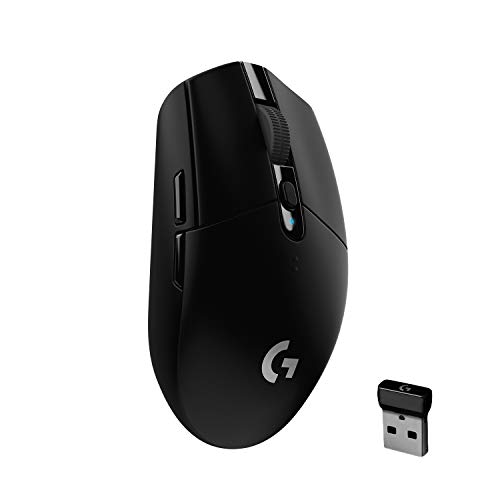
Logitech G304 Lightspeed Wireless Gaming Mouse
Gaming mice compared side by side
How the shortlist stacks up. Scroll sideways on mobile.
| Product | Sensor / DPI | Key Feature | Price | Deal |
|---|---|---|---|---|
| Razer Basilisk V3 | Focus Pro 26K | HyperScroll + 11 RGB Buttons | ₹4,999 | Check Price |
| Logitech G502 Hero | HERO 25K | 11 Buttons + Adjustable Weight | ₹3,995 | Check Price |
| HyperX Pulsefire Haste 2 Core | 26K Sensor | 61g + 100-Hour Battery | ₹4,499 | Check Price |
| Razer Cobra Wired | Focus X 8.5K | 58g + Chroma RGB | ₹2,999 | Check Price |
| Redragon Mammoth M801 | Laser 16.4K | 9 Buttons + Braided Cable | ₹1,299 | Check Price |
| Logitech G304 Lightspeed | HERO 12K | 1ms Wireless + 250hr Battery | ₹2,495 | Check Price |


Gaming mice under ₹5,000: sensor, battery and grip
Specs, the honest pros and cons, and who each one is for.
Razer Basilisk V3 Customizable Ergonomic Wired Gaming Mouse
- Sensor
- Focus Pro 26K Optical
- DPI Range
- 100 - 26,000
- Buttons
- 11 Programmable
- Weight
- 101g
- Connection
- Wired USB
- RGB
- Chroma (11 zones)
The Razer Basilisk V3 is the definitive gaming mouse under ₹5,000 for Indian gamers who want premium performance without compromise. Its Focus Pro 26K optical sensor delivers flawless tracking on virtually any surface including glass, with zero acceleration or smoothing—your aim is translated 1:1 to the screen. The signature HyperScroll Tilt Wheel is a revelation: switch between precise click-to-click scrolling for shooters and free-spinning mode that can scroll through 1000 lines per second for productivity, at the press of a button. With 11 independently programmable Chroma RGB buttons and 5 on-board profiles, you have complete control over every game. The 3rd-generation Razer Optical Mouse Switches are rated for 90 million clicks and register at the speed of light—literally, using an infrared beam instead of physical contacts, so there's zero debounce delay.
- + Premium sensor with 26,000 DPI
- + excellent Chroma RGB customization with 11 programmable buttons. HyperScroll wheel is a joy for MMOs and productivity. Built for right-handed ergonomic comfort with excellent optical switches.
- - Right-hand only design excludes left-handers. Heavier at 101g compared to ultra-light mice. Wired only. Requires Razer Synapse software for full customization.
Logitech G502 Hero High Performance Wired Gaming Mouse
- Sensor
- HERO 25K Optical
- DPI Range
- 100 - 25,600
- Buttons
- 11 Programmable
- Weight
- 121g (adjustable)
- Connection
- Wired USB
- RGB
- Lightsync RGB
The Logitech G502 Hero is one of the most celebrated gaming mice of all time, and it has earned that reputation. The HERO 25K sensor is arguably the most accurate optical sensor ever created—tracking at up to 400 IPS with zero negative acceleration, it has been the choice of professional esports players worldwide. What sets the G502 apart from every competitor is its adjustable weight system: five removable 3.6g weights let you tune the mouse from 121g down to a lighter feel, and you can shift the center of gravity forward, backward, or to the sides. This tactile tuning capability is unique in this price range. The mechanical spring button tensioning system ensures the main clicks feel consistent and snappy throughout the mouse's lifetime—many owners use G502s for 5+ years without degradation. With 11 programmable buttons and 5 on-board profiles via Logitech G Hub, macro configuration for MMOs is unmatched.
- + Industry-famous HERO 25K sensor with zero smoothing. Adjustable weight system lets you tune balance and feel. 11 programmable buttons great for MMOs. Solid build quality with textured rubber grips and onboard memory profiles.
- - Heavy at 121g (even heavier with weights). Not ideal for fast-paced FPS players who prefer lighter mice. Large size may not suit small-handed users. Software required for full features.
HyperX Pulsefire Haste 2 Core Wireless Gaming Mouse
- Sensor
- HyperX 26K Optical
- DPI Range
- 100 - 26,000
- Weight
- 61g (Ultra-light)
- Battery
- 100 Hours
- Connection
- 2.4GHz Wireless + USB-C
- Report Rate
- 2ms (wireless)
The HyperX Pulsefire Haste 2 Core redefines what is possible in wireless gaming mice under ₹5,000. At just 61 grams, it is one of the lightest wireless mice available at any price—the honeycomb-free design still achieves this through precise material optimization. The 100-hour battery life is exceptional: charge it once a week even with heavy daily gaming sessions. The 2.4GHz wireless connection with 2ms report rate is imperceptible in gameplay; you will never feel the difference from a wired mouse. HyperX's 26K optical sensor matches the Basilisk V3 in raw tracking capability, featuring zero jitter, zero smoothing, and accurate tracking up to 50G acceleration. The included HyperFlex 2 USB-C cable allows wired play when battery is low, giving you flexibility no other mouse in this price range offers.
- + Incredible 61g ultra-lightweight design. Outstanding 100-hour battery life. 2.4GHz wireless with 2ms report rate near-zero latency. 26K sensor for pinpoint accuracy. Comes with USB-C cable for wired play option.
- - No RGB lighting (weight savings trade-off). Ambidextrous design may feel bland for ergonomic preference users. Limited button count compared to competitors.
Razer Cobra Wired Gaming Mouse
- Sensor
- Focus X 8500 DPI
- DPI Range
- 100 - 8,500
- Weight
- 58g Lightweight
- Switches
- Gen-3 Optical (90M)
- Connection
- Wired USB
- RGB
- Chroma RGB
The Razer Cobra is the answer for gamers who want a legitimate lightweight FPS mouse from a premium brand under ₹3,000. At just 58 grams, it competes with mice costing twice as much in raw maneuverability. The Gen-3 Razer Optical Mouse Switches—the same technology found in mice three times the price—register clicks at the speed of light with zero debounce delay, giving you a genuine competitive advantage in reaction-sensitive games. The Focus X 8500 DPI optical sensor is more than sufficient for any gaming scenario; professionals typically game at 400-800 DPI regardless of available maximum. The fully symmetrical ambidextrous design suits both right and left-handed players. Razer Chroma RGB adds visual flair that integrates with the wider Chroma ecosystem for synchronized lighting across your entire gaming setup.
- + Excellent 58g lightweight design for fast FPS play. Razer optical switches provide satisfying clicks. Good Chroma RGB. Affordable entry price for a Razer product. Symmetrical design suits both hand orientations.
- - 8500 DPI sensor is less advanced than higher-end models. Smaller mouse may not suit large hands. Only 6 buttons limits MMO suitability.
Redragon Mammoth M801 Wired Laser Gaming Mouse 16400 DPI
- Sensor
- Laser 16400 DPI
- DPI Levels
- 5 Adjustable Levels
- Buttons
- 9 Programmable
- Cable
- Braided + Gold USB
- Connection
- Wired USB
- LED
- 5-Color 7 Modes
The Redragon Mammoth M801 represents extraordinary value for India's budget gaming segment. At under ₹1,300, it offers specifications that were found only in mice costing three times as much five years ago. The 16,400 DPI laser sensor is more DPI than you'll ever realistically use, with 5 adjustable DPI levels letting you find your sweet spot from slow precision to fast sweeping. The 9 programmable buttons—including two side buttons on both left and right—give MMO gamers more macro options than most mice twice the price. The braided cable with gold-plated USB connector is a quality touch that prevents fraying and ensures a stable signal connection. 5-color LED lighting with 7 different lighting modes provides gaming aesthetics. Redragon has built a solid reputation in India for delivering functional, durable budget gaming peripherals that punch above their weight class.
- + Exceptional value at under ₹1,500. High 16400 DPI sensor. 9 programmable buttons. Braided cable for durability. Good for budget-conscious gamers entering the hobby.
- - Laser sensor less accurate than optical sensors on most surfaces. Build quality reflects the budget price. Software is basic. LED lighting not individually addressable RGB.
Logitech G304 Lightspeed Wireless Gaming Mouse
- Sensor
- HERO 12K Optical
- DPI Range
- 200 - 12,000
- Weight
- 99g
- Battery
- 250 Hours (1x AA)
- Connection
- LIGHTSPEED 1ms
- RGB
- No RGB
The Logitech G304 (sold internationally as G305) delivers the world's most proven wireless gaming technology at an unmatched price under ₹2,500. Logitech's LIGHTSPEED wireless technology achieves a 1ms report rate—the same as a wired mouse—making it the only genuinely lag-free wireless gaming mouse in this budget segment. Competing wireless mice in this range use generic 2.4GHz technology with 8ms or higher latency; LIGHTSPEED is categorically different. The HERO sensor provides accurate 12,000 DPI tracking that is entirely sufficient for all gaming scenarios. The most remarkable statistic is the 250-hour battery life on a single AA battery—Logitech's power efficiency engineering is unmatched. The compact, travel-friendly design makes it perfect for LAN parties and travel gaming setups.
- + LIGHTSPEED 1ms wireless is lag-free for competitive gaming. Up to 250 hours battery on 1 AA battery is remarkable. Affordable wireless pricing. Compact and travel-friendly. Trusted Logitech reliability with wide service network in India.
- - 12000 DPI cap is lower than competitors. No RGB lighting keeps it plain. AA battery design adds weight vs rechargeable options. 6 buttons limit MMO usage.
Which gaming mouse under ₹5,000
Here is who each pick is for, based on the comparison above.
Razer Basilisk V3 Customizable Ergonomic Wired Gaming Mouse · ₹4,999
26K DPI sensor with HyperScroll and 11 RGB buttons
Check Price on Amazon →HyperX Pulsefire Haste 2 Core Wireless Gaming Mouse · ₹4,499
61g ultralight with 100-hour battery and 26K sensor
Check Price on Amazon →Logitech G502 Hero High Performance Wired Gaming Mouse · ₹3,995
HERO 25K sensor with 11 buttons and adjustable weights
Check Price on Amazon →Logitech G304 Lightspeed Wireless Gaming Mouse · ₹2,495
LIGHTSPEED 1ms wireless with 250-hour battery life
Check Price on Amazon →See every mouse ranking side by side, from mid-range wired shells to premium wireless flagships and quiet office mice.
Compare every gaming mouse ranking →How to choose a gaming mouse: wired or wireless
-
Wired vs Wireless Gaming Mouse
Wired gaming mice offer zero latency and never need charging - ideal for competitive FPS players. Modern wireless mice with LIGHTSPEED (Logitech) or HyperX 2.4GHz technology achieve 1-2ms report rates that are imperceptible in actual gameplay. Wireless is excellent for comfort and clean desk setups. Under ₹5,000, both options are available - choose wired if you hate charging, wireless if you prefer cable freedom. -
DPI and Sensor Quality
DPI (dots per inch) measures cursor sensitivity. Most gamers use 400-1600 DPI regardless of the sensor's maximum. What matters more is sensor accuracy and tracking surface compatibility. Optical sensors (Razer Focus, Logitech HERO) outperform laser sensors on most surfaces with less negative acceleration. Higher DPI ranges (12K-26K) allow multiple sensitivity profiles for different game types. -
Weight and Ergonomics
Competitive FPS players prefer lightweight mice (under 80g) for fast flick shots - the HyperX Pulsefire Haste 2 Core (61g) and Razer Cobra (58g) excel here. MMO and casual gamers can handle heavier mice (100g+) that offer more buttons and comfortable palm-grip ergonomics. Right-handed ergonomic mice (Razer Basilisk V3, G502) provide superior comfort for all-day use; symmetrical designs suit both hands. -
RGB and Customization
RGB lighting is cosmetic but RGB software like Razer Synapse and Logitech G Hub also provide DPI profiles, button remapping, and macro programming. If you prioritize weight and battery life, go with no-RGB models (HyperX Pulsefire Haste 2 Core). If you want the full gaming setup aesthetic, Razer Chroma with 11 RGB zones (Basilisk V3) or Logitech Lightsync delivers excellent visual integration.
Frequently asked questions
Which is the best gaming mouse under ₹5000 in India?
Is the Logitech G502 Hero good for FPS gaming in India?
Should I buy a wired or wireless gaming mouse under ₹5000?
What DPI should I use for gaming in India?
Is Redragon a good brand for gaming mice in India?
Does the Logitech G304 have the same wireless quality as expensive gaming mice?
What grip style should I use and which mouse suits it?
What is the best wireless gaming mouse under 5000 in India?
You may also like
More guides and reviews to help you decide.
Find the best gaming mice under 1000 in India for 2026. Compare Cosmic Byte & more from ₹549 to ₹999 with Pixart 3327 sensors, ultralight designs.
Read more →6 best gaming mice under ₹2000 in India 2026 — Cosmic Byte Firestorm (PixArt 3327 winner), Logitech G102, Kreo Hawk, Redragon M612 PRO wireless.
Read more →Find the best premium wireless gaming mouse in India 2026. Compare Razer, Logitech & more with research-based reviews, prices & pros and cons.
Read more →Find the best wireless mouse under 1500 in India 2026. Compare HP, Logitech & more with research-based reviews, prices & pros and cons.
Read more →How to choose a mouse in India: why higher DPI is a myth, when 8000Hz polling is wasted, optical vs mechanical switches, and grip by hand size. All sourced.
Read more →Find the best gaming keyboards under 10000 in India for 2026. Compare AULA F75 & more with gasket mount, hot-swap, wireless, QMK/VIA from ₹3,500 to ₹9,486.
Read more →