
PRODUCT REVIEW
Best Monitors Under 10000 in India 2026
We analysed India owner reviews of 12 monitors under ₹10,000. The MSI MAG 255F E20 wins at ₹8,599 with a 24.5-inch 200Hz IPS panel, 100% sRGB and DisplayPort.
 By Naveen Bhavnani
Updated
As an Amazon Associate we earn from qualifying purchases. We could also earn a fee through some links when you click on them.
On this page
Other picks to consider
Already covered the winner above — here are the picks for specific needs.

Lenovo LOQ 24-10 23.8" 200Hz Monitor

BenQ GW2490C 24" 144Hz USB-C Monitor

LG UltraGear 24GS65F 23.8" 180Hz Monitor
Monitors under ₹10,000 side-by-side comparison
How the shortlist stacks up. Scroll sideways on mobile.
| WWCD Score | Product | Screen Size | Panel | Refresh Rate | Colour Gamut | Brightness | Ports | Stand | Speakers | India Reviews (24 mo) | Price | Deal |
|---|---|---|---|---|---|---|---|---|---|---|---|---|
| 7.7/10 | MSI MAG 255F E20 | 24.5in | Rapid IPS | 200Hz | 100% sRGB | 300 nits | HDMI 2.0b, DP 1.2a, audio out | Tilt | None | 102 (12% negative) | ₹8,599 | Check Price |
| 7.6/10 | MSI MAG 245F X24 | 23.8in | Rapid IPS | 240Hz | 112% sRGB | 300 nits | HDMI 2.0b, DP 1.2a | Tilt | None | 5 (0% negative) | ₹9,499 | Check Price |
| 7.6/10 | Lenovo LOQ 24-10 | 23.8in | IPS | 200Hz | 99% sRGB | 300 nits | 2× HDMI 2.1 TMDS, DP 1.4 | Tilt | None | 8 (13% negative) | ₹7,999 | Check Price |
| 7.6/10 | BenQ GW2490C | 23.8in | IPS | 144Hz | 99% sRGB | 250 nits | HDMI, DP, USB-C (no charging) | Tilt | 2W × 2 | 14 (7% negative) | ₹8,750 | Check Price |
| 7.5/10 | MSI PRO MP251 E2 | 24.5in | IPS | 120Hz | 99% sRGB | 300 nits | HDMI 2.0, DP 1.4a, VGA, headphone | Tilt | 2W × 2 | 9 (22% negative) | ₹7,499 | Check Price |
| 7.4/10 | LG UltraGear 24GS65F | 23.8in | IPS | 180Hz | 99% sRGB | 300 nits | HDMI 2.0, DP 1.4, headphone | Height + tilt + pivot | None | 208 (19% negative) | ₹9,799 | Check Price |
| 7.4/10 | Lenovo L24-4C | 23.8in | IPS | 144Hz | 99% sRGB | 250 nits | HDMI, VGA (title says DP) | Tilt | 2 × 3W | 42 (12% negative) | ₹8,399 | Check Price |
| 7.4/10 | Acer RS242Y | 23.8in | IPS | 120Hz | 99% sRGB | Not published | HDMI, VGA, audio out | Tilt | 2W × 2 | 18 (0% negative) | ₹7,628 | Check Price |
| 7.3/10 | MSI PRO MP251 E14L | 24.5in | IPS | 144Hz | 99% sRGB | 300 nits | HDMI 1.4b, VGA | Tilt | None | 13 (15% negative) | ₹6,999 | Check Price |
| 7.3/10 | AOC 24B36H | 23.8in | IPS | 100Hz | 105% (basis not stated) | 300 nits | HDMI, VGA | Not stated | None | 5 (20% negative) | ₹6,999 | Check Price |
| 7.3/10 | MSI PRO MP253 | 24.5in | IPS | 100Hz | 100% sRGB | 300 nits | HDMI 1.4, DP 1.2a, VGA, headphone | Tilt | 3W × 2 | 4 (0% negative) | ₹7,599 | Check Price |
| 7.3/10 | Lenovo LOQ 27-10 | 27in | IPS | 200Hz | 99% sRGB | 300 nits | 2× HDMI 2.1 TMDS, DP 1.4 | Tilt | None | 12 (8% negative) | ₹9,499 | Check Price |


Monitor reviews: panel, Hz and ports
Specs, the honest pros and cons, and who each one is for.
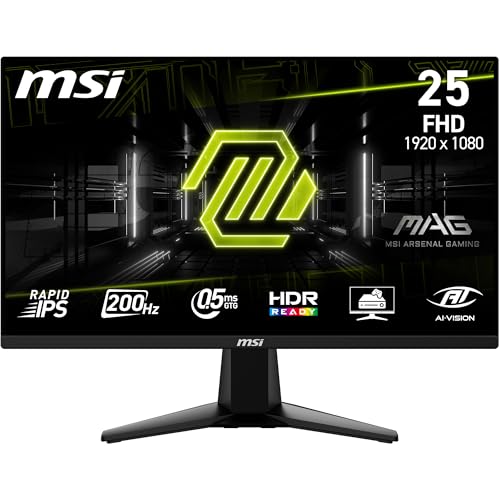
MSI MAG 255F E20 24.5" 200Hz Monitor
A 200Hz Rapid IPS panel with the deepest, cleanest India review record in the field
- Screen
- 24.5-inch FHD
- Panel
- Rapid IPS
- Refresh Rate
- 200Hz
- Colour
- 100% sRGB
- Brightness
- 300 nits
- Ports
- HDMI 2.0b, DP 1.2a, audio out
- Stand
- Tilt only
- VESA
- 75×75
- Warranty
- 3 years
The best all-rounder under ₹10,000. It has a sharp 24.5-inch Rapid IPS panel, 200Hz, DisplayPort and 100% sRGB. 102 verified India owners average 4.38 stars, with only 12% at 1-2 stars. The risk is the usual IPS panel lottery: a handful of buyers got backlight bleed or stuck pixels.
- + 102 verified India reviews in 14 months averaging 4.38 stars
- + 24.5-inch Rapid IPS is the sweet spot for 1080p sharpness
- + 200Hz makes scrolling visibly smoother than 100Hz office panels
- + 100% sRGB and 300 nits put it among the brightest here
- + DisplayPort 1.2a plus HDMI 2.0b and an audio-out jack
- + VESA 75×75 mount for a monitor arm
- - Backlight bleed and stuck pixels on arrival in 5+ India reviews
- - Tilt-only stand with no height adjustment
- - Several buyers struggled to get a panel-defect replacement
- - No built-in speakers
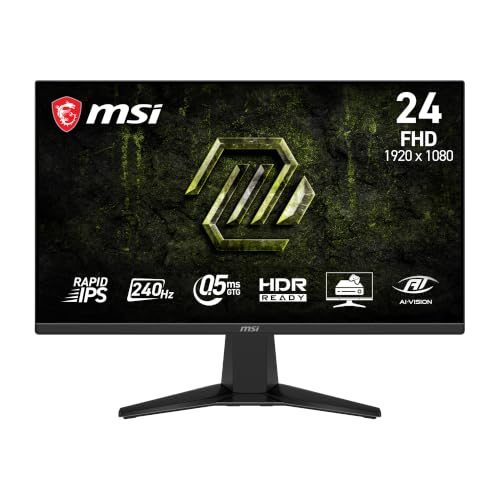
MSI MAG 245F X24 23.8" 240Hz Monitor
240Hz Rapid IPS for the same money as most 144Hz panels — but barely reviewed in India yet
- Screen
- 23.8-inch FHD
- Panel
- Rapid IPS
- Refresh Rate
- 240Hz
- Colour
- 112% sRGB
- Brightness
- 300 nits
- Ports
- HDMI 2.0b, DP 1.2a
- Stand
- Tilt only
- VESA
- Yes
- Warranty
- 3 years
The fastest panel on this list, and every India owner so far is delighted. There are only five of them, though. Its specs earn its rank, but treat it as promising rather than proven.
- + 240Hz Rapid IPS is the highest refresh rate on this list
- + 112% sRGB claimed with 300 nits brightness
- + DisplayPort 1.2a and HDMI 2.0b
- + All 5 verified India owners rate it 5 stars
- + VESA mount support
- - Only 5 verified India reviews so reliability is unproven
- - 240Hz is wasted on office work
- - Tilt-only stand
- - No speakers
- - Its own India reviews only start in June 2026 though the listing is older
Lenovo LOQ 24-10 23.8" 200Hz Monitor
200Hz IPS with two HDMI 2.1 ports and DisplayPort at under ₹8,000
- Screen
- 23.8-inch FHD
- Panel
- IPS
- Refresh Rate
- 200Hz
- Colour
- 99% sRGB
- Brightness
- 300 nits
- Ports
- 2× HDMI 2.1 (TMDS), DP 1.4
- Stand
- Tilt only
- HDR
- HDR10
- Warranty
- 3 years
Remarkable connectivity and refresh rate for ₹7,999. The first eight Indian owners are mostly happy. It is a very new listing, so its reliability record is still being written.
- + 200Hz IPS at ₹7,999 is the cheapest 200Hz option here
- + Two HDMI 2.1 (TMDS) ports plus DisplayPort 1.4 for console and PC
- + 99% sRGB and 300 nits
- + Owners praise its comfort for long coding and office sessions
- - Only 8 verified India reviews so it is unproven
- - One buyer reports mild screen bleed and one got a defective unit
- - Low tilt-only stand
- - No VESA mount stated on the listing
- - No speakers
BenQ GW2490C 24" 144Hz USB-C Monitor
The only pick with a USB-C video input — plug a laptop in with one cable
- Screen
- 23.8-inch FHD
- Panel
- IPS
- Refresh Rate
- 144Hz
- Colour
- 99% sRGB
- Contrast
- 1500:1
- Ports
- HDMI, DP, USB-C (video + data)
- Stand
- Tilt only
- Speakers
- 2W × 2
- Warranty
- 3 years
If you work from a laptop, the USB-C input is a convenience no other monitor here offers. It carries video only and will not charge your laptop. Picture, speakers and eye-care features are solid, but the India review base is still small.
- + USB-C input with DisplayPort Alt Mode for single-cable video from a compatible laptop
- + HDMI and DisplayPort as well
- + 144Hz IPS with 99% sRGB and 1500:1 contrast
- + 2W × 2 speakers
- + TÜV-certified flicker-free and low blue light
- + VESA 100×100
- - USB-C does not deliver power so your laptop still needs its charger
- - Only 14 verified India reviews
- - Tilt-only stand
- - One report of an audible hiss from the board
- - 5ms response is slower than the gaming panels
MSI PRO MP251 E2 24.5" 120Hz Monitor
A 24.5-inch office panel with DisplayPort 1.4, VGA and speakers
- Screen
- 24.5-inch FHD
- Panel
- IPS
- Refresh Rate
- 120Hz
- Colour
- 99% sRGB
- Brightness
- 300 nits
- Contrast
- 1500:1
- Ports
- HDMI 2.0, DP 1.4a, VGA, headphone
- Speakers
- 2W × 2
- Warranty
- 3 years
A well-equipped office monitor with a bright 24.5-inch IPS panel. It has every common input, including DisplayPort 1.4, plus usable speakers. Nine India reviews are mostly positive, but two complain about dull colour.
- + 24.5-inch IPS with 300 nits and 1500:1 contrast
- + HDMI 2.0 plus DisplayPort 1.4a and VGA with a headphone jack
- + 2W × 2 speakers that owners call decent
- + 120Hz refresh
- + TÜV Eye Comfort certified
- - Only 9 verified India reviews so it is unproven
- - 2 of 9 India reviewers found colours dull or whites off
- - Tilt-only stand
- - 120Hz rather than 144Hz or more
LG UltraGear 24GS65F 23.8" 180Hz Monitor
The only stand here that raises, lowers and rotates to portrait — with 180Hz IPS
- Screen
- 23.8-inch FHD
- Panel
- IPS
- Refresh Rate
- 180Hz
- Colour
- 99% sRGB
- Brightness
- 300 nits
- Ports
- HDMI 2.0, DP 1.4, headphone
- Stand
- Height, tilt, pivot
- VESA
- 100×100
- Warranty
- 3 years
The only monitor here with a height-adjustable, pivoting stand. That matters more for all-day comfort than any panel spec. The catch is reliability: 19% of recent India reviews are 1-2 stars. Several report vertical or green lines appearing within months.
- + Height and tilt and pivot adjustable stand is unique in this budget
- + 180Hz IPS with 99% sRGB and 300 nits
- + DisplayPort 1.4 and HDMI with headphone out
- + VESA 100×100
- + 208 verified India reviews in 24 months
- - 19% of the last 100 verified India reviews are 1-2 stars
- - Vertical or green lines appearing after 1-8 months in 5+ India reviews
- - Several buyers report slow LG service and refused dead-pixel replacements
- - Most expensive pick at ₹9,799
- - No speakers
Lenovo L24-4C 24" 144Hz Monitor
A 144Hz IPS all-rounder with louder-than-usual 3W speakers
- Screen
- 23.8-inch FHD
- Panel
- IPS
- Refresh Rate
- 144Hz
- Colour
- 99% sRGB
- Contrast
- 1500:1
- Ports
- HDMI, VGA (title says DP)
- Stand
- Tilt only
- Speakers
- 2 × 3W
- Warranty
- 3 years
A dependable-looking 144Hz IPS monitor. Its 42 recent India reviews are only 12% negative. Treat the listing's DisplayPort claim with caution, because the spec table says HDMI and VGA.
- + 42 verified India reviews since December 2025 averaging 4.43 stars
- + 144Hz IPS with 99% sRGB and 1500:1 contrast
- + 2 × 3W speakers are the most powerful here
- + Eyesafe low-blue-light panel
- + VESA mount
- - Title claims DisplayPort but the spec table lists only HDMI and VGA
- - A few reports of speakers not working
- - One unit died at 5 months with poor Lenovo service
- - Tilt-only stand
Acer RS242Y 23.8" 120Hz Monitor
Every one of 18 verified India owners rates it 4 or 5 stars
- Screen
- 23.8-inch FHD
- Panel
- IPS
- Refresh Rate
- 120Hz
- Colour
- 99% sRGB
- Brightness
- Not published
- Ports
- HDMI, VGA, audio out
- Speakers
- 2W × 2
- Design
- 6.9mm slim body
- Warranty
- 3 years
The cleanest owner record on this list: 18 of 18 recent India reviewers give it 4 or 5 stars. Weak speakers are the only complaint. It is a straightforward 120Hz IPS office monitor with a stylish slim build.
- + 18 verified India reviews all at 4-5 stars with no 1-2 star reviews
- + Slim 6.9mm design with a patterned mood-light back
- + 120Hz IPS with 99% sRGB
- + 2W × 2 speakers and audio out
- + VESA wall-mount support
- - 18 reviews is still a modest base
- - Several owners call the speakers weak
- - HDMI and VGA only with no DisplayPort
- - Brightness not published on the listing
- - Tilt-only stand
MSI PRO MP251 E14L 24.5" 144Hz Monitor
24.5-inch 144Hz IPS at ₹6,999 with excellent colour
- Screen
- 24.5-inch FHD
- Panel
- IPS
- Refresh Rate
- 144Hz
- Colour
- 99% sRGB
- Brightness
- 300 nits
- Contrast
- 1500:1
- Ports
- HDMI 1.4b, VGA
- Stand
- Tilt only
- Warranty
- 3 years
One of the best pictures per rupee here: a 24.5-inch 144Hz IPS at ₹6,999. The stand wobbles, though. Its 13 India reviews are not enough to call it proven, and stock was limited when we checked.
- + 24.5-inch IPS with 300 nits and 99% sRGB
- + 144Hz refresh at ₹6,999
- + TÜV Eye Comfort certified
- + VESA mount for an arm
- - Only 13 verified India reviews so it is unproven
- - Several owners say the stand wobbles
- - HDMI 1.4 and VGA only with no DisplayPort
- - Some listing images imply speakers the model does not have
AOC 24B36H 23.8" 100Hz Monitor
A plain 100Hz IPS office monitor with a 3-year on-site warranty
- Screen
- 23.8-inch FHD
- Panel
- IPS
- Refresh Rate
- 100Hz
- Colour
- 105% (basis not stated)
- Brightness
- 300 nits
- Ports
- HDMI, VGA
- Speakers
- None
- Warranty
- 3 years on-site
The only pick whose listing promises on-site warranty service. That is a real advantage for a fragile panel that is heavy to carry to a service centre. Picture specs are good, but the India evidence is minimal.
- + 3-year on-site warranty stated on the listing
- + 300-nit IPS panel
- + 100Hz with 1ms response
- + Flicker-free with a low-blue mode
- - Only 5 verified India reviews so it is unproven
- - One buyer received no warranty card
- - Contrast and colour-space basis not published
- - HDMI and VGA only
- - No VESA or stand adjustment stated
MSI PRO MP253 24.5" 100Hz Monitor
24.5-inch office IPS with DisplayPort, VGA and 3W speakers
- Screen
- 24.5-inch FHD
- Panel
- IPS
- Refresh Rate
- 100Hz
- Colour
- 100% sRGB
- Brightness
- 300 nits
- Ports
- HDMI 1.4, DP 1.2a, VGA, headphone
- Stand
- Tilt only
- Speakers
- 3W × 2
- Warranty
- 3 years
A capable office monitor with every input you might need. The bright 24.5-inch IPS panel scores well on picture. Only four India buyers have reviewed it so far.
- + 24.5-inch IPS with 300 nits and 100% sRGB
- + HDMI plus DisplayPort 1.2a and VGA with headphone out
- + 3W × 2 speakers
- + TÜV Eye Comfort certified
- + VESA mount
- - Only 4 verified India reviews so it is unproven
- - Owners say the speakers are very quiet
- - 100Hz only
- - Tilt-only stand
Lenovo LOQ 27-10 27" 200Hz Monitor
A 27-inch 200Hz IPS with two HDMI 2.1 ports and DisplayPort
- Screen
- 27-inch FHD
- Panel
- IPS
- Refresh Rate
- 200Hz
- Colour
- 99% sRGB
- Brightness
- 300 nits
- Ports
- 2× HDMI 2.1 (TMDS), DP 1.4
- Stand
- Tilt only
- HDR
- HDR10
- Warranty
- 3 years
The only 27-inch monitor that made the list: big, smooth and well connected for ₹9,499. Remember that 1080p on 27 inches looks softer for text than on 24 inches. Its 12 India reviews are encouraging but young.
- + 27-inch screen is the largest on this list
- + 200Hz IPS with 99% sRGB and 300 nits
- + Two HDMI 2.1 (TMDS) ports plus DisplayPort 1.4
- + Recent owners praise the build quality
- - 1080p at 27 inches (about 81 PPI) makes text softer than on a 24-inch
- - Only 12 verified India reviews so it is unproven
- - One unit arrived damaged
- - Tilt-only stand with no VESA stated
Which monitor to buy under ₹10,000
A pick earns its place here on panel sharpness, ports, and what verified India owners report after months of use. If you'd rather skip the full comparison, these are the two worth choosing between.
For most people, buy the MSI MAG 255F E20 (₹8,599). It pairs a 24.5-inch 200Hz Rapid IPS panel with 100% sRGB, 300 nits and DisplayPort. Its 102 recent India reviews average 4.38 stars, the deepest record here. The stand only tilts, so check the panel for bleed on day one.
Check Price on Amazon →Want to spend less and keep 200Hz? Get the Lenovo LOQ 24-10 (₹7,999). It adds a second HDMI 2.1 port and DisplayPort 1.4, which suits a console plus a PC. The trade-off is evidence: only eight India owners have reviewed it so far.
Check Price on Amazon →Our monitor roundup explains when refresh rate, resolution or panel type is worth paying for, then ranks panels up to QHD and OLED.
Compare monitors at every budget →Choosing a monitor under ₹10,000
-
Pick 24 inches unless you sit far back
Every monitor under ₹10,000 in 2026 is 1080p. At that resolution, a 24-inch screen looks much sharper than a 27-inch one.
- 23.8-24.5 inches. About 90-92 pixels per inch, which keeps text crisp at desk distance.
- 27 inches. About 81 pixels per inch, so text looks visibly softer. The pixel density formula shows why the same pixels spread wider.
- 21.5-22 inches. Sharp, but small for side-by-side windows.
Choose 27 inches only for films and games, or if you sit further back.
-
Refresh Rate: 100Hz vs 144Hz vs 180Hz vs 200Hz
100Hz is the new floor and costs no more than 60Hz once did. Higher rates matter mainly for gaming.
- 100-120Hz. Visibly smoother scrolling and cursor movement for office work.
- 144-200Hz. Real headroom for games. The 200Hz picks here start at ₹7,999.
- Cables matter. VGA tops out at 60Hz. Use HDMI or DisplayPort for the full rate.
- Check Windows. It sometimes defaults to 60Hz until you change it in Display settings.
For 240Hz or a sharper 27-inch QHD panel, see our best gaming monitors under ₹20,000.
-
Panel Type: IPS Dominates Budget Segment
Every pick on this list uses an IPS panel. At this price it is the safer default.
- IPS for colour. IPS technology was designed to fix poor viewing angles and colour shift. Colour stays consistent from any seat.
- VA for contrast. VA panels show deeper blacks (3000:1+) and suit dark-room films.
- The VA trade-off. Colours shift at angles, and fast motion can smear.
Our best monitors in India guide explains when refresh rate, resolution or panel type matters most.
-
Check the ports against your laptop
Most budget monitors have only HDMI and VGA. Match the inputs to what your computer actually has.
- USB-C-only laptops. The BenQ GW2490C is the only USB-C monitor here. It uses DisplayPort Alt Mode over USB-C for video.
- No charging. The BenQ carries video and data only, so your laptop still needs its charger.
- The alternative. Budget for a USB-C-to-HDMI adapter.
- DisplayPort. Useful for high refresh rates on a desktop PC.
-
Eye Care Technology Comparison
Eye-care labels vary more than they look. Only some picks carry a third-party certificate.
- TÜV certified. BenQ GW2490C, plus the MSI PRO MP251 E2, MP251 E14L and MP253.
- Eyesafe panel. The Lenovo L24-4C lowers blue light in the panel itself.
- No certificate. The LG, Acer and AOC picks list flicker-free modes without a named certification.
For long workdays, screen size and brightness settings matter as much as any badge.
-
Gaming Features: FreeSync and Response Time
Every gaming pick here supports AMD FreeSync, which removes screen tearing. Read the response-time figure with care.
- "1ms" is usually MPRT. MPRT, VRB and MBR modes strobe the backlight. They often cost brightness.
- GtG is pixel speed. A Blur Busters motion test shows MPRT and GtG measure different things.
- Real figures. Budget GtG is often 4-8ms, listed in small print.
For office work, neither number matters much.
-
Ergonomics and Stand Quality
The LG UltraGear 24GS65F is the only pick with a height and pivot stand. Every other model here only tilts.
- Use a monitor arm. Most picks support the VESA mounting standard, at 75×75 or 100×100 mm.
- Check first. The two Lenovo LOQ models and the AOC do not state VESA support on the listing.
- Wobble. Several MSI PRO MP251 E14L owners say its stand wobbles.
-
Inspect the panel on day one
The most common complaint across every brand is a panel defect on arrival. Check for it inside the return window.
- What to look for. Corner backlight bleed, dead or stuck pixels, or a line across the screen.
- How to check. Show a full black, then a full white screen in a dim room.
- Bleed does not settle. It comes from uneven panel pressure and rarely improves with time.
Several Indian buyers report that brands treat a few dead pixels as within tolerance once the return window closes.
-
Warranty and Service Network
Every monitor here carries a 3-year warranty. How service happens is the real difference.
- On-site. The AOC 24B36H is the only pick whose listing states on-site service.
- Carry-in. Others usually mean taking a fragile panel to a service centre.
- Rejected claims. Several Acer and LG owners report lines rejected as "physical damage".
Keep the box, and photograph the screen when it arrives.
Frequently asked questions
What is the best monitors under 10000 in India?
Which is the best gaming monitor under ₹10,000 in India?
Which monitor is best for office work and eye care?
Is 100Hz enough for gaming?
Do I need a monitor with built-in speakers?
Which brand has the best warranty and service?
What is IPS panel and why is it better?
Can I get a 2K/QHD monitor under ₹10,000?
Will a USB-C monitor charge my laptop?
Is a gaming monitor fine for office work?
Why does my new 144Hz monitor show only 60Hz?
Some monitors ship with a 16A plug — is that a problem?
Why are some monitors ranked high with very few reviews?
Sources & References
- Pixel density Wikipedia The pixels-per-inch calculation behind the 24-inch versus 27-inch sharpness gap: about 92 PPI at 23.8 inches and 81 PPI at 27 inches for 1080p.
- IPS panel Wikipedia Establishes that IPS was designed to fix the poor viewing angles and colour reproduction of earlier TN LCDs.
- VESA Brings DisplayPort to New USB Type-C Connector Video Electronics Standards Association · 2014 Announces the DisplayPort Alt Mode standard that lets a USB-C cable carry full DisplayPort video, the mechanism the BenQ GW2490C's USB-C input uses.
- TestUFO: Compare (GtG+MPRT) versus MPRT Blur Busters A motion test showing that GtG (pixel transition time) and MPRT (pixel visibility time) are different measurements, so a "1ms MPRT" claim is not pixel speed.
- Flat Display Mounting Interface Wikipedia Documents the VESA mounting standard, including the 75 mm and 100 mm hole patterns used by the monitors here.
You may also like
More guides and reviews to help you decide.
The best portable monitors for laptops in India for 2026, compared on resolution, colour, USB-C single-cable use and India warranty — from ₹6,598 to ₹18,990.
Read more →Best gaming monitors under ₹1,00,000 in India 2026: 14 QD-OLED, WOLED, 4K, ultrawide and IPS picks compared on refresh rate, HDMI 2.1 and burn-in warranty.
Read more →The best gaming monitors under ₹20,000 in India 2026 — LG 27GS60QC curved QHD 180Hz, BenQ EW270Q, Lenovo Legion 240Hz, MSI MAG 255F & more.
Read more →Best gaming monitors under ₹50,000 in India 2026. Samsung, ViewSonic, Lenovo, BenQ, MSI, LG, AOC compared on refresh rate, panel type, resolution.
Read more →Find the best studio monitor under 15000 in India 2026. Compare JBL & more with research-based reviews, prices & pros and cons.
Read more →Find the best usb-c docking station in India 2026. Compare Dell, Lenovo, Portronics, Anker with research-based reviews, prices, pros & cons.
Read more →