
PRODUCT REVIEW
Best Webcams in India 2026
Find the best webcam in India 2026. Research-based reviews with detailed comparisons, prices, pros & cons to help you pick the right one.
 By Naveen Bhavnani
Updated
By Naveen Bhavnani
Updated
As an Amazon Associate we earn from qualifying purchases. We could also earn a fee through some links when you click on them.
Webcam picks by budget and USB-C
Already covered the winner above — here are the picks for specific needs.

EMEET C960 1080P


Dell UltraSharp WB7022 4K
Webcams compared on FOV and 4K
How the shortlist stacks up. Scroll sideways on mobile.
| Webcam | Resolution | FOV | Key Feature | Best For | Price | Deal |
|---|---|---|---|---|---|---|
| Logitech C920 HD Pro | 1080p/30fps | 78° | RightLight 2 + Autofocus | Best Overall | ₹7,995 | Check Price |
| Logitech Brio 300 | 1080p/30fps | 70° | USB-C + Privacy Shutter | Modern Laptops | ₹5,946 | Check Price |
| EMEET C960 1080P | 1080p/30fps | 90° | Wide Angle + Privacy Cover | Best Value | ₹2,995 | Check Price |
| Logitech MX Brio 4K | 4K/30fps, 1080p/60fps | 90° | Sony Sensor + Show Mode | Content Creators | ₹19,995 | Check Price |
| Dell UltraSharp WB7022 | 4K UHD | 90° | AI Auto-Framing + HDR | Best Premium | ₹14,691 | Check Price |
| Creative Sync 1080p V2 | 1080p/30fps | 77° | Auto Mute + Long Cable | Budget Alternative | ₹3,999 | Check Price |
| Logitech C270 HD | 720p/30fps | 60° | RightLight 2 + Compact | Ultra Budget | ₹2,095 | Check Price |
Webcam reviews: 4K, low light and FOV
Specs, the honest pros and cons, and who each one is for.
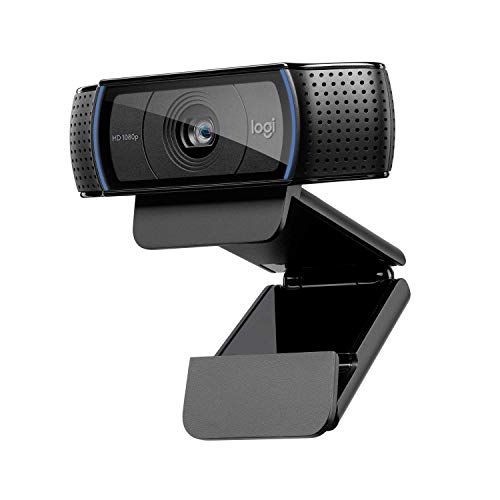
Logitech C920 HD Pro
- ● Full HD 1080p/30fps Video
- ● 78° Diagonal Field of View
- ● Dual Built-in Microphones
- ● RightLight 2 Technology
- ● 5-Element Glass Lens with Autofocus
- ● Works with Zoom, Teams, Meet
- + Crystal clear Full HD video
- + excellent low-light with RightLight 2
- + reliable autofocus
- + dual mics with noise reduction
- + plug-and-play
- + trusted Logitech quality
- + 2-year warranty
- - No privacy shutter included
- - USB-A only (no USB-C)
- - 78° FOV may be narrow for groups
Logitech Brio 300
- ● Full HD 1080p Resolution
- ● USB-C Connectivity
- ● Built-in Privacy Shutter
- ● RightLight 2 Auto Light Correction
- ● Noise Reduction Microphone
- ● Certified for Zoom, Teams, Meet
- + Modern USB-C connection
- + physical privacy shutter
- + compact design
- + auto light correction
- + certified for all platforms
- + eco-friendly 48% recycled plastic
- - Mono mic (not dual)
- - some users report grainy image in low light
- - no autofocus
- - fixed focus only
EMEET C960 1080P
- ● Full HD 1080p Resolution
- ● 90° Wide-Angle View
- ● Dual Omnidirectional Microphones
- ● Privacy Cover Included
- ● Plug & Play USB Connection
- ● Auto Light Correction
- + Excellent budget pricing under 3K
- + wide 90° FOV for groups
- + privacy cover included
- + dual noise-canceling mics
- + plug-and-play
- + solid build quality
- - Requires good lighting for best results
- - basic autofocus
- - no USB-C option
- - fixed focal length
Logitech MX Brio 4K
- ● 4K Ultra HD at 30fps / 1080p at 60fps
- ● Large Sony Sensor with 70% Bigger Pixels
- ● AI-Enhanced Low Light Performance
- ● Dual Noise-Reducing Microphones
- ● Show Mode for Desk Sharing
- ● USB-C with Privacy Cover
- + Stunning 4K quality
- + exceptional low-light with larger sensor
- + smooth 1080p/60fps
- + Show Mode for presentations
- + USB-C
- + free Adobe subscription included
- - Premium pricing
- - 4K not utilized on most video platforms
- - may be overkill for basic calls
Dell UltraSharp WB7022 4K
- ● 4K UHD Sony STARVIS Sensor
- ● AI Auto-Framing Technology
- ● Digital Overlap HDR
- ● Dell ExpressSign-In (IR Sensor)
- ● Video Noise Reduction
- ● Exceptional Low-Light Performance
- + Best-in-class 4K with Sony STARVIS sensor
- + phenomenal low-light
- + AI auto-framing keeps you centered
- + privacy shutter
- + premium aluminum build
- + 3-year warranty
- - Highest price point
- - no built-in mic (external required)
- - heavy design
- - limited software support
Creative Live! Cam Sync 1080p V2
- ● Full HD 1080p Wide-Angle
- ● Dual Built-in Microphones
- ● Auto Mute & Noise Cancellation
- ● Privacy Lens Cap Included
- ● Universal Tripod Mount
- ● 1.8m Long Cable
- + Very affordable under 3K
- + good video quality
- + wide-angle view
- + privacy lens cover
- + long 1.8m cable
- + noise cancellation feature
- - Wide angle shows too much background
- - mic quality not ideal for professional calls
- - needs adequate lighting
Logitech C270 HD
- ● 720p HD Video Quality
- ● RightLight 2 Technology
- ● Built-in Noise-Reducing Mic
- ● Universal Clip Mount
- ● Widescreen Format
- ● Fixed Focus Design
- + Best budget option under 2K
- + RightLight 2 adjusts to lighting
- + clear voice capture
- + plug-and-play
- + compact and portable
- + reliable Logitech
- - Only 720p not Full HD
- - fixed focus
- - basic single mic
- - no privacy shutter
- - limited FOV
Which webcam to buy
Here is who each pick is for, based on the comparison above.
Logitech C920 HD Pro · ₹7,995
1080p, RightLight 2, dual mics, autofocus
Check Price on Amazon →EMEET C960 1080P · ₹2,995
1080p, 90° wide angle, privacy cover, dual mics
Check Price on Amazon →Logitech Brio 300 · ₹5,946
USB-C native, privacy shutter, compact design
Check Price on Amazon →Dell UltraSharp WB7022 4K · ₹14,691
4K Sony STARVIS, AI auto-framing, HDR
Check Price on Amazon →Separate rankings cover budget, mid-range and premium webcams, plus a WFH shortlist. Pair any of them with a USB mic.
Browse webcams by budget and use →How to choose a webcam
-
Resolution Comparison: 720p vs 1080p vs 4K
720p HD (1280×720) is adequate for basic video calls but shows less detail. 1080p Full HD (1920×1080) is the sweet spot for most users - sharp, professional-looking video that works across all platforms. 4K Ultra HD (3840×2160) provides exceptional clarity with larger sensors for better low-light, but most platforms limit to 1080p anyway. For WFH, 1080p offers the best balance of quality and value. -
Low-Light Performance Matters
Low-light performance is crucial for home offices. Look for webcams with larger sensors (Sony STARVIS in Dell WB7022), RightLight technology (Logitech), or AI enhancement (MX Brio). These adjust exposure automatically for clear images in dim rooms. Budget webcams struggle without good lighting - invest in a desk lamp if using entry-level models. -
USB-C vs USB-A Connectivity
Newer webcams like Logitech Brio 300 and MX Brio feature USB-C for modern laptops. USB-C offers faster data transfer and future-proof connectivity. Older models (C920, C270) use USB-A but adapters are available for ₹200-300. Check your laptop ports before buying. -
Privacy Shutters Are Essential
Physical privacy covers (Brio 300, EMEET C960, Creative Sync, Dell WB7022) mechanically block the lens when not in use - protection against hacking and accidental activation. If your webcam lacks one, purchase adhesive covers or simply use tape. Never rely on software alone for camera privacy. -
Field of View (FOV) Guide
70-78° FOV suits individual users in small spaces. 78-90° FOV is ideal for small groups or showing more background. 90°+ wide-angle accommodates multiple people but reveals more room - clean your background! Most WFH users prefer 78-90° as the sweet spot. -
Autofocus vs Fixed Focus
Autofocus webcams (C920, MX Brio, Dell WB7022) adjust automatically as you move - ideal for presentations with physical objects. Fixed focus (C270, Brio 300, EMEET) works well for stationary desk work at consistent distance. For standard video calls, fixed focus is adequate and cheaper.
Frequently asked questions
Which is the best webcam for work from home in India?
Is 1080p webcam enough for Zoom and Microsoft Teams?
Do I need an external microphone or is webcam mic sufficient?
Which webcam works best in low light without ring light?
What field of view (FOV) do I need for video calls?
Is autofocus necessary or is fixed focus fine?
Do these webcams work on both Windows and Mac?
How do I improve webcam image quality without buying expensive models?
Which brand has the best service and warranty in India?
You may also like
More guides and reviews to help you decide.
Find the best webcam under 6000 in India 2026. Compare Logitech & more with research-based reviews, prices & pros and cons.
Read more →Find the best webcam under 10000 in India 2026. Compare Logitech, Anker & more with research-based reviews, prices & pros and cons.
Read more →Find the best webcam under 3000 in India 2026. Compare Lenovo, Logitech & more with research-based reviews, prices & pros and cons.
Read more →Find the best webcam for work from home in India 2026. Compare Lenovo, Logitech & more with research-based reviews, prices & pros and cons.
Read more →Complete webcam buying guide for India: Find the perfect camera for video calls, work from home, streaming & content creation. Compare resolution, features &.
Read more →Find the best usb microphone for podcasting in India 2026. Research-based reviews with detailed comparisons, prices, pros & cons to help you pick the right one.
Read more →