
PRODUCT REVIEW
Best Webcams for Work From Home in India 2026
Find the best webcam for work from home in India 2026. Compare Lenovo, Logitech & more with research-based reviews, prices & pros and cons.
 By Naveen Bhavnani
Updated
By Naveen Bhavnani
Updated
As an Amazon Associate we earn from qualifying purchases. We could also earn a fee through some links when you click on them.

On this page
Webcam picks for every WFH budget
Already covered the winner above — here are the picks for specific needs.


Logitech Brio 100 Full HD Webcam

WFH webcams compared side by side
How the shortlist stacks up. Scroll sideways on mobile.
| WWCD Score | Product | Key Feature | Price | Deal |
|---|---|---|---|---|
| 9.0/10 | Logitech C920 HD Pro | Carl Zeiss optics | ₹7,915 | Check Price |
| 8.8/10 | Lenovo 300 FHD | 95° FOV, best value | ₹2,499 | Check Price |
| 8.7/10 | Kreo Owl 4K PRO | IMX260, touch controls | ₹5,999 | Check Price |
| 8.6/10 | eMeet S600 4K | Sony sensor, 60fps | ₹5,799 | Check Price |
| 8.5/10 | Logitech Brio 100 | Auto-light balance | ₹2,995 | Check Price |
| 8.2/10 | eMeet C950 4K | Budget 4K, PDAF | ₹3,499 | Check Price |
| 8.0/10 | Zebronics Pure Plus 4K | Cheapest 4K | ₹2,199 | Check Price |
| 7.8/10 | Logitech C270 HD | Budget Logitech | ₹1,999 | Check Price |


Webcam reviews for WFH: mic, FOV and lighting
Specs, the honest pros and cons, and who each one is for.
Logitech C920 HD Pro Webcam
- Resolution
- 1080p Full HD @ 30 FPS
- Optics
- Carl Zeiss Glass Lens
- Microphone
- Dual Stereo Microphones
- Light Correction
- RightLight 2 HD
- FOV
- 78° Diagonal
- Compression
- H.264 Video
The Logitech C920 HD Pro is the undisputed industry standard for professional webcams. With Carl Zeiss glass optics, dual stereo microphones, and RightLight 2 HD auto light correction, it delivers exceptional 1080p quality in all conditions. Used by professionals, streamers, and corporations worldwide for over a decade. While it lacks 4K or 60fps, its proven reliability and excellent low-light performance justify the premium price.
- + Industry standard for professionals
- + Carl Zeiss optics
- + dual stereo mics
- + excellent low-light performance
- + proven reliability
- + widely compatible
- - Premium price
- - no 4K or 60fps
- - no privacy shutter
- - older model (still excellent)
- - limited FOV adjustment
Lenovo 300 FHD Webcam
- Resolution
- 1080p FHD @ 30 FPS
- Sensor
- 2.1 MP CMOS
- FOV
- Ultra-Wide 95°
- Microphone
- Full Stereo Dual Mics
- Zoom
- 4X Digital Zoom
- Rotation
- 360° with Flexible Mount
The Lenovo 300 FHD is our Best Value pick for 2026. At ₹2,499 (50% off), it packs an ultra-wide 95° lens, full stereo dual microphones, 4X digital zoom, and 360° rotation - features typically found in webcams costing twice as much. The wide FOV is perfect for workspace demonstrations or showing multiple people. Users praise its versatility for online teaching, product demos, and family video calls.
- + Best value overall
- + ultra-wide 95° FOV
- + dual stereo microphones
- + 4X zoom
- + flexible mounting
- + excellent feature set for price
- - Lower color accuracy in dim lighting
- - plastic build quality
- - no privacy shutter
- - occasional autofocus hunting
Kreo Owl 4K PRO Webcam
- Resolution
- 4K @ 30FPS, 1080p @ 60FPS
- Sensor
- IMX260 Professional Sensor
- Controls
- Touch Controls on Body
- Autofocus
- PDAF (Phase Detection)
- FOV
- 77° Wide-Angle
- Microphone
- Dual Stereo Microphones
The Kreo Owl 4K PRO stands out with innovative touch controls on the camera body - adjust brightness or zoom levels without touching your computer. The IMX260 professional sensor delivers excellent image quality, while PDAF autofocus keeps you sharp during movement. As an Indian brand, Kreo offers competitive specs with unique features. The magnetic privacy cover is a nice touch for security.
- + IMX260 professional sensor
- + 60fps at 1080p
- + touch controls
- + Indian brand
- + privacy shutter
- + good build quality
- - Newer brand with limited reviews
- - touch controls may be gimmicky
- - software features unproven
- - higher price than competitors
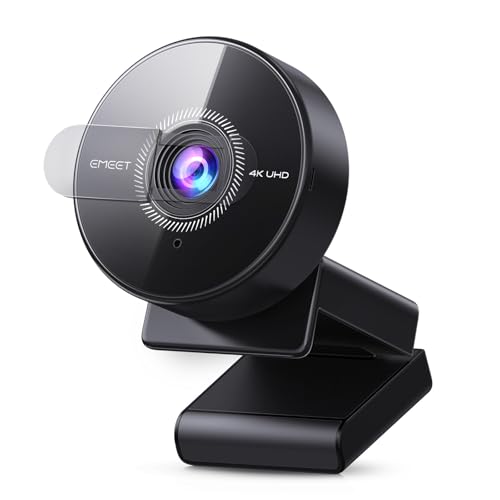
eMeet S600 4K Webcam
- Resolution
- 4K @ 30FPS, 1080p @ 60FPS
- Sensor
- Sony 1/2.5" CMOS
- Autofocus
- PDAF (Phase Detection)
- FOV
- Adjustable 40°-73°
- Microphone
- Dual Noise-Reduction
- Privacy
- Built-in Privacy Cover
The eMeet S600 4K is a professional-grade webcam with a Sony 1/2.5" CMOS sensor delivering exceptional image quality. The adjustable 40°-73° field of view adapts to different scenarios - narrow for headshots, wide for workspace. PDAF autofocus ensures you're always sharp, while 1080p @ 60FPS provides butter-smooth motion for live streaming. At ₹5,799 (52% off), it's a steal for serious content creators.
- + 4K resolution
- + 60 FPS at 1080p
- + superior Sony sensor
- + PDAF autofocus
- + adjustable field of view
- + professional quality
- - Software reliability concerns reported
- - some units freeze or disconnect randomly
- - customer support issues in India
Logitech Brio 100 Full HD Webcam
- Resolution
- 1080p Full HD @ 30 FPS
- Light Balance
- Auto-Light Balance (RightLight)
- Privacy
- Built-in Privacy Shutter
- Microphone
- Mono Built-in Mic
- Connection
- USB-A Plug & Play
- Compatibility
- Teams, Meet, Zoom, Skype
The Logitech Brio 100 is the most reliable choice for daily work-from-home video conferencing. Logitech's RightLight auto-light balance technology boosts brightness by up to 50%, ensuring you look good even in less-than-ideal lighting - a common challenge in Indian homes where natural light varies throughout the day. The integrated privacy shutter slides easily for total privacy when not on calls. Simple plug-and-play with rock-solid reliability.
- + Reliable Logitech quality
- + auto-light correction
- + privacy shutter
- + plug-and-play setup
- + wide compatibility
- + compact design
- - No 60 FPS option
- - basic microphone quality
- - limited field of view adjustment
- - mono audio only
eMeet C950 4K Webcam
- Resolution
- 4K @ 30FPS, 1080p @ 60FPS
- Sensor
- 8 Megapixels UHD
- Autofocus
- PDAF (Phase Detection)
- FOV
- 70° Field of View
- Microphone
- Dual Noise-Canceling
- Privacy
- Physical Lens Cover
The eMeet C950 4K offers impressive 4K resolution at a mid-range ₹3,499 price point. The Phase Detection Autofocus (PDAF) technology provides faster and more accurate focus tracking than standard autofocus. Dual noise-canceling microphones filter background noise effectively. At 56% off, it's an affordable entry into 4K webcam territory for content creators and professionals who want superior image quality.
- + 4K resolution at mid-range price
- + PDAF autofocus
- + dual microphones
- + privacy cover
- + excellent light correction
- - eMeet software reliability concerns
- - some units have stability issues
- - customer support limited in India
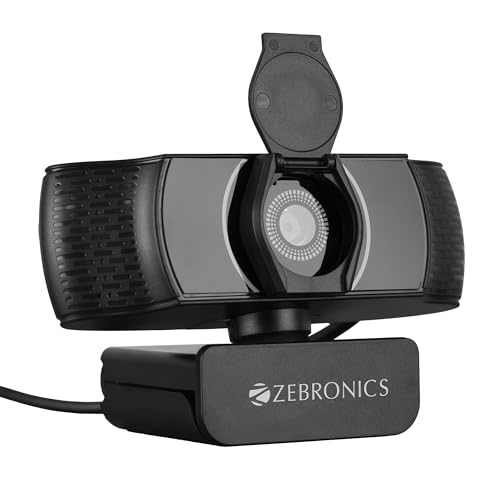
Zebronics Pure Plus 4K Webcam
- Resolution
- 4K UHD (3840x2160) @ 30 FPS
- Focus
- Auto-focus
- FOV
- Standard Wide Angle
- Microphone
- Dual Noise-Canceling
- Privacy
- Built-in Privacy Shutter
- Compatibility
- Windows, Mac, Linux
The Zebronics Pure Plus 4K is India's most affordable 4K webcam at just ₹2,199. This Indian brand offers impressive specs on paper - 4K resolution, auto-focus, auto white balance, dual microphones, and a privacy shutter. The 360-degree rotation provides flexible positioning. While it's a new product with limited reviews, it represents exceptional value if the 4K quality holds up.
- + Cheapest 4K webcam in India
- + Indian brand
- + privacy shutter
- + dual microphones
- + auto-focus
- + good value for money
- - New product with limited reviews
- - 4K quality unverified at this price
- - build quality concerns
- - software support unknown
Logitech C270 HD Web Camera
- Resolution
- 720p HD @ 30 FPS
- Focus
- Fixed Focus
- FOV
- 55° Diagonal
- Microphone
- Mono Noise-Reducing
- Mount
- Universal Clip
- Compatibility
- Windows, Mac, Chrome OS
The Logitech C270 HD is the most affordable entry point to Logitech's legendary build quality and reliability. With RightLight 2 technology, it automatically adjusts to lighting conditions to help you look good even in less-than-ideal lighting. At ₹1,999, it's perfect for those who need a simple, reliable webcam for basic video calls without fancy features. The mono noise-reducing microphone ensures your voice comes through clearly up to 1.5 meters away.
- + Most affordable Logitech webcam
- + reliable brand quality
- + simple plug-and-play
- + good for basic video calls
- + compact design
- - Only 720p resolution
- - no privacy shutter
- - basic microphone quality
- - fixed focus requires optimal distance
Which WFH webcam to buy
Here is who each pick is for, based on the comparison above.
Logitech C920 HD Pro Webcam · ₹7,915
Industry standard, Carl Zeiss optics
Check Price on Amazon →Lenovo 300 FHD Webcam · ₹2,499
95° FOV, dual stereo mics, 4X zoom
Check Price on Amazon →Logitech Brio 100 Full HD Webcam · ₹2,995
Auto-light balance, privacy shutter
Check Price on Amazon →Logitech C270 HD Web Camera · ₹1,999
Reliable 720p, Logitech quality
Check Price on Amazon →The overall webcam ranking includes 4K models for content. Add a USB mic first: audio matters more than video.
Compare webcams, mics and lights →How to choose a WFH webcam
-
Resolution and Frame Rate
For work from home, 1080p @ 30 FPS is the sweet spot for video calls. It provides crisp, professional-looking video for Zoom, Teams, and Google Meet while consuming moderate bandwidth. 1080p @ 60 FPS offers smoother motion for presentations and streaming. 4K is overkill for video calls but great for recording content. -
Microphone Quality Matters
Built-in microphones vary significantly. Dual microphones with noise reduction provide clearer audio and reduce background noise. For professional calls, consider a separate USB microphone. Stereo mics capture better spatial audio than mono options. -
Field of View (FOV) Selection
78-90° FOV works for individual video calls. Ultra-wide 95° FOV is excellent for showing multiple people or workspace demonstrations. Adjustable FOV offers maximum flexibility. Wider angles may distort edges slightly but capture more context. -
Auto-Focus vs Fixed Focus
Auto-focus keeps you sharp when moving closer or farther from the camera. PDAF (Phase Detection) is faster and more accurate. Fixed focus webcams require you to stay within the optimal distance range (typically 50-200 cm). For static desk setups, fixed focus is adequate. -
Light Correction Technology
Auto-light balance and HD light correction help produce clear images even in suboptimal lighting conditions. Still, position your webcam facing a window or good ambient light source for best results. Avoid backlighting. -
Privacy and Security
Physical privacy shutters provide peace of mind when not in use. This is preferable to software-based privacy or covering with tape. Always disconnect or cover your webcam when not in use for maximum security.
Frequently asked questions
What is the best webcams wfh in India?
Q: Which is the best webcam for daily Zoom and Teams meetings under ₹3,000?
Q: Do I really need a separate webcam if my laptop has a built-in camera?
Q: Will these webcams work on Windows 11, macOS, and Chromebooks?
Q: What internet speed do I need for smooth 1080p video calls?
Q: How can I improve webcam video quality in dim lighting conditions?
Q: Should I buy a webcam with a microphone or use a separate mic?
Q: Is 4K webcam quality worth the extra cost for video calls?
Q: Can I use these webcams for live streaming on YouTube or Twitch?
Q: Are eMeet webcams reliable? I've heard about software issues.
Q: Why is the Logitech C920 so expensive when it doesn't have 4K?
You may also like
More guides and reviews to help you decide.
Find the best webcam under 3000 in India 2026. Compare Lenovo, Logitech & more with research-based reviews, prices & pros and cons.
Read more →Find the best webcam under 10000 in India 2026. Compare Logitech, Anker & more with research-based reviews, prices & pros and cons.
Read more →Find the best webcam in India 2026. Research-based reviews with detailed comparisons, prices, pros & cons to help you pick the right one.
Read more →Find the best webcam under 6000 in India 2026. Compare Logitech & more with research-based reviews, prices & pros and cons.
Read more →We compared 18 USB podcast mics on owner reviews and specs. The Shure MV7+ leads at ₹25,990; the FDUCE SL40 is the best USB/XLR mic under ₹10,000 at ₹4,319.
Read more →Complete webcam buying guide for India: Find the perfect camera for video calls, work from home, streaming & content creation. Compare resolution, features &.
Read more →