
PRODUCT REVIEW
Best Portable Monitor for Laptops in India 2026
The best portable monitors for laptops in India for 2026, compared on resolution, colour, USB-C single-cable use and India warranty — from ₹6,598 to ₹18,990.
 By Naveen Bhavnani
Updated
By Naveen Bhavnani
Updated
As an Amazon Associate we earn from qualifying purchases. We could also earn a fee through some links when you click on them.

On this page
Portable monitor picks by use case
Already covered the winner above — here are the picks for specific needs.
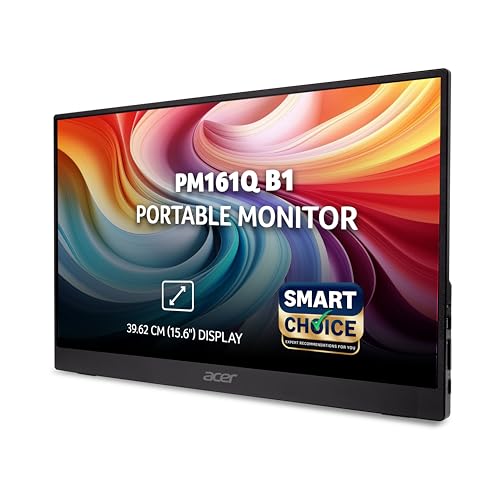
Acer PM161Q B1 15.6" FHD IPS Portable Monitor

MSI Pro MP165 E6 15.6" Portable Monitor

helett LogicView lite 15.6" Portable Monitor
Portable laptop monitors compared side by side
How the shortlist stacks up. Scroll sideways on mobile.
| WWCD Score | Product | Resolution | Refresh | Colour | Price | Deal |
|---|---|---|---|---|---|---|
| 8.4/10 | ARZOPA Z3FC 16.1" 2.5K | 2560x1440 | 180Hz | 107% sRGB | ₹18,990 | Check Price |
| 7.9/10 | ARZOPA 16.1" 144Hz | 1920x1080 | 144Hz | 106% sRGB | ₹15,547 | Check Price |
| 7.6/10 | MSI Pro MP165 E6 15.6" | 1920x1080 | 60Hz | ~63% sRGB | ₹12,999 | Check Price |
| 7.4/10 | Acer PM161Q B1 15.6" | 1920x1080 | 60Hz | ~65% sRGB | ₹7,299 | Check Price |
| 7.1/10 | helett LogicView lite 15.6" | 1920x1080 | 60Hz | Budget (unlisted) | ₹6,598 | Check Price |

Portable monitor reviews: size, colour and USB-C
Specs, the honest pros and cons, and who each one is for.
ARZOPA Z3FC 16.1" 2.5K 180Hz Portable Monitor
The most display for your money — 2.5K, 180Hz, wide gamut.
- Screen Size
- 16.1 inch
- Resolution
- 2560x1440 (QHD)
- Refresh Rate
- 180Hz
- Brightness
- ~400 nits
- Colour Gamut
- 107% sRGB
- Weight
- 0.78kg
The best-balanced pick here. The 2560x1440 panel runs at 180Hz with 107% sRGB and ~400 nits. That makes it the sharpest, smoothest and brightest screen in the field. Two USB-C ports plus a dedicated power-in cable give reliable power and video. The 0.78kg aluminium body travels well too. Two caveats keep it honest. The "2.5K" label really means QHD/2K. ARZOPA also has no India service network, so inspect the unit within the return window.
- + 2560x1440 (QHD) sharpness at 180Hz
- + Brightest LCD here at ~400 nits
- + 107% sRGB wide colour gamut
- + Dual USB-C with a dedicated power-in for stable single-cable use
- + Strong value for a high-spec 16.1-inch panel
- - No published India warranty term
- - Sold as '2.5K' but the panel is really QHD/2K
- - ARZOPA has no service-centre network in India
- - Only mini-HDMI (no full-size HDMI)
- - Thin India verified-review base
ARZOPA 16.1" 144Hz Portable Monitor (G1)
A big, smooth 144Hz screen that fits in your bag.
- Screen Size
- 16.1 inch
- Resolution
- 1920x1080 (FHD)
- Refresh Rate
- 144Hz
- Brightness
- ~300 nits
- Colour Gamut
- 106% sRGB
- Weight
- 0.78kg
A light 16.1-inch panel with a 144Hz refresh and 106% sRGB at a fair price. It has the largest India review base of the ARZOPA models here, at 52 reviews. Buyers like the smoothness, the portability and the picture. Coders single out portrait mode. It sits a step below the Z3FC on sharpness because it is only 1080p. The two risks are the same: thin India service and the odd light-bleed or connection-drop complaint. The glossy finish also reflects more than a matte rival.
- + 144Hz refresh for smooth scrolling and casual gaming
- + 106% sRGB wide colour gamut
- + Large 16.1-inch screen at just 0.78kg
- + Dual USB-C plus mini-HDMI
- + Praised by coders for portrait use
- - Only 1080p on a 16.1-inch panel so pixel density is modest
- - Recurring 'no service centre in India' complaints
- - Some units show light or pixel bleed
- - Glossy screen is reflective
- - No published India warranty term
MSI Pro MP165 E6 15.6" Portable Monitor
The safe, brand-backed all-rounder with full HDMI.
- Screen Size
- 15.6 inch
- Resolution
- 1920x1080 (FHD)
- Refresh Rate
- 60Hz
- Colour Gamut
- ~63% sRGB
- Ports
- 2x USB-C (PD) + full HDMI
- Weight
- 0.78kg
The easiest monitor here to hook up to anything. It has two USB-C ports with Power Delivery plus a full-size HDMI 2.0b, a 75mm VESA mount and a tripod thread. It ships with a protective case and carries MSI's build quality and India service. The trade-off is the panel. A basic ~63% sRGB 60Hz screen that reviewers call average is not for colour work. Only four verified India reviews exist so far, so reliability rests on the brand rather than proven local feedback.
- + Full-size HDMI 2.0b plus dual USB-C with Power Delivery
- + Includes a protective case and tripod mount
- + Major brand with an India service presence
- + Solid well-finished build
- + 75mm VESA mount
- - Weak colour gamut (~63% sRGB) so not for colour work
- - 60Hz only and no HDR
- - Only four verified India reviews so far
- - Average brightness at 250 nits
- - No published India warranty term
Acer PM161Q B1 15.6" FHD IPS Portable Monitor
The proven, no-nonsense budget workhorse.
- Screen Size
- 15.6 inch
- Resolution
- 1920x1080 (FHD)
- Refresh Rate
- 60Hz
- Brightness
- 250 nits (~200 real)
- Colour Gamut
- ~65% sRGB
- Weight
- 0.70kg
The most reliable and best-value pick for plain productivity. It is cheap, light and backed by 100 verified India reviews at only 8% negative. That makes it the best-evidenced product here by far. Buyers praise the portability and the option to run off laptop power. The panel is the weak point. Its ~65% sRGB colour looks pale, worst on a Mac, and the 250-nit claim measures nearer 200. Single-cable USB-C also caps brightness on some laptops, so keep a power source handy. It ships without a case too.
- + Best-proven reliability here with 100 India reviews at 8% negative
- + Cheapest big-brand pick
- + Light 0.70kg with dual USB-C inputs
- + Can run on laptop power alone for basic use
- + Highest sales velocity and review base
- - Mediocre colour (~65% sRGB) and pale on Mac
- - Single-cable USB-C caps brightness ~30% on some laptops
- - No protective case included
- - Real brightness measures only ~170-220 nits
- - One reviewer reports Acer refused a warranty claim
helett LogicView lite 15.6" Portable Monitor
The lightest, cheapest way onto a second screen.
- Screen Size
- 15.6 inch
- Resolution
- 1920x1080 (FHD)
- Refresh Rate
- 60Hz
- Brightness
- 250 nits
- Weight
- 0.67kg
- Warranty
- 1 year India
The budget champion. At ~₹6,600 it is the cheapest here, the slimmest at ~7mm and among the lightest at 0.67kg. It is also the only pick that publishes an India warranty term. Most of its 38 India reviewers are happy, praising the value and portability. The negative tail is real, though. Several units flicker, a few arrived DOA or with missing parts, and some buyers hit compatibility misses. A single USB-C port also makes it harder to split power and display.
- + Lowest price in the field
- + Slimmest and among the lightest at 0.67kg and ~7mm
- + Stated 1-year India warranty (the only pick to publish one)
- + Can run off a power bank or laptop USB-C
- + India-focused brand with responsive support
- - Screen flicker reported on a number of units
- - Some DOA or missing-parts complaints
- - Only one USB-C port
- - Colour gamut unpublished and dim in dark scenes
- - No HDR or VESA mount
Which portable monitor to buy
A pick earns its place here on display, connectivity, build and proven India reviews. If you would rather skip the full comparison, these are the two worth choosing between.
For most people, buy the ARZOPA Z3FC (₹18,990) — it is the only panel here that is sharp (2560x1440), fast (180Hz) and genuinely bright (~400 nits, 107% sRGB) at once. The catch is a thin India review base and no local service network, so test it thoroughly on arrival.
Check Price on Amazon →Want to spend far less? Get the Acer PM161Q (₹7,299) — the cheapest big-brand pick and the best-proven here, with 100 India reviews and only 8% negative. You give up colour accuracy (~65% sRGB) and it ships without a case, but for plain productivity it is the safe buy.
Check Price on Amazon →Our monitor roundup ranks full-size desk displays from entry FHD screens to QHD and 4K panels, with a guide to which spec is worth paying for.
Compare desk monitors →How to choose a portable monitor
-
Check your laptop's USB-C port before anything else
The whole appeal is one USB-C cable for video and power. It works only if your laptop's port supports DisplayPort Alt Mode.
- Look for the DP symbol. A USB-C port marked with the DisplayPort or Thunderbolt logo can send video over VESA DisplayPort Alt Mode.
- Power is separate. Charging shares the cable through USB Power Delivery, and a thin laptop often cannot spare enough.
- Two USB-C ports win. A second port takes a charger so brightness stays full.
Thin laptop or a phone? Choose a two-USB-C model.
-
Match resolution and size to the job
Full HD on a 15.6 to 16-inch panel is plenty for spreadsheets, email and code. Step up only if sharpness earns its keep.
- FHD (1920x1080). The value default — light, cheap and sharp enough for work.
- QHD/2.5K (2560x1440). Noticeably crisper for media and photos, though a panel sold as "2.5K" is really QHD.
- 14 to 16 inches travels best. Bigger 17 to 18-inch panels get heavy and awkward to pack.
For a screen that never leaves your desk, a full-size display costs less — start with our best monitors in India.
-
Colour gamut decides if it is fit for creative work
Budget panels often cover only 45-65% sRGB, which looks pale beside a good laptop screen. Fine for documents, poor for anything colour-critical.
- sRGB is the yardstick. The IEC sRGB standard defines the colour space these percentages measure against.
- 100%+ sRGB for creative work. Photo, video and design need accurate colour — both ARZOPAs clear this bar.
- Treat unlisted gamut as budget. A listing that hides the number is usually hiding a weak panel.
Editing photos or video? Insist on 100% sRGB. For coding and Excel, a cheaper panel is fine.
-
Refresh rate: 60Hz works, 120Hz+ is a bonus
60Hz is perfectly good for work. Higher refresh only helps if your source device can output it.
- 60Hz. Smooth enough for documents, browsing and video.
- 144Hz and 180Hz. Cheaper than you would expect here and worth it for casual gaming and slick scrolling.
Buy high refresh only if you game or want the smoother feel — otherwise save the money.
-
Weight, stand and case — the portability details
Every 100g counts in a bag. Sub-700g is excellent for a 15-inch panel.
- Check the stand. A folio cover doubles as protection; a bare kickstand does not.
- Confirm a case is included. Several popular models ship without one and a bare panel travels badly.
- VESA or a tripod is a bonus. Handy if the screen also lives on a desk.
If you travel daily, favour the lightest model that ships with real protection.
-
Warranty and India service can be the deciding factor
Portable monitors are fragile and many listings are imports with no local service. If a defect appears you may be stuck.
- Prefer a published India warranty. Only one budget pick here states a term at all.
- Import brands can mean no service centre. A recurring complaint against the ARZOPA models this year.
- Test within the return window. Check for dead pixels, flicker, backlight bleed and every port.
Buy from a brand with India support if you can, and inspect the panel the day it arrives.
Frequently asked questions
What is the best portable monitor laptop in India?
Will a portable monitor drain my laptop battery faster?
Do I need 100% sRGB colour accuracy, or is 60-70% enough?
How do I know if my laptop supports single-cable USB-C portable monitors?
Is a 15.6-inch screen too small for serious productivity work?
Can I use a portable monitor for PS5, Xbox or Switch gaming?
Should I buy a lesser-known import brand or pay more for a major brand?
Why does my portable monitor flicker?
Can I use one outdoors or in a bright room?
Sources & References
- VESA DisplayPort Alt Mode for USB Type-C Video Electronics Standards Association (VESA) · 2014 Establishes that a single USB-C cable can carry full DisplayPort video plus up to 100W of power — the basis of single-cable portable-monitor use.
- USB Power Delivery (USB PD) Specification USB Implementers Forum (USB-IF) Defines how power and data share one USB-C cable, which is why a laptop port that cannot spare enough watts makes a monitor dim or flicker.
- IEC 61966-2-1:1999 — Default RGB colour space (sRGB) International Electrotechnical Commission (IEC) · 1999 The standard that defines the sRGB colour space the "% sRGB" gamut figures in this review are measured against.
- IEEE 1789-2015 — Modulating Current in High-Brightness LEDs to Mitigate Health Risks IEEE Standards Association · 2015 Documents how low-frequency backlight flicker can cause eye strain and headaches, informing the flicker guidance in this review.
You may also like
More guides and reviews to help you decide.
We analysed India owner reviews of 12 monitors under ₹10,000. The MSI MAG 255F E20 wins at ₹8,599 with a 24.5-inch 200Hz IPS panel, 100% sRGB and DisplayPort.
Read more →Best gaming monitors under ₹1,00,000 in India 2026: 14 QD-OLED, WOLED, 4K, ultrawide and IPS picks compared on refresh rate, HDMI 2.1 and burn-in warranty.
Read more →Best gaming monitors under ₹50,000 in India 2026. Samsung, ViewSonic, Lenovo, BenQ, MSI, LG, AOC compared on refresh rate, panel type, resolution.
Read more →The best gaming monitors under ₹20,000 in India 2026 — LG 27GS60QC curved QHD 180Hz, BenQ EW270Q, Lenovo Legion 240Hz, MSI MAG 255F & more.
Read more →Find the best studio monitor under 15000 in India 2026. Compare JBL & more with research-based reviews, prices & pros and cons.
Read more →The best laptop cooling pads in India for 2026, from ₹599 budget picks to ₹1,899 premium coolers. Compare fans, cooling, build and prices with pros and cons.
Read more →