
PRODUCT REVIEW
Best Gaming Monitor Under 100000 in India 2026
Best gaming monitors under ₹1,00,000 in India 2026 — 12 QD-OLED, WOLED, 4K & ultrawide models compared.
 By Naveen Bhavnani
Updated
By Naveen Bhavnani
Updated
As an Amazon Associate we earn from qualifying purchases. We could also earn a fee through some links when you click on them.
Gaming monitor picks by panel
Already covered the winner above — here are the picks for specific needs.

MSI MAG 271QPX QD-OLED E2 27" QHD 240Hz

Samsung Odyssey OLED G9 49" Dual-QHD 240Hz

AOC AG276QZD2 27" QHD QD-OLED 240Hz
Gaming monitors compared on Hz
How the shortlist stacks up. Scroll sideways on mobile.
| WWCD Score | Product | Screen | Resolution | Refresh | Panel | HDMI 2.1 | Rating | Price | Deal |
|---|---|---|---|---|---|---|---|---|---|
| 9.6/10 | Alienware AW3225QF 32" 4K QD-OLED Gaming Monitor | 32 inch (31.6") | 4K UHD 3840x2160 | 240Hz | QD-OLED (curved 1700R) | Yes | 4.4★ (691) | ₹93,749 | Check Price |
| 9.5/10 | Samsung Odyssey G8 27" 4K QD-OLED (LS27FG810) | 27 inch | 4K UHD 3840x2160 | 240Hz | QD-OLED (flat) | Yes | 4.4★ (22) | ₹81,799 | Check Price |
| 9.5/10 | LG UltraGear 27GX790A 27" QHD OLED 480Hz | 27 inch | QHD 2560x1440 | 480Hz | WOLED (matte/anti-glare) | No | 4.4★ (24) | ₹80,999 | Check Price |
| 9.5/10 | MSI MAG 271QPX QD-OLED E2 27" QHD 240Hz | 26.5 inch | QHD 2560x1440 | 240Hz | QD-OLED | Yes | 4.3★ (98) | ₹59,944 | Check Price |
| 9.5/10 | GIGABYTE AORUS FO32U2P 32" 4K WOLED 240Hz | 32 inch (31.5") | 4K UHD 3840x2160 | 240Hz | WOLED (4th-gen) | Yes | 5★ (4) | ₹90,499 | Check Price |
| 9.4/10 | AOC AG276QZD2 27" QHD QD-OLED 240Hz | 27 inch | QHD 2560x1440 | 240Hz | QD-OLED | No | 5★ (2) | ₹54,999 | Check Price |
| 9.3/10 | Samsung Odyssey OLED G9 49" Dual-QHD 240Hz | 49 inch (32:9, 1800R curve) | Dual QHD 5120x1440 | 240Hz | QD-OLED | No | 4.2★ (45) | ₹97,199 | Check Price |
| 9.3/10 | MSI MAG 321UP QD-OLED 32" 4K 165Hz | 32 inch (31.5") | 4K UHD 3840x2160 | 165Hz | QD-OLED | Yes | 4.2★ (91) | ₹85,999 | Check Price |
| 9.3/10 | GIGABYTE AORUS FO27Q2 27" QHD OLED 240Hz | 27 inch (26.5") | QHD 2560x1440 | 240Hz | OLED (WOLED) | No | 5★ (2) | ₹54,300 | Check Price |
| 9.2/10 | ASUS ROG Swift PG27AQDM 27" QHD OLED 240Hz | 27 inch | QHD 2560x1440 | 240Hz | WOLED (anti-glare micro-texture) | No | 4.1★ (52) | ₹81,849 | Check Price |
| 9.1/10 | Dell S3225QC 32" 4K QD-OLED 120Hz | 32 inch (31.6") | 4K UHD 3840x2160 | 120Hz | QD-OLED | No | 4★ (48) | ₹77,899 | Check Price |
| 9.0/10 | PHILIPS Evnia 8000 42" 4K OLED 138Hz | 42 inch | 4K UHD 3840x2160 | 138Hz | WOLED (LG C2-class panel) | No | 4.1★ (5) | ₹82,999 | Check Price |



Gaming monitors under ₹1 lakh: panel, refresh and HDMI 2.1
Specs, the honest pros and cons, and who each one is for.
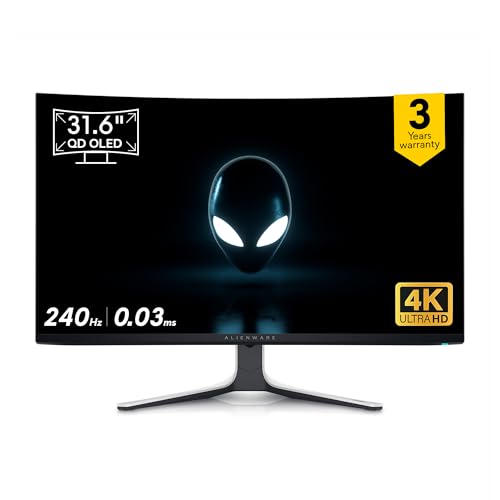
Alienware AW3225QF 32" 4K QD-OLED Gaming Monitor
The no-compromise 4K QD-OLED that does everything brilliantly.
- Screen Size
- 32 inch (31.6")
- Panel Type
- QD-OLED (curved 1700R)
- Resolution
- 4K UHD 3840x2160
- Refresh Rate
- 240Hz
- Response Time
- 0.03ms GtG
- HDR
- DisplayHDR True Black 400 + Dolby Vision
- Peak Brightness
- ~1000 nits (3% window)
- Adaptive Sync
- G-Sync Compatible / FreeSync
- Ports
- 2x HDMI 2.1, 1x DP 1.4, 5x USB 3.2
- Warranty
- 3 yr (incl. burn-in cover)
The AW3225QF is the most complete gaming monitor under ₹1 lakh: a stunning 4K 240Hz QD-OLED panel, dual HDMI 2.1 for next-gen consoles, and by far the deepest India review base. Just treat the panel gently.
- + Reference-grade 4K QD-OLED with perfect blacks and ~1000-nit HDR
- + True 4K@240Hz with dual HDMI 2.1 for PS5/Xbox 4K120
- + By far the most reviewed monitor here (691 ratings, 4.4★)
- + Anti-reflection coating handles bright rooms
- + Full ergonomic stand with 5-port USB hub
- - Delicate panel glass that scratches/cracks from minor knocks
- - Occasional VRR/G-Sync flicker in dark scenes
- - No remote control at this price
- - 32" curved needs a deep desk
Samsung Odyssey G8 27" 4K QD-OLED (LS27FG810)
4K 240Hz QD-OLED at the lowest price in its class.
- Screen Size
- 27 inch
- Panel Type
- QD-OLED (flat)
- Resolution
- 4K UHD 3840x2160
- Refresh Rate
- 240Hz
- Response Time
- 0.03ms GtG
- HDR
- DisplayHDR True Black 400 / HDR10+
- Peak Brightness
- ~1000 nits (peak)
- Adaptive Sync
- FreeSync Premium Pro
- Ports
- 2x HDMI 2.1, DP, USB hub
- Warranty
- 3 yr
If you want true 4K at 240Hz without spending a lakh, the G8 is the value champion of the 4K OLEDs — sharp, fast and console-ready. The only catch is subpixel text fringing on a small, dense 27" panel.
- + Cheapest way into 4K@240Hz QD-OLED with ~163 PPI razor-sharp clarity
- + Dual HDMI 2.1 for PS5/Xbox 4K120
- + OLED Safeguard+ burn-in protection with 3-yr Samsung India warranty
- + Excellent factory colour accuracy and HDR pop
- + Tool-free height/tilt/pivot stand
- - 27" is dense for 4K so QD-OLED text fringing bothers some desktop/coding users
- - No bundled remote and no built-in speakers
- - Isolated dead-on-arrival reports with brand-letter replacement hassle
- - Stock is thin
LG UltraGear 27GX790A 27" QHD OLED 480Hz
480Hz of pure competitive-gaming smoothness.
- Screen Size
- 27 inch
- Panel Type
- WOLED (matte/anti-glare)
- Resolution
- QHD 2560x1440
- Refresh Rate
- 480Hz
- Response Time
- 0.03ms GtG
- HDR
- DisplayHDR True Black 400
- Peak Brightness
- ~1300 nits (peak)
- Adaptive Sync
- G-Sync + FreeSync Premium Pro
- Ports
- DisplayPort 2.1, 2x HDMI, USB
- Warranty
- 1 yr
For esports and high-refresh PC gaming, nothing here touches the 480Hz 27GX790A — it's the fastest, slickest panel in the segment. Just budget for the short 1-year warranty risk on an OLED.
- + Class-leading 480Hz refresh for the smoothest competitive FPS motion
- + DisplayPort 2.1 with dual-mode flexibility
- + Matte micro-textured coating beats glossy panels under room lighting
- + Includes a remote and full tilt/height/swivel/pivot stand
- + Buttery ghost-free OLED motion praised by Indian buyers
- - Only a 1-year warranty (shortest here for an expensive OLED)
- - QHD not 4K so less ideal for 4K media/desktop sharpness
- - Large deep stand eats desk space
- - OLED off-angle glow means little side privacy
MSI MAG 271QPX QD-OLED E2 27" QHD 240Hz
Flagship QD-OLED picture quality at a mid-range price.
- Screen Size
- 26.5 inch
- Panel Type
- QD-OLED
- Resolution
- QHD 2560x1440
- Refresh Rate
- 240Hz
- Response Time
- 0.03ms GtG
- HDR
- DisplayHDR True Black 400
- Peak Brightness
- up to 1000 nits
- Adaptive Sync
- FreeSync Premium Pro / G-Sync Compatible
- Ports
- HDMI 2.1, DP 1.4a, USB-C (15W)
- Contrast
- 1,500,000:1
- Warranty
- 3 yr
The 271QPX is the smart-money pick: you get real QD-OLED gaming at 240Hz for around ₹60,000, backed by the largest review base of any affordable OLED here. Unless you specifically need 4K, this is the one to buy.
- + Outstanding value — a genuine QD-OLED at ~₹60k
- + 240Hz QD-OLED with 1000-nit peaks and 99% DCI-P3
- + 98 India ratings at 4.3★ (most validated affordable OLED here)
- + MSI OLED Care 2.0 anti-burn-in with 3-yr warranty
- + HDMI 2.1 + USB-C and a proper 4-way stand
- - QHD rather than 4K (fine for 27" gaming, less sharp for 4K media)
- - USB-C carries only 15W (not a laptop-charging dock)
- - An isolated dead-on-arrival complaint among reviews
- - Glossy-ish coating shows some reflections in bright rooms
GIGABYTE AORUS FO32U2P 32" 4K WOLED 240Hz
True 4K 240Hz with DisplayPort 2.1 future-proofing.
- Screen Size
- 32 inch (31.5")
- Panel Type
- WOLED (4th-gen)
- Resolution
- 4K UHD 3840x2160
- Refresh Rate
- 240Hz
- Response Time
- 0.03ms GtG
- HDR
- DisplayHDR True Black 400
- Adaptive Sync
- FreeSync Premium Pro
- Ports
- DP 2.1 (UHBR20), 2x HDMI 2.1, USB-C, KVM
- Warranty
- 3 yr
The FO32U2P is the spec-sheet enthusiast's choice: 4K at a real 240Hz over DisplayPort 2.1, plus KVM and USB-C. It earns its place on raw capability — just note the thin India review history.
- + One of the few here doing 4K at a full 240Hz
- + DisplayPort 2.1 UHBR20 gives uncompressed 4K240 headroom
- + Built-in KVM switch and USB-C for dual-machine setups
- + Aggressive anti-burn-in feature set praised by early owners
- + Big immersive 32" 4K canvas for gaming and content
- - Very few India reviews so far (long-term reliability less proven)
- - WOLED is a touch dimmer in full-screen highlights than the best QD-OLEDs
- - Limited stock
- - No remote in the box
AOC AG276QZD2 27" QHD QD-OLED 240Hz
The cheapest ticket into 240Hz QD-OLED gaming.
- Screen Size
- 27 inch
- Panel Type
- QD-OLED
- Resolution
- QHD 2560x1440
- Refresh Rate
- 240Hz
- Response Time
- 0.03ms GtG
- HDR
- HDR TrueBlack 400
- Peak Brightness
- ~250 nits full / 1000 peak
- Adaptive Sync
- G-Sync compatible
- Ports
- HDMI, DP, USB hub
- Warranty
- 3 yr
If your priority is OLED gaming for the lowest possible spend, the AG276QZD2 delivers true QD-OLED at ~₹55,000. The trade-off is a thin review history and modest brightness/connectivity.
- + Lowest-priced QD-OLED here at ~₹55k
- + Same QD-OLED strengths (inky blacks, vivid colour, 0.03ms response)
- + Built-in speakers
- + USB hub and rear Light FX
- + 3-year AOC/TPV India warranty
- + Both early Indian buyers rate it 5★ for value
- - Only a handful of India reviews so far (reliability not broadly proven)
- - Lower full-field brightness than premium QD-OLEDs
- - Connectivity is basic versus pricier rivals
- - QHD not 4K
Samsung Odyssey OLED G9 49" Dual-QHD 240Hz
A 49" super-ultrawide wall of QD-OLED immersion.
- Screen Size
- 49 inch (32:9
- Panel Type
- QD-OLED
- Resolution
- Dual QHD 5120x1440
- Refresh Rate
- 240Hz
- Response Time
- 0.03ms GtG
- HDR
- HDR10+ / OLED Glare Free
- Adaptive Sync
- FreeSync Premium Pro / G-Sync Compatible
- Ports
- DisplayPort, HDMI, USB-C
- Warranty
- 3 yr
The 49" Odyssey OLED G9 is the immersion king under a lakh — a colossal 240Hz QD-OLED ultrawide that's equally at home in racing sims and a multitasking workflow. Just be ready for its desk footprint and thin port selection.
- + Enormous 49" 32:9 super-ultrawide for unmatched immersion
- + 240Hz QD-OLED with glare-free coating (biggest canvas under ₹1 lakh)
- + Doubles as a productivity/trading/editing powerhouse
- + Strong India review base (45 ratings) for a niche flagship
- + 3-yr Samsung India warranty with OLED Safeguard
- - Sparse connectivity — limited usable ports
- - no KVM
- - no high-wattage USB-C PD
- - Needs a very wide deep desk and a capable GPU to drive 5120x1440
- - Some buyers find SDR brightness modest
- - Occasional after-sales/support complaints
MSI MAG 321UP QD-OLED 32" 4K 165Hz
A big-screen 4K QD-OLED that won't break six figures.
- Screen Size
- 32 inch (31.5")
- Panel Type
- QD-OLED
- Resolution
- 4K UHD 3840x2160
- Refresh Rate
- 165Hz
- Response Time
- 0.03ms GtG
- HDR
- DisplayHDR True Black 400
- Adaptive Sync
- FreeSync Premium
- Ports
- HDMI 2.1, DP 1.4a, USB-C
- Warranty
- 3 yr
The 321UP gets you a 32" 4K QD-OLED with a strong review record for around ₹86k. You trade 240Hz for size and savings — a fair deal unless you're chasing the highest frame rates.
- + Big 32" 4K QD-OLED with gorgeous colour and excellent HDR
- + 91 India ratings at 4.2★ (well validated for a premium 4K OLED)
- + 165Hz is plenty for 4K gaming and ideal for PS5 4K120 via HDMI 2.1
- + USB-C connectivity and a sturdy stand
- + Far cheaper than 4K-240 panels with the same QD-OLED quality
- - 165Hz not 240Hz (competitive players will prefer faster panels)
- - Recurring reports of OSD/control-menu glitches and a fussy power connector
- - Isolated dead-on-arrival units
- - No remote
GIGABYTE AORUS FO27Q2 27" QHD OLED 240Hz
Affordable 240Hz OLED gaming with strong colour.
- Screen Size
- 27 inch (26.5")
- Panel Type
- OLED (WOLED)
- Resolution
- QHD 2560x1440
- Refresh Rate
- 240Hz
- Response Time
- 0.03ms GtG
- HDR
- DisplayHDR True Black 400
- Color Gamut
- 99% DCI-P3
- Adaptive Sync
- FreeSync / G-Sync
- Ports
- 2x HDMI, DisplayPort, USB-C
- Warranty
- 2 yr
The FO27Q2 is a genuinely cheap route into 240Hz OLED gaming with excellent colour, but the 2-year warranty and thin review history make it a slightly higher-risk buy than the MSI/AOC alternatives.
- + 240Hz OLED at ~₹54k (among the cheapest OLED panels here)
- + 99% DCI-P3 colour with perfect blacks and instant response
- + AI-based OLED Care to mitigate burn-in
- + USB-C and dual HDMI for flexible hookups
- + Light 4.6 kg build with height-adjustable stand
- - Only a 2-year warranty (shorter than most OLED rivals)
- - Very few India reviews so far (reliability less proven)
- - Last-unit stock at time of research
- - WOLED brightness trails the brighter QD-OLEDs
ASUS ROG Swift PG27AQDM 27" QHD OLED 240Hz
A premium, well-built QHD OLED with a matte finish.
- Screen Size
- 27 inch
- Panel Type
- WOLED (anti-glare micro-texture)
- Resolution
- QHD 2560x1440
- Refresh Rate
- 240Hz
- Response Time
- 0.03ms GtG
- HDR
- True 10-bit
- Adaptive Sync
- G-Sync Compatible
- Ports
- DisplayPort, HDMI, USB
- Warranty
- 3 yr
The PG27AQDM is a refined matte WOLED that looks great in any lighting, but at ~₹82k it's hard to justify over the cheaper QD-OLEDs unless you specifically want ASUS's build and anti-glare coating.
- + Well-regarded WOLED with excellent dark-scene depth and 99% DCI-P3
- + Anti-glare micro-texture coating many prefer over glossy panels
- + Custom heatsink and uniform brightness for a polished premium build
- + 52 India ratings and a 3-yr warranty
- + Flicker-free true 10-bit panel
- - Pricey for a QHD panel (QD-OLED rivals cost ₹20k+ less for similar gaming)
- - WOLED subpixel layout causes noticeable text fringing for desktop/coding
- - Reports of slow ASUS after-sales support
- - No 4K and no HDMI 2.1
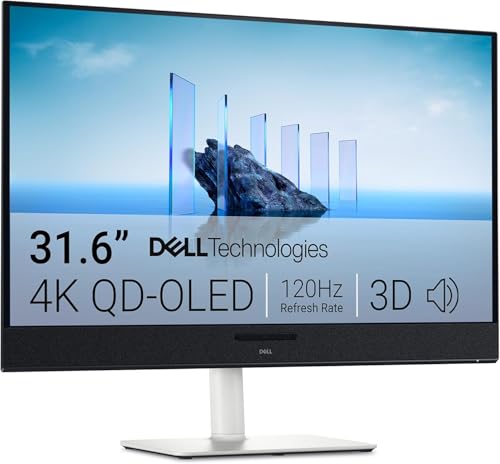
Dell S3225QC 32" 4K QD-OLED 120Hz
A 4K QD-OLED tuned for consoles, films and laptop docking.
- Screen Size
- 32 inch (31.6")
- Panel Type
- QD-OLED
- Resolution
- 4K UHD 3840x2160
- Refresh Rate
- 120Hz
- Response Time
- 0.03ms GtG
- HDR
- DisplayHDR True Black 400
- Peak Brightness
- 1000 nits
- Audio
- 5 speakers + AI 3D spatial audio
- Ports
- HDMI, 2x USB-C (90W up / 15W down)
- Warranty
- 3 yr
The S3225QC is less a twitch-gaming display and more a do-everything 4K QD-OLED — stellar for PS5/Xbox, movies and as a USB-C dock. PC esports players should look elsewhere, but for console-and-media buyers it's excellent.
- + Superb 4K QD-OLED picture with 1000-nit highlights
- + Genuinely good built-in 5-speaker spatial-audio system
- + 90W USB-C makes it a brilliant single-cable hub for a laptop
- + 120Hz 4K is perfect for PS5/Xbox Series X
- + 48 India ratings and a 3-yr Dell warranty
- - Only 120Hz (weakest pick for high-refresh PC gaming)
- - No DisplayPort at all (HDMI + USB-C only)
- - Reports of audible coil/fan whine and a warm-running panel
- - Fragile rear control button
PHILIPS Evnia 8000 42" 4K OLED 138Hz
TV-sized 42" 4K OLED for big-screen, couch-style gaming.
- Screen Size
- 42 inch
- Panel Type
- WOLED (LG C2-class panel)
- Resolution
- 4K UHD 3840x2160
- Refresh Rate
- 138Hz
- Response Time
- 0.1ms
- HDR
- True 10-bit
- Adaptive Sync
- FreeSync Premium
- Ports
- HDMI, DisplayPort, USB-C
- Extras
- AI-Enhanced Ambiglow
- Warranty
- 3 yr
The Evnia 8000 is the pick if you want a giant 42" 4K OLED for living-room or big-desk gaming and media. It's not for competitive play at 138Hz, and its review history is thin, but nothing else here gives you this much OLED real estate.
- + Huge 42" 4K OLED for near-TV-sized gaming and media
- + C2-class WOLED panel with vivid colour and excellent contrast
- + Ambiglow bias lighting adds immersion
- + Good port selection including USB-C
- + Made-in-India unit with a 3-yr Philips warranty
- - Only 138Hz (slowest panel here, aimed at big-screen/couch gaming)
- - First-gen WOLED needs tuning (SDR/sRGB modes draw criticism)
- - 42" is too large for a typical desk
- - Few India reviews and mixed sentiment
Gaming monitor specs decoded
The panel, refresh, HDR and sync jargon explained in plain English.
QD-OLED vs WOLED vs IPS
Refresh rate & response time
HDR certifications
Adaptive sync: G-Sync vs FreeSync
Which gaming monitor under ₹1 lakh
Twelve OLEDs, four jobs. Whatever you're optimising for — all-round excellence, value, immersion or the lowest OLED entry price — one of these is your monitor.
Alienware AW3225QF 32" 4K QD-OLED · ₹93,749
Buy this for a no-compromise 4K 240Hz QD-OLED that's flawless on both PC and PS5/Xbox.
Check Price on Amazon →MSI MAG 271QPX QD-OLED 27" · ₹59,944
Buy this if you want real QD-OLED gaming at 240Hz without spending near a lakh.
Check Price on Amazon →Samsung Odyssey OLED G9 49" · ₹97,199
Buy this for maximum immersion and side-by-side multitasking on a giant 32:9 canvas.
Check Price on Amazon →AOC AG276QZD2 27" QHD QD-OLED · ₹54,999
Buy this for the cheapest route into true 240Hz QD-OLED gaming with a 3-yr warranty.
Check Price on Amazon →Our monitor roundup shows what refresh rate your PC can actually use, and ranks cheaper QHD and FHD monitors that may cover it.
Browse monitors at lower budgets →Choosing an OLED gaming monitor
-
QD-OLED vs WOLED — which OLED is right for you?
Almost every worthwhile gaming monitor under ₹1 lakh now uses an OLED panel, in one of two flavours. QD-OLED (Samsung-made; used by Alienware, MSI, AOC, Dell) tends to hit higher colour volume and brighter, more saturated highlights, but its triangular subpixel can cause slight text fringing on the desktop and its glossy surface shows reflections. WOLED (LG-made; used by LG, ASUS, GIGABYTE, Philips) often ships with a matte anti-glare coating that's better in bright rooms and cleaner for text, at the cost of slightly lower full-screen brightness. For pure gaming and HDR films, QD-OLED edges ahead; for mixed work-and-play in a bright room, matte WOLED is easier to live with. -
Match resolution and refresh rate to your GPU and use-case
The big fork is 4K-at-240Hz versus QHD-at-240Hz(+). 4K (3840x2160) looks stunning but needs a powerful GPU (RTX 4080/4090-class) to push high frame rates — great if you also watch a lot of 4K content or game on a PS5/Xbox. QHD (2560x1440) at 240–480Hz is far easier to drive, sharper-feeling on 27", and the right call for competitive/esports players who want maximum frame rate. If you mostly play fast shooters, prioritise refresh rate (240Hz minimum, 480Hz for the truly competitive). If you want a do-everything screen, 4K 240Hz QD-OLED is the sweet spot. If OLED is beyond your budget, our best gaming monitors under ₹50,000 offer QHD at 240Hz on LED panels. -
HDMI 2.1 matters if you game on a console
PS5 and Xbox Series X output 4K at up to 120Hz — but only over HDMI 2.1. Several otherwise-great panels here use HDMI 2.0 or route full bandwidth only through DisplayPort, which caps console performance. If a console is part of your setup, insist on HDMI 2.1 (the Alienware AW3225QF, Samsung G8, MSI 321UP and GIGABYTE FO32U2P all have it). For a pure PC build, DisplayPort 1.4 (with DSC) handles 4K240/QHD480 fine, and DisplayPort 2.1 adds uncompressed headroom for the future. -
OLED burn-in — real risk or non-issue?
Modern gaming OLEDs include extensive burn-in mitigation: pixel shifting, logo dimming, panel-refresh cycles and AI-based 'OLED Care' routines. In normal mixed gaming/media use, burn-in is unlikely within the warranty period — and crucially, most brands here (Dell/Alienware, Samsung, MSI, AOC, ASUS) now include burn-in cover in their India warranty. If you'll display static taskbars or HUDs for many hours daily, enable the care features, hide the taskbar, and prefer a 3-year warranty. Avoid panels with only 1–2 year cover (e.g. LG 27GX790A at 1yr) if burn-in worries you. -
Don't forget brightness, coating and desk space
OLEDs have modest full-screen brightness (typically 250–300 nits) even if HDR highlights hit 1000 nits. In a very bright room, a matte/anti-reflection coating (ASUS micro-texture, AOC/Alienware anti-glare) matters more than raw nits. Size also dictates desk needs: a 32" 4K or 34" ultrawide wants a deep desk, and the 42" Philips or 49" Samsung G9 are effectively furniture — measure before you buy. -
Buy from a brand with real India after-sales
At this price an OLED is a multi-year investment, so India service matters. Dell/Alienware, Samsung, LG, ASUS, MSI, AOC (TPV) and GIGABYTE all have India support and importers, but reviews flag slow ASUS RMA and occasional Samsung replacement-letter hassles. Favour models with a healthy India review count for proven reliability, register your warranty, and keep the invoice — burn-in claims usually require it.
Frequently asked questions
Is QD-OLED worth it for gaming monitors over traditional IPS?
Which gaming monitor is best for PS5 and Xbox Series X in India under ₹1,00,000?
What GPU do I need for gaming at 4K on these monitors?
Should I buy a 4K monitor or a high-refresh QHD monitor for gaming?
Is there a risk of burn-in with QD-OLED gaming monitors?
Which gaming monitor has the best warranty and service in India?
What does "text fringing" on QD-OLED mean — will it bother me?
Do I need DisplayPort 2.1, or is 1.4 enough?
You may also like
More guides and reviews to help you decide.
Best gaming monitors under ₹50,000 in India 2026. Samsung, ViewSonic, Lenovo, BenQ, MSI, LG, AOC compared on refresh rate, panel type, resolution.
Read more →The best gaming monitors under ₹20,000 in India 2026 — LG 27GS60QC curved QHD 180Hz, BenQ EW270Q, Lenovo Legion 240Hz, MSI MAG 255F & more.
Read more →Find the best portable monitor for laptop India offers in 2026. Compare ASUS ZenScreen, ViewSonic, MSI & more from ₹10,649 to ₹25,999 for WFH and productivity.
Read more →Find the best monitor under 10000 India offers. Acer, AOC, LG, Samsung compared for 200Hz gaming, IPS panels & eye-care features. Research-backed picks.
Read more →Find the best studio monitor under 15000 in India 2026. Compare JBL & more with research-based reviews, prices & pros and cons.
Read more →How to choose a TV in India: read the panel behind the QLED/OLED badge, spot fake HDMI 2.1 and 120Hz, size 4K to your sofa, and skip 8K. Every claim sourced.
Read more →