
PRODUCT REVIEW
Best Gaming Monitor Under 50000 in India 2026
Best gaming monitors under ₹50,000 in India 2026. Samsung, ViewSonic, Lenovo, BenQ, MSI, LG, AOC compared on refresh rate, panel type, resolution.
 By Naveen Bhavnani
Updated
By Naveen Bhavnani
Updated
As an Amazon Associate we earn from qualifying purchases. We could also earn a fee through some links when you click on them.

Gaming monitor picks by use case
Already covered the winner above — here are the picks for specific needs.

ViewSonic VX2758A-2K-PRO-3 27" 240Hz QHD IPS
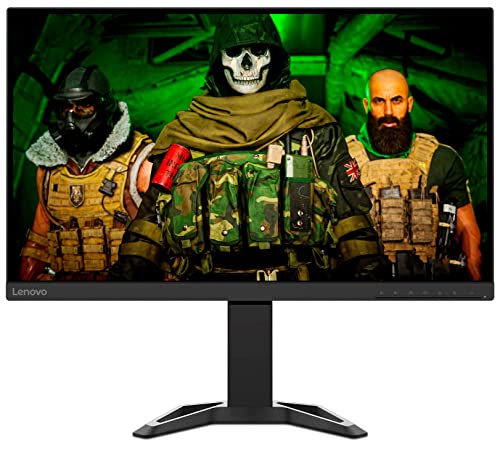
Lenovo Legion R27q-30 27" 2K 180Hz

LG 27" Ultragear FHD IPS 180Hz
Monitors compared on resolution
How the shortlist stacks up. Scroll sideways on mobile.
| WWCD Score | Model | Panel | Resolution | Refresh Rate | Response | HDR | Price | Deal |
|---|---|---|---|---|---|---|---|---|
| 9.4/10 | Samsung Odyssey G6 | VA Curved | QHD 2K | 240Hz | 1ms | HDR600 | ₹34,990 | Check Price |
| 9.1/10 | ViewSonic VX2758A | IPS Flat | QHD 2K | 240Hz | 1ms | HDR400 | ₹24,990 | Check Price |
| 9.0/10 | Lenovo Legion R27q | IPS Flat | QHD 2K | 180Hz | 0.5ms | None | ₹22,990 | Check Price |
| 8.8/10 | BenQ MOBIUZ EX2710R | VA Curved | QHD 2K | 165Hz | 1ms | HDR400 | ₹29,990 | Check Price |
| 8.7/10 | MSI MAG 255XF | Rapid IPS | FHD 1080p | 300Hz | 0.5ms | HDR400 | ₹19,990 | Check Price |
| 8.4/10 | LG Ultragear 27" | IPS Flat | FHD 1080p | 180Hz | 1ms | HDR10 | ₹16,990 | Check Price |
| 8.2/10 | AOC 24G42E | Fast IPS | FHD 1080p | 180Hz | 0.5ms | HDR10 | ₹13,990 | Check Price |


Gaming monitors under ₹50,000: panel, HDR and service
Specs, the honest pros and cons, and who each one is for.
Samsung Odyssey G6 27" QHD 240Hz Curved
- Screen Size
- 27" (68.47cm)
- Resolution
- QHD 2560x1440
- Panel Type
- VA Curved (1000R)
- Refresh Rate
- 240Hz
- Response Time
- 1ms (GtG)
- HDR
- DisplayHDR 600
- Connectivity
- HDMI 2.1 + DP 1.4
- Adaptive Sync
- FreeSync Premium Pro
- + Stunning 1000R curve for immersive gaming
- + blazing 240Hz at QHD resolution
- + HDR600 with excellent peak brightness
- + Smart TV features
- + Samsung premium build quality
- + strong local service network
- + HDMI 2.1 for console gaming
- - VA panel with slightly slower pixel response than IPS
- - limited color accuracy for creative work
- - Smart features add cost
- - limited adjustability on stand
ViewSonic VX2758A-2K-PRO-3 27" 240Hz QHD IPS
- Screen Size
- 27" (68.58cm)
- Resolution
- QHD 2560x1440
- Panel Type
- IPS Flat
- Refresh Rate
- 240Hz
- Response Time
- 1ms (GtG)
- HDR
- DisplayHDR 400
- Connectivity
- HDMI 2.0x2 + DP 1.4
- Adaptive Sync
- FreeSync + G-Sync
- + Excellent IPS color accuracy at QHD
- + 240Hz refresh at a competitive price
- + wide color gamut
- + works with both AMD and NVIDIA GPUs
- + solid build quality
- + height-tilt adjustable stand
- - DisplayHDR 400 is entry-level HDR
- - no USB hub
- - HDMI 2.0 limits 4K consoles
- - ViewSonic service network smaller than Samsung/LG
Lenovo Legion R27q-30 27" 2K 180Hz
- Screen Size
- 27" (68.58cm)
- Resolution
- QHD 2560x1440
- Panel Type
- IPS Flat
- Refresh Rate
- 180Hz
- Response Time
- 0.5ms (GtG)
- Color Coverage
- 90% DCI-P3
- Connectivity
- HDMI x2 + DP 1.4
- Stand
- Full Ergonomic
- + Best ergonomic stand in class (height, tilt, swivel, pivot)
- + excellent color accuracy for work and gaming
- + 90% DCI-P3 for content creators
- + built-in speakers
- + competitive pricing
- + Lenovo reliability
- - 180Hz vs 240Hz competitors at similar price
- - no USB hub
- - no HDR certification
- - built-in speakers are average quality
BenQ MOBIUZ EX2710R 27" Curved QHD 165Hz
- Screen Size
- 27" (68.58cm)
- Resolution
- QHD 2560x1440
- Panel Type
- VA Curved (1500R)
- Refresh Rate
- 165Hz
- Response Time
- 1ms (MPRT)
- USB-C
- Yes (65W charging)
- Speakers
- 2.1ch treVolo
- HDR
- DisplayHDR 400
- + USB-C 65W charging for laptops
- + excellent built-in 2.1ch audio
- + BenQ HDRi auto-adjustment
- + good color accuracy for VA
- + reliable BenQ quality
- + ergonomic stand included
- - 165Hz lower than 240Hz rivals
- - VA panel has slower pixel response vs IPS
- - HDMI 2.0 limits bandwidth
- - higher price for refresh rate
MSI MAG 255XF 24.5" FHD 300Hz Rapid IPS
- Screen Size
- 24.5" (62.23cm)
- Resolution
- FHD 1920x1080
- Panel Type
- Rapid IPS
- Refresh Rate
- 300Hz
- Response Time
- 0.5ms (GtG)
- HDR
- DisplayHDR 400
- Connectivity
- HDMI 2.0b + DP 1.4a
- Adaptive Sync
- FreeSync + G-Sync
- + Blazing 300Hz for competitive esports gaming
- + ultra-fast 0.5ms response time
- + IPS panel with good colors
- + excellent for CS2/Valorant/Apex players
- + MSI build quality
- + great value for esports
- - FHD resolution looks softer vs QHD on 24.5"
- - no USB hub
- - HDR 400 is minimal
- - smaller 24.5" screen vs 27" rivals
- - no built-in speakers
LG 27" Ultragear FHD IPS 180Hz
- Screen Size
- 27" (68.47cm)
- Resolution
- FHD 1920x1080
- Panel Type
- IPS Flat
- Refresh Rate
- 180Hz
- Response Time
- 1ms (GtG)
- HDR
- HDR10
- Connectivity
- HDMI 1.4x2 + DP 1.4
- Service Network
- Excellent India
- + Most affordable LG Ultragear
- + IPS panel with excellent 1ms response
- + 180Hz very smooth for casual gaming
- + Black Stabilizer for FPS advantage
- + wide LG service network across India
- + reliable long-term build
- - FHD resolution at 27" less sharp than QHD
- - HDMI 1.4 limited bandwidth
- - no USB hub
- - no height adjustment on stand
- - HDR10 lacks brightness for true HDR
AOC 24G42E 24" FHD Fast IPS 180Hz
- Screen Size
- 24" (60.96cm)
- Resolution
- FHD 1920x1080
- Panel Type
- Fast IPS
- Refresh Rate
- 180Hz
- Response Time
- 0.5ms (GtG)
- USB Hub
- Yes (USB 3.0)
- Connectivity
- HDMI 2.0x2 + DP 1.4
- Adaptive Sync
- FreeSync + G-Sync
- + Best value entry gaming monitor
- + Fast IPS with 0.5ms response
- + 180Hz for smooth gaming
- + includes USB hub (rare at this price)
- + works with AMD and NVIDIA
- + solid AOC build quality
- - FHD only at 24"
- - limited HDR performance
- - AOC service network smaller in India
- - stand has limited adjustability (tilt only)
- - no built-in speakers
Which gaming monitor under ₹50,000
Here is who each pick is for, based on the comparison above.
Samsung Odyssey G6 27" QHD 240Hz Curved · ₹34,990
Samsung 240Hz QHD Curved, HDR600, Smart features
Check Price on Amazon →ViewSonic VX2758A-2K-PRO-3 27" 240Hz QHD IPS · ₹24,990
ViewSonic 240Hz IPS QHD at ₹24,990
Check Price on Amazon →Lenovo Legion R27q-30 27" 2K 180Hz · ₹22,990
Lenovo R27q 90% DCI-P3, full ergonomic stand
Check Price on Amazon →LG 27" Ultragear FHD IPS 180Hz · ₹16,990
LG Ultragear 180Hz IPS at ₹16,990
Check Price on Amazon →Our monitor roundup explains what IPS, VA and OLED each do well, and ranks monitors up to 4K QD-OLED and Mini-LED flagships.
Compare panel types and budgets →Choosing a gaming monitor
-
IPS vs VA vs Rapid IPS - Which Panel Is Right for You?
IPS panels offer the best color accuracy and wide viewing angles - ideal for those who play a mix of games, watch movies, and do creative work (Lenovo R27q, ViewSonic VX2758A, LG Ultragear). VA panels deliver deeper blacks and better contrast ratios (3000:1 vs 1000:1 for IPS), making dark scenes in RPGs and horror games look dramatically better (Samsung Odyssey G6, BenQ EX2710R). Rapid IPS is an IPS variant with faster pixel response (0.5ms), purpose-built for competitive esports with minimal ghosting (MSI MAG 255XF, AOC 24G42E). Rule of thumb: Choose IPS for versatility, VA for cinematic immersion, Rapid IPS for competitive esports. Our best monitors in India guide sets refresh rate, resolution and panel type side by side. -
QHD 2K vs FHD 1080p - Do You Need the Extra Resolution?
QHD (2560x1440) delivers 78% more pixels than FHD (1920x1080), resulting in noticeably sharper text and finer game details especially on 27" screens. At 27", FHD gives 82 PPI vs QHD's 109 PPI - the difference is clearly visible. However, QHD demands roughly 50% more GPU power. With a mid-range GPU (RTX 3060, RX 6600), QHD at 165Hz is achievable. For 240Hz+ at QHD, you need an RTX 4070 or RX 7800 XT class GPU. FHD makes sense if your GPU is below RTX 3060 or if you prioritize maximum frame rate in competitive games like Valorant and CS2 where 300Hz FHD beats 165Hz QHD for competitive advantage. For QHD at a lower price, see our best gaming monitors under ₹20,000. -
Refresh Rate Guide: 165Hz vs 180Hz vs 240Hz vs 300Hz
165Hz: Smooth for most gaming. Noticeable improvement over 60Hz. Best for narrative/RPG/adventure games (BenQ EX2710R). 180Hz: Sweet spot for mixed casual-competitive gaming. Nearly indistinguishable from 165Hz but standard on newer models (LG Ultragear, Lenovo R27q). 240Hz: Serious competitive gaming advantage. Measurably faster input processing. Recommended for FPS, battle royale, racing games (Samsung Odyssey G6, ViewSonic). 300Hz: Extreme competitive esports tier. Meaningful only in fast-paced titles with consistent 200+ FPS. Requires high-end GPU (MSI MAG 255XF). Bottom line: 165-180Hz for casual gamers, 240Hz for serious competitive play, 300Hz for dedicated esports athletes. -
HDR on Gaming Monitors - What the Ratings Really Mean
DisplayHDR ratings indicate minimum brightness performance. DisplayHDR 600 (Samsung Odyssey G6): Genuine HDR with 600 nits peak brightness. Visible HDR impact in supported games. DisplayHDR 400 (ViewSonic, BenQ, MSI): Entry-level certification. Marginal HDR impact. Limited zone dimming. HDR10 (LG Ultragear, AOC): Software HDR only. Minimal visual benefit over SDR. True HDR gaming requires DisplayHDR 1000+ for best results. DisplayHDR 600 on the Samsung G6 is the only genuinely impactful HDR in this price bracket. Do not pay premium purely for HDR400 - it offers minimal real-world benefit. For OLED HDR with true per-pixel blacks, see our best gaming monitors under ₹1 lakh. -
Connectivity: What You Need for PC vs Console Gaming
For PC gaming: DisplayPort 1.4 is essential for 240Hz+ at QHD. HDMI 2.0 maxes out at 144Hz at QHD. All recommended monitors include at least one DP 1.4 port. For PlayStation 5/Xbox Series X: Requires HDMI 2.1 for 4K/120Hz. Only the Samsung Odyssey G6 has HDMI 2.1 in this selection. For 1080p@120Hz console gaming, HDMI 2.0 is sufficient on all monitors here. USB Hub (AOC 24G42E, BenQ EX2710R): Convenient for connecting peripherals directly to the monitor. USB-C 65W charging (BenQ EX2710R only): Allows single-cable laptop connection for work setup. -
Brand Service Network in India - Critical for Warranty
Samsung: Best service network. 2000+ service centers pan-India including tier-3 cities. 3-year panel warranty on Odyssey series. LG: Excellent coverage. 1500+ authorized service centers. Strong tier-2 presence. Lenovo: Good metro coverage, adequate in tier-2 cities. Lenovo ThinkShield quality standards. BenQ: Metro-focused service. Good support in Delhi, Mumbai, Bangalore, Chennai, Hyderabad. Limited in smaller cities. ViewSonic: Limited service network. Best if you are in a metro city. MSI: Adequate in major cities. Gamer-focused support. AOC: Basic warranty support. Metro-centric. Check local service availability before purchase.
Frequently asked questions
Which is the best gaming monitor under ₹50,000 in India in 2026? +
Is QHD better than FHD for gaming on a 27" monitor? +
What refresh rate do I need for gaming in 2026? +
Should I buy an IPS or VA panel gaming monitor? +
Which gaming monitor is best for PS5 and Xbox Series X in India? +
What GPU do I need for a QHD 240Hz gaming monitor? +
Is the Samsung Odyssey G6 worth buying over a 27" IPS monitor at the same price? +
You may also like
More guides and reviews to help you decide.
Best gaming monitors under ₹1,00,000 in India 2026 — 12 QD-OLED, WOLED, 4K & ultrawide models compared.
Read more →The best gaming monitors under ₹20,000 in India 2026 — LG 27GS60QC curved QHD 180Hz, BenQ EW270Q, Lenovo Legion 240Hz, MSI MAG 255F & more.
Read more →Find the best monitor under 10000 India offers. Acer, AOC, LG, Samsung compared for 200Hz gaming, IPS panels & eye-care features. Research-backed picks.
Read more →Find the best portable monitor for laptop India offers in 2026. Compare ASUS ZenScreen, ViewSonic, MSI & more from ₹10,649 to ₹25,999 for WFH and productivity.
Read more →Find the best studio monitor under 15000 in India 2026. Compare JBL & more with research-based reviews, prices & pros and cons.
Read more →Find the best vr headset in India 2026. Research-based reviews with detailed comparisons, prices, pros & cons to help you pick the right one.
Read more →