
PRODUCT REVIEW
Best Gaming Monitor Under 20000 in India 2026
The best gaming monitors under ₹20,000 in India 2026 — LG 27GS60QC curved QHD 180Hz, BenQ EW270Q, Lenovo Legion 240Hz, MSI MAG 255F & more.
 By Naveen Bhavnani
Updated
By Naveen Bhavnani
Updated
As an Amazon Associate we earn from qualifying purchases. We could also earn a fee through some links when you click on them.

Gaming monitor picks by budget
Already covered the winner above — here are the picks for specific needs.

Lenovo Legion 24-10 24" FHD 240Hz IPS Gaming Monitor
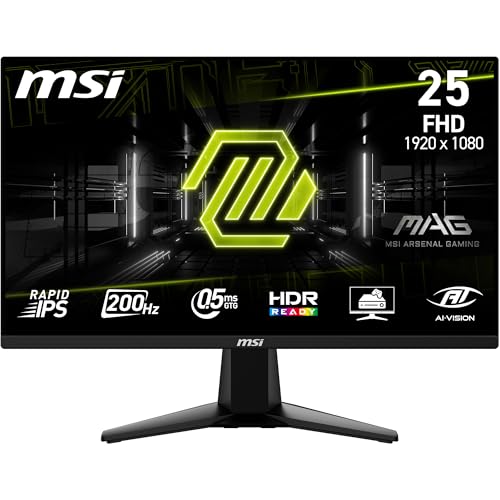
MSI MAG 255F E20 24.5" FHD 200Hz IPS Gaming Monitor

BenQ EW270Q 27" 2K QHD 200Hz IPS Gaming Monitor
Gaming monitor specs compared
How the shortlist stacks up. Scroll sideways on mobile.
| WWCD Score | Product | Resolution | Refresh Rate | Panel | Stand | Rating | Price | Deal |
|---|---|---|---|---|---|---|---|---|
| 9.5/10 | LG 27GS60QC UltraGear 27" Curved QHD Gaming Monitor | QHD 2560x1440 | 180Hz | VA (Curved 1000R) | Tilt only | 4.4 (461) | ₹15,999 | Check Price |
| 9.5/10 | BenQ EW270Q 27" 2K QHD 200Hz IPS Gaming Monitor | QHD 2560x1440 | 200Hz | IPS | Tilt only | 4.4 (125) | ₹18,248 | Check Price |
| 9.4/10 | Lenovo Legion 24-10 24" FHD 240Hz IPS Gaming Monitor | FHD 1920x1080 | 240Hz | IPS | Tilt / Swivel / Pivot / Height | 4.4 (90) | ₹10,796 | Check Price |
| 9.3/10 | LG 27GS65F UltraGear 27" FHD 180Hz IPS Gaming Monitor | FHD 1920x1080 | 180Hz | IPS | Tilt / Height / Pivot | 4.4 (865) | ₹14,399 | Check Price |
| 9.2/10 | LG 27G610A UltraGear 27" QHD 200Hz IPS Gaming Monitor | QHD 2560x1440 | 200Hz | IPS | Tilt / Swivel / Height / Pivot | 4.2 (280) | ₹18,499 | Check Price |
| 9.2/10 | Acer SA272U P1 27" WQHD 144Hz IPS Monitor | QHD 2560x1440 | 144Hz | IPS | Tilt only | 4.4 (34) | ₹12,901 | Check Price |
| 9.2/10 | Acer Nitro VG270 X1 27" FHD 200Hz IPS Gaming Monitor | FHD 1920x1080 | 200Hz | IPS | Tilt only | 4.3 (388) | ₹11,589 | Check Price |
| 9.2/10 | MSI MAG 255F E20 24.5" FHD 200Hz IPS Gaming Monitor | FHD 1920x1080 | 200Hz | IPS | Tilt only (VESA) | 4.5 (216) | ₹9,499 | Check Price |
| 9.1/10 | Lenovo Legion R27qe Gen 2 27" QHD 200Hz IPS Gaming Monitor | QHD 2560x1440 | 200Hz | IPS | Tilt / Swivel / Pivot / Height | 4 (151) | ₹16,421 | Check Price |
| 9.1/10 | Zebronics A27QHD 27" QHD 180Hz IPS Gaming Monitor | QHD 2560x1440 | 180Hz | IPS | Tilt only | 4 (25) | ₹13,999 | Check Price |
| 9.1/10 | Samsung Odyssey G5 27" QHD 180Hz Fast IPS Gaming Monitor | QHD 2560x1440 | 180Hz | Fast IPS | Tilt / Swivel / Pivot / Height | 4.3 (229) | ₹19,599 | Check Price |





Gaming monitors under ₹20,000: panel, refresh rate and stand
Specs, the honest pros and cons, and who each one is for.
LG 27GS60QC UltraGear 27" Curved QHD Gaming Monitor
The QHD curved sweet spot — big-screen immersion and high refresh without breaking ₹16k.
- Screen Size
- 27 inch
- Resolution
- QHD 2560x1440
- Panel
- VA (Curved 1000R)
- Refresh Rate
- 180Hz
- Response Time
- 1ms (MPRT)
- Contrast
- 3000:1
- Brightness
- 300 nits
- Colour Gamut
- 99% sRGB
- Adaptive Sync
- AMD FreeSync
- Ports
- 2x HDMI, 1x DP, Headphone out
- Stand
- Tilt only
- HDR
- HDR10
- Warranty
- 3 Years
The best all-round gaming monitor under ₹20,000: QHD sharpness, a smooth 180Hz, and a contrast-rich curved VA panel at a price that leaves room in the budget. Just add your own HDMI cable.
- + Sharp QHD resolution at a smooth 180Hz — a real step up from FHD
- + Curved VA panel with excellent 3000:1 contrast for immersive
- + inky dark scenes
- + Most-reviewed QHD pick here (461 ratings at 4.4) — proven in Indian homes
- + Confirmed 120Hz on PS5/PS5 Pro over HDMI
- + Big effective discount off MRP; best price-to-resolution ratio under ₹16k
- + 3-year warranty
- - Tilt-only stand — no height or pivot adjustment
- - No HDMI 2.1
- - so consoles are capped below the panel's full potential
- - Ships with a DP cable
- - not HDMI
- - despite the box listing — buy an HDMI cable separately
- - A few units report an auto-dimming quirk; check yours within the return window
BenQ EW270Q 27" 2K QHD 200Hz IPS Gaming Monitor
The colour-accurate all-rounder — the best-looking panel here, with USB-C to boot.
- Screen Size
- 27 inch
- Resolution
- QHD 2560x1440
- Panel
- IPS
- Refresh Rate
- 200Hz
- Response Time
- 1ms
- Contrast
- 1200:1
- Brightness
- 350 nits
- Colour Gamut
- 90% DCI-P3
- Adaptive Sync
- AMD FreeSync Premium
- Ports
- HDMI, USB-C (65W PD)
- Stand
- Tilt only
- HDR
- HDRi
- Speakers
- 5W x2
- Warranty
- 3 Years
If picture quality and a clean work-and-play setup matter most, the EW270Q is the one: gorgeous P3 colour, HDRi, 200Hz and USB-C charging. You trade away height adjustment and pay a little more.
- + Best picture quality in the group — 90% DCI-P3
- + 350 nits and HDRi tone mapping
- + QHD at a fast 200Hz with FreeSync Premium
- + USB-C with 65W power delivery — single-cable docking for a laptop
- + Genuinely usable 5W stereo speakers
- + Excellent for a dual work-and-play desk
- + not just gaming
- + 3-year warranty
- - Tilt-only stand — no height adjustment (VESA mount if you need more)
- - Ships with a 16A power plug; many homes need a 16A-to-6A adapter
- - A few buyers received dead-on-arrival or dead-pixel units
- - Priced near the top of the budget
Lenovo Legion 24-10 24" FHD 240Hz IPS Gaming Monitor
Esports value champion — 240Hz and a full ergonomic stand for the price of a basic monitor.
- Screen Size
- 24 inch
- Resolution
- FHD 1920x1080
- Panel
- IPS
- Refresh Rate
- 240Hz
- Response Time
- 0.5ms
- Contrast
- 1000:1
- Colour Gamut
- 99% sRGB
- Adaptive Sync
- FreeSync Premium + G-Sync Compatible
- Ports
- 2x HDMI, 1x DP
- Stand
- Tilt / Swivel / Pivot / Height
- Warranty
- 3 Years
For fast-paced competitive gaming on a budget, nothing here beats it: 240Hz, 0.5ms, dual adaptive sync and a fully adjustable stand for under ₹11,000. The compromise is 24-inch FHD.
- + 240Hz at 0.5ms — the fastest
- + clearest motion in this list for competitive FPS
- + Full ergonomic stand (height, swivel, pivot, tilt) — very rare under ₹11k
- + Both G-Sync Compatible and FreeSync Premium certified
- + 99% sRGB IPS with vibrant
- + accurate colours
- + Outstanding value — flagship-grade refresh at an entry price
- + 3-year warranty
- - 24-inch FHD — smaller and less sharp than the QHD options
- - FHD detail is limiting for productivity and content work
- - No built-in speakers
- - Occasional defective-on-arrival units reported — inspect on delivery
LG 27GS65F UltraGear 27" FHD 180Hz IPS Gaming Monitor
The crowd favourite — a proven big-screen 180Hz monitor with a stand that does it all.
- Screen Size
- 27 inch
- Resolution
- FHD 1920x1080
- Panel
- IPS
- Refresh Rate
- 180Hz
- Response Time
- 1ms
- Contrast
- 1000:1
- Brightness
- 300 nits
- Colour Gamut
- 99% sRGB
- Adaptive Sync
- G-Sync Compatible + FreeSync
- Ports
- HDMI, DP
- Stand
- Tilt / Height / Pivot
- HDR
- HDR10
- Warranty
- 3 Years
The safest pick by sheer track record: a 27-inch 180Hz IPS with a full ergonomic stand and 865 happy ratings. Choose it over QHD only if you value screen size, ergonomics and proven reliability over pixel density.
- + Most-reviewed monitor in this list (865 ratings at 4.4) — extremely well validated
- + Big 27-inch screen with a full tilt/height/pivot stand
- + 180Hz IPS with G-Sync Compatible certification
- + Accurate 99% sRGB colour
- + glare-free coating
- + Strong value for a brand-name 27-inch ergonomic gaming monitor
- + 3-year warranty
- - FHD on 27 inches looks softer than the QHD picks
- - especially for text/work
- - Only one HDMI port
- - and G-Sync runs over DisplayPort only
- - Mediocre HDR despite the HDR10 label
- - Some units arrive with dead pixels or a missing/wrong cable
LG 27G610A UltraGear 27" QHD 200Hz IPS Gaming Monitor
QHD 200Hz with a proper ergonomic stand — strong specs with a QC caveat.
- Screen Size
- 27 inch
- Resolution
- QHD 2560x1440
- Panel
- IPS
- Refresh Rate
- 200Hz
- Response Time
- 1ms (GtG)
- Contrast
- 1000:1
- Brightness
- 320 nits
- Colour Gamut
- 99% sRGB
- Adaptive Sync
- AMD FreeSync Premium
- Ports
- 2x HDMI, 1x DP
- Stand
- Tilt / Swivel / Height / Pivot
- HDR
- HDR10
- Warranty
- 3 Years
On paper one of the best-specced monitors here — QHD, 200Hz and a full ergonomic stand. Recurring dead-pixel reports pull it down the order, so check yours within the return window.
- + QHD at 200Hz — top-tier refresh and resolution combo
- + Full ergonomic stand (height, swivel, pivot, tilt)
- + 99% sRGB IPS with G-Sync Compatible behaviour
- + Dual HDMI plus DisplayPort
- + Trusted LG UltraGear panel tuning
- + 3-year warranty
- - Notable dead-pixel and panel-line complaints in recent reviews — inspect carefully
- - 200Hz only over DisplayPort; HDMI is limited to a lower refresh
- - Mixed LG after-sales experiences reported
- - Near the top of the ₹20k budget
Acer SA272U P1 27" WQHD 144Hz IPS Monitor
The cheapest ticket to QHD — sharp 1440p gaming if you can live with 144Hz.
- Screen Size
- 27 inch
- Resolution
- QHD 2560x1440
- Panel
- IPS
- Refresh Rate
- 144Hz
- Response Time
- 1ms (VRB)
- Contrast
- 1500:1
- Brightness
- 250 nits
- Colour Gamut
- 72% (NTSC)
- Adaptive Sync
- AMD FreeSync
- Ports
- 1x HDMI 2.0, 1x DP 1.4
- Stand
- Tilt only
- HDR
- HDR10
- Speakers
- Built-in
- Warranty
- 3 Years
If you want QHD sharpness for the least money, this is it. You give up some refresh, colour and brightness versus pricier QHD panels, and the review base is still small — but the value is hard to argue with.
- + Cheapest entry into 27-inch QHD here — excellent price for the resolution
- + Sharp QHD detail for gaming and everyday work
- + Striking ultra-slim 7.2mm design
- + Built-in speakers and a 3-year warranty
- + 144Hz with FreeSync is plenty smooth for most gamers
- - Lowest refresh (144Hz) and colour gamut (72%) among the QHD picks
- - Tilt-only stand and a single HDMI port
- - Backlight-bleed reports and only 34 ratings so far — less validated
- - Ships with an HDMI 1.4 cable that can cap refresh/resolution — use DP or a better cable
- - Weak built-in speakers
Acer Nitro VG270 X1 27" FHD 200Hz IPS Gaming Monitor
Big-screen 200Hz on a budget — fast FHD gaming for under ₹12k.
- Screen Size
- 27 inch
- Resolution
- FHD 1920x1080
- Panel
- IPS
- Refresh Rate
- 200Hz
- Response Time
- 0.5ms
- Contrast
- 1000:1
- Brightness
- 250 nits
- Colour Gamut
- 99% sRGB
- Adaptive Sync
- AMD FreeSync Premium
- Ports
- 2x HDMI, 1x DP
- Stand
- Tilt only
- HDR
- HDR10
- Speakers
- Stereo
- Warranty
- 3 Years
A lot of refresh and screen for the money: 27-inch, 200Hz and 0.5ms for under ₹12,000. The trade-offs are FHD sharpness, a basic stand and forgettable speakers.
- + 27-inch at a fast 200Hz/0.5ms for under ₹12,000
- + 99% sRGB IPS with FreeSync Premium
- + Dual HDMI plus DisplayPort
- + Well-reviewed (388 ratings at 4.3)
- + 3-year warranty
- - FHD on 27 inches looks soft compared to QHD
- - Tilt-only stand
- - Weak built-in speakers — plan for external audio
- - Ships with a 16A power plug; an adapter may be needed
MSI MAG 255F E20 24.5" FHD 200Hz IPS Gaming Monitor
Maximum frames per rupee — the cheapest, highest-rated way to game at 200Hz.
- Screen Size
- 24.5 inch
- Resolution
- FHD 1920x1080
- Panel
- IPS
- Refresh Rate
- 200Hz
- Response Time
- 0.5ms
- Contrast
- 1000:1
- Brightness
- 300 nits
- Colour Gamut
- 100% sRGB
- Adaptive Sync
- AMD FreeSync Premium
- Ports
- HDMI 2.0b, DP 1.2a
- Stand
- Tilt only (VESA)
- HDR
- HDR Ready
- Warranty
- 3 Years
The budget hero: 200Hz, 0.5ms and 100% sRGB for under ₹9,500, with the best rating in the group. Accept a basic stand and FHD sharpness and it's almost unbeatable value.
- + Cheapest pick here and the highest-rated (4.5 over 216 ratings)
- + 200Hz/0.5ms FHD for fast
- + fluid gaming
- + 100% sRGB IPS — accurate colour for the price
- + Frameless design with VESA mount support
- + 3-year warranty
- - Tilt-only stand — no height or pivot
- - Some ghosting reported at 200Hz (smoother at 165Hz)
- - Backlight bleed on a few units
- - 24.5-inch FHD — small and soft next to the QHD options
Lenovo Legion R27qe Gen 2 27" QHD 200Hz IPS Gaming Monitor
The console gamer's spec sheet — dual HDMI 2.1 and QHD 200Hz, if the QC lottery goes your way.
- Screen Size
- 27 inch
- Resolution
- QHD 2560x1440
- Panel
- IPS
- Refresh Rate
- 200Hz
- Response Time
- 0.5ms
- Contrast
- 1000:1
- Brightness
- 400 nits
- Colour Gamut
- 99% sRGB
- Adaptive Sync
- AMD FreeSync Premium
- Ports
- 2x HDMI 2.1, 1x DP 1.4
- Stand
- Tilt / Swivel / Pivot / Height
- HDR
- HDR10
- Warranty
- 3 Years
Spec-for-spec a standout — dual HDMI 2.1, QHD 200Hz and a full ergonomic stand make it the best on paper for PS5/Xbox. But the lowest rating and recurring QC complaints mean you should buy ready to exchange a bad unit.
- + Only pick with dual HDMI 2.1 — ideal for PS5/Xbox at full QHD/120Hz with VRR & ALLM
- + QHD at 200Hz
- + 0.5ms and a bright 400-nit panel
- + Full ergonomic stand (height, swivel, pivot, tilt)
- + 99% sRGB IPS colour
- + 3-year warranty
- - Lowest rating here (4.0) with recurring dead-pixel and panel-line complaints
- - Reports of overheating when run at 200Hz over time
- - Some find on-screen text less crisp than expected
- - No speakers or 3.5mm jack; mixed Lenovo after-sales
Zebronics A27QHD 27" QHD 180Hz IPS Gaming Monitor
Budget QHD with ports to spare — just mind the 1-year warranty.
- Screen Size
- 27 inch
- Resolution
- QHD 2560x1440
- Panel
- IPS
- Refresh Rate
- 180Hz
- Response Time
- 1ms (MPRT)
- Contrast
- 1200:1
- Brightness
- 300 nits
- Colour
- 1.07B (HDR10)
- Adaptive Sync
- Supported
- Ports
- 2x HDMI, 2x DP
- Stand
- Tilt only
- Speakers
- Built-in
- Warranty
- 1 Year
The cheapest brand-name route to QHD 180Hz with generous connectivity. The short warranty, flimsy stand and thin review base make it a value gamble rather than a safe bet.
- + Affordable 27-inch QHD at 180Hz
- + Plenty of ports — 2x HDMI and 2x DisplayPort
- + Bezel-less design with built-in speakers
- + Cheaper than most brand-name QHD panels
- - Only a 1-year warranty — half of what rivals offer
- - Flimsy plastic stand and build reported
- - Very small review base (25 ratings) — least validated here
- - Budget brand with a thinner service network
Samsung Odyssey G5 27" QHD 180Hz Fast IPS Gaming Monitor
Premium-feel QHD with a full stand — undercut by recurring panel and port niggles.
- Screen Size
- 27 inch
- Resolution
- QHD 2560x1440
- Panel
- Fast IPS
- Refresh Rate
- 180Hz
- Response Time
- 1ms
- Contrast
- 1000:1
- Brightness
- 300 nits
- Colour Gamut
- 99%
- Adaptive Sync
- FreeSync + G-Sync Compatible
- Ports
- DP, HDMI, Headphone
- Stand
- Tilt / Swivel / Pivot / Height
- HDR
- HDR10
- Warranty
- 3 Years
It has the makings of a great QHD monitor — Fast IPS, dual adaptive sync and a full ergonomic stand — but recurring DisplayPort and panel complaints at a top-of-budget price drop it to the bottom of an otherwise strong field.
- + Sharp Fast IPS QHD with both FreeSync and G-Sync Compatible support
- + Full ergonomic stand (height, swivel, pivot, tilt)
- + Understated styling that suits a work desk too
- + Trusted Samsung panel and 3-year warranty
- - Recurring DisplayPort issue where 180Hz won't POST on some units
- - Grey-patch and dead-pixel complaints; some report it runs at 144Hz
- - No built-in speakers and a flimsy connector panel
- - Most expensive QHD-180Hz here
- - at the very top of the budget
- - Samsung after-sales reported as difficult for replacements
Which gaming monitor under ₹20,000
Five strong picks for every kind of gamer under ₹20,000 — from the QHD curved all-rounder to the 240Hz value champion and the cheapest 200Hz budget hero.
LG 27GS60QC UltraGear 27" Curved QHD Gaming Monitor · ₹15,999
Buy this if you want the best balance of QHD sharpness, immersion and price — just add an HDMI cable.
Check Price on Amazon →Lenovo Legion 24-10 24" FHD 240Hz IPS Gaming Monitor · ₹10,796
Buy this for competitive FPS — 240Hz, 0.5ms and a full ergonomic stand for under ₹11k.
Check Price on Amazon →MSI MAG 255F E20 24.5" FHD 200Hz IPS Gaming Monitor · ₹9,499
Buy this if you want maximum frames per rupee — the cheapest, highest-rated 200Hz here.
Check Price on Amazon →BenQ EW270Q 27" 2K QHD 200Hz IPS Gaming Monitor · ₹18,248
Buy this for a work-and-play desk — the best-looking panel here with USB-C single-cable docking.
Check Price on Amazon →Our monitor roundup weighs refresh rate against resolution and panel type, and ranks monitors from entry FHD screens to 4K QD-OLED flagships.
See which monitor spec to pay for →Choosing a ₹20,000 gaming monitor
-
QHD vs FHD: pick your resolution first
At ₹20,000 you now have a real choice. A 27-inch QHD (2560x1440) panel looks noticeably sharper and gives more desktop space than FHD (1920x1080), which is ideal if you also work, browse or watch on the screen. FHD stays the smart pick if you play fast competitive shooters (it's easier to push high frame rates) or want a smaller 24-inch screen. As a rule: 24-inch = FHD, 27-inch = QHD for the best clarity. A 27-inch FHD panel works but looks softer up close. Want QHD and 240Hz together? That combination starts in our best gaming monitors under ₹50,000. -
Refresh rate and response time
144Hz is the sensible floor for gaming; 180Hz and 200Hz are noticeably smoother, and 240Hz suits serious competitive play. Higher refresh only helps if your GPU can push the frames — a QHD 200Hz panel needs a stronger card than an FHD 200Hz one. Response time of 1ms (GtG/MPRT) or 0.5ms is fine across all these picks; don't over-index on the marketing number. On a tighter budget, our best monitors under ₹10,000 still reach 200Hz. -
IPS vs VA panels
IPS panels (most monitors here) give the best colour accuracy and viewing angles — great for both gaming and work. VA panels (like the curved LG 27GS60QC) trade a little viewing-angle consistency for much deeper contrast (3000:1 vs ~1000:1), which makes dark scenes and movies look richer. Curved screens are usually VA and add immersion at 27 inches and above. Our best monitors in India guide compares panel types across every budget. -
Adaptive sync: FreeSync and G-Sync Compatible
Adaptive sync eliminates screen tearing by matching the monitor's refresh to your GPU. AMD FreeSync is near-universal here; several panels are also NVIDIA G-Sync Compatible certified, which is what you want with a GeForce card. Most modern monitors work with both regardless of certification, but certification is a reassurance. -
Console gamers: check the HDMI version
PS5 and Xbox Series X output up to 4K/120Hz, but at this budget you're buying 1080p/1440p panels. To get 120Hz with VRR/ALLM on a console you want HDMI 2.1 — only the Lenovo Legion R27qe Gen 2 here has dual HDMI 2.1. On HDMI 2.0 panels, consoles typically run 1080p/1440p at 60-120Hz depending on the title. PC gamers should use DisplayPort, which carries the full refresh rate on every monitor here. -
Don't forget the stand, ports and the cable in the box
A tilt-only stand is common at this price; a full height/swivel/pivot stand (LG 27GS65F, Lenovo Legion 24-10, LG 27G610A, Samsung G5) is far more comfortable for long sessions — or budget for a VESA arm. A recurring theme in reviews: boxes often ship a DisplayPort cable (or a basic HDMI cable) rather than what's listed, and some units come with a 16A power plug needing an adapter. Factor in a good DP/HDMI cable, and always check for dead pixels and backlight bleed within the return window. -
Response time: MPRT vs GtG, what the numbers mean
Almost every monitor here advertises "1ms" or "0.5ms", but that figure is MPRT (Moving Picture Response Time), which uses backlight strobing rather than true pixel switching speed. Real GtG (grey-to-grey) response times on these IPS and VA panels are closer to 3–5ms — still well below the ~16ms that causes visible smearing. The practical takeaway: don’t pay extra chasing a lower MPRT number. Any of these panels is fast enough to avoid ghosting in normal play; panel type, refresh rate and your GPU matter far more than the marketed response figure. -
24-inch vs 27-inch: which screen size suits you
Size interacts with resolution. A 24–24.5-inch FHD panel packs ~92 pixels per inch for crisp text and a sharp image, which is why competitive players favour it — the whole screen sits in your field of view. A 27-inch FHD panel drops to ~81 PPI and looks noticeably softer up close, so on 27 inches you really want QHD (~109 PPI) for sharpness. Sit about 2–3 feet from a 24-inch screen and 3–4 feet from a 27-inch. Choose 24-inch FHD for pure esports, 27-inch QHD for immersion and everyday work. -
Colour gamut: sRGB vs DCI-P3 for gaming and creative work
sRGB is the standard colour space games and the web are built around, so 99–100% sRGB coverage (most panels here) gives accurate, as-intended colour. DCI-P3 is a wider gamut for more vivid, saturated colour — the BenQ EW270Q’s 90% DCI-P3 is the standout if you also edit photos or video, where that extra coverage matters. For pure gaming, 99% sRGB is plenty; only step up to a wide-gamut P3 panel if colour-critical creative work shares the desk. -
Gaming features worth having (and the ones that are just nice-to-have)
A few features genuinely help: a black stabiliser/equaliser brightens dark corners so enemies don’t hide in shadow (great for competitive FPS), and low-input-lag and FPS/RTS picture presets are handy quality-of-life touches. Most LG UltraGear and Acer panels here include them. Built-in speakers, crosshair overlays and RGB are pleasant extras but shouldn’t drive your choice — a good panel, the right refresh rate and a comfortable stand matter far more. Budget for a VESA monitor arm (₹1,500–3,000) if your pick is tilt-only and you sit for long sessions.
Frequently asked questions
What is the best gaming monitor under 20000 in India?
Which is the best gaming monitor under ₹20,000 for competitive esports?
Which is the best gaming monitor under ₹15,000?
Is 144Hz enough for gaming or should I get 180Hz/200Hz?
What's the difference between IPS, Fast IPS, and VA panels for gaming?
Should I buy a 24" or 27" monitor for gaming?
Do these monitors work with PS5/Xbox Series X?
Which is the best monitor for a PS5 under ₹20,000?
Which monitor is best for gaming AND content creation (photo/video editing)?
Do I need DisplayPort or is HDMI fine for gaming?
What does 1ms MPRT actually mean? Is it true 1ms response time?
Which brand has the best reliability and service in India?
Is QHD worth it over FHD under ₹20,000?
Why do so many reviews mention a missing HDMI cable?
What's the deal with the 16A power plug?
How worried should I be about dead pixels and backlight bleed?
Do I need built-in speakers?
You may also like
More guides and reviews to help you decide.
Best gaming monitors under ₹50,000 in India 2026. Samsung, ViewSonic, Lenovo, BenQ, MSI, LG, AOC compared on refresh rate, panel type, resolution.
Read more →Best gaming monitors under ₹1,00,000 in India 2026 — 12 QD-OLED, WOLED, 4K & ultrawide models compared.
Read more →Find the best portable monitor for laptop India offers in 2026. Compare ASUS ZenScreen, ViewSonic, MSI & more from ₹10,649 to ₹25,999 for WFH and productivity.
Read more →Find the best monitor under 10000 India offers. Acer, AOC, LG, Samsung compared for 200Hz gaming, IPS panels & eye-care features. Research-backed picks.
Read more →Find the best studio monitor under 15000 in India 2026. Compare JBL & more with research-based reviews, prices & pros and cons.
Read more →Find the best vr headset in India 2026. Research-based reviews with detailed comparisons, prices, pros & cons to help you pick the right one.
Read more →