
PRODUCT REVIEW
Best Studio Monitor Under 15000 in India 2026
Find the best studio monitor under 15000 in India 2026. Compare JBL & more with expert reviews, prices & pros and cons.
As an Amazon Associate we earn from qualifying purchases. We could also earn a fee through some links when you click on them.
Other picks worth considering
Already covered the winner above — here are the picks for specific needs.


Quick Comparison
How the shortlist stacks up. Scroll sideways on mobile.
| WWCD Score | Product | Key Feature | Price | Deal |
|---|---|---|---|---|
| 9.4/10 | Edifier MR4 | Dual Modes | ₹12,910 | Check Price |
| 9.2/10 | Mackie CR4-X | 4" Drivers | ₹9,999 | Check Price |
| 9.0/10 | Alesis Elevate 3 MKII | Sub Output | ₹10,532 | Check Price |
| 8.8/10 | PreSonus Eris E3.5 2nd Gen | EQ Controls + 50W | ₹11,990 | Check Price |
| 8.6/10 | Mackie CR3-X | Compact | ₹8,899 | Check Price |
| 8.5/10 | JBL Professional 104-BT | Bluetooth 5.0 | ₹11,999 | Check Price |
| 8.2/10 | M-Audio BX4 | 120W Power | ₹14,296 | Check Price |
In-depth reviews
Specs, the honest pros and cons, and who each one is for.
Mackie CR3-X
- Driver Size
- 3-inch woofer
- Tweeter
- Silk dome
- Design
- Ultra-compact
- Brand
- Mackie Professional
- Inputs
- RCA, 3.5mm
- Price
- Lowest in guide
The Mackie CR3-X is the perfect entry point into studio monitors at just ₹8,899. Despite the budget price, you get authentic Mackie professional quality that's been trusted in studios worldwide for decades. The compact 3-inch design is ideal for cramped desks, small bedrooms, or hostel rooms where space is premium. The silk dome tweeter delivers clear, detailed highs perfect for vocal editing and podcast production. While bass response is limited compared to 4-inch models, the sound quality far exceeds consumer speakers at this price. Mackie's studio-tuned frequency response means you hear accurate sound without artificial coloration. For beginners on a tight budget, this is the best way to start monitoring properly.
- + Excellent sound clarity for price
- + compact size perfect for small spaces
- + professional Mackie quality
- + good build quality
- + ideal for beginners
- - Limited bass response due to 3-inch driver
- - no Bluetooth connectivity
- - basic features compared to higher models
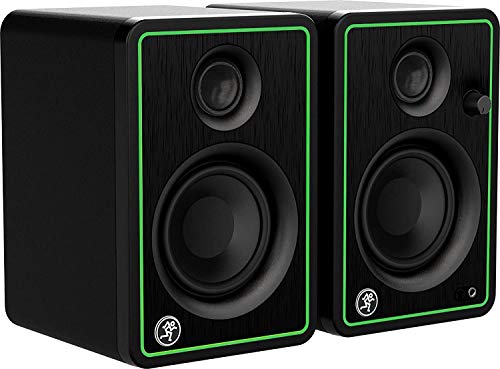
Mackie CR4-X
- Driver Size
- 4-inch woofer
- Tweeter
- Silk dome
- Brand
- Mackie Professional
- Connectivity
- RCA inputs
- Controls
- Front volume knob
- Best For
- Desktop/small room
The Mackie CR4-X offers the best value proposition with 4-inch drivers at under ₹10,000. Mackie's decades of professional audio experience deliver studio-quality sound with better bass response than 3-inch alternatives. The larger 4-inch woofer provides enhanced low-frequency response perfect for bass-heavy genres like EDM and hip-hop. Silk dome tweeters deliver smooth, fatigue-free highs for long mixing sessions. The solid build quality and Mackie's trusted brand reputation ensure reliability. Front-panel volume control makes daily adjustments easy. At this price point with 4-inch drivers, it's the sweet spot for budget-conscious producers who won't compromise on sound.
- + Better bass than CR3-X
- + excellent mid-range clarity
- + professional build quality
- + great value for 4-inch monitors
- + trusted Mackie brand
- - Slightly larger footprint
- - no Bluetooth
- - no tone controls
- - basic connectivity
Alesis Elevate 3 MKII
- Driver Size
- 3-inch woofer
- Power
- 20W total (10W each)
- Cabinet
- High-density wood
- Sub Output
- Dedicated
- Tweeter Guide
- Elliptical waveguide
- Bass Port
- Rear ported
The Alesis Elevate 3 MKII is unique in this category with its dedicated subwoofer output, allowing you to add a powered subwoofer later for deep bass extension. The high-density wood cabinets suppress unwanted resonances better than plastic, delivering cleaner sound. The ported enclosure design with 3-inch woofer provides tighter bass response than sealed designs. The elliptical tweeter waveguide optimizes stereo imaging and dispersion. While 20W power is lower than competitors, the efficient design and quality drivers deliver surprisingly good volume. Best for users who want gaming/multimedia monitors now with the option to add serious bass later via subwoofer connection.
- + Dedicated subwoofer output for expansion
- + wood cabinets reduce resonance
- + smooth treble response
- + compact design
- + good for gaming and multimedia
- - Lower power than competitors
- - basic features
- - no tone controls
- - limited bass without subwoofer
PreSonus Eris E3.5 2nd Gen
- Driver Size
- 3.5-inch woven composite
- Power
- 50W Class AB
- EQ Controls
- High/Low tuning
- Inputs
- TRS, RCA, 3.5mm
- Headphone Amp
- Integrated
- Frequency
- 80 Hz - 20 kHz
The PreSonus Eris E3.5 2nd Generation offers the most features in this category, making it ideal for serious beginners and intermediate producers. The 50W Class AB amplification delivers powerful, clean sound with excellent headroom. What sets it apart are the Acoustic Tuning controls - dedicated high and low-frequency EQ knobs that let you adapt the sound to your room acoustics. The 3.5-inch woven composite woofer and ultra-low mass silk dome tweeter provide accurate frequency response. The integrated stereo headphone amplifier with front-panel output is a game-changer for private mixing sessions. Multiple professional input options make it versatile for any setup.
- + Best features in category with EQ controls
- + excellent 50W power
- + headphone amp included
- + multiple connectivity options
- + professional PreSonus quality
- + 2nd generation improvements
- - Higher price point
- - compact size limits bass extension
- - no Bluetooth connectivity
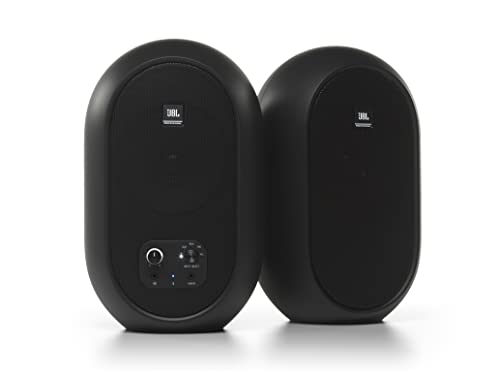
JBL Professional 104-BT
- Driver Size
- 4-inch woofer
- Connectivity
- Bluetooth 5.0
- Inputs
- BT, RCA, TRS, Aux
- Controls
- Front-panel
- Headphone Jack
- Yes (with mute)
- Brand Heritage
- JBL Professional
The JBL Professional 104-BT stands out as the best overall choice for beginners and home studios, combining legendary JBL sound quality with modern Bluetooth 5.0 connectivity. The 4-inch professional-grade drivers deliver accurate, balanced sound perfect for music production, mixing, and content creation. With multiple input options (Bluetooth, RCA, TRS, Aux) and a front-panel input selector, you can seamlessly switch between your audio interface, smartphone, or laptop. The integrated headphone jack with speaker mute is incredibly convenient for late-night sessions. JBL's decades of professional audio experience shine through in the excellent imaging and clarity.
- + Best overall for beginners with Bluetooth 5.0
- + legendary JBL sound quality
- + multiple input options
- + front-panel controls
- + excellent connectivity
- + perfect for wireless streaming
- - Premium pricing
- - compact size limits bass depth
- - no dedicated tone controls
Edifier MR4
- Driver Size
- 4-inch diaphragm
- Tweeter
- 1" silk dome
- Cabinet
- MDF wooden
- Modes
- Monitor + Music
- Headphone Jack
- Front-panel
- Control
- Multi-function knob
The Edifier MR4 stands out with its unique dual-mode system - switch between Monitor mode (flat response for mixing) and Music mode (enhanced for casual listening). This versatility makes it perfect for producers who also use monitors for entertainment. The MDF wooden cabinets minimize acoustic resonance better than plastic enclosures, while the 4-inch woofer and silk dome tweeter deliver smooth frequency response. The front-panel headphone output and multi-functional control knob provide convenient access to key functions. Edifier's reputation for balanced sound at competitive prices makes this a solid mid-range choice for those wanting flexibility.
- + Dual modes (monitor/music) for versatility
- + MDF cabinets minimize resonance
- + smooth frequency response
- + front headphone jack
- + good build quality
- - Higher price for features offered
- - limited connectivity options
- - no Bluetooth
- - basic EQ controls
M-Audio BX4
- Driver Size
- 4.5-inch Kevlar
- Power
- 120W Total
- Tweeter
- 1" silk dome
- Cabinet
- Acoustically-inert MDF
- EQ Controls
- High & Low
- Software
- MPC Beats included
The M-Audio BX4 is the most powerful option in this category with 120W total power output, delivering impressive volume and headroom for larger rooms. The 4.5-inch Kevlar woofers provide exceptional durability and deep, punchy bass response that outperforms smaller drivers. The acoustically-inert MDF cabinet with bass reflex design minimizes resonance and extends low-frequency response. Computer-optimized tweeter waveguide ensures precise stereo imaging. Both high and low EQ controls let you fine-tune the sound. Best of all, it includes AKAI Professional's MPC Beats software - a professional DAW worth thousands - making this an incredible value for producers just starting out.
- + Best in class with highest power (120W)
- + Kevlar drivers for durability
- + EQ controls included
- + MPC Beats software bundle
- + professional quality
- + rear bass ports
- - Most expensive in category
- - larger size requires more desk space
- - no Bluetooth connectivity
Final verdict & recommendations
Here is who each pick is for, based on the comparison above.
JBL Professional 104-BT · ₹11,999
Bluetooth 5.0, professional sound
Check Price on Amazon →PreSonus Eris E3.5 2nd Gen · ₹11,990
EQ controls, 50W power, headphone amp
Check Price on Amazon →Mackie CR4-X · ₹9,999
4-inch drivers, trusted brand
Check Price on Amazon →Mackie CR3-X · ₹8,899
Entry-level, compact design
Check Price on Amazon →How to choose the right one
-
Active vs Passive Studio Monitors
Active monitors (recommended) have built-in amplifiers, require only power cable, and offer better impedance matching. All monitors in this guide are active. Passive monitors need external amplifiers, adding cost and complexity. For beginners and home studios, active monitors are the best choice. -
Driver Size Selection
3-inch drivers: Compact, clear highs, limited bass (Mackie CR3-X, Alesis Elevate 3). 3.5-inch drivers: Balanced performance, good for small rooms (PreSonus Eris E3.5). 4-inch drivers: Better bass response, ideal for music production (Mackie CR4-X, JBL 104-BT, Edifier MR4). 4.5-inch drivers: Maximum bass in this category (M-Audio BX4). -
Power Output Guide
20-50W: Sufficient for bedroom studios and desktop use. 50-80W: Ideal for small to medium rooms, better headroom. 100W+: Professional level, larger rooms, maximum clarity at high volumes. The M-Audio BX4 leads with 120W total power output. -
Connectivity Requirements
Essential: Balanced TRS/XLR inputs for audio interfaces. Useful: RCA for consumer devices, 3.5mm aux for smartphones. Advanced: Bluetooth for wireless streaming (JBL 104-BT). Check your audio interface outputs before purchasing. -
Room Size Considerations
Small desk (3-5 feet): 3-3.5 inch monitors (Mackie CR3-X, PreSonus Eris E3.5). Medium room (6-10 feet): 4-inch monitors (JBL 104-BT, Mackie CR4-X). Larger studios: Consider adding a subwoofer with Alesis Elevate 3 MKII which has dedicated subwoofer output. -
Acoustic Treatment Importance
Studio monitors reveal room acoustics clearly. Invest in: monitor isolation pads (₹500-2000), acoustic foam panels for reflections (₹2000-5000), bass traps for corners (₹3000-8000). Even budget monitors benefit significantly from proper acoustic treatment and positioning.
Frequently asked questions
What is the best studio monitors under 15000 in India?
Do I need studio monitors for music production?
What size studio monitors should I buy for a bedroom studio?
Should I buy studio monitors with or without Bluetooth?
Do I need an audio interface to use studio monitors?
What's the difference between studio monitors and regular speakers?
Where should I place studio monitors on my desk?
Can I use studio monitors for gaming and movies?
Which is better: Class AB or Class D amplification?

Technologist and product researcher. Every recommendation is backed by aggregating thousands of Amazon reviews, comparing specs across brands and tracking price trends — so you don't have to.
More about how we research →You may also like
More guides and reviews to help you decide.
The best gaming monitors under ₹20,000 in India 2026 — LG 27GS60QC curved QHD 180Hz, BenQ EW270Q, Lenovo Legion 240Hz, MSI MAG 255F & more.
Read more →Best gaming monitors under ₹1,00,000 in India 2026 — 12 QD-OLED, WOLED, 4K & ultrawide models compared.
Read more →Best gaming monitors under ₹50,000 in India 2026. Samsung, ViewSonic, Lenovo, BenQ, MSI, LG, AOC compared on refresh rate, panel type, resolution.
Read more →Find the best 144hz monitor under 15k in India 2026. Compare LG, Acer, Dell, Lenovo with expert reviews, prices, pros & cons.
Read more →Find the best portable monitor for laptop India offers in 2026. Compare ASUS ZenScreen, ViewSonic, MSI & more from ₹10,649 to ₹25,999 for WFH and productivity.
Read more →Find the best monitor under 10000 India offers. Acer, AOC, LG, Samsung compared for 200Hz gaming, IPS panels & eye-care features. Research-backed picks.
Read more →