PRODUCT REVIEW
Best USB-C Docking Station in India 2026
Find the best usb-c docking station in India 2026. Compare Dell, Lenovo, Portronics, Anker with research-based reviews, prices, pros & cons.
 By Naveen Bhavnani
Updated
By Naveen Bhavnani
Updated
As an Amazon Associate we earn from qualifying purchases. We could also earn a fee through some links when you click on them.
Docking station picks by budget
Already covered the winner above — here are the picks for specific needs.

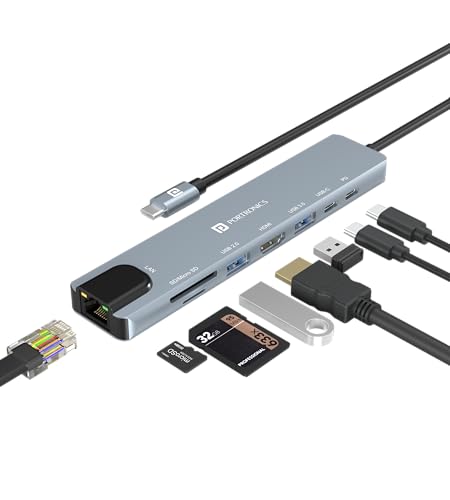
Portronics MPort View Three 10-in-1


UGREEN Revodok Pro 6-in-1 USB-C Hub
Docking stations compared on 4K
How the shortlist stacks up. Scroll sideways on mobile.
| WWCD Score | Product | Display | Key Feature | Price | Deal |
|---|---|---|---|---|---|
| 9.0/10 | UGREEN Revodok Pro 6-in-1 | 4K@60Hz | 10Gbps USB 3.2 | ₹2,553 | Check Price |
| 8.8/10 | Anker 332 5-in-1 | 4K@30Hz | Premium build | ₹1,799 | Check Price |
| 8.8/10 | UGREEN Revodok Pro 207 (7-in-1) | Dual 4K@60Hz | Dual monitors | ₹4,257 | Check Price |
| 8.6/10 | UGREEN Revodok 105 5-in-1 | 4K@30Hz | Compact travel | ₹1,999 | Check Price |
| 8.4/10 | Portronics MPort View Three | 4K@60Hz | 10-in-1, Ethernet | ₹1,799 | Check Price |
| 8.4/10 | Lenovo ThinkPad USB-C Dock | 4K@60Hz | Enterprise, 3yr warranty | ₹13,000 | Check Price |
| 8.2/10 | Lemorele 13-in-1 | Dual 4K@30Hz | Maximum ports | ₹3,343 | Check Price |
| 8.0/10 | Portronics Mport 8 | 4K@30Hz | Budget champion | ₹899 | Check Price |
| 8.0/10 | Dell WD22TB4 Thunderbolt 4 | 5K@60Hz | Thunderbolt 4, 40Gbps | ₹23,299 | Check Price |




Docking station reviews: ports, power and 4K
Specs, the honest pros and cons, and who each one is for.
Portronics Mport 8 USB-C Hub
- Ports
- 8-in-1
- Display
- 4K@30Hz HDMI
- Power Delivery
- 100W PD
- USB Speed
- 5Gbps USB 3.0
- Card Readers
- SD/TF
- Build
- Aluminum alloy
The Portronics Mport 8 is the most affordable 8-in-1 hub under ₹1,000 that doesn't compromise on essentials. For budget-conscious users, it delivers everything needed for basic office work - HDMI display output, three USB-A ports, card readers, and 100W charging support. The aluminum construction provides durability typically seen in hubs costing 2-3x more. Perfect for students, freelancers, or anyone who needs simple, reliable laptop expansion without breaking the bank.
- + Most affordable 8-in-1 hub
- + excellent value under ₹1,000
- + compact and portable
- + solid aluminum build
- + good for basic office work
- + widely available on Amazon
- - HDMI limited to 4K@30Hz (not 60Hz)
- - USB ports only 5Gbps (not 10Gbps)
- - no Ethernet port
- - newer Portronics product with limited reviews
Portronics MPort View Three 10-in-1
- Ports
- 10-in-1
- Display
- 4K@60Hz + VGA
- Ethernet
- Gigabit RJ45
- Power Delivery
- 100W PD
- USB Speed
- 5Gbps USB 3.0
- Card Readers
- SD/TF
The Portronics MPort View Three is the best budget option with 4K@60Hz and Ethernet under ₹2,000. It packs 10 ports including Gigabit Ethernet - rare at this price point. The dual HDMI + VGA outputs make it perfect for presentations and offices with legacy equipment. While it's a new product without customer reviews yet, the feature set is impressive for the price. The metal construction promises good heat dissipation during extended use.
- + Best budget option with 4K@60Hz
- + Gigabit Ethernet included
- + dual display capability
- + VGA for legacy monitors
- + excellent port variety for price
- + good for presentations
- - New product with no customer reviews yet
- - HDMI limited to 4K@30Hz on secondary port
- - 5Gbps USB speeds only
- - Portronics brand quality concerns
Anker 332 USB-C Hub (5-in-1)
- Ports
- 5-in-1
- Display
- 4K@30Hz HDMI
- Power Delivery
- 85W PD
- USB Speed
- 5Gbps USB 3.0
- Build
- Premium Aluminum
- Warranty
- 18 months
Anker is a trusted global brand known for quality, and the 332 5-in-1 delivers. The premium aluminum alloy construction feels solid and dissipates heat better than plastic alternatives. It's specifically optimized for MacBooks with perfect color matching and seamless integration. The minimalist 5-port design keeps things simple - HDMI, 2x USB-A, USB-C PD, and USB-C data. Anker's 18-month warranty and excellent customer support provide peace of mind.
- + Trusted Anker brand quality
- + premium aluminum build
- + excellent MacBook compatibility
- + compact for travel
- + reliable performance
- + 18-month warranty
- + minimal port variety keeps it simple
- - Only 4K@30Hz (not 60Hz)
- - limited to 5 ports
- - no Ethernet or card readers
- - no 10Gbps ports
- - best suited for light users
UGREEN Revodok 105 USB-C Hub (5-in-1)
- Ports
- 5-in-1
- Display
- 4K@30Hz HDMI
- Power Delivery
- 100W PD
- USB Speed
- 5Gbps USB 3.0
- Build
- Aluminum alloy
- Size
- Compact
The UGREEN Revodok 105 is the perfect travel companion - ultra-compact yet delivering 100W charging and all essential ports. UGREEN's reputation for quality shines through with excellent aluminum construction and heat management. The simple 5-port layout (HDMI + 3x USB-A + USB-C PD) covers 90% of users' needs. It's reliable, portable, and priced right for frequent travelers who need a minimalist setup that just works.
- + Excellent build quality
- + compact travel-friendly design
- + 100W PD charging
- + reliable UGREEN brand
- + good heat management
- + ideal for minimalist setup
- - Only 4K@30Hz HDMI
- - no Ethernet port
- - limited to 5 ports
- - no card readers
- - 5Gbps speeds only
- - some users report display connection loops
UGREEN Revodok Pro 6-in-1 USB-C Hub
- Ports
- 6-in-1
- Display
- 4K@60Hz HDMI
- Data Speed
- 10Gbps USB 3.2
- Power Delivery
- 100W (85W pass)
- USB Ports
- 2x USB-A + 2x USB-C
- Build
- Aluminum alloy
The UGREEN Revodok Pro is the best value hub for 10Gbps speeds - transferring 4K footage or large files at lightning speed. With 4K@60Hz HDMI output, it provides smooth, crisp visuals perfect for video editors and graphic designers. The mix of USB-A and USB-C ports (all 10Gbps) offers maximum flexibility. At under ₹3,000, you're getting professional-grade data speeds that competing brands charge ₹5,000+ for. The aluminum construction keeps it cool during intensive data transfers.
- + Best value for 10Gbps speed
- + smooth 4K@60Hz output
- + excellent build quality
- + compact design
- + reliable performance
- + widely available
- + good for video editors
- - Gets warm during extended use
- - single display output only
- - USB-C port for data only (no video/charging)
- - no Ethernet
- - some display connection issues reported
Lemorele 13-in-1 USB-C Docking Station
- Ports
- 13-in-1
- Display
- Dual 4K@30Hz + VGA
- Ethernet
- Gigabit RJ45
- Power Delivery
- 100W PD
- USB Ports
- 5x USB-A 3.0
- Card Readers
- SD/microSD
The Lemorele 13-in-1 is the ultimate port collection - dual HDMI, VGA, Gigabit Ethernet, 5x USB-A ports, card readers, and 100W PD charging all in one dock. It's perfect for offices and presentation setups where you need to connect to legacy projectors (VGA) and modern displays simultaneously. The inclusion of Ethernet makes it reliable for video conferences and large file uploads. While it's limited to 4K@30Hz on HDMI, the sheer versatility and port count make it exceptional value at ₹3,343.
- + Maximum port variety (13-in-1)
- + VGA for older displays
- + Gigabit Ethernet included
- + dual HDMI capability
- + excellent for offices
- + good value for features
- - HDMI limited to 4K@30Hz (not 60Hz)
- - requires 100W charger for full functionality
- - newer brand with limited reviews
- - bulkier than compact hubs
UGREEN Revodok Pro 207 USB-C Dock (7-in-1)
- Ports
- 7-in-1
- Display
- Dual 4K@60Hz
- Data Speed
- 10Gbps USB 3.2
- Power Delivery
- 100W PD
- USB Ports
- 3x USB-A + 1x USB-C
- Build
- Aluminum
The UGREEN Revodok Pro 207 is a rare find - dual 4K@60Hz displays at ₹4,257. Most docks in this price range offer only 4K@30Hz or single display. With 10Gbps USB 3.2 speeds and dual smooth 60Hz monitors, it's perfect for power users who need extended desktop space for productivity. The aluminum construction provides excellent heat dissipation during intensive multi-monitor use. Ideal for developers, traders, designers, and anyone who multitasks with multiple applications.
- + Dual 4K@60Hz displays - rare in this price
- + 10Gbps fast data transfer
- + excellent for multi-monitor setups
- + solid build quality
- + good for professionals
- + reliable UGREEN brand
- - No Ethernet port
- - premium pricing
- - limited port count for price
- - no card readers
- - gets warm with dual displays
- - some display loop issues reported
Lenovo ThinkPad USB-C Dock
- Display
- DP 1.4 + HDMI 2.0
- Resolution
- 1x 4K@60Hz
- Power
- 90W (60W to laptop)
- USB Ports
- 3x USB 3.0 + 1x USB 2.0
- Ethernet
- Gigabit
- Warranty
- 3-year worldwide
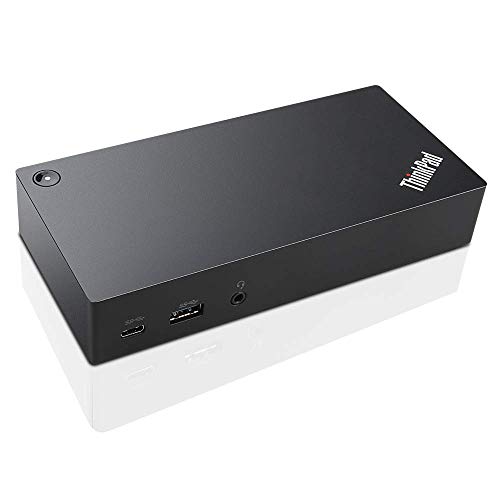
The Lenovo ThinkPad USB-C Dock is an enterprise-grade solution built for reliability. With a 3-year worldwide warranty (best in class), it's designed for business environments where downtime costs money. The dock provides rock-solid performance with ThinkPad laptops and offers Gigabit Ethernet for stable connections. While the feature set is basic compared to consumer hubs, the focus here is on bulletproof reliability and long-term support - essential for corporate users.
- + Enterprise-grade reliability
- + excellent ThinkPad compatibility
- + 3-year warranty (best in class)
- + proven build quality
- + stable performance
- + trusted Lenovo brand
- - Best suited for Lenovo laptops
- - premium pricing
- - limited stock on Amazon
- - basic feature set for price
- - not ideal for non-Lenovo users
Dell WD22TB4 Thunderbolt 4 Dock
- Technology
- Thunderbolt 4
- Speed
- 40Gbps
- Display
- 5K@60Hz / Dual 4K
- Power
- 130W
- USB Ports
- 4x USB-A + 2x USB-C/TB4
- Ethernet
- Gigabit
The Dell WD22TB4 is the ultimate professional docking solution with Thunderbolt 4 technology delivering 40Gbps speeds - 4x faster than standard USB-C hubs. It supports up to 5K@60Hz or dual 4K displays, making it exceptional for creative professionals. The 130W power delivery can charge even the most power-hungry laptops. While primarily optimized for Dell XPS and Latitude laptops, it's the best choice for users who need maximum performance and are willing to pay premium pricing.
- + Thunderbolt 4 speeds (40Gbps)
- + highest display support (5K@60Hz)
- + 130W charging for power-hungry laptops
- + excellent for Dell XPS/Latitude
- + professional-grade build
- + multiple display options
- - Very expensive (₹23K+)
- - primarily optimized for Dell laptops only
- - overkill for basic users
- - bulky design
- - limited compatibility with non-Dell laptops
Which docking station to buy
Here is who each pick is for, based on the comparison above.
Portronics Mport 8 USB-C Hub · ₹899
8-in-1, best budget value
Check Price on Amazon →Portronics MPort View Three 10-in-1 · ₹1,799
10-in-1, Ethernet, dual display
Check Price on Amazon →Anker 332 USB-C Hub (5-in-1) · ₹1,799
MacBook-optimized, trusted brand
Check Price on Amazon →UGREEN Revodok Pro 6-in-1 USB-C Hub · ₹2,553
10Gbps, 4K@60Hz, video editors
Check Price on Amazon →How to choose a docking station
-
Understanding Power Delivery (PD) Ratings
USB-C Power Delivery determines how much power your dock can supply to charge your laptop. MacBook Air needs 30W, MacBook Pro 13"/14" needs 67W, and 16" MacBook Pro requires 96W+. Always choose docks with 85W+ PD for professional laptops. Remember: a 100W PD dock typically delivers 85W to your laptop (15W reserved for dock operation). -
Display Output Standards Explained
4K@60Hz provides smooth, crisp visuals for professional work and is now the standard. 4K@30Hz works for office tasks but feels laggy for video editing. Thunderbolt 4 docks can drive 2-3 displays simultaneously at 4K@60Hz, while standard USB-C hubs typically support 1 external display. Check your laptop GPU capabilities - some older laptops limit external display support via USB-C. -
Data Transfer Speed Hierarchy
USB 2.0: 480Mbps (outdated), USB 3.0/3.1: 5Gbps (standard), USB 3.2: 10Gbps (best), Thunderbolt 3/4: 40Gbps (premium). For video editing or large file transfers, prioritize 10Gbps+ ports. Budget hubs mix port speeds - check specifications carefully. UGREEN Revodok Pro offers best value with 10Gbps ports under ₹3,000. -
Thunderbolt vs Standard USB-C Hubs
Thunderbolt 4 hubs (Dell WD22TB4) support 40Gbps speeds, multiple 4K displays, and daisy-chaining but cost ₹20,000+. Standard USB-C hubs (UGREEN, Anker, Portronics) offer 5-10Gbps, single display, and adequate for most users at ₹900-5,000. Choose Thunderbolt only if you need multi-monitor setups or work with 4K video editing professionally. -
Essential Ports for Work From Home
Minimum recommended: 1x HDMI (4K@60Hz), 2x USB-A 3.0, 1x USB-C PD, 1x Ethernet. Optional but useful: SD/microSD card readers (photographers/content creators), VGA (older projectors/monitors), 3.5mm audio jack (conference calls). Lemorele 13-in-1 offers maximum versatility with legacy VGA support. -
Laptop Compatibility Considerations
MacBooks (2016+) work with all USB-C hubs but benefit from Thunderbolt docks for dual displays. Windows laptops vary - check if your USB-C port supports DisplayPort Alt Mode and Power Delivery. ThinkPad/XPS/Surface laptops have excellent compatibility. Budget Windows laptops may have limited USB-C functionality - verify before purchase. -
Build Quality and Heat Management
Aluminum construction (UGREEN, Anker) provides better heat dissipation than plastic. All hubs generate heat during heavy use - this is normal. Excessive heat indicates poor design or overload. Place docks on hard surfaces with ventilation. Avoid stacking papers/devices on top. Premium brands like Dell and Lenovo include active cooling for sustained professional use.
Frequently asked questions
What's the difference between a USB-C hub and a docking station?
Will a USB-C dock work with my laptop?
Is 4K@30Hz good enough or should I pay more for 4K@60Hz?
Why do UGREEN docks have display connection looping issues?
Do I need a Thunderbolt 4 dock or is USB-C enough?
Can I charge my laptop and use an external display at the same time?
Why is my dock getting hot? Is this normal?
Which dock is best for MacBook Pro/Air users?
Should I buy from Amazon or directly from brand websites?
Can I use my dock with a tablet or smartphone?
What is the best usb c docking stations in India?
You may also like
More guides and reviews to help you decide.
Best laptops under ₹50,000 in India 2026 compared — Acer Aspire 3 (16GB IPS), HP 14 Ryzen 5, Acer TravelLite, Dell Inspiron 120Hz and more.
Read more →Best laptops under 30000 in India for students and everyday use. Compare Primebook 2 Pro & Max & more with real specs, honest pros and cons.
Read more →Find the best usb type-c cable in India 2026. Compare Anker, Belkin, Amazon Basics with research-based reviews, prices, pros & cons.
Read more →Find the best monitor under 10000 India offers. Acer, AOC, LG, Samsung compared for 200Hz gaming, IPS panels & eye-care features. Research-backed picks.
Read more →Best gaming monitors under ₹1,00,000 in India 2026 — 12 QD-OLED, WOLED, 4K & ultrawide models compared.
Read more →The best gaming monitors under ₹20,000 in India 2026 — LG 27GS60QC curved QHD 180Hz, BenQ EW270Q, Lenovo Legion 240Hz, MSI MAG 255F & more.
Read more →